


Why Your Room Rate Is Never Just a Number
Have you ever wondered why the boutique hotel down the street always seems to be fully booked at top dollar, while you are left stressing over empty rooms or leaving money on the table? Imagine a relatable scenario: two independent hotels in the exact same city, offering the exact same room types, on the exact same busy event weekend. By Sunday morning, one hotel has earned significantly more revenue because their rates moved fluidly with real-time demand, while the other hotel didn’t change a thing.
As an independent hotelier, you are likely wearing too many hats—balancing operations, guest experience, marketing, and revenue management all at once. Because of this, pricing is often set based on intuition rather than data, risking underpricing or lost revenue opportunities. But setting room rates is no longer a seasonal decision; it is a daily one. What if you could put your hotel dynamic pricing on autopilot, ensuring you always offer the right rate at the right time without spending hours staring at spreadsheets? This guide covers exactly what dynamic pricing is and how it works.
Section 1: What Is Hotel Dynamic Pricing?
Let’s keep it as simple as possible. Hotel dynamic pricing is a pricing approach where your room rates adjust automatically or strategically based on real-time demand signals rather than fixed seasonal brackets.
Think of it like buying an airline ticket. If you book a flight to Hawaii for Christmas week just three days in advance, you expect to pay a premium. If you book a flight to Ohio in mid-February six months in advance, you expect a deal. Hotel pricing is adopting this exact same logic.
To really understand it, let’s clear up a few common misconceptions:
- It’s not “surge pricing.” It’s not about gouging your guests or taking advantage of people during an emergency.
- It’s not random. It is a highly calculated number based on hard data.
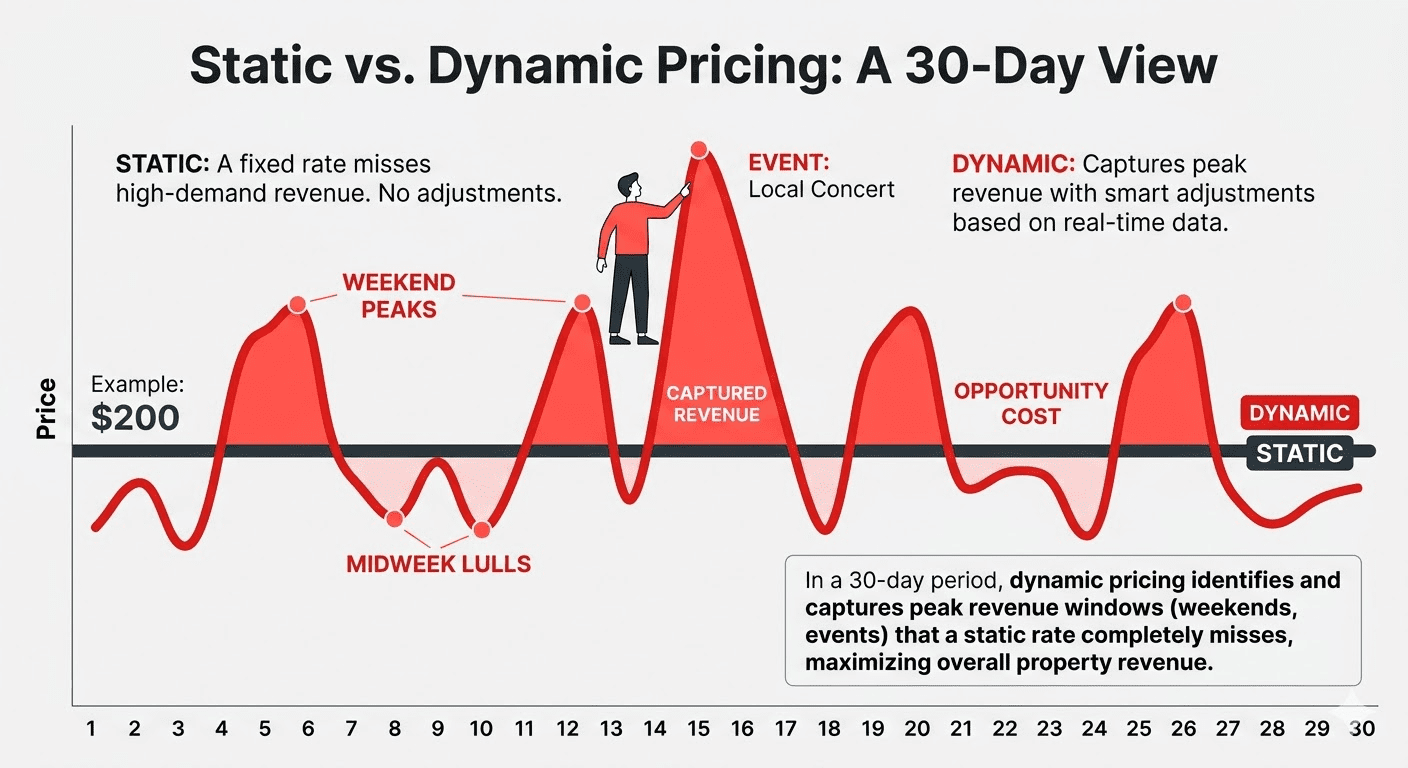
- It’s not just about raising prices. Sometimes, smart dynamic pricing means intelligently lowering your rates on a slow Tuesday to capture bookings you otherwise would have lost.
The core principle is brilliantly simple: offering the right rate, for the right room, at the right time.
How PriceLabs Helps Here: If you’re managing a boutique hotel, you simply don’t have the time to manually check market demand every hour. PriceLabs automates this core principle for you. It generates data-informed pricing recommendations but leaves you with full user control. You set your baseline rules, and the system ensures your rates update automatically based on your hotel’s occupancy, competitor pricing, and market demand—removing the guesswork entirely.
How to Navigate on PriceLabs
- Begin by creating a free PriceLabs account.
- Use the Add/Reconnect Properties option to select your Property Management System (PMS) and import your rooms.
- Once imported, navigate to your Pricing Dashboard. Here, you can see all your imported properties and use the search field to quickly find specific room types you want to review.
Section 2: How Did Dynamic Pricing Come Into Hotels?

If you feel like you are late to the hotel dynamic pricing party, don’t worry. This concept wasn’t built for independent hotels originally.
Airlines pioneered this concept—known as “yield management“—back in the 1980s. Seeing the massive revenue gains, large hotel chains adopted it through incredibly expensive Revenue Management Systems (RMS) in the 1990s and 2000s. For decades, this technology stayed out of reach for independent hotels. The barriers were simply too high: the software was too complex, the market data wasn’t accessible, and the cost was astronomical.
So, what changed? Cloud technology, the public availability of Online Travel Agency (OTA) data, and affordable SaaS (Software as a Service) tools finally democratized access, with dynamic pricing now available on cloud-based applications. Where things stand in 2026 is clear: dynamic pricing is no longer a big-chain advantage—it is table stakes across the entire industry.
How PriceLabs Helps Here: You no longer need a massive enterprise budget to compete with the big corporate brands. PriceLabs helps independent hoteliers automate their pricing without the steep learning curve or the extreme costs (often $500–$1,000+ per month) of a traditional enterprise RMS. You get big-chain sophistication at an independent hotelier’s price point.
How to Navigate on PriceLabs

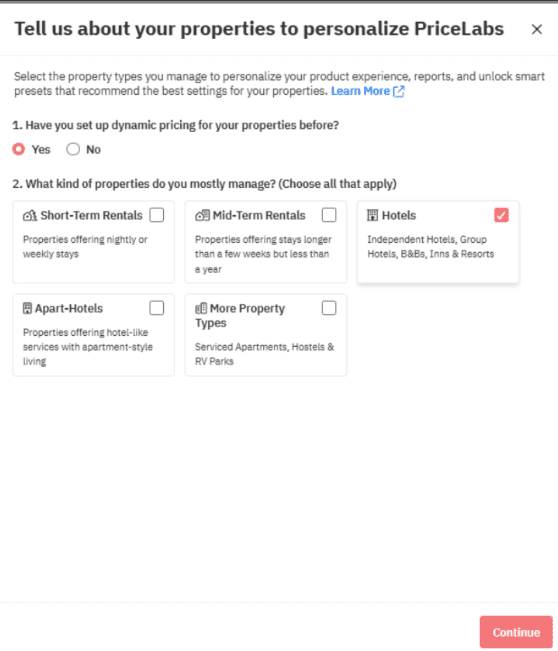
- Right after importing your listings, a Property Type and Personalization pop-up will appear .
- Select Hotels, and then choose your specific hotel type on the follow-up screen.
- This single selection tells PriceLabs to immediately apply tailored features, “Smart Presets,” and recommended settings built specifically for the hotel industry, bypassing the complex setup normally required by legacy systems.
Section 3: What Signals Actually Drive Dynamic Pricing?
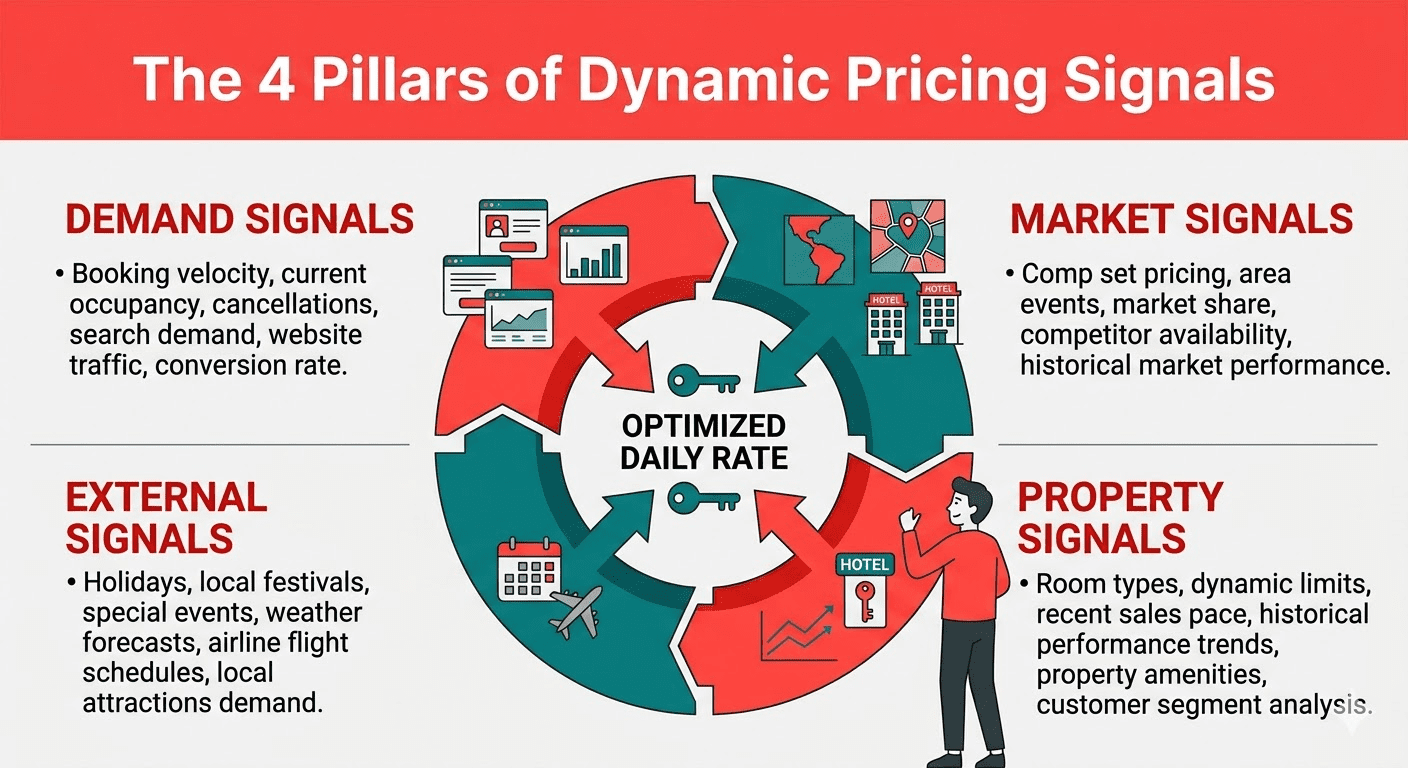
If prices aren’t random, what actually makes them move? This is the educational heart of dynamic pricing. Advanced algorithms look at a massive web of data points to generate your daily rate. Let’s break down the four core signals:
1. Demand Signals
- Occupancy levels: How full is your hotel right now, and how full is the broader market in your city?.
- Booking pace: Are your rooms for October filling up much faster this year than they did at the exact same time last year?.
- Lead time: A room booked 90 days in advance holds a very different value than a room booked just 3 days out.
2. Market Signals
- Competitor rates: What are the similar hotels in your competitive set (comp set) charging right now?.
- OTA availability: How many rooms are actually left in your market for a given date?.
- Day-of-week patterns: The natural curve of demand. A business hotel might peak on Tuesdays, while a beachfront boutique peaks on Saturdays.
3. External Signals
- Local events: Concerts, conferences, sports games, and festivals. (For example, if Taylor Swift announces a tour date in your city, demand instantly skyrockets).
- Seasonality: This goes beyond just “summer is busy.” Algorithms track micro-seasonal demand shifts, school holidays, and regional travel patterns.
4. Your Own Property Signals
- Room type inventory levels: Adjusting prices based on how many premium suites you have left versus standard rooms.
- Historical booking patterns: Looking at how your property normally performs during certain times of the year.
- Cancellation and no-show rates: Factoring in the likelihood that some reservations will drop off.
How PriceLabs Helps Here: Tracking all these signals manually on a spreadsheet is mathematically impossible for a human. PriceLabs uses an advanced algorithm called Hyper Local Pulse. It automatically generates daily pricing recommendations by synthesising your internal occupancy, lead time, seasonality, local events, and publicly available hotel market data.
How to Navigate on PriceLabs:

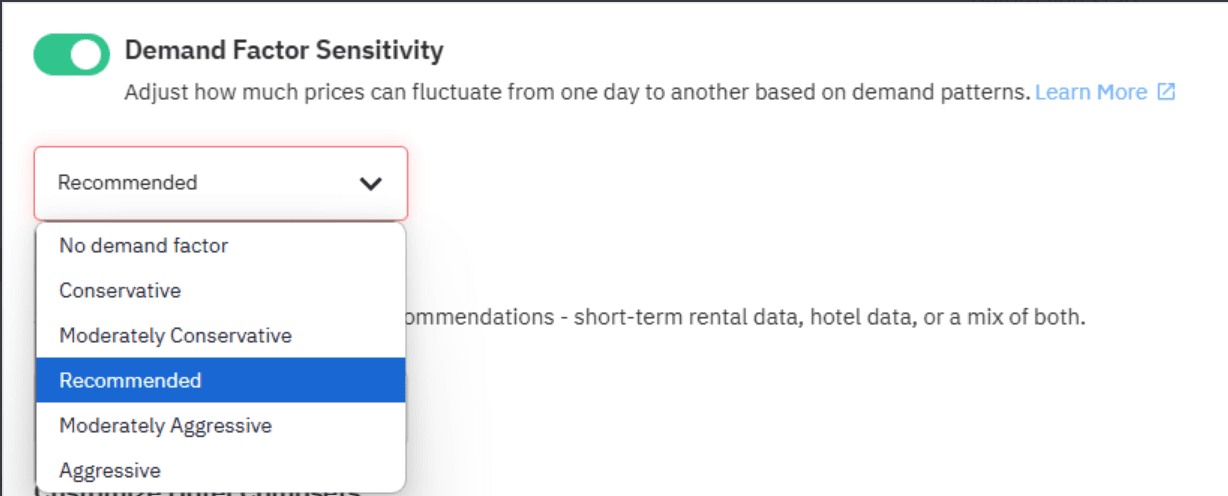
- Go to your Pricing Customizations.
- Click on Smart Presets.
- Locate Demand Factor Sensitivity.
- Here, you can tell the algorithm how aggressively to react to these market signals. Choose “Conservative” to secure earlier bookings at stable prices, “Recommended” to target higher rates closer to high-demand dates, or “Aggressive” if you want to push for absolute peak pricing during the busiest events.
Section 4: Static Pricing vs. Dynamic Pricing — A Side-by-Side Reality Check
To truly see the value, let’s walk through a concrete example using a fictional 20-room boutique hotel across four different everyday scenarios:
| Scenario | Static Pricing Outcome | Dynamic Pricing Outcome |
| Major local event weekend | Sells out Friday at $120 | Sells out at $195, captures full demand |
| Slow Tuesday in shoulder season | 40% occupancy at $120 | 75% occupancy at $98, fills rooms profitably |
| Last-minute availability (3 days out) | Still at $120, may not fill | Drops to $105, triggers bookings |
| 90-day advance booking | $120 flat | $88 early-bird, locks in revenue |
The key insight here is that hotel dynamic pricing doesn’t just mean charging more—it means charging correctly in both directions. Think about the slow Tuesday: dropping the rate from $120 to $98 might feel like a loss, but jumping from 40% occupancy to 75% occupancy means a massive increase in actual cash collected. This is how your RevPAR (Revenue Per Available Room) improves even when your ADR (Average Daily Rate) sometimes dips.
How PriceLabs Helps Here: Usually, PriceLabs applies discounts for last-minute bookings or premiums for far-out bookings based on the short-term rental market. However, because hotels operate differently—rarely gradually decreasing rates right before check-in or penalising early bookers—PriceLabs allows you to easily turn these specific adjustments off so your rates behave exactly like a traditional hotel.
How to Navigate on PriceLabs

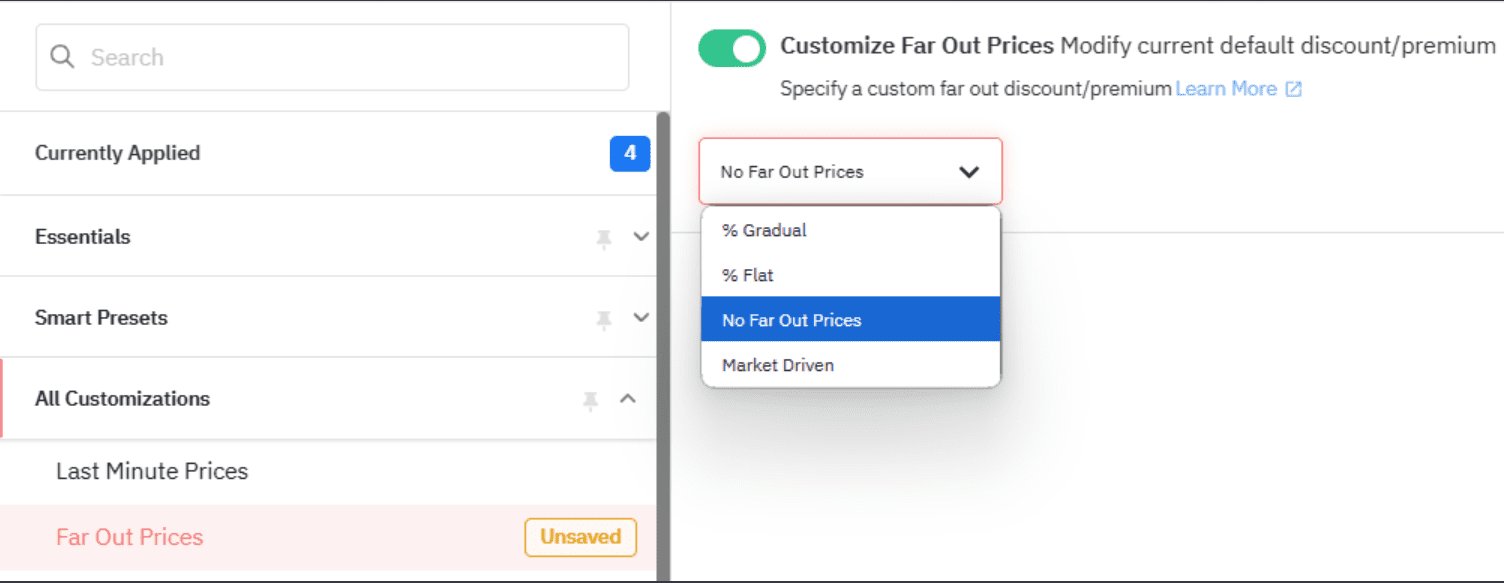
- Open Additional Customizations for your hotel listings.
- Navigate to Last Minute Prices and select “No last minute adjustment”.
- Navigate to Far-out premium and select “No Far-out premium” to ensure your rates are not artificially inflated just because someone booked far in advance.
Section 5: Why Independent Hotels Are Actually Better Positioned for Dynamic Pricing
A very common fear among independent hoteliers is, “This is just for big hotels with revenue management teams”.
The reality is quite the opposite. Independent hotels actually have structural advantages that massive corporate chains simply don’t have:
- Faster decision-making: You don’t need to wait three weeks for corporate approval to test a new rate strategy.
- More flexibility: You have the freedom to override the system, customize rules, and cater to your unique guests.
- Stronger local knowledge: You know your town’s micro-events (like a local college graduation or a regional sports tournament) better than a generalized corporate algorithm ever could.
- Proportional gains: If a 30-room property increases its RevPAR by 15%, that money can be the difference between surviving and thriving. It matters proportionally more than it does to a 300-room giant.
The real barrier to entry isn’t the size of your hotel—it’s simply awareness and getting access to the right tools.
How PriceLabs Helps Here: PriceLabs is built specifically to give operators full control without the headache. To help you set your foundation, the Base Price Guidance tool gives you data-informed recommendations for setting your annual average rate. Furthermore, Multi-Room Occupancy-Based Adjustments allow you to change prices based strictly on how fast a specific room category (like your premium suites) is filling up.
How to Navigate on PriceLabs

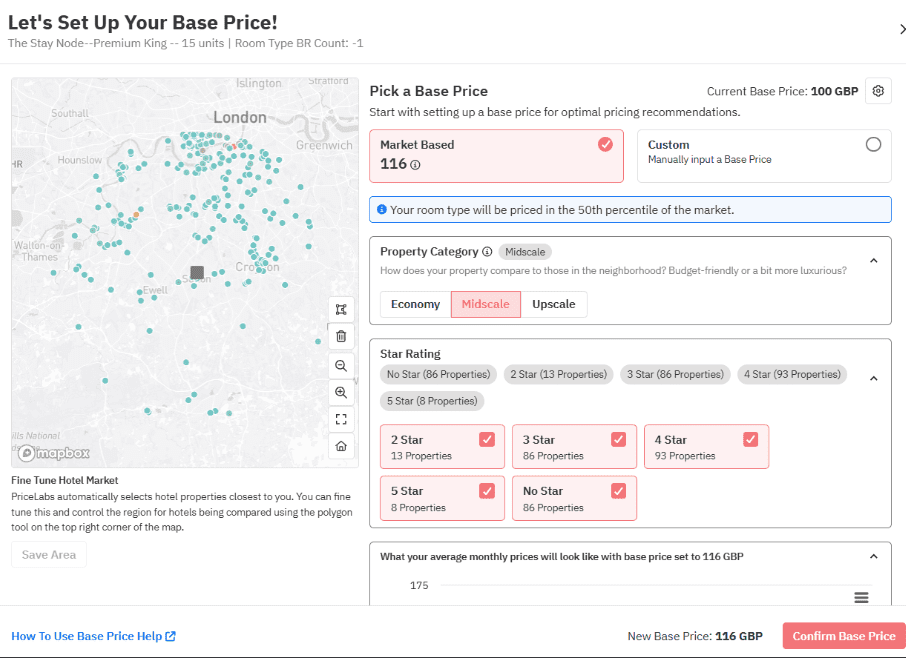
- During your initial setup, click on a room type to Define Base Price. You can use the Base Price Help tool, which looks at market factors and demand patterns to suggest a solid starting rate.
- Next, go to Smart Presets and locate Multi-Room Occupancy Based Adjustments.
- Select a pre-filled profile or choose ‘Custom’ to create rules that push prices higher as your remaining boutique inventory naturally shrinks.
Section 6: Common Myths About Hotel Dynamic Pricing (Debunked)
If you are evaluating dynamic pricing software, it’s completely normal to have reservations. Let’s address the most common myths holding independent hoteliers back, honestly and clearly:
- Myth 1: “Dynamic pricing will cheapen my brand.”
- Reality: You are always the boss. You set absolute “rate floors” (minimum prices) to protect your brand’s prestige. Dynamic pricing never has to go below the rock-bottom number you set. If your luxury room should never sell for less than $250, the algorithm will never price it at $249.
- Myth 2: “Guests will feel cheated if they see prices change.”
- Reality: Modern travelers already expect fluctuating prices from airlines and ride-share apps (like Uber). Furthermore, constant price comparisons on OTAs (like Booking.com or Expedia) have completely normalized dynamic rates in hospitality.
- Myth 3: “I’ll lose control of my own rates.”
- Reality: Every credible dynamic pricing tool allows you to set minimums, maximums, and apply manual, date-specific overrides whenever you want.
- Myth 4: “My market is too small or too niche for it to work.”
- Reality: Every single market experiences demand variation—whether from weekends, local events, or seasons—and every variation is a revenue opportunity.
- Myth 5: “It takes too long to set up and maintain.”
- Reality: Initial setup typically only takes a few hours. Ongoing maintenance is incredibly minimal once your overarching rules are configured.
How PriceLabs Helps Here: You never lose control with PriceLabs. It allows for Date-Specific Overrides, enabling you to manually adjust pricing, stay restrictions, and availability for highly specific high-demand dates. For example, if you know a VIP wedding party is booking the hotel next September, you can manually lock the rates for that weekend.
How to Navigate on PriceLabs

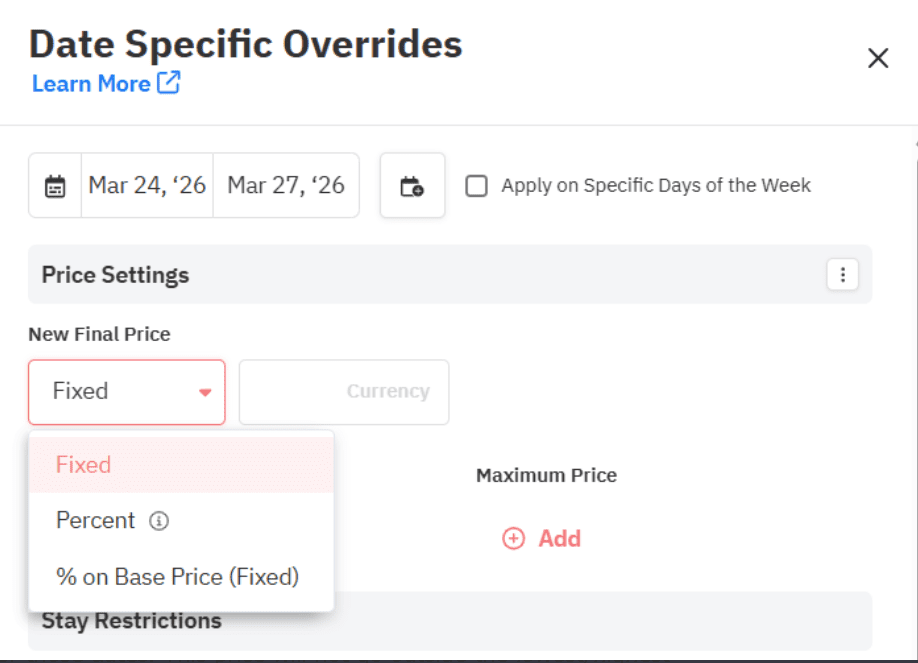
- Open the Multi Calendar page.
- Click and highlight the specific dates you want to control manually.
- Apply a custom rate override or enforce a specific minimum stay (like a 3-night minimum for a holiday weekend), then click save to override the automated algorithm instantly.
Section 7: Setting Up Your Strategy (The Parent/Child Room Secret)
One of the most tedious, mind-numbing tasks for hoteliers is manually pricing every single room in their building. Imagine having 40 rooms and having to adjust 40 different prices every single day. Modern dynamic pricing fixes this instantly using a clever structure during initial setup.
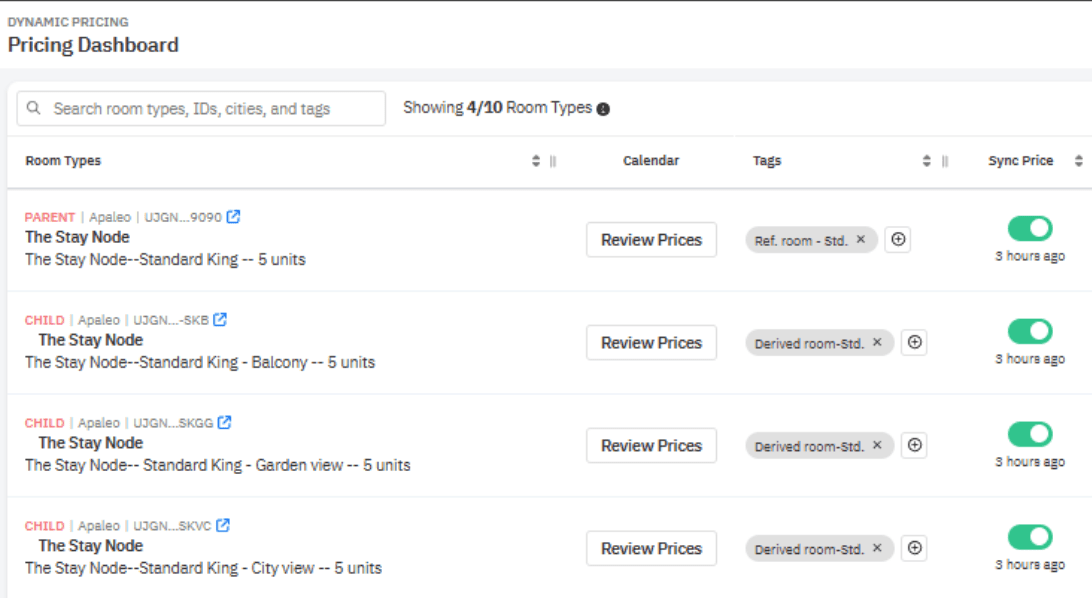
Most smart hotels use a Parent & Child room type relationship. Think of it like a family tree where the parent makes the rules, and the kids follow along. You set a basic room type as the ‘Benchmark’ or ‘Parent’ room. Other similar room types are linked to the Parent room with defined price rules.
- Example: The Standard Room is the Parent. The Standard Double Room (child) costs the exact same to maintain rate parity. The Deluxe Room (child) is set to always cost $10 more than the Parent, and the Superior Room (child) is set to always cost $20 more.
Now, you only need to manage the pricing on the Parent room. As the algorithm moves the Parent room’s price up or down based on demand, the child rooms automatically follow along, keeping that $10 or $20 gap perfectly intact.
How PriceLabs Helps Here: PriceLabs handles these Parent/Child relationships flawlessly. With the Mapping function, you can create these links effortlessly. Using the Pricing Offsets feature, you can set a fixed dollar amount or a percentage gap (e.g., your Suite category is always 30% higher than the Standard category). PriceLabs also supports multiple Rate Plans (like refundable vs. non-refundable rates), syncing pricing recommendations across all of them via select PMSs.
How to Navigate on PriceLabs

- Navigate to Map Room Types during your initial setup.
- Select your base room and assign it as the Parent, then link your other room types as Children.
- Next, go to the Adding Pricing Offset feature.
- Enter your fixed amount or percentage gap (e.g., set the Deluxe room to always be 10% more expensive than the Standard room).
Section 8: Hyper-Local Competitive Intelligence
You can’t price effectively in a vacuum. You need to know exactly what the hotel down the street is doing. But here is a major problem: standard pricing tools often mix up real hotel data with Airbnb/Short-Term Rental data. This gives you a totally distorted view of the market. A 5-star boutique hotel should not be benchmarking its prices against someone renting out their spare bedroom on Airbnb.
A robust pricing strategy requires looking at specific competitors that guests actually consider alongside yours. Furthermore, you need to understand the Length of Stay (LOS) restrictions your competitors are using. If every hotel in town requires a 3-night minimum for a major festival, you should probably do the same so you don’t get stuck with a 1-night booking that blocks out a lucrative weekend.
How PriceLabs Helps Here: PriceLabs provides a dedicated Hotel Rate Shopper that lets you monitor pricing trends across up to 350 nearby hotel-like properties, tracking recent rate changes using publicly available data from Booking.com. The Custom Comp Sets feature ensures your rates are influenced only by your true rivals. And if you are in a market that is heavily mixed, the Hotel Weights setting lets you control exactly how much influence short-term rental data has on your pricing.
How to Navigate on PriceLabs

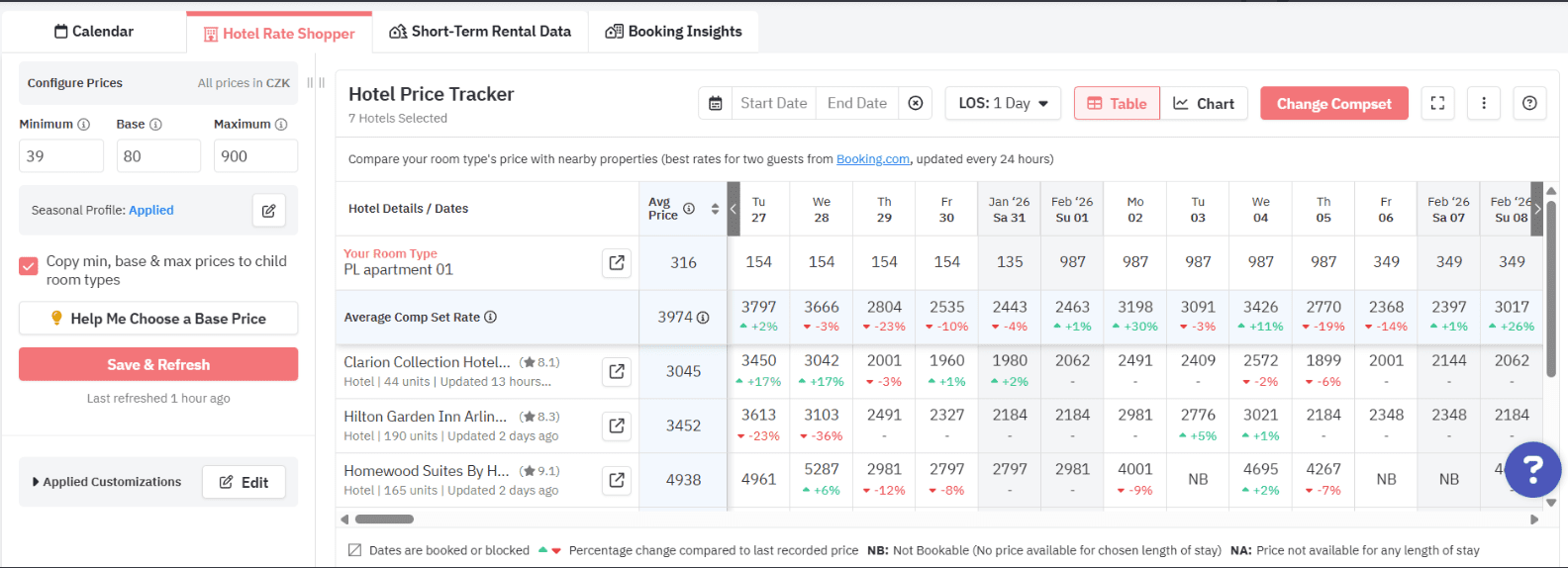
- Click on the Hotel Rate Shopper tab.
- Click Change Compset.
- You can quickly click Select 10 Nearest, or you can filter a list of up to 350 properties by distance, star rating, and unit count to hand-pick your exact competitors .
- Once selected, use the Length of Stay (LOS) Filter on the dashboard to analyse the minimum stay criteria your competitors are enforcing, adjusting your own rules accordingly.
Section 9: Deep Dive Analytics (Pacing & OTB)
Data is only helpful if you can actually understand it. For revenue managers and hotel owners, one of the biggest headaches is trying to justify a pricing decision to a stakeholder or partner who doesn’t understand revenue management. You need reports that are easy to generate and simple to digest—nobody wants data overload.
You need to track “Pacing” (are we booking rooms faster or slower than we did at this exact time last year?) and “On The Books” (OTB) metrics to see exactly where your revenue stands today.
How PriceLabs Helps Here: PriceLabs offers a powerful Report Builder tool completely free with your account. It allows you to create custom reports using key hotel KPIs like ADR, Occupancy, RevPAR, and pacing. You can access forward-looking Pacing Reports to visualize your booking curves and compare your current momentum to last year or to the broader market.
How to Navigate on PriceLabs:

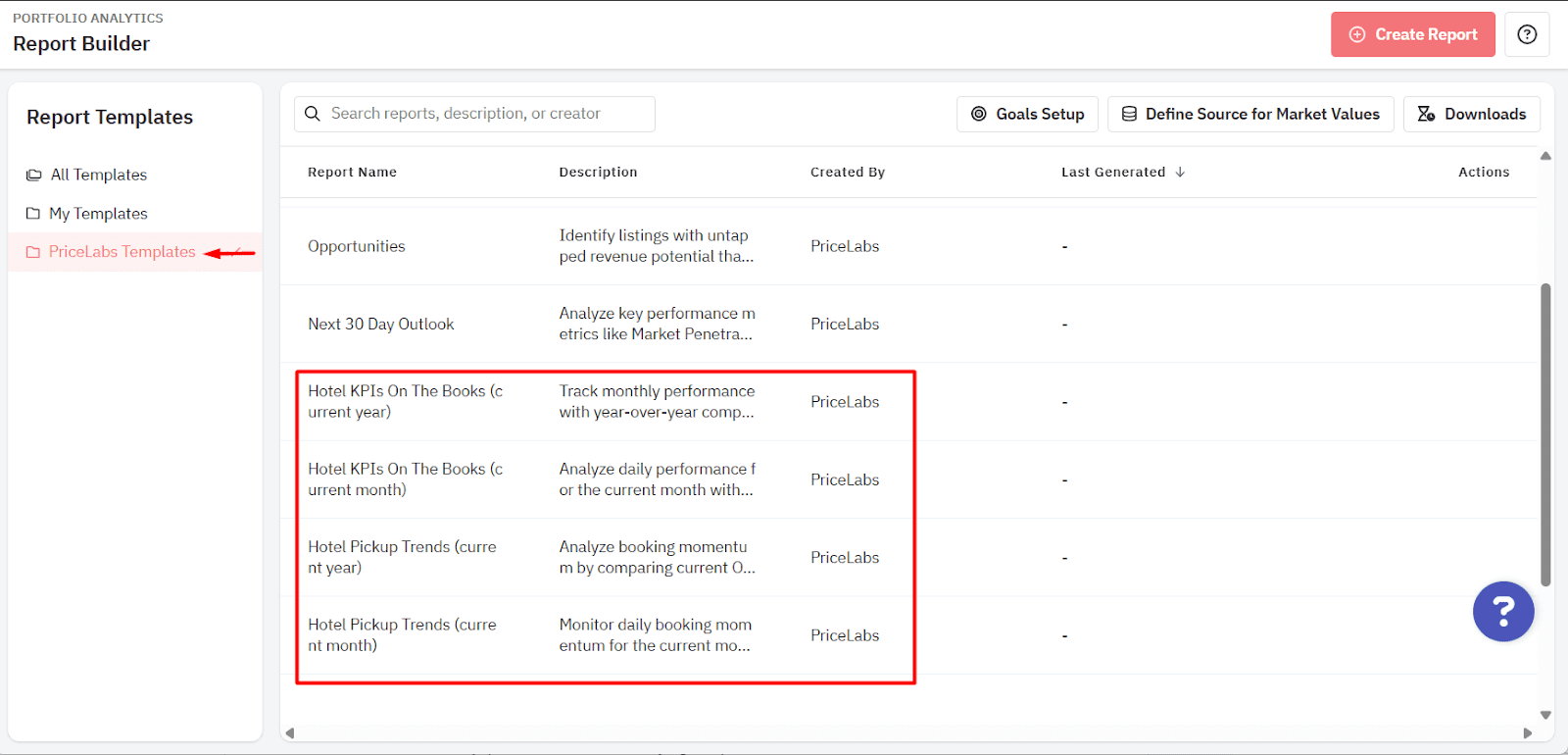
- From the top menu bar, click on Portfolio Analytics and select Report Builder .
- Look under the PriceLabs Templates folder to find pre-built reports curated specifically for hotels .
- Select Hotel KPIs On The Books to track monthly performance and spot year-over-year trends. Or, select Hotel Pickup Trends to analyze your booking momentum across 3-day, 7-day, and 30-day windows. You can click Download Report to export everything to Excel for further editing.
Section 10: What Does a Dynamic Pricing Workflow Actually Look Like Day-to-Day?

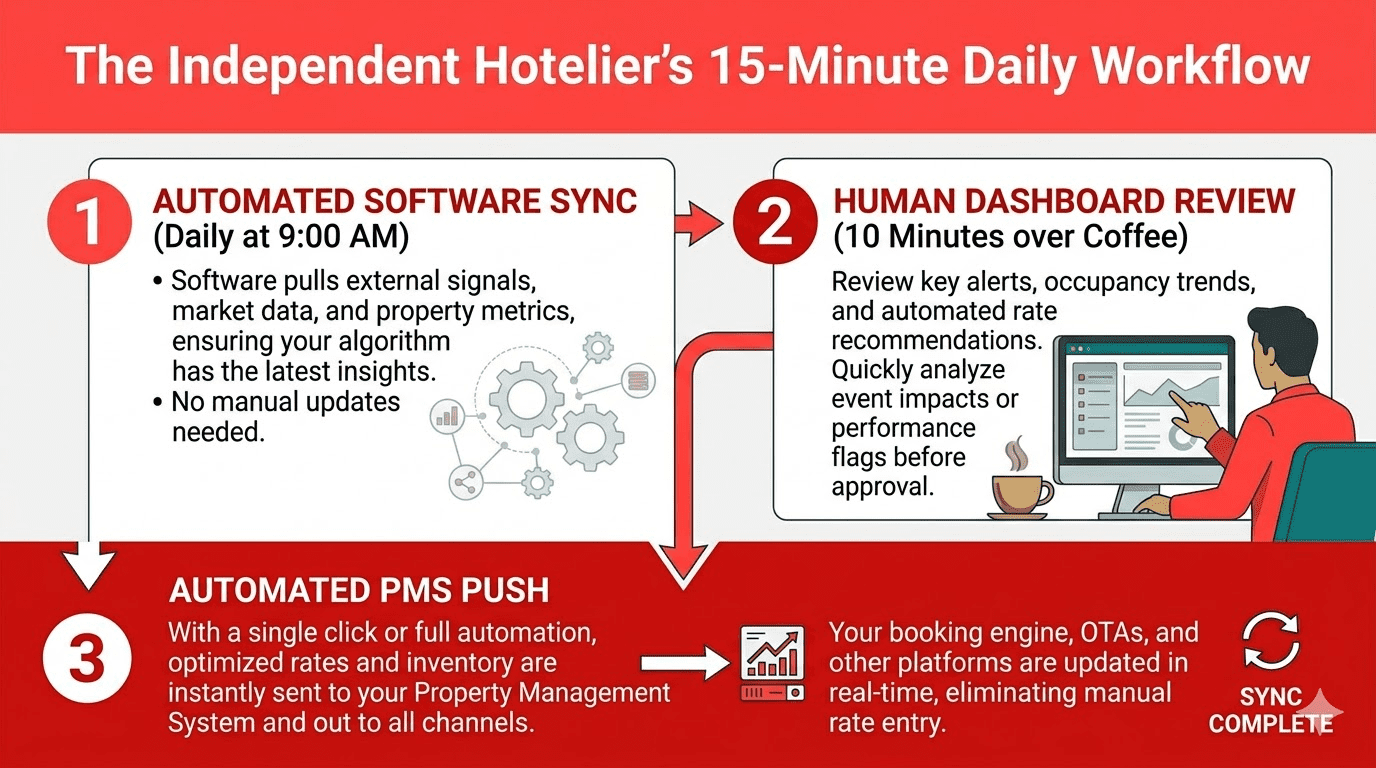
This is a section most guides skip, but it’s what you genuinely want to know. The biggest fear is that new software means more work. In reality, dynamic pricing reduces daily decision-making; it doesn’t add to it.
Here is what a highly realistic workflow looks like for a small hotel using dynamic pricing:
Daily (The Automated Stuff)
- The software silently pulls market data, checks your occupancy, and scans competitor rates.
- Rates update automatically across all your connected OTAs and your direct booking website.
- Your Job: You review a simple summary dashboard while drinking your morning coffee—typically taking just 10–15 minutes.
Weekly
- Review your upcoming 30, 60, and 90-day pacing reports to see if you are hitting your targets.
- Check the local news for any newly announced events (like a pop-up concert) that might not be in the software’s system yet.
- Adjust any manual overrides or enforce minimum stays for upcoming high-demand weekends.
Monthly
- Review your overall performance: Did your ADR, occupancy, and RevPAR improve compared to last month and last year?.
- Assess your seasonal strategy—are your base prices still calibrated correctly as the seasons change?.
- Look at any specific dates that underperformed and try to understand why.
How PriceLabs Helps Here: PriceLabs handles the heavy, repetitive lifting. With Real-Time Sync (available for select PMSs), it uses webhooks to instantly trigger up to 24 price updates per day following new reservations or cancellations. Furthermore, if multiple people manage the hotel (like an owner and a front desk manager), the Teams feature provides role-based permissions and logs every action, so everyone knows exactly who made what changes.
How to Navigate on PriceLabs:
- Go to your Settings, then navigate to Sync Settings.
- Turn on the Enable Price Sync toggle. This tells PriceLabs to start sending its automated prices directly to your PMS.
- By default, prices sync once every 24 hours. If you want to increase frequency to stay ultra-responsive to market changes, click Specify Your Own Time to add up to 3 automatic daily syncs.
Section 11: How to Know If You’re Ready for Dynamic Pricing
Not sure if you should pull the trigger? Use this self-assessment framework. This isn’t a sales pitch; it’s a genuine readiness checklist to make sure you have the basics in place before adding new technology:
- You have at least 6 months of booking history. (You need this data to inform a reliable base price).
- You’re listed on at least one OTA (like Booking.com or Expedia) or you have a strong direct booking channel.
- You have (or want) a Property Management System (PMS) that can actually receive automated rate updates.
- You experience at least some demand variation across the year (e.g., weekends are busier than weekdays, or summer is busier than winter—which almost every hotel experiences).
- You’re spending more than 2–3 hours per week managing rates manually and feeling frustrated by the process.
The Verdict: If you check 3 or more of these boxes, you are completely ready to implement a dynamic strategy. If you check fewer, take a step back. Work on establishing yourProperty Management System (PMS) and getting your distribution channels (OTAs) set up first before adopting dynamic pricing.
Section 12: What to Look for in a Hotel Dynamic Pricing Tool
If you’ve decided it’s time to upgrade your revenue strategy, evaluating vendors is your next step. Don’t just pick the first software you see. Here are the five criteria that matter most for independent hotels:
- Hotel-specific data, not just STR data — Some tools are built exclusively for Airbnb hosts and awkwardly retrofitted for hotels. The data sources are different, and it shows. You need a tool that understands hotel metrics.
- Room-type level pricing — A tool that only prices at the broad property level is far too blunt for most hotels. You need to be able to price a Standard room differently than a Suite.
- PMS integration — If you have to manually enter the rates the software suggests, it defeats the entire purpose. Always check that your specific PMS is supported.
- Transparency in recommendations — You should be able to clearly see why a rate was suggested based on data, not just blindly trust a “black box” algorithm.
- Affordable for independents — Traditional enterprise RMS pricing (often $500–$1,000+ per month) is simply not designed for a 20-room boutique hotel. Look for modern SaaS tools that have changed this pricing model.
How PriceLabs Helps Here: PriceLabs ticks every single box. It was built specifically with independent hotels and aparthotels in mind. It offers Multi-Room Occupancy-Based Adjustments for specific room-type pricing, connects seamlessly with 160+ PMS systems and channel managers, and provides transparent hotel-specific intelligence. Most importantly, it starts at a price point highly accessible to single-property operators.
How to Navigate on PriceLabs:
- Head to the PriceLabs website and sign up for the 30-day free trial—there is no credit card or payment info needed to start .
- Once signed up, take advantage of the free PriceLabs Basics | Account Set Up onboarding training webinars. These daily sessions will walk you through setting up your listings for success right from day one .
Wrapping Up : Dynamic Pricing Isn’t a Tactic — It’s a Mindset Shift
Ultimately, hotel dynamic pricing is a living, breathing strategy—a total mindset shift from the old days of set-and-forget seasonal calendars. You now understand exactly what dynamic pricing is, how the demand signals actually work, why independent hoteliers possess a unique advantage, and what features to demand from a modern tool. You now know more about hotel pricing strategy than most independent operators. The next step is simply taking action and putting this knowledge to work so you never leave money on the table again.
FAQ
What is hotel dynamic pricing?
It is a pricing approach where room rates adjust automatically or strategically based on real-time demand signals (like occupancy and competitor rates) rather than relying on fixed seasonal brackets.
How is dynamic pricing different from yield management?
Yield management is the broader, older philosophy pioneered by airlines to sell the right inventory to the right guest. Dynamic pricing is the modern, highly automated software execution of that strategy using real-time data.
Does dynamic pricing work for small boutique hotels?
Yes, absolutely. Independent hotels actually have a major advantage over big chains due to their faster decision-making, greater local knowledge, and the flexibility to customize rules without corporate red tape .
How often do rates change with dynamic pricing?
Rates update automatically every 24 hours by default. However, using high-frequency sync add-ons with select PMSs, they can update up to 24 times a day instantly following new reservations or cancellations.
Will dynamic pricing raise my rates or lower them?
It does both. It optimizes your total revenue by raising rates during peak demand, but it intelligently lowers them during slow shoulder seasons to trigger bookings and fill empty rooms profitably .
What is the difference between dynamic pricing and revenue management?
Revenue management is the overarching business strategy of managing a hotel’s total income streams (including marketing and operations). Dynamic pricing is a specific, highly automated software tool utilized to execute the rate adjustment portion accurately.
How much does hotel dynamic pricing software typically cost?
Unlike legacy enterprise RMS tools that often cost $500–$1,000+ per month, modern SaaS dynamic pricing tools (like PriceLabs) are highly affordable for independent owners, charging flat monthly rates per listing with absolutely no hidden commissions .
Can I still control my minimum and maximum room rates?
Absolutely. Every credible dynamic pricing tool allows you to set clear minimums (rate floors), maximums, and deploy manual date-specific overrides so you never lose control of your brand’s pricing value.