


Are you still spending your Sunday evenings staring at complex spreadsheets, trying to guess if you should drop your rates for next Tuesday or hike them for the local festival three months away? For many boutique hotel owners, manual pricing feels like a high-stakes game of poker, played blindfolded against competitors who have all the data. What if you could stop the guesswork, reclaim your time, and actually see your direct bookings climb? It is time to explore how the best cloud-based revenue management platforms for hotels can transform your property from a manual struggle into a data-driven success story.
Understanding Cloud Revenue Software and Its Benefits

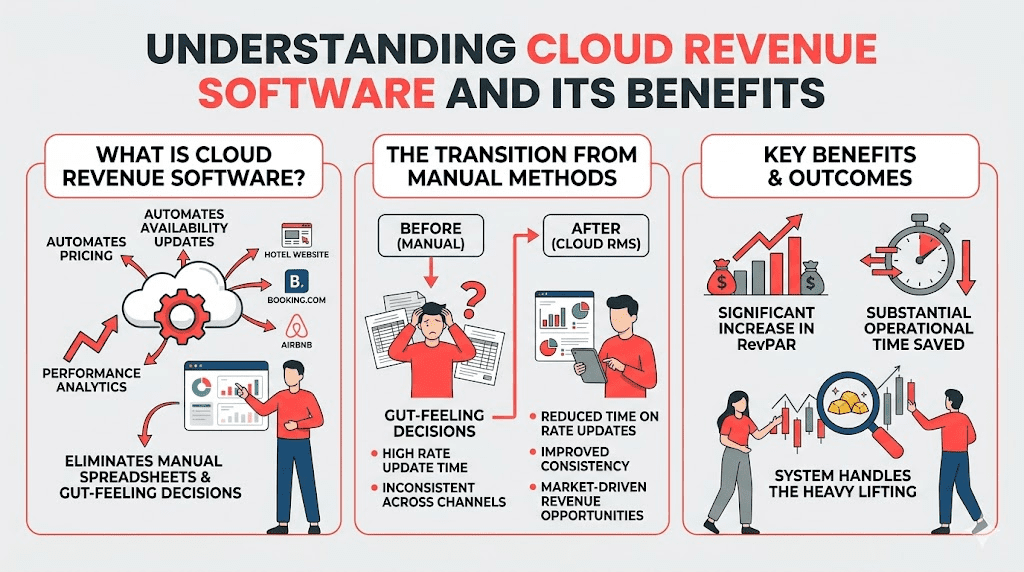
Cloud revenue software is an online system that automates pricing, availability updates, and performance analytics across multiple distribution channels, effectively eliminating manual spreadsheets and gut-feeling decisions. By replacing manual pricing with cloud revenue software for direct bookings, you reduce the time spent on rate updates, improve consistency across channels, and capture market-driven revenue opportunities that are otherwise invisible to the naked eye. Operators adopting a cloud RMS often see a significant increase in RevPAR and save substantial operational time by letting the system handle the heavy lifting.
Within PriceLabs, this is achieved through Dynamic Pricing (Hyper Local Pulse), which generates daily pricing recommendations by analyzing internal occupancy, lead time, seasonality, local events, and publicly available hotel market data.
What is Dynamic Pricing? Dynamic pricing is a data-driven strategy where room rates automatically adjust in time based on market demand, competitor prices, local events, and booking patterns to maximize revenue.
Manual vs. Automated Pricing: A Quick Comparison
| Feature | Manual Pricing | Automated Cloud RMS (PriceLabs) |
| Speed | Slow, reactive adjustments | Real-time updates (up to 24x/day) |
| Data Quality | Limited to personal observation | Hyper-local market data & 200+ parameters |
| Consistency | Risk of rate parity issues | Automated rate syncing across all channels |
| Revenue Potential | Frequent underpricing or missed peaks | Optimized for maximum RevPAR and ADR |
Assessing Your Current Systems and Technology Stack
Before jumping into a new platform, you must evaluate your current technology stack to ensure a smooth transition. This involves auditing your Property Management System (PMS), Central Reservation System (CRS), and booking engines to identify any integration gaps. Technical compatibility is the backbone of modern multi-channel revenue management; without it, you risk overbookings and manual data entry errors.
PriceLabs makes this step easy by offering 160+ PMS and OTA integrations. To begin your audit:
- List your current systems: Identify which PMS or Channel Manager you currently use.
- Check Compatibility: Ensure your PMS is on the list of supported integrations to allow for automated rate syncing.
- Identify Pain Points: Note where you currently spend the most time, such as manually changing rates on Booking.com or your direct site.
Selecting a Cloud Revenue Management Platform That Integrates Seamlessly
When searching for the best cloud-based revenue management platforms for hotels, look for a solution that minimizes friction and maximizes automation. You need a platform that provides a “single source of truth” for your portfolio.
PriceLabs is designed specifically to help independent hotels automate pricing without the complexity of an enterprise RMS. Key features to look for include

- Real-Time Sync: Use webhooks to trigger instant price updates following new reservations or cancellations.
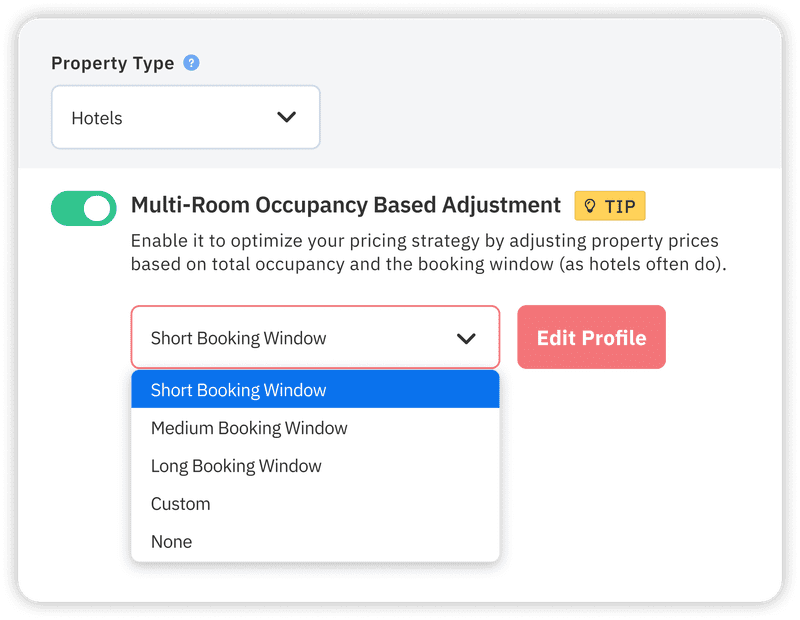
- Multi-Room Occupancy-Based Adjustments: Adjust pricing based on occupancy trends within specific room types to ensure balanced sell-through.
- Role-Based Access: Provide specific permissions for owners, revenue managers, and staff to keep your workflow efficient and secure.
Setting Up and Importing Historical Data with Guardrails

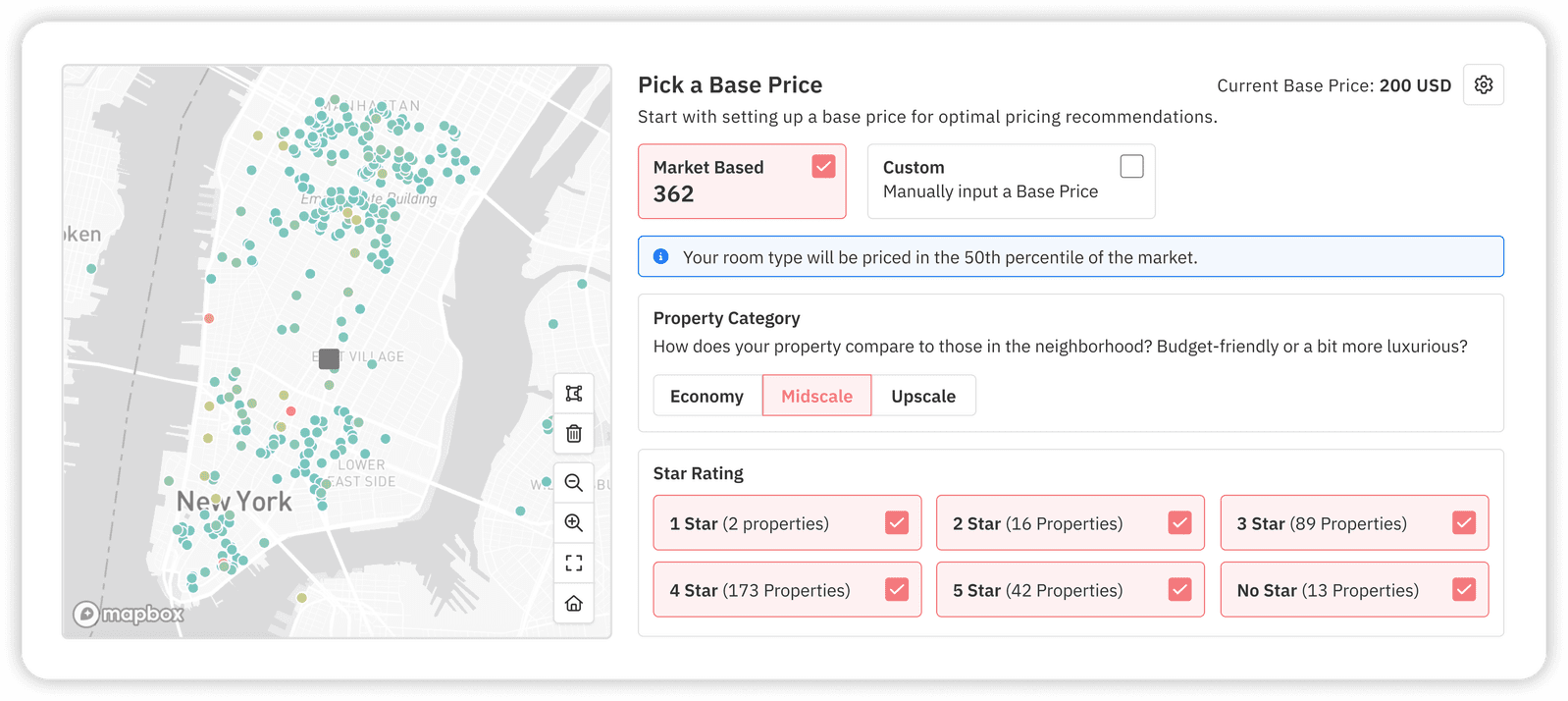
Once you’ve selected PriceLabs, the initial setup involves importing your rooms and establishing “guardrails.” This ensures the automation stays within your comfort zone while the AI learns your market.
Step-by-Step Initial Setup
- Add/Reconnect Properties: Import your rooms directly from your PMS.
- Define Base Price: This is the annual average rate you would charge for a room type. Use the Base Price Guidance tool for data-informed recommendations.
- Map Room Types: Establish Parent-Child relationships. For example, set a “Standard Room” as the parent and link “Deluxe” rooms with a specific price offset.
- Set Minimum Stay Rules: Adapt length-of-stay requirements based on seasonality and demand patterns.
Setting these guardrails—like minimum and maximum price limits—is a critical setup step for risk mitigation, ensuring the software never prices your rooms lower than your costs or higher than the market will bear.
Activating Dynamic Pricing and Monitoring Performance
Now comes the exciting part: activating your dynamic pricing tools. In PriceLabs, you simply turn on the “Enable Price Sync” toggle to start sending optimized rates to your PMS.
It is highly recommended to let the AI-based model run for an initial “learning period.” Trust the algorithms for at least 2–3 months before making heavy manual overrides; the AI needs this time to fully understand your specific booking patterns and local market shifts. You can monitor progress through the Pricing Dashboard, which displays recommended prices for every available night in the future.
Refining Pricing Rules Using Market Insights and Competitor Data

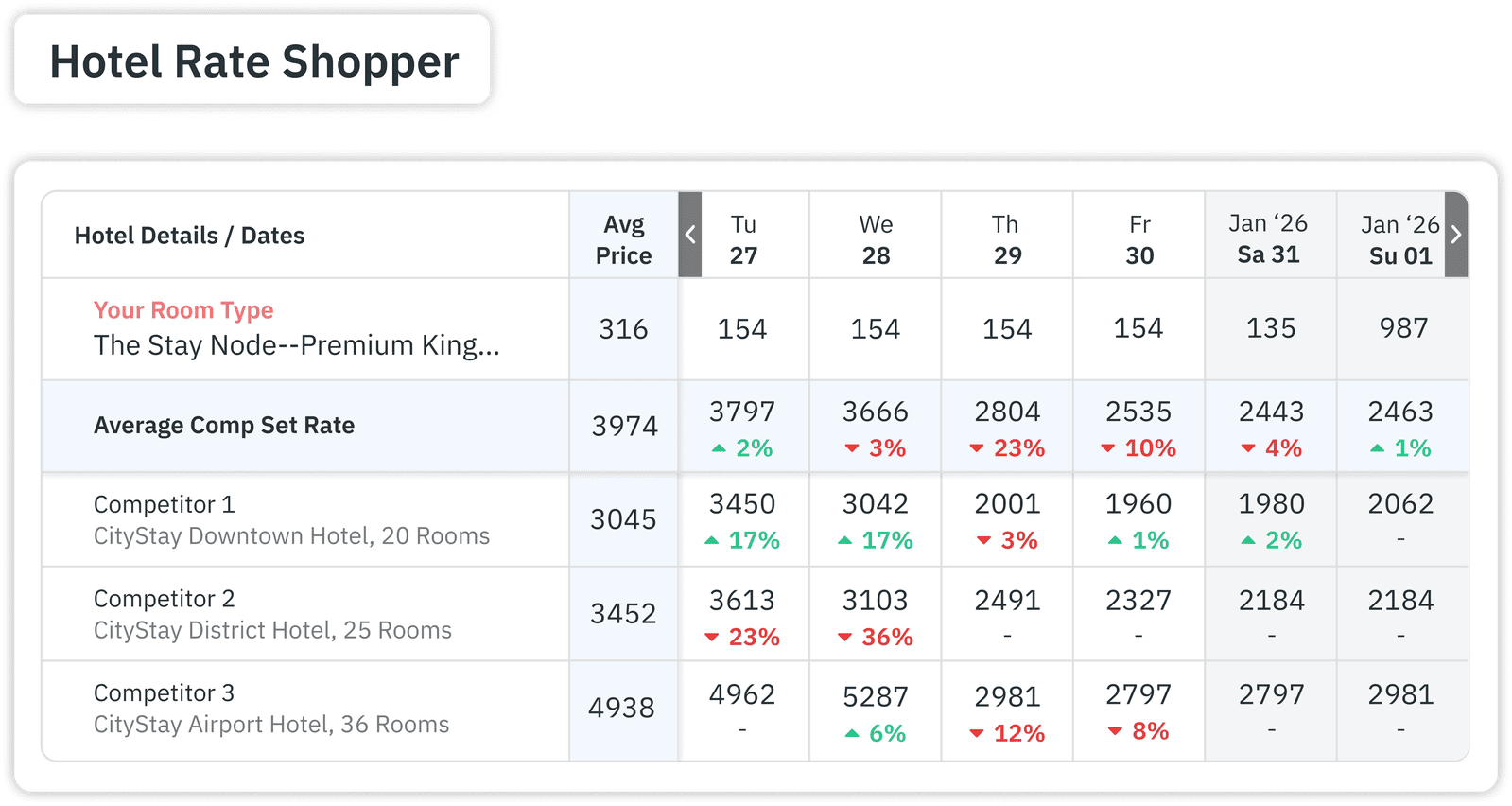
To truly outshine the competition, you should refine your strategy using the Hotel Rate Shopper. This tool allows you to monitor pricing trends across up to 350 nearby hotels.
Best Practices for Market Refinement:
- Custom Comp Sets: Manually select specific rivals to benchmark against, ensuring your rates are only influenced by properties guests actually consider alongside yours.
- Smart Presets: Use pre-filled profiles for seasonality and demand sensitivity. For hotels, setting Seasonality Factor Sensitivity to “Conservative” is often recommended to gently adjust prices.
- Day of Week Adjustments: Apply percentage adjustments for consistent trends, such as higher demand on weekends for leisure destinations.
Automated competitor tracking removes the lag time associated with manual research, allowing you to react to market shifts instantly.
Measuring Impact on Direct Bookings and Revenue Growth

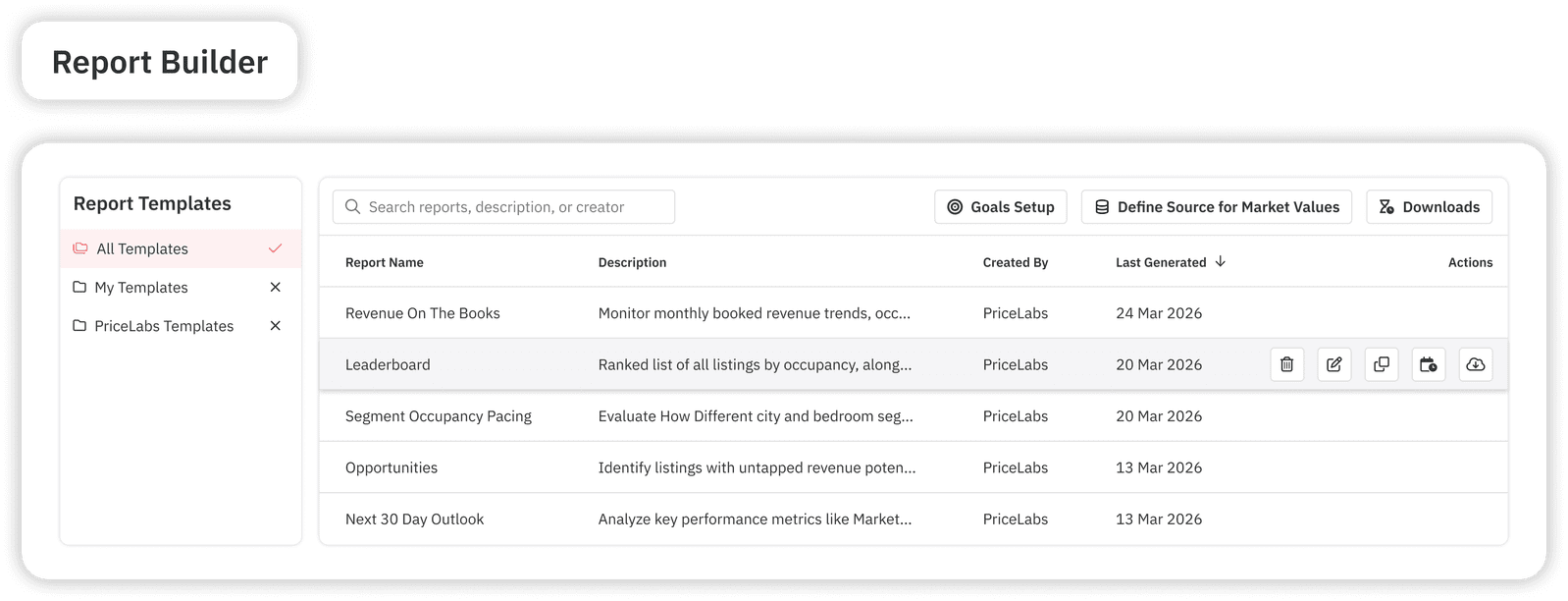
The ultimate goal of switching to the best cloud-based revenue management platforms for hotels is measurable ROI. You should track key KPIs such as ADR (Average Daily Rate), Occupancy, and RevPAR (Revenue Per Available Room).
PriceLabs’ Report Builder allows you to create custom reports tailored to your hotel’s needs. You can track:
- Hotel KPIs On The Books: Compare current year performance against last year’s actuals.
- Hotel Pickup Trends: Identify changes in booking pace to adjust your strategies in real time.
Boutique operators often find that by centralizing their revenue management, they can double their direct booking share by offering more competitive and consistent rates on their own websites compared to high-commission OTAs.
Best Practices for Maintaining Human Oversight and Team Alignment
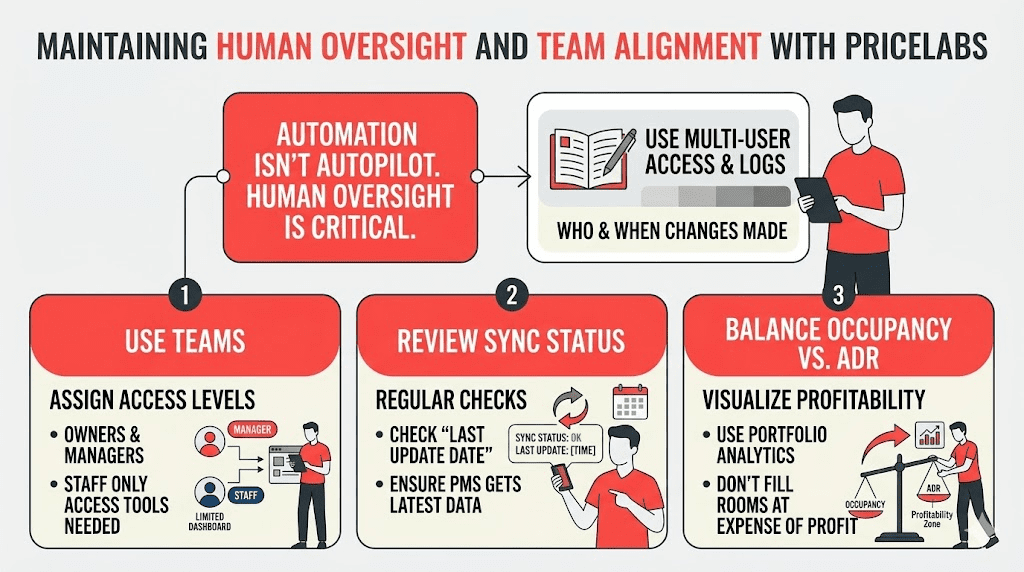
Automation is a powerful tool, but it is not an autopilot. Periodic human oversight is critical for maintaining trust and handling unique local exceptions. PriceLabs supports this through Multi-User Access & Logs, which show exactly who made changes and when.
Operational Guidelines:
- Use Teams: Assign different access levels for owners and managers to ensure staff only access the tools they need.
- Review Sync Status: Regularly check the “last update date” and sync status to ensure your PMS is receiving the latest data.
- Balance Occupancy vs. ADR: Use Portfolio Analytics to visualize whether you are filling rooms at the expense of profitability.
Conclusion
Transitioning from manual spreadsheets to a cloud-based revenue management system is the single most impactful change an independent hotelier can make to drive direct bookings and protect margins. By leveraging PriceLabs’ dynamic pricing, real-time synchronization, and deep market intelligence, you move from reacting to the market to leading it. The result isn’t just better revenue—it’s the freedom to stop worrying about your rates and start focusing back on what you do best: providing an exceptional guest experience.
Way Forward
Ready to see what data-driven pricing can do for your boutique hotel? Start by auditing your current PMS for compatibility and sign up for a 30-day free trial of PriceLabs. During your trial, set your Base Price, connect your “Comp Set” in the Rate Shopper, and let the Hyper Local Pulse algorithm show you the hidden revenue opportunities in your neighborhood.
Frequently Asked Questions (FAQ)
What are the main benefits of switching to cloud revenue software for direct bookings?
Cloud revenue software like PriceLabs automates dynamic pricing and rate updates, which can increase revenue by 15–30%. It saves hours of manual work and ensures your direct booking rates are always optimized and consistent across all platforms.
How does cloud revenue software integrate with existing PMS and channel managers?
PriceLabs connects with over 160 PMS and Channel Managers. Once integrated, it uses automated rate syncing to push price updates directly to your system, ensuring your rates are always current without manual entry.
What are the key steps to replace manual pricing with automated systems?
The process starts with adding your property to PriceLabs, defining a Base rice, and mapping your room types. You then set your pricing “guardrails” (min/max prices) and enable the sync toggle to allow the automated system to take over.
Is cloud revenue software suitable for small properties as well as large portfolios?
Absolutely. PriceLabs is designed for accommodation providers of all sizes, from single rentals to independent boutique hotels and large portfolios. Small properties benefit from the automation and market insights that they otherwise wouldn’t have the staff to manage.
How can operators overcome common challenges during implementation?
The best way to overcome challenges is to utilize the free 30-day trial and onboarding sessions provided. Starting with “Smart Presets” and conservative “guardrails” allows you to ease into automation while learning the interface at your own pace.