



Think of PriceLabs as autopilot for your hotel’s pricing—once you chart the course, it constantly adjusts to wind, weather, and traffic so you reach the best destination: higher RevPAR with less manual work. Small hotels can deploy PriceLabs in days—not months—to automate dynamic pricing across every OTA and direct channel. The platform connects via API to your property management system (PMS) or channel manager, pushing optimized rates and restrictions that your distributor propagates to all channels in real time. With 150+ PMS and channel manager integrations listed in the PriceLabs integrations directory and recognition as the most integrated revenue management platform, compatibility is rarely a blocker for small teams focused on fast, measurable uplift in RevPAR and time savings.Below is a precise, step-by-step path—from compatibility checks to BI-driven iteration—so you can launch confidently, avoid common pitfalls, and scale automation at your pace.
Confirm Compatibility with Your Channel Manager or PMS
Start with a quick fit check. PriceLabs channel manager integration works with 150+ PMS and channel managers, so your stack is likely already covered.
Before you start, confirm your stack is supported so data and pricing updates flow seamlessly. PriceLabs integrates with 150+ PMS and channel managers; start by searching the PriceLabs integrations directory for your provider and connection notes. If you don’t see your tool listed, contact PriceLabs support to confirm roadmap status or alternate connection paths.
How to do this in PriceLabs:
- Open the integrations directory and search your PMS/channel manager by name (see the PriceLabs integrations directory).
- Review any connection notes or special mapping requirements.
- If you operate PMS + channel manager, decide which system will receive price pushes from PriceLabs.
Key terms to align your team:
- Channel manager: Software that centralizes inventory and synchronizes availability and rates across OTAs and booking channels; it also helps maintain parity and prevent overbookings by routing updates instantly (see what a channel manager does).
- PMS: Your hotel’s operating backbone for reservations, guest folios, housekeeping, and often distribution to a channel manager. PriceLabs connects upstream to your PMS or directly to your channel manager, depending on your setup.
Tip: If you operate multiple tools (e.g., PMS + separate channel manager), confirm which system should receive rate pushes from PriceLabs to avoid duplicates later.
Clean and Consolidate Your Data Before Integration
Clean inputs power strong dynamic pricing. A few minutes here can prevent hours of firefighting later.
Dynamic pricing only performs as well as the data you feed it. Before connecting, export and review key histories from your PMS or channel manager—occupancy, ADR, rate plans, and room mappings—and fix inconsistencies that can cause pricing or mapping errors. Small hotels frequently inherit legacy room names, duplicated listings, and outdated rate plans; cleaning this up now saves rework and protects guest experience during launch (see small hotel pricing challenges).
Use this simple pre-integration checklist:
| Data asset | Source system | Why it matters | What to do |
| Historical occupancy & ADR | PMS | Establishes baselines for demand and rate sensitivity | Export last 12–24 months; remove outliers (e.g., closed periods) |
| Room types & unit IDs | PMS or channel manager | Ensures correct one-to-one mapping | Standardize names/IDs; merge or archive duplicates |
| Rate plans & policies | PMS | Prevents mismatched pricing downstream | List active plans; note cancellation, LOS, and meal inclusions |
| Channel listings | Channel manager | Aligns naming and distribution | Ensure each room type is listed correctly on each OTA |
Clean data leads to accurate room-type mapping and reduces the risk of double bookings or rate mismatches once automation starts.
Practical tips:
- Use consistent, human-readable room names (e.g., “Queen City View” vs. “QCV-01”).
- Archive old rate plans you no longer offer so they don’t accidentally sync.
- Confirm which channels carry each room type—especially if some sell only direct.
How to do this in PriceLabs:
- After connecting, review the imported properties and room types on the mapping screen. Unmapped or duplicate items will stand out.
- Use monitor mode first to verify that the occupancy and availability data look right before turning on full sync.
Connect PriceLabs to Your Channel Manager and Map Entities

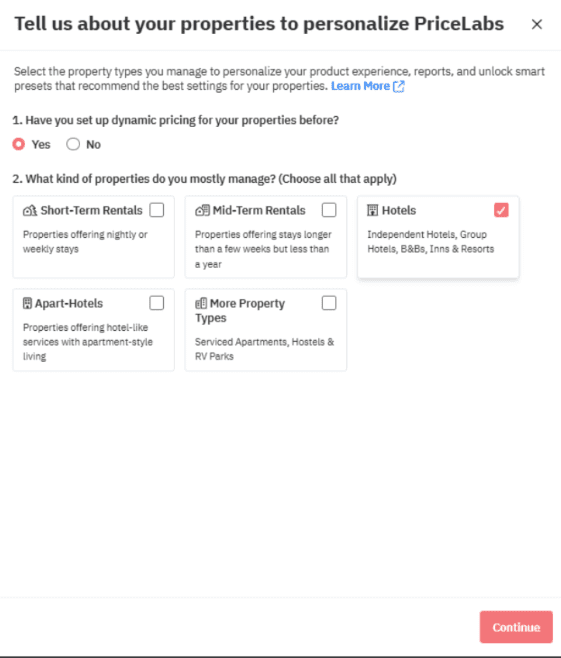
Your mapping is the backbone of accurate pricing. Take a few minutes to get it airtight.
Connection and mapping determine what gets priced, where, and how often.
Step-by-step:
- Log in to PriceLabs and choose Add/Reconnect to select your PMS or channel manager connector.
- Enter the API credentials or authorization tokens provided by your PMS/channel manager.
- Import properties; then map each unit, room type, and rate plan one-to-one between PriceLabs and your system.
- Validate that occupancy and future availability appear correctly in PriceLabs dashboards.
- Save mappings and run a test pull/push in sandbox or monitor mode if available (see small hotel pricing challenges).
Entity mapping means aligning the room types and rate plans in PriceLabs with their exact counterparts in your PMS/channel manager so that prices, minimum stays, and restrictions sync to the right places.
How to do this in PriceLabs:
- Use the mapping page to pair each PriceLabs room type to its PMS/channel manager equivalent.
- Open the calendar or pricing preview to confirm future availability and current pickup look correct.
- Run a limited push to a single, low-risk room type to verify downstream updates on each OTA.
Enable two-way sync where supported so updated rates, minimum-stay rules, and key restrictions flow from PriceLabs to your PMS/channel manager, and real-time availability and bookings flow back for accurate recommendations.
Example: If a “Deluxe King” maps to “DLX-K” in your PMS and “Deluxe King – Free Breakfast” in your channel manager, confirm all three references point to the same inventory bucket before syncing.
Configure Base Pricing Rules and Channel-Specific Settings in PriceLabs

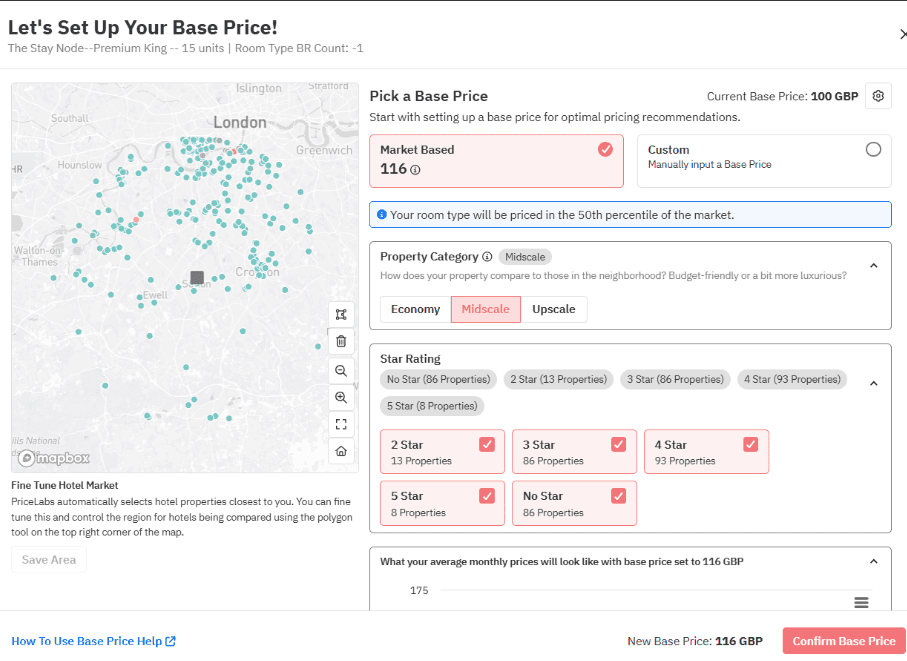
Set the guardrails once, and let PriceLabs handle the daily heavy lifting.
With entities mapped, set the “guardrails” for automation.
Core setup:
- Establish your base price (typical rate for normal demand) and minimum/maximum price floors and ceilings.
- Configure minimum-stay rules by day-of-week and seasonality.
- Set orphan-gap fills, last-minute discounts, and far-out premiums.
- Apply channel-specific customizations to reflect audience and fee structures (see PriceLabs customizations).
Dynamic pricing adjusts nightly rates automatically based on market demand, on-the-books occupancy,competitor pricing, events, and seasonality to capture more revenue with less manual work (see predictive analytics for dynamic pricing).
How to do this in PriceLabs:
- Set your base price and price bounds on the listing or group settings page.
- Create minimum-stay profiles for weekdays vs. weekends and apply them seasonally.
- Turn on last-minute discounts and far-out premiums with curves that match your lead-time behavior.
Run a Validation Period to Monitor and Adjust Pricing Recommendations
A short shakedown builds confidence and catches edge cases early.
Plan a short, structured shakedown to build confidence and fine-tune.
We recommend a 2–4 week validation window operating in monitor mode or with limited sync. Compare suggested vs. actual rates and pickup; check channel pages for parity and visibility; adjust baselines, sensitivity, and competitor sets as needed (see small hotel pricing challenges).
Validation workflow:
| Step | What to check | Action if off-target |
| 1. Baseline audit | Are suggested rates aligned with brand position? | Adjust base price and minimums/maximums |
| 2. Demand signals | Last-minute and event spikes recognized? | Tweak dynamic sensitivity; enrich event calendars |
| 3. Channel parity | Same room shows intended differentials? | Update channel-specific adjustments or floors |
| 4. Performance | Pickup, ADR, and occupancy trending as expected? | Refine min-stays; revisit competitor set and lead-time rules |
How to do this in PriceLabs:
- Use monitor mode to preview rates without pushing live.
- Spot-check 10–15 future dates across low, normal, and high demand periods.
- Compare OTA search results (mobile and desktop) to confirm visibility and intended price differentials.
Example: If a city festival drives Saturday demand, but Friday lags, adjust minimum stays to capture Friday arrivals and let orphan-gap rules fill any single-night gaps on Saturday.
Enable Automation and Set Alerts for Sync and Pricing Issues
Once you trust the outputs, flip to full automation and add guardrails.
Once validated, switch to full automation to save time and protect revenue.
- Turn on scheduled rate pushes from PriceLabs to your PMS/channel manager, which then fans out updates to all connected OTAs in near real time (see evaluating hotel pricing strategies).
- Configure alerts and notifications for failed syncs, price parity breaks, or unusual rate swings. Clear alerting prevents silent errors and keeps teams proactive (see channel management best practices).
How to do this in PriceLabs:
- Toggle sync on for each listing or apply it in bulk for a room-type group.
- Set up email/in-app alerts so you’re notified of sync failures or unexpected price deviations.
- Keep a simple weekly checklist: verify pushes ran, parity holds, and no listings are paused.
Practical tip: Automate most updates but keep a short “exception” list (e.g., VIP blocks, renovations) managed via date-specific overrides.
Monitor Performance with Business Intelligence and Iterate Pricing Strategies
Iteration is where small hotels compound gains—month after month.
Continuous improvement is where small hotels compound gains.
Use Portfolio Analytics and BI exports to track ADR, RevPAR, occupancy, pacing, and booking lead time; compare cohorts by room type or channel to spot under- or over-performance (see PriceLabs on HotelTechReport). Then run a monthly optimization loop:
- Review prior 30–60 days vs. same period last year: ADR, occupancy, RevPAR, pickup by channel.
- Identify outliers: days with high demand you underpriced, or soft days needing stronger discount curves.
- Adjust rules: channel-specific floors, lead-time premiums, event sensitivity, and min-stay patterns.
- Revalidate after major changes for 1–2 weeks, then lock in.
How to do this in PriceLabs:
- Open Portfolio Analytics to view pacing, pickup, and channel mix trends.
- Export BI data to your dashboard for weekly revenue meetings.
- Tag changes (e.g., “new weekend min-stay”) and verify impact over the next 2–4 weeks.
RevPAR—revenue per available room—measures total room revenue divided by available rooms and is your best single indicator of pricing and occupancy effectiveness (see what a channel manager does).
Common Pitfalls and How to Avoid Them
Most issues trace back to a few fixable setup gaps. Stay ahead with these checks.
Typical issues and fixes:
- Overly restrictive minimum prices or min-stays that block demand: set realistic floors and seasonally smart min-stays (see small hotel pricing challenges).
- Duplicate rate pushes from both PMS and PriceLabs: select one master for pricing pushes and disable the other’s auto-rate rules (see common integration pitfalls).
- Poor room/plan mapping: audit one-to-one mappings and test pushes for every room type before go-live.
- Misaligned team workflows: document who monitors syncs, who approves strategy changes, and how exceptions are escalated.
How to handle in PriceLabs:
- Use bulk actions to adjust minimum stays and price bounds across multiple room types.
- Keep PMS-generated “smart rates” turned off if PriceLabs is your pricing source of truth.
- Run a weekly mapping check to confirm no new rate plans or rooms appeared unlinked.
Provide brief training for front-desk and revenue teams, keep a one-page SOP for sync checks, and bookmark support resources to speed troubleshooting.
Outcome Benefits of a Proper PriceLabs and Channel Manager Integration
A tight PriceLabs channel manager integration pays off fast and keeps compounding.
When set up correctly, small hotels typically see double-digit revenue gains with less manual effort. Independent hoteliers report RevPAR uplifts after adopting dynamic pricing and automation, driven by better demand capture and tighter controls (see what a channel manager does). Centralized control, automatic rate and inventory updates, and fewer manual edits improve parity and reduce errors that erode margin (see channel management best practices). Start simple, validate for a few weeks, and scale automation confidently—you’ll capture more demand with fewer clicks.
Proof in practice:
- Time saved: Hours reclaimed weekly from manual rate edits and parity checks.
- Revenue lift: Stronger ADR on peak dates, better occupancy on soft nights.
- Control: Clear rules, consistent updates, and alerts when something looks off.
Conclusion and Way Forward
If you’re ready to make a confident, technical buying decision, this playbook is your blueprint. Confirm compatibility, clean data, map precisely, set smart guardrails, validate, and automate—then iterate with BI. That’s how small hotels turn PriceLabs channel manager integration into sustained RevPAR growth and fewer manual tasks. Next step: complete your compatibility check, connect in monitor mode, and run a 2–4 week validation. You’ll see where automation saves time immediately and where fine-tuning unlocks the next round of gains.
Frequently asked questions
How does PriceLabs sync rates and restrictions with channel managers and PMS?
PriceLabs pushes updated rates, minimum stays, and key restrictions to your PMS or channel manager, which then updates all connected OTAs in real time to maintain accuracy and reduce manual work.
What customization options are available for channel-specific pricing rules?
You can set channel-specific price adjustments, minimum-stay overrides, floors/ceilings, and lead-time or last-minute rules so each OTA or your direct site follows its own optimized strategy.
How does integration with PriceLabs prevent double bookings in multi-channel setups?
By syncing availability and pricing through your channel manager in real time, all platforms update immediately after a booking, which significantly reduces double-booking risk.
Which popular channel managers and PMS systems are best suited for small hotels?
Vendors like PriceLabs, Little Hotelier, Cloudbeds, SiteMinder, and eviivo are commonly used with PriceLabs, offering reliable connections and automation suited to small properties.
What are the primary benefits of using PriceLabs with a channel manager for small hotels?
You’ll save time, boost revenue with dynamic pricing, maintain tight parity across channels, and reduce errors through automated updates and proactive alerts.