


As an STR property manager, the idea of handing over your pricing to an algorithm can feel like “juggling flaming torches”. You want the extra revenue, but the risk of underpricing a peak weekend or pricing yourself out of the market is real. This is why a pilot program is your best friend.
A pilot allows you to test Vrbo dynamic pricing software on a small sample of properties, gather data, and refine yourpricing strategy before a full portfolio rollout. Here is your step-by-step guide to doing it right.
Bonus Read: The Ultimate Guide to Dynamic Pricing for Short-Term Rentals
1. Select the Right Vrbo Dynamic Pricing Software
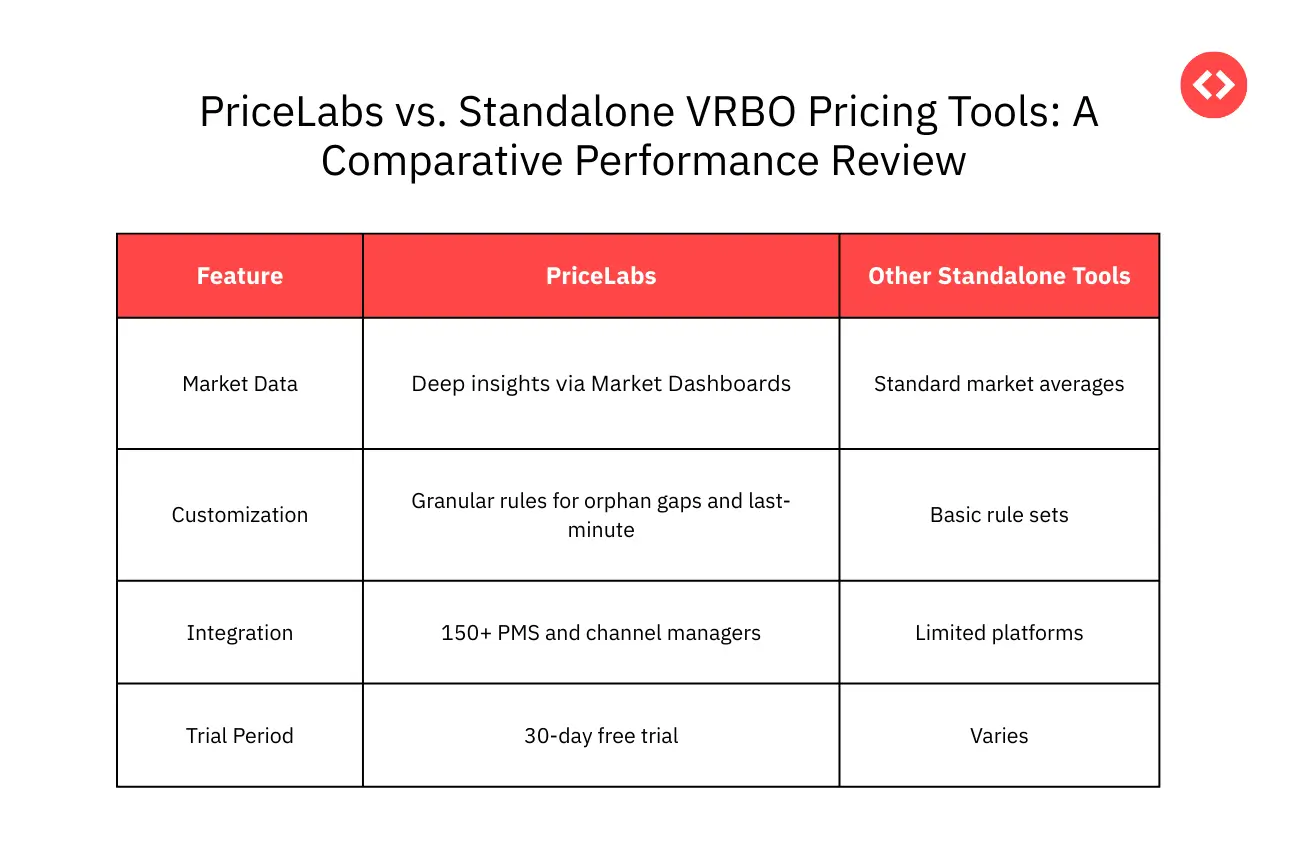
Not all pricing tools are created equal. To maximize your RevPAR (Revenue per Available Room), you need a tool that balances automation with intelligent control.
Dynamic pricing is an automated strategy that updates nightly rates based on real-time market and historical data to maximize revenue and occupancy. While Vrbo offers a built-in “Rate Automation” tool, professional property managers often find it lacks the sophisticated customizations needed for complex portfolios.

2. Connect and Configure Your Tech Stack
Before you test, you need a clean data flow. Connecting your Vrbo dynamic pricing software directly to your Property Management System (PMS) eliminates the need for manual spreadsheets and ensures rate parity across channels.
- Define Your PMS: A PMS centralizes bookings, calendars, and guest communication, enabling seamless rate updates.
- Set Your Base Price: The average rate for your listing over the year. You can use the PriceLabs Base Price Help Tool to calculate this based on competition and historical performance.
- Establish Guardrails: Set a minimum price (the lowest you’ll ever accept) and a maximum price to prevent the algorithm from overreaching in either direction.
3. Design a Pricing Pilot Strategy
Don’t just pick properties at random. Your pilot should be a methodical, data-focused experiment.
- Select a Representative Sample: Choose 5 to 10 listings that reflect different segments of your portfolio—for example, a mix of luxury mountain cabins and budget urban condos.
- Create Test and Control Groups: Keep some properties on your manual pricing (control) while moving others to dynamic pricing (test) to see the actual uplift.
- Define Success KPIs: Monitor Occupancy, ADR (Average Daily Rate), and the Booking Window.
Stop Guessing, Start Growing: Take Control of Your Revenue Today
Stop guessing why your listings aren't converting. Get instant quality scores, AI-driven recommendations, and the tools to manage 100+ properties effortlessly.
Start Your Free Trial Now4. Monitor and Analyze During the Test
A pilot isn’t “set-and-forget.” For the first 30 days, closely monitor the software’s recommendations.
- Watch for Anomalies: Check for spikes around local events or unexpectedly low midweek rates.
- Use Market Dashboards: Leverage PriceLabs’ Market Dashboard to compare your “test” listings against local competitors in real-time.
- Manual Overrides: If a major local event is announced but the software hasn’t yet picked it up, don’t hesitate to use a manual override to protect your revenue.
5. Optimize and Scale the Rollout
Once the data is in, it’s time to refine and expand. If your pilot properties show a healthy increase in RevPAR without a negative impact on reviews, you’re ready to scale.
- Refine Rulesets: Use your findings to adjust minstay restrictions for weekends versus weekdays.
- Bulk Updates: Use Portfolio Analytics to apply winning strategies across entire groups of listings simultaneously.
- Phased Rollout: Expand gradually by region or property type rather than flipping the switch on 100 listings at once.
Bottom Line
Piloting Vrbo dynamic pricing software reduces risk and allows you to “future-proof” your business. By leveraging data-driven tools like PriceLabs, you can eliminate the guesswork and ensure your portfolio remains profitable in any season.
Frequently Asked Questions
1. How many listings should I include in a Vrbo pricing pilot?
Start with a diverse sample of 5 to 10 listings. This ensures the pilot is manageable while providing enough data to be representative of your broader portfolio.
2. How long should I run a dynamic pricing test before making decisions?
We recommend a minimum of 30 days. This allows the software to capture at least one full booking cycle and account for weekend vs. weekday demand shifts.
3. What is the most important KPI for evaluating a pricing pilot?
While ADR and Occupancy are necessary, RevPAR (Revenue per Available Room) is the gold standard because it measures how effectively you balance price and occupancy.
4. Do I need to turn off Vrbo’s built-in “Rate Automation”?
Yes. If you use a third-party tool like PriceLabs, you must turn off Vrbo’s internal automation to avoid conflicting price updates.