


If you manage one to five Airbnb listings, competition on the platform has likely never felt harder to navigate. More properties, more hosts, and a search algorithm that decides who gets seen. Airbnb is currently testing a pay-to-play visibility feature — and whether you’ve received the prompt or not, it’s worth understanding exactly how it works before you decide anything.
What Is Airbnb’s Pay-to-Play Feature?
Some hosts are receiving a message from Airbnb that reads: “Offer 20% off to top-rated guests and get a higher search ranking in search results.”
Here’s what that means in practice. Airbnb is asking hosts to offer a 20% discount on their nightly rate in exchange for higher search placement and promotion to guests with a 4.8+ rating and at least 3 reviews. In return, Airbnb gives those listings a visibility boost, a badge, and strikethrough pricing that signals a deal to guests browsing the platform.
The important detail: the discount is fully funded by the host. Airbnb doesn’t contribute anything. You’re taking a 20% cut to your nightly rate on those bookings in exchange for more eyeballs on your listing.
This is still a limited test and not a formal program. Not all hosts have received it, and Airbnb hasn’t made it mandatory. But it signals a meaningful shift in how ranking may work going forward — one that’s worth paying attention to now.
How to Set It Up
If the feature has been made available to your account, you’ll see the prompt directly in your Airbnb host dashboard at the listing level. Here’s how to act on it:
- Log into your Airbnb host account and go to your Listings page.
- Select the listing you want to configure.
- Look for the visibility or discount prompt Airbnb has surfaced for that listing.
- Review the terms — specifically the discount percentage, the eligible guest segment, and the booking window it applies to.
- Confirm if you want to proceed. The feature applies for a defined period, not permanently.
If you use a property management system (PMS) or channel manager, check whether it has already integrated this feature or whether you need to configure it directly through Airbnb.
Things to Keep in Mind Before You Activate
Before opting in, it’s worth thinking through a few things specific to your situation:
- Your current nightly rate: A 20% discount is significant. If your rate is already competitive or your margins are tight, that reduction can meaningfully affect your revenue per booking — not just by a little.
- Your current occupancy: If your listings are already consistently booking out, taking a 20% rate hit for more visibility may not make financial sense. This feature is likely to have more impact when a listing is struggling to get seen.
- Market saturation: In highly competitive markets, the visibility boost could make a real difference. In less crowded markets, your listing may already be visible enough without the discount.
- Seasonality: You may find more value in activating this during slower periods, when filling gaps matters more than protecting rate, and in skipping it during peak season, when demand is already strong.
How PriceLabs Can Help You Decide
Before committing to a higher Airbnb commission, it’s worth asking whether a pricing or listing-quality issue is actually holding your bookings back. PriceLabs has two specific tools that are useful here.
Dynamically Price Your Property and Get FREE Custom Reports Tailored To Your Property!
Use PriceLabs Dynamic Pricing to competitively and dynamically price your property according to demand shifts and analyze past performance to set a strong pricing strategy for your property.
Create your Account NowMarket Dashboard
The Market Dashboard shows you what’s happening in your local short-term rental market — occupancy rates, average daily rates, booking windows, and competitor pricing, all updated daily. You can build a custom “Comp Set” using 40+ filters (bedroom count, amenities, location radius) to benchmark your listing directly against the properties guests are most likely comparing yours to.


For the pay-to-play decision, this is valuable context. If your occupancy is trailing competitors at similar price points, that’s a sign your pricing or listing quality needs attention first — and paying for placement on top of that is unlikely to solve the underlying problem. If your pricing looks competitive but you’re still not getting bookings, that’s a different conversation.
Listing Optimizer
Listing Optimizer is an AI-powered tool that audits your Airbnb listing and flags exactly what to fix — your title, description, photos, amenities, and cover image. It also shows how your listing ranks against similar properties in your area and identifies weak spots that are quietly pulling your search ranking down.

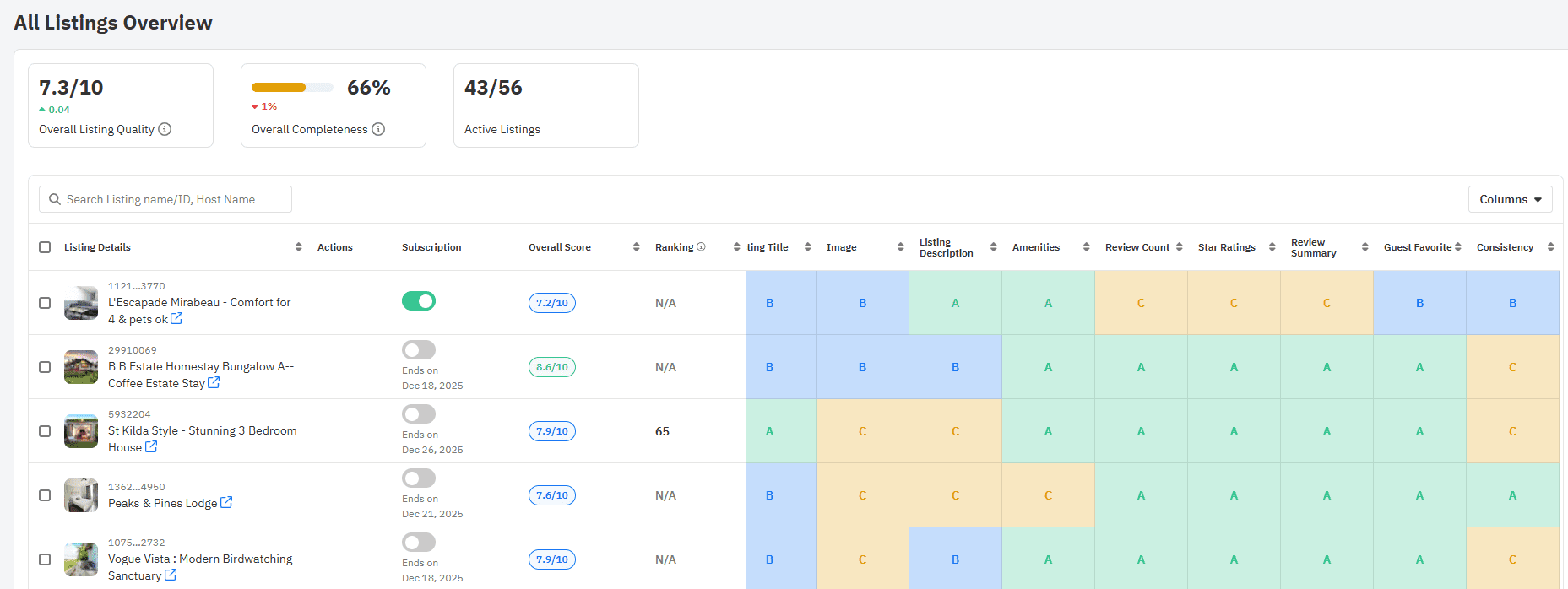
This matters because Airbnb’s algorithm rewards listings that convert — not just listings that are promoted. A listing with a weak cover photo or a vague description will underperform in search regardless of whether you’re paying for placement. Running Listing Optimizer before activating pay-to-play tells you whether visibility is actually your problem, or whether it’s something you can fix without spending more on commission.
With PriceLabs Listing Optimizer You Can Analyze The Quality Of Your Competitor's Listings.
With PriceLabs Listing Optimizer, you will be able to compare your listing with other listings guests would consider your competition and optimize your listing accordingly.
Create your Account NowBoth tools are available directly through PriceLabs and can be used independently of the dynamic pricing product.
Keeping Listings Competitive With or Without Pay-to-Play
Whether or not you opt into the discount, Airbnb’s search ranking is shaped by a range of factors. Hosts who stay on top of these tend to see strong organic performance regardless:
- Review score and response rate are heavily weighted in Airbnb’s algorithm.
- Pricing competitiveness relative to similar listings in your area directly affects where you appear in search.
- Keeping your calendar current signals to Airbnb that your listing is actively managed.
- High-quality photos and an accurate description reduce friction and improve conversion when guests do find your listing.
Discounting your rate for more visibility on a listing with weak photos or inconsistent reviews is unlikely to produce results worth the revenue cost. The fundamentals come first.
Final Thoughts
Airbnb’s pay-to-play test introduces a new dynamic for small hosts: ranking influenced by how much margin you’re willing to trade. It follows the same logic as Booking.com’s Genius program — discount-for-visibility — and if Airbnb formalizes it, the stakes will be higher.
For now, it’s a limited test. But it’s a good prompt to take a hard look at how your listings are priced and whether they’re optimized before deciding whether a 20% discount is a lever worth pulling. PriceLabs can help you answer both questions — with real market data and a clear picture of where your listings actually stand.
Frequently Asked Questions
1. Is the 20% discount mandatory if I want better visibility on Airbnb?
No. The feature is currently being tested and is not available to all hosts. If you do receive the prompt, opting in is entirely your choice. Your listing will continue to appear in search results as normal if you decide not to participate.
2. Will offering the 20% discount guarantee more bookings?
Not necessarily. The discount improves your placement in search and makes your listing more visible to high-rated guests — but visibility alone doesn’t guarantee bookings. Factors like your photos, description, reviews, and the competitiveness of your base rate will still influence whether guests actually book. That’s why it’s worth auditing your listing with a tool like PriceLabs’ Listing Optimizer before activating the discount.
3. How do I know if the 20% discount is worth it for my listing?
The simplest way to evaluate it is to look at two things: your current occupancy rate relative to similar listings in your market, and whether your nightly rate has room to absorb a 20% reduction without putting you in the red. PriceLabs’ Market Dashboard can show you both — how you’re performing against comparable properties and whether your pricing is already competitive. If your occupancy is lagging and your rate has margin to spare, the discount may be worth testing. If you’re already booking well, the trade-off likely isn’t worth it.