
Get started with PriceLabs now!
Want to learn what PriceLabs can do for you? See for yourself with a free trial. Get started now!
You’re renting out a beachside cottage. If most of your guests book two months in advance, wouldn’t it help to know this so you can plan your pricing and promotions?
That’s exactly what is a booking window for you.
A booking window refers to the time between when a guest makes a reservation and their check-in date. Whether it’s early planners snagging summer dates or last-minute travelers booking a quick weekend getaway, understanding these patterns can help you boost revenue, fill gaps in your calendar, and deliver the perfect guest experience.
A booking window refers to the time span between when a guest makes a reservation and their check-in date. Think of it as the lead time you have to prepare for their stay. It’s a vital vacation rental KPI that helps short-term rental hosts understand guest booking behaviors and refine their strategies.
Here’s a simple formula to calculate the booking window:
Booking Window (in days) = Check-in Date – Booking Date
For example, if someone books your property on January 1 for a stay starting January 15, the booking window is calculated as:
January 15 (Check-in Date) – January 1 (Booking Date) = 14 Days
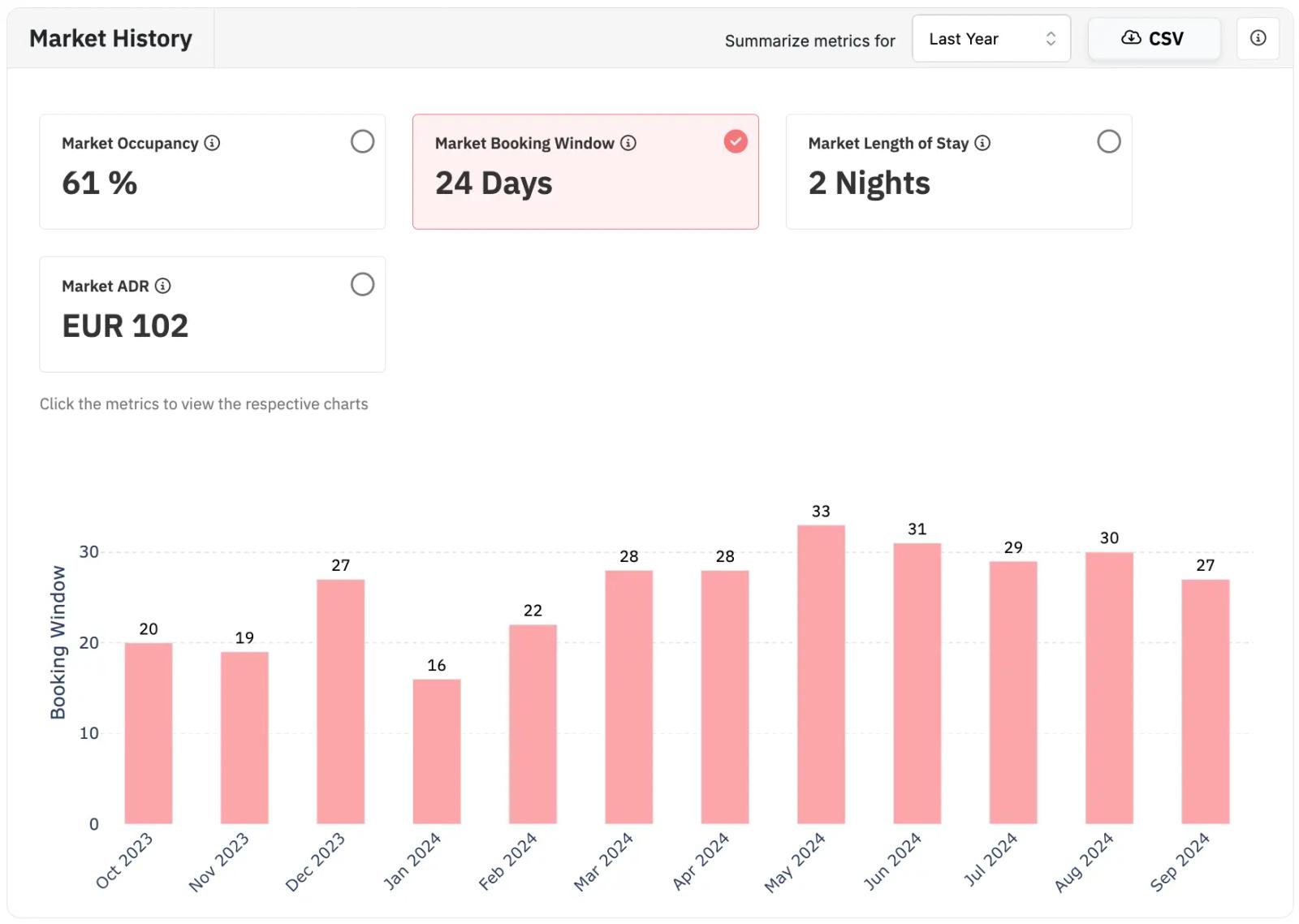
You can use PriceLabs Neighborhood Data to understand your market’s booking window. The Market Booking Window displays how far in advance dates are booked in your market. This metric shows you the number of between the data of the booking to when they stay at your property.
Every short-term rental market has unique booking patterns influenced by factors like location, seasonality, and guest demographics.
Understanding your property’s booking window can help you unlock the following benefits:
By leveraging these insights, you’re not just reacting to guest behavior—you’re anticipating it and aligning your operations, pricing, and budget marketing to stay ahead of the curve.
To make the most of your booking window data, follow these detailed strategies:
When you understand how your booking windows, you should leverage that data to then capitalize on the demand. For example, if most of your bookings come in at the last-minute (probably 2-3 days before the booking date), then you can charge a premium for all of those last–minute bookings because your turn-around cost would also be high to ensure that your property is ready between each booking.
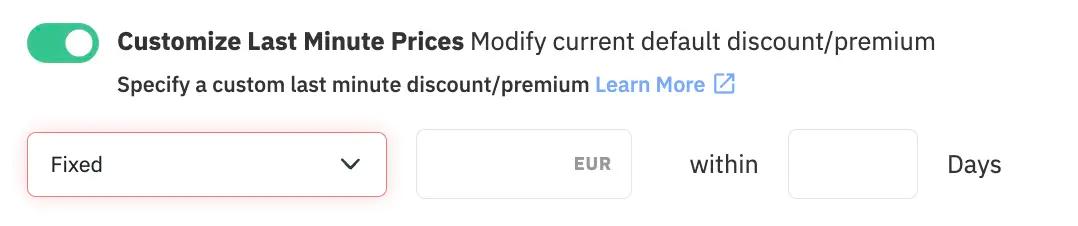
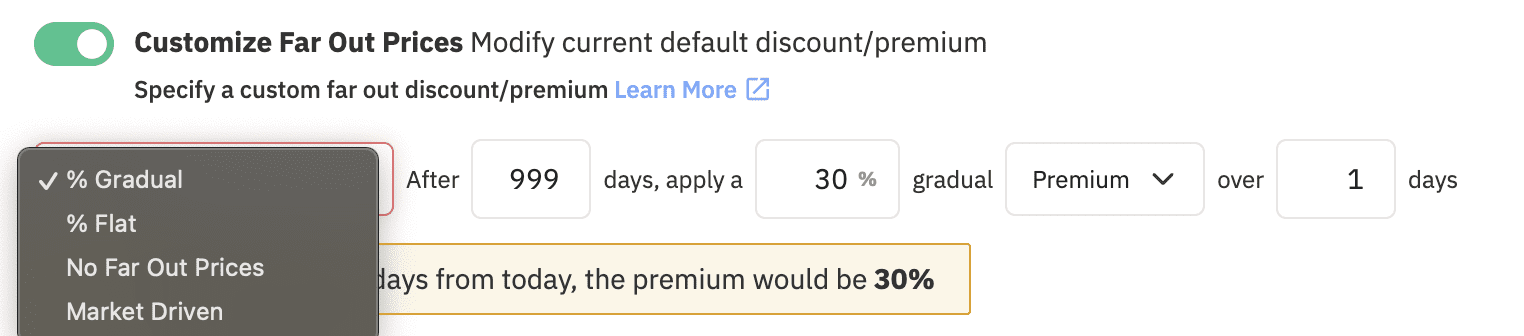
Or if you get a lot of bookings at least a month ahead, you can adjust far-out prices accordingly. If you want you can add a premium for bookings made far in advance. You can adjust that using far-out prices.
Longer booking windows often come with longer stays. Encourage these by setting minimum stay requirements for early bookings. For shorter booking windows, especially last-minute stays, consider reducing the minimum stay requirement to capture spontaneous travelers. For the broader analytics picture beyond booking windows, see how to use market data to price your vacation rental.
LOS vs. Booking Window charts in PriceLabs Market Dashboard compares the booking window to the length of stay for booked nights. The number of busy nights for each lead time range is presented in the left chart, and the number of occupied nights booked in each stay length category is presented in the right chart.
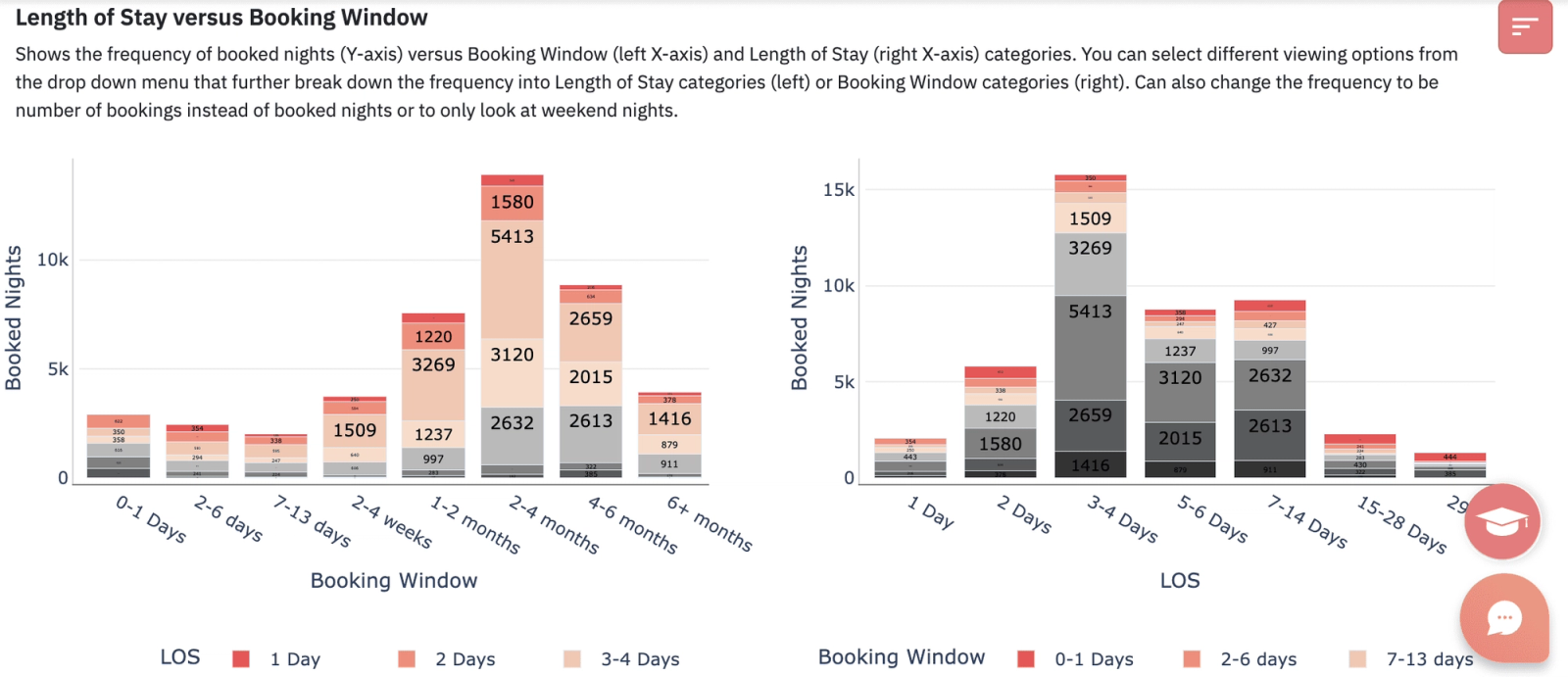
If you find that your LOS is around 3-4 days, you can set this up in your PriceLabs Minimum Night Stay Requirements. You can either do all your work manually, or leverage our Minstay Recommendation Engine is a data-driven tool that provides dynamic minimum night recommendations for vacation rental properties.
It leverages historical data, market trends, and other relevant factors to suggest the optimal minimum length of stay for each date. The engine analyzes factors such as booking patterns and seasonal demand to make intelligent recommendations.
To tailor marketing campaigns for different traveler types, focus on their unique needs and booking habits:
Listing your property on multiple platforms can help attract diverse audiences:
To optimize your listing, tailor your property description and photos based on booking windows:
1. What is the ideal booking window for short-term rentals?
The ideal booking window varies by location, property type, and season. Analyze your data to identify trends that work best for you
2. How do seasons affect booking windows?
Peak seasons often have longer booking windows as guests plan ahead. Shoulder and off-peak seasons typically see shorter lead times
3. Can I adjust my booking window strategy mid-year?
Absolutely. Regularly review booking trends and performance metrics to tweak your strategy as needed
Understanding and optimizing your booking window isn’t just about filling your calendar—it’s about aligning with guest behaviors to maximize revenue and deliver exceptional experiences. Tools like PriceLabs empower you to analyze data, implement dynamic pricing, and cater to diverse traveler profiles.
Whether you’re targeting early planners looking for summer vacations or last-minute adventurers seeking weekend getaways, a well-optimized booking window strategy ensures your property stands out. Start analyzing your data today and unlock your property’s full potential!
For visualizing how bookings accumulate over time, see our guide to booking curve analysis, and for forecasting what's coming next, see our guide to predicting future demand. For gauging current demand in a specific area, see our guide to Airbnb demand by area.
Want to learn what PriceLabs can do for you? See for yourself with a free trial. Get started now!