



When dynamic pricing lowers your rate after a booking, some guests cancel and re-book to capture the new price, creating immediate revenue dilution. If this happens, act quickly to protect margins without harming the guest experience. In short: offset the loss across nearby dates, upsell the existing guest, tighten stay rules to add nights, and update policies so future cancel‑rebook attempts carry a cost.
Dynamic pricing is the automated, data-driven adjustment of nightly rates in real time; revenue dilution is the drop in expected income from unexpected price changes or cancellations. The five moves below can be deployed in days, not weeks, and work across major channels like Airbnb and Booking.com.
Action Summary
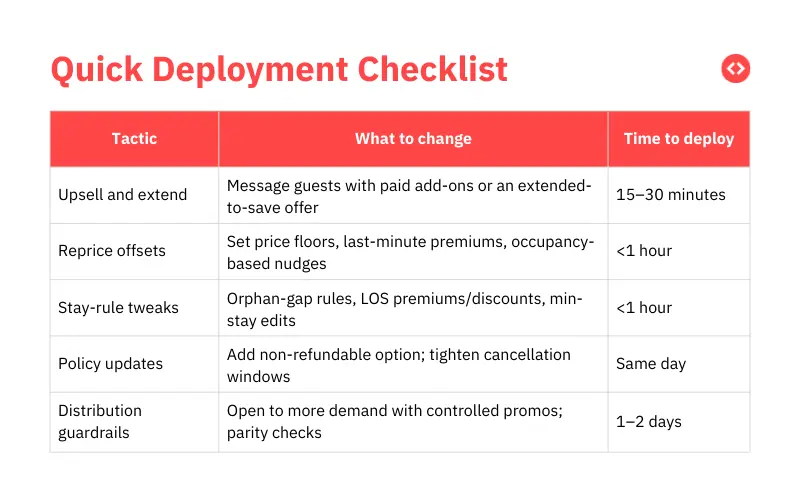
At a glance, do this now:
- Upsell the re-booked guest with value-adds or a paid extension.
- Reprice nearby dates to recover the shortfall.
- Adjust stay rules to turn gap nights into booked nights.
- Update cancellation settings (including non-refundable) so future rebooks don’t erode revenue.
- Use distribution and guardrails to attract higher-value demand while limiting price gaming.

1. Upsell the Guest to Recapture Margin
The most immediate way to recover lost revenue is to increase the value of existing reservations through strategic add-ons and extensions. Since price-sensitive behavior is common across major platforms, often encouraged by programs like Booking.com’s Best Price Guarantee, you should meet the guest with clear value rather than confrontation.
To win back margin fast, consider these authoritative tactics:
- Offer Value-Based Extensions: Propose a paid extension, such as adding one night at a preferred rate to lock in availability or keep original perks.
- Monetize Conveniences: Introduce paid add-ons like early check-in, late checkout, or mid-stay cleanings.
- Ancillary Services: Recapture revenue through pet fees, parking, or curated local experiences and grocery drops.
- Streamline with Templates: Use a simple upsell menu or guidebook template to make these offers a low-friction part of your communication flow.
By focusing on these value-adds, you can recover the base rate difference without renegotiating the original contract or damaging the guest relationship.
Dynamically Price Your Property and Get FREE Custom Reports Tailored To Your Property!
Use PriceLabs Dynamic Pricing to competitively and dynamically price your property according to demand shifts and analyze past performance to set a strong pricing strategy for your property.
Create your Account Now2. Reprice Nearby Dates to Recover the Shortfall
Rather than attempting to claw back revenue from the specific guest who re-booked, an expert-led approach focuses on a “calendar-level offset.” By spreading the lost margin across other dates, you maintain a competitive listing while protecting your overall portfolio performance.
To effectively recover the difference within just a few bookings, implement these data-driven adjustments:

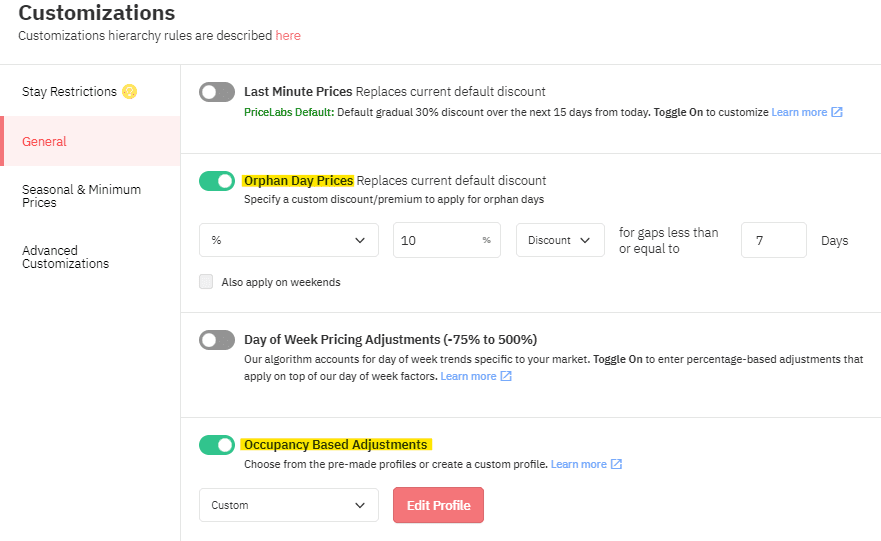
- Implement Short-Term Price Floors: Apply a temporary price floor to high-demand weekends or upcoming event dates to ensure you don’t book below a profitable threshold.
- Apply Last-Minute Premiums: If your local market shows strong last-minute demand, add premiums to capture higher margins from travelers booking at the last minute.
- Utilize Occupancy-Based Adjustments: Automatically nudge rates upward for dates with low availability and downward only where fill is strictly necessary.
- Leverage Real-Time Automation: Shift away from manual guesswork and use AI-driven tools that react to supply, demand, and pacing in real time to outperform standard market rates.
This strategy ensures that a single underpriced re-booking becomes a minor “rounding error” in your total revenue rather than a permanent loss.
3. Convert Gaps into Booked Nights with Stay Rules
A cancel-rebook event often disrupts your calendar, leaving behind suboptimal booking patterns or small gaps between stays. Expert property managers use stay-rule tuning as a high-impact lever to recover revenue by generating incremental nights that wouldn’t otherwise be booked.

To optimize your calendar efficiency, deploy these tactical adjustments:
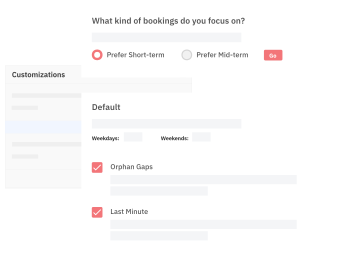
- Enable Orphan-Gap Rules: Set your system to dynamically price and open single-night holes that are created between reservations, converting “unbookable” nights into paid stays.
- Apply Length-of-Stay (LOS) Premiums: Add price premiums for 1–2-night stays to protect your margins on short visits, while offering tiered discounts for 3–5-night stays to encourage longer, higher-value bookings.
- Refine Minimum Stay Settings: Loosen minimum stay requirements during the midweek to capture smaller demand segments while keeping strict weekend minimums to protect high-value dates.
- Adjust Advance Notice Requirements: Temporarily reduce minimum advance notice windows on “soft” dates to capture late-breaking demand that can backfill lost revenue.
By systematizing these guardrails, you ensure that your pricing strategy reacts to calendar changes on autopilot, maximizing occupancy where it counts most.
Dynamically Price Your Property and Get FREE Custom Reports Tailored To Your Property!
Use PriceLabs Dynamic Pricing to competitively and dynamically price your property according to demand shifts and analyze past performance to set a strong pricing strategy for your property.
Create your Account Now4. Update Cancellation Settings to Prevent Future Revenue Erosion
If your cancellation policy is too flexible, guests can cancel and re-book at lower rates at will. Within the Airbnb framework and other major platforms, you have the authority to choose policies ranging from Flexible to Strict. By aligning your policies with market volatility, you can deter “cancel to chase a lower price” behavior.
To secure your future revenue, implement these authoritative policy updates:
- Adopt Stricter Base Policies: Align your cancellation window with your market’s booking lead times and demand volatility to ensure you are protected against last-minute changes.
- Implement Non-Refundable Options: Turn on non-refundable rate options to allow price-sensitive guests to opt for a discount in exchange for a locked-in, non-refundable booking.
- Balance Conversion and Protection: Use a non-refundable option as a middle ground that provides lower rates to guests while ensuring the booking remains firm.
- Communicate Clearly Upfront: Transparently state your policies to reduce friction and set expectations regarding payouts and retained amounts in the event of a cancellation.
- Document and Report Abuse: If you notice repeated patterns of cancel-rebook behavior from a single guest, document the evidence and contact platform support for guidance.
5. Expand Distribution with Guardrails to Attract High-Value Demand
Expert property managers mitigate the risk of revenue dilution by broadening their reach while maintaining strict control over pricing integrity. Increasing your visibility across multiple channels allows you to backfill your calendar at healthy Average Daily Rates (ADRs), turning a single underpriced re-booking into a negligible rounding error across your entire portfolio.
To scale your distribution effectively, follow these professional guardrails:
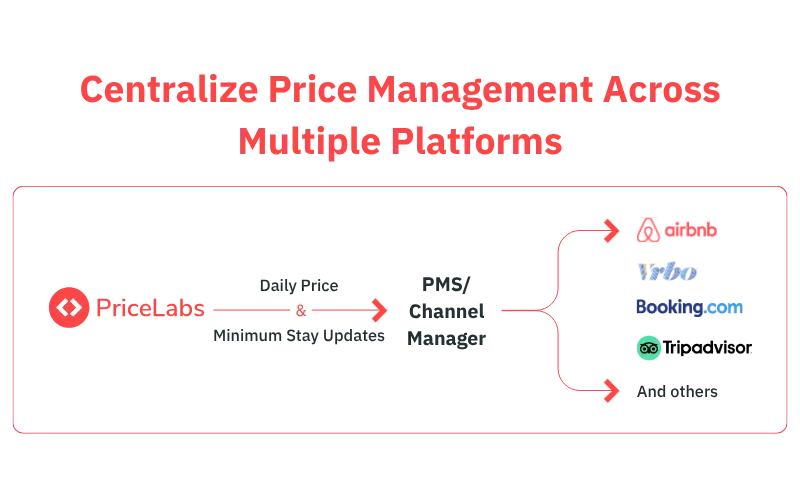
- Synchronize Across Channels: List your property across multiple platforms via a Property Management System (PMS) or Channel Manager (CM).
- Maintain Consistent Price Floors: Use standardized price floors and minimum-stay rules across all platforms to prevent your own listings from undercutting each other.
- Deploy Value-Based Promotions: Instead of blanket percentage discounts, run targeted promotions that offer specific value, such as cleaning fee credits or add-on perks.
- Monitor Price Parity: Be aware that platform price-match programs can create cross-channel arbitrage if your rates diverge too far; keeping parity ensures shoppers don’t “game” the system across different OTAs.
- Systematize Your Strategy: Unchecked cancel-rebook loops can devastate margins at scale; the authoritative solution is to replace manual monitoring with automated guardrails.
Dynamically Price Your Property and Get FREE Custom Reports Tailored To Your Property!
Use PriceLabs Dynamic Pricing to competitively and dynamically price your property according to demand shifts and analyze past performance to set a strong pricing strategy for your property.
Create your Account NowPriceLabs Dynamic Pricing and Automation
The platform is built to prevent small leaks from becoming losses—and to help you recover quickly when they do:


- Real-time dynamic pricing: Our AI ingests market demand, pace, seasonality, events, and competitor signals to automatically update nightly rates. Occupancy-based adjustments, last-minute profiles, and price floors make it simple to spread a one-off loss across stronger dates without tanking conversion.
- Stay-rule automation: Minimum-stay profiles, orphan-gap fills, and LOS pricing let you convert awkward gaps into paid nights—on autopilot.
- Policy-aware pricing: Set non-refundable rate strategies and price fences in coordination with your OTA policies so guests who value flexibility pay for it, while price-sensitive guests can opt into non-refundable terms.
- Portfolio Analytics and Market Dashboards: Spot cancel-rebook patterns, track ADR drift, and measure recovery across listings; if a rebook reduces ADR, PriceLabs highlights where to lift rates or relax rules to regain margin.
- Seamless integrations: Connect with leading PMS and channel managers to push changes across Airbnb and other OTAs in minutes—crucial when market conditions move fast.
Conclusion
If a guest cancels and re-books at a lower rate, don’t chase the difference in the thread. Use automation to
1) upsell value
2) raise revenue elsewhere on the calendar
3) convert gaps
4) tighten policies so the next attempt is less likely and less costly
Platforms outline how cancellations and refunds work, including non‑refundable options and policy enforcement—your job is to align pricing and policies so dynamic pricing grows profit, not dilution (see Airbnb’s cancellation policies for hosts).
Frequently Asked Questions
1. How should I respond immediately after a cancel-and-rebook price drop?
Prioritize recovery levers over renegotiating the base rate. Execute the five moves outlined above: upsell the guest, reprice nearby dates, tune stay rules, tighten cancellation settings, and expand distribution with guardrails.
2. Is it advisable to ask the guest to pay the difference after they re-book cheaper?
Generally, no. It risks guest experience and may conflict with platform norms. Offer clear value via add-ons or a paid extension instead of confronting the guest about price changes.
3. Will stricter cancellation policies hurt my conversion?
They can if over-tightened. Balance protection and conversion by pairing a stricter base policy with a non‑refundable option so price-sensitive guests can opt into a lower, locked-in rate.
4. How do I know I’ve recovered the lost revenue?
Track ADR, occupancy, and pickup in your PMS and PriceLabs Portfolio Analytics. Look for ADR drift improvements, incremental nights from gap fills, and faster pickup on repriced dates.
5. How quickly do changes from PriceLabs reach OTAs like Airbnb and Booking.com?
With supported PMS/channel manager integrations, updates typically sync within minutes. Exact timings vary by integration and platform, so allow a brief propagation time.
6. What if I suspect a guest is abusing cancel-and-rebook behavior?
Document patterns, ensure your policies are clearly communicated, and contact platform support for guidance. Some hosts report success when they provide clear evidence of repeated behavior.
7. What are orphan-gap rules and why do they matter?
Orphan-gap rules dynamically price and open single-night gaps created between bookings, helping convert otherwise unbookable nights into paid stays while preserving longer-stay patterns.