



To be a great Airbnb host, you must move from intuition to a data-driven mindset. For hosts with 1–5 properties, success relies on two pillars: listing visibility—how often you appear in search results—and automation, which allows you to scale while focusing on the guest experience. Using PriceLabs’ analytics, you can transition from a hobbyist to a professional by making decisions based on real-time market evidence.
Conduct a Baseline Audit with Listing Optimizer
Every high-performing Airbnb business begins with a thorough, objective understanding of listing strengths and weaknesses. For hosts managing a small portfolio, it is easy to become “blind” to your own listing’s flaws. Using the Listing Optimizer allows you to move past personal bias and evaluate your property through a data-backed lens.

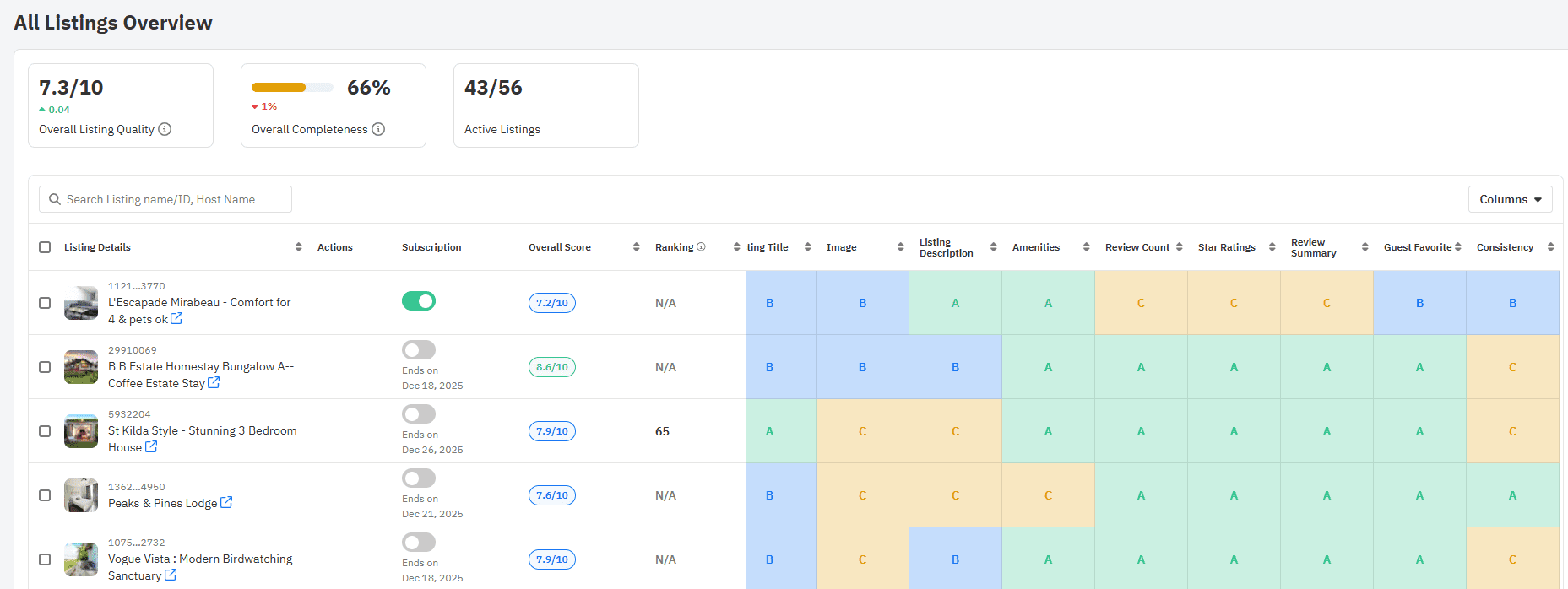
The Listing Optimizer is a specialized tool that analyzes your public Airbnb data—including titles, photos, descriptions, amenities, and guest reviews—to rapidly surface gaps that are currently hurting your performance. By comparing your listing to top-performing local competitors, it identifies exactly what is preventing you from achieving higher search rankings and greater discoverability.
Your Baseline Audit Checklist
To begin your audit, follow this step-by-step workflow for each of your properties:
- Run the Optimizer: Execute the Listing Optimizer tool for every individual listing in your portfolio to get a baseline score.
- Review Ranked Fixes: Focus on the prioritized recommendations for your cover photo, headline, and amenities.
- Benchmark Locally: Examine how your property compares to the most successful listings in your specific neighborhood to see what they are doing differently.
By identifying these visibility gaps early, you can implement the specific, actionable changes needed to drive booking growth.
With PriceLabs Listing Optimizer You Can Analyze The Quality Of Your Competitor's Listings.
With PriceLabs Listing Optimizer, you will be able to compare your listing with other listings guests would consider your competition and optimize your listing accordingly.
Create your Account NowPrioritize and Implement High-Impact Content Fixes
Not all content improvements yield equal returns, and for a host with a small portfolio, efficiency is key. Enhanced content quality is often the primary driver of outperforming competitors, sometimes even before pricing adjustments are made.
To see quick wins, you should prioritize low-effort, high-impact changes surfaced by the Listing Optimizer Focus on the following elements to improve your search performance:
| Feature | Actionable Fix |
| Cover Photo | Use a professional, well-lit image that captures the property’s best feature. |
| Listing Title | Write a concise, benefit-driven headline including unique selling points and location keywords. |
| Amenities | Ensure your list is comprehensive and accurate, specifically highlighting high-demand items like WiFi and parking. |
| Description | Align your text strictly with the actual guest experience to build trust and manage expectations. |
By focusing on these specific content gaps, you can significantly increase your listing’s discoverability and set a professional foundation for your pricing strategy.
Set Data-Backed Pricing and Enable Dynamic Pricing Automation
To move from intuition to precision, hosts must understand that pricing is not static. Dynamic pricing is an automated strategy where nightly rates adjust frequently in response to local demand, seasonality, occupancy, and competitor pricing. For hosts with a small portfolio, this automation ensures you are never leaving money on the table during peak periods or priced out of the market during slow seasons.
PriceLabs’ Dynamic Pricing updates your rates daily using hyper-local data and real-time market analysis. This ensures your listings remain competitive 24/7 without requiring manual intervention.

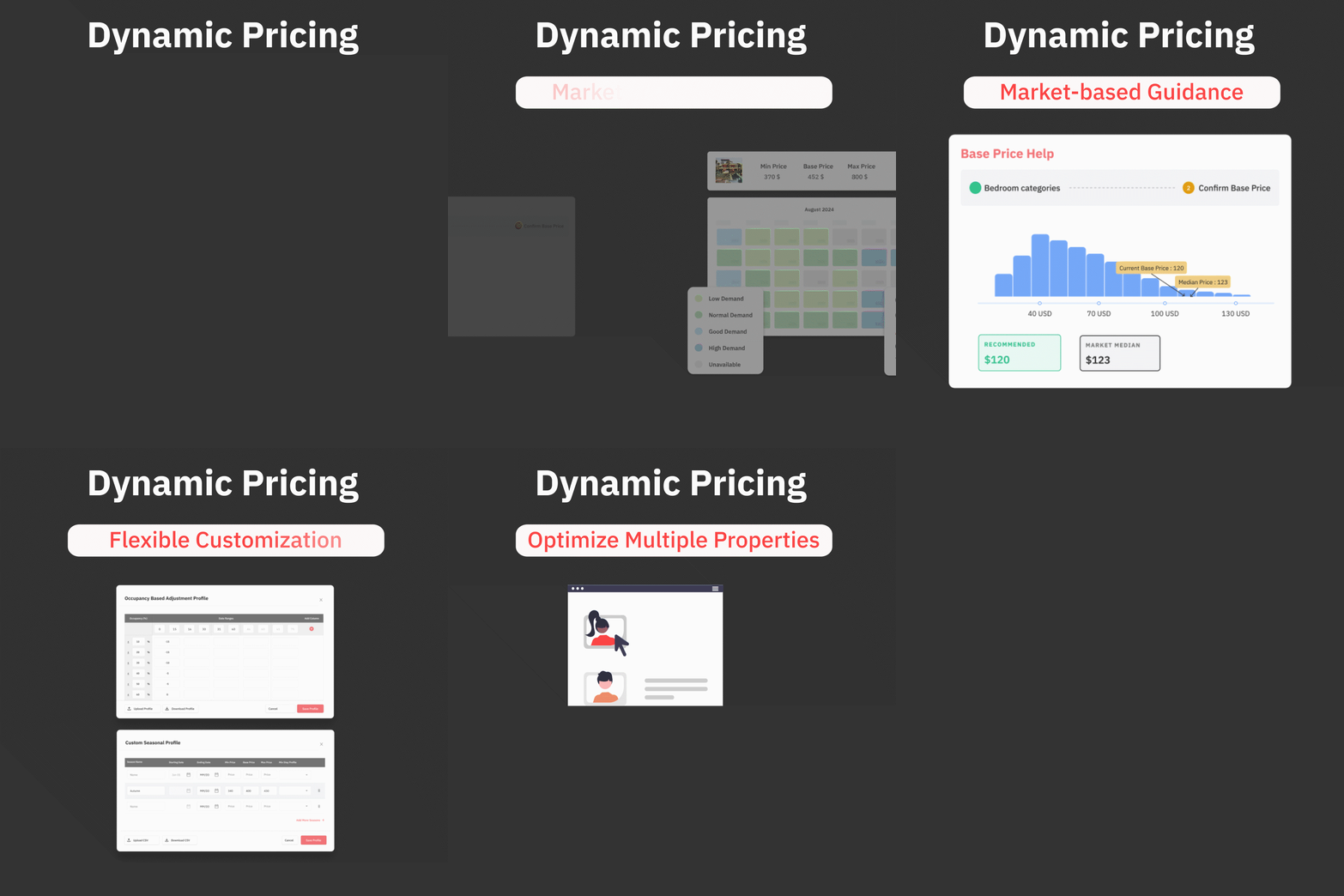
Establishing Your Pricing Strategy
A common mistake for growing hosts is setting overly restrictive pricing caps that limit the algorithm’s ability to test market ceilings. Instead, follow this three-step flow to establish a defensible strategy:
- Use the Base Price Help Tool: Establish a defensible base price using data-backed recommendations rather than guesswork.
- Enable Dynamic Pricing: Set personalized minimum and maximum boundaries to maintain control while allowing the system to fluctuate.
- Optimize for Peaks: Allow the algorithm to push rates during high-demand periods while using custom rule guardrails to protect your bottom line.
While the system is automated, the best practice is to “trust but verify”—set your smart rules, then monitor and adjust based on the real-world results you see in your booking pace.
Dynamically Price Your Property and Get FREE Custom Reports Tailored To Your Property!
Use PriceLabs Dynamic Pricing to competitively and dynamically price your property according to demand shifts and analyze past performance to set a strong pricing strategy for your property.
Create your Account NowLeverage Market Dashboards to Adjust Pricing and Availability
While dynamic pricing handles daily fluctuations, great hosts use Market Dashboards to gain a competitive advantage through local intelligence. A Market Dashboard is a feature that displays hyperlocal Airbnb and Vrbo data—including pricing, occupancy, and competitor analysis—enabling you to optimize your own availability and rules.


By monitoring these dashboards, you can move beyond guesswork and react to market shifts faster than your competitors.
Strategic Workflow for Small Portfolios
To maximize your revenue during events and seasonal shifts, implement the following workflow:
- Review for Spikes: Regularly check your Market Dashboard for occupancy spikes related to local holidays or events.
- Preemptive Adjustments: Adjust your minimum stay requirements and weekend pricing rules before peak demand hits.
- Data vs. Intuition: Use real-time signals from the Listing Dashboard rather than relying on “intuitive guesswork”.
| Metric | Intuitive Guesswork | Market Dashboard Data |
| Local Events | Guessing when a festival might increase demand. | Seeing exact occupancy spikes in the local area. |
| Minimum Stays | Keeping the same rules year-round. | Shortening or lengthening stays based on booking windows. |
| Competition | Checking a neighbor’s calendar manually. | Real-time analysis of active competitor pricing. |
Leveraging this hyper-local data allows you to capture demand surges that others might miss, ensuring your properties stay booked at the highest possible rate.
Monitor Performance Metrics and Iterate Pricing Strategies
To evolve from a property owner to a professional manager, you must adopt a “test and measure” mindset. This means continually refining your strategy based on hard data rather than assumptions. PriceLabs’ Portfolio Analytics allows you to track key performance indicators (KPIs) at both the individual listing and portfolio levels.

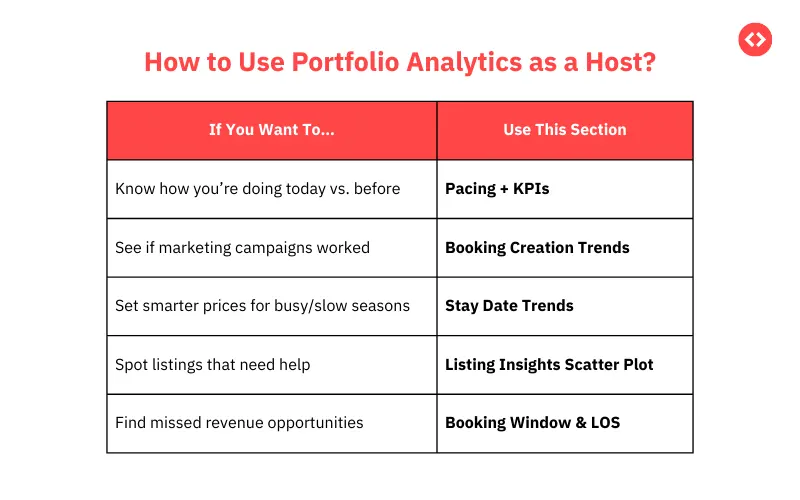
Key Metrics to Track
A holistic measure of profitability requires looking beyond simple occupancy. You should focus on:
- Occupancy Rate: The percentage of available nights that are booked.
- Average Daily Rate (ADR): The average rental income per paid occupied room.
- RevPAR (Revenue Per Available Room): Calculated as total room revenue divided by the number of available nights. This is a critical metric because it provides a complete view of profitability, helping you avoid filling rooms at low rates that hurt your bottom line.
Dynamically Price Your Property and Get FREE Custom Reports Tailored To Your Property!
Use PriceLabs Dynamic Pricing to competitively and dynamically price your property according to demand shifts and analyze past performance to set a strong pricing strategy for your property.
Create your Account NowThe Iteration Process
Small-portfolio hosts can use these insights to conduct short-duration pricing experiments (7–14 days). Using pacing reports, you can get rapid feedback on whether your price adjustments are attracting guests at the right pace.
If your pacing data shows you are booking much faster than local competitors, it may be a signal that your base price is too low. Conversely, if you are booking much more slowly, you may need to lower your base price or adjust your minimum stay rules to remain competitive.
Integrate Your PMS and Automate Daily Price Updates
For hosts managing 1–5 properties, manual data entry is not only a time sink but a significant source of potential error. To scale effectively, you should connect PriceLabs to a Property Management System (PMS) or Channel Manager. PriceLabs integrates with over 150 PMS and channel managers, enabling seamless data flow.
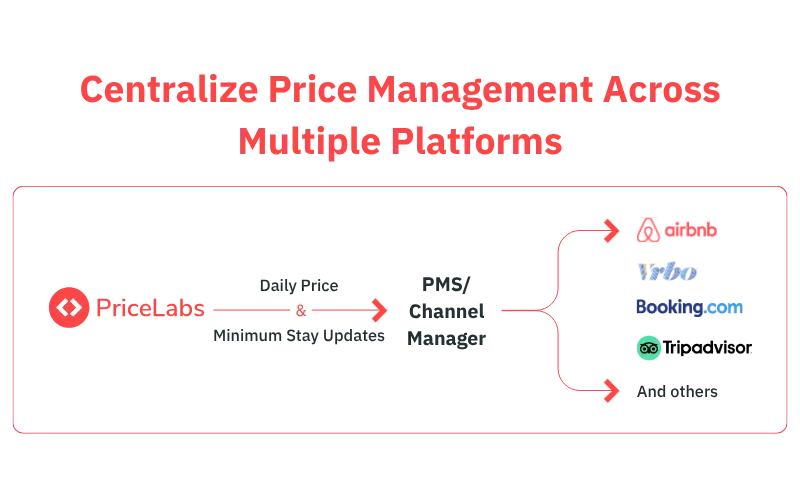
The Power of Synchronization
Integrating your systems allows you to push daily pricing and rule changes with zero manual intervention. This automation ensures:
- Accuracy: Rates and availability are updated directly to Airbnb, Vrbo, and other platforms, eliminating manual sync errors.
- Time Savings: Automated rate uploads free up hours each week, allowing you to focus on guest-facing tasks.
- Accountability: For those working with partners or small teams, role-based controls and activity logs support transparency and accountability.
Choosing the Right Partner
When selecting a PMS to grow your portfolio, look for a system with robust API integration and proven compatibility with PriceLabs. Regular spot-checks and routine sync reviews will ensure that all systems remain perfectly aligned as your business grows.
Automate for Scale While Focusing on Guest Experience
The ultimate goal of using data is not just higher revenue, but a better quality of life for the host. By automating pricing, availability, and reporting, you can devote more energy to personalized touches—like custom guest messages or local recommendations that lead to superior reviews.
Manual vs. Automated Hosting
| Manual Hosting | Automated Hosting with PriceLabs |
| Tasks: Daily manual price checks and calendar updates | Automated: Pricing, minimum stay adjustments, and rate uploads |
| Time Spent: Hours lost to administrative spreadsheets | Freed Up: Time for guest messages and property improvements |
| Growth: Difficult to manage more than 2 listings alone | Scalable: Move from 1 to 100+ listings seamlessly |
Frequently Asked Questions
How do I position my base price correctly?
Use the Base Price Help tool and monitor your booking pacing in Portfolio Analytics. If you are booking much faster than competitors, your base price is likely too low; if slower, consider adjusting your price or stay rules.
Why is RevPAR more important than occupancy?
RevPAR (Revenue Per Available Room) provides a complete view of profitability by combining both price and occupancy. This prevents you from filling your calendar with low-rate bookings that hurt your bottom line.
How do I balance automation with manual overrides?
Set up guardrails and smart rules within PriceLabs, but monitor performance regularly. You can temporarily override the system when your unique local knowledge—like a sudden neighborhood event—signals demand the data hasn’t caught yet.
What common pricing setup mistakes should I avoid?
Avoid layering too many conflicting custom rules without a clear purpose. Start with a simple setup and only add complexity when supported by hard data to prevent pricing errors.