



Small Booking.com hosts don’t need massive teams to outpace bigger competitors—they need tight system connections, clear metrics, and pricing software that reads the market faster than humans can. By syncing your PMS, channel manager, and dynamic pricing tool, then acting on Booking.com’s analytics, you can adjust rates in real time, sharpen conversion, and scale what works.
With official integrations that streamline rate updates and availability, hosts can automate the heavy lifting and focus on polishing guest experience and listings to win more searches and bookings. The playbook below shows how to connect systems, read your dashboards, deploy pricing rules, and iterate—so every move compounds into higher occupancy and revenue.
Connect Your Systems for Seamless Data Flow
When your PMS, channel manager, and pricing platform communicate effectively, you avoid mismatched rates, stale calendars, and missed demand spikes. Real-time syncs ensure prices, availability, and restrictions update across channels instantly, reducing overbookings and guest friction while protecting revenue. Booking.com underscores that operational accuracy and pricing agility are core to performance improvement across its ecosystem.

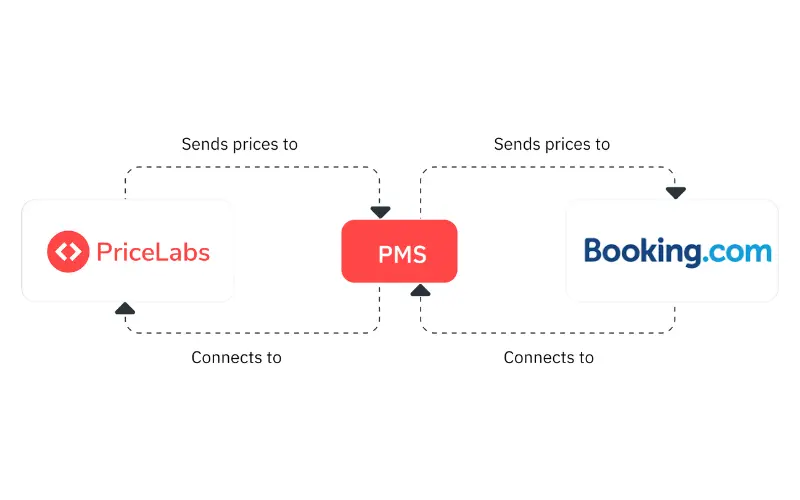
A channel manager is a software system that automatically publishes and synchronizes your property’s rates, availability, and restrictions across multiple online travel agencies and direct channels in real time, eliminating manual updates, reducing double bookings, and keeping inventory accurate everywhere to improve guest experience and revenue.
Quick setup flow:
- Connect PMS
- Enable channel manager sync
- Link your pricing tool
- Confirm daily data flow and successful push/pull of rates, availability, and reservations
Tip: If you use PriceLabs, the official Booking.com connectivity streamlines dynamic pricing and reduces manual effort, helping you maintain market-relevant rates without constant extranet edits.
Dynamically Price Your Property and Get FREE Custom Reports Tailored To Your Property!
Use PriceLabs Dynamic Pricing to competitively and dynamically price your property according to demand shifts and analyze past performance to set a strong pricing strategy for your property.
Create your Account NowLeverage Booking.com Analytics to Understand Market Demand
Booking.com’s dashboards reveal what’s moving in your market so you can adjust early, not after you’ve fallen behind. Use the following built-in tools in your Analytics Space to translate signals into action.

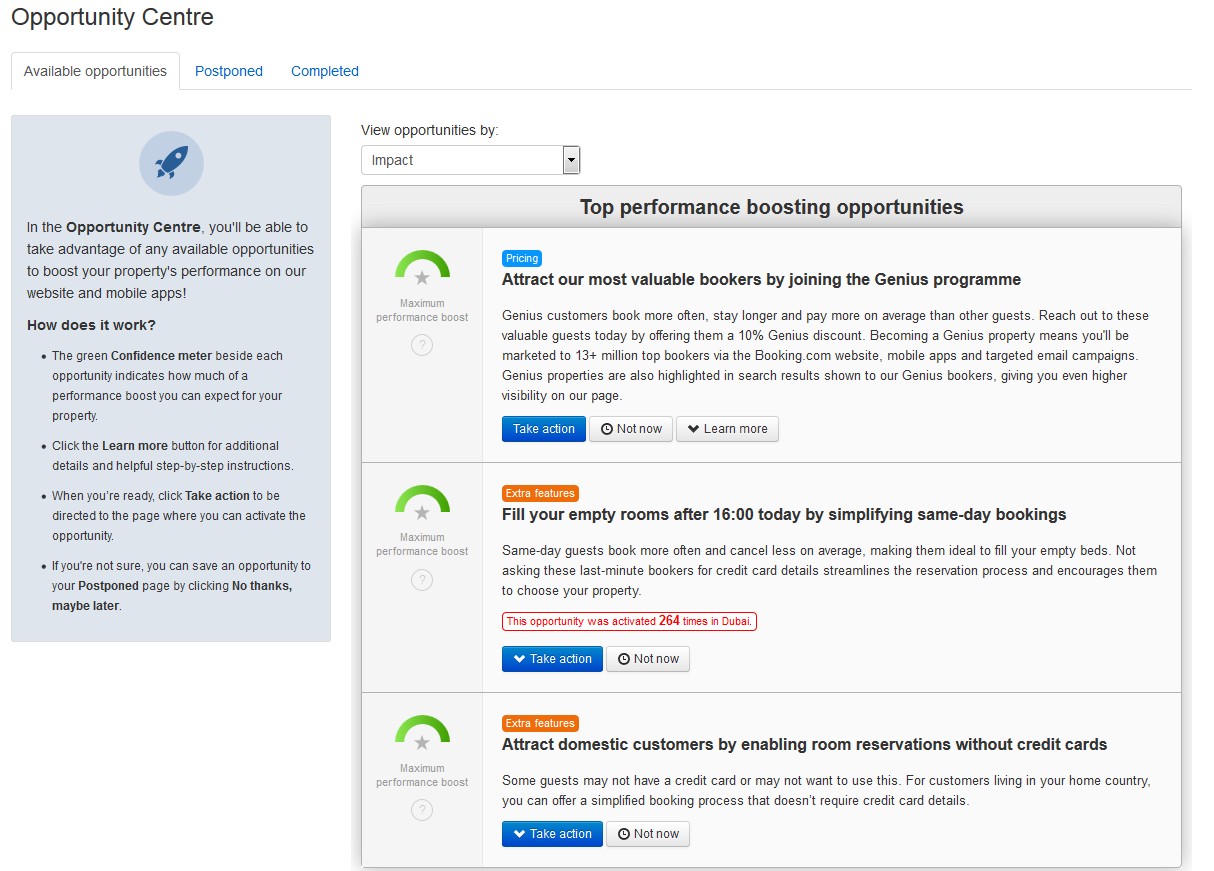
- Demand: Shows interest and search patterns so you can prepare rates and restrictions for busy and slow periods.
- Pace: Tracks future bookings versus last year or prior periods to spot accelerations or slowdowns before they hit revenue.
- Performance Analysis: Dissects conversion and cancellation drivers to pinpoint where to optimize listings or policies.
- Booker Insights: Surfaces guest behavior and source markets so you can localize rates and promotions.
Pacing compares the rate at which a property receives bookings now against previous periods, highlighting shifts in demand.
Use the Opportunity Center for targeted, data-driven suggestions—like adding photos, updating amenities, or adjusting pricing and policies—to unlock quick, compounding gains across visibility and conversion (see Booking.com’s guide to improving performance).
Dashboard quick reference:
| Dashboard | What it tells you | One quick action to take |
|---|---|---|
| Demand | Search interest and upcoming demand pockets | Raise rates and minimum stays for peak weekends |
| Pace | Future bookings vs. last year/periods | If behind pace, open shorter stays and add discounts |
| Performance Analysis | Conversion, cancellations, and content effectiveness | Refresh photos, refine policies, simplify fees |
| Booker Insights | Source markets, lead time, device behavior | Add geo-targeted offers and align lead-time pricing |
Dynamically Price Your Property and Get FREE Custom Reports Tailored To Your Property!
Use PriceLabs Dynamic Pricing to competitively and dynamically price your property according to demand shifts and analyze past performance to set a strong pricing strategy for your property.
Create your Account NowUse Pricing Software to Automate Data-Driven Rate Adjustments
Dynamic pricing tools turn analytics into automated, timely actions—no guesswork required. Software can monitor occupancy, booking windows, competitor rates, and local events to push the right price to the right dates instantly, preventing underpricing in high demand and filling gaps in soft periods. With AI-driven guardrails and local market benchmarks, hosts stay ahead of price swings while preserving brand and profit goals.

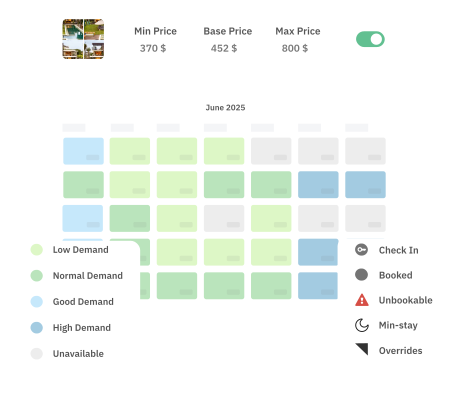
Dynamic pricing is an automated strategy that adjusts nightly rates based on real-time factors—such as demand, competition, and local events—to maximize occupancy and revenue.
Practical automations to consider:
- Event premiums: Add a 10–25% uplift when verified demand spikes are detected on specific dates.
- Shoulder week discounts: Nudge down rates in days adjacent to peaks to capture spillover traffic.
- Lead-time and occupancy rules: Increase prices when pacing is strong far out; apply tactical discounts closer in for low pickup.
- Minimum stay changes: Lengthen minimum stays during high compression; shorten them to backfill gaps.
Define and Standardize Listing Tags for Accurate Comparisons
Apples-to-apples comparisons require consistent listing attributes. Before running analytics or deploying price rules, tag every unit by fundamentals like property type, bedroom count, neighborhood, and standout amenities. This lets you roll up performance for similar homes, set intelligent baselines, and deploy tailored pricing automation efficiently.


Typical tags to standardize:
- Property type: Apartment, House, Studio, Aparthotel unit
- Bedroom count: 1BR, 2BR, 3BR+
- Neighborhood/zone: City center, Waterfront, Business district
- Special amenities: Hot tub, Parking, Balcony, Pet-friendly, EV charger
Dynamically Price Your Property and Get FREE Custom Reports Tailored To Your Property!
Use PriceLabs Dynamic Pricing to competitively and dynamically price your property according to demand shifts and analyze past performance to set a strong pricing strategy for your property.
Create your Account NowOrganize your portfolio with a simple template:
| Listing | Property type | Bedrooms | Neighborhood | Amenities tags | Notes |
|---|---|---|---|---|---|
| A-101 | Apartment | 1 | City Center | Balcony, Fast Wi-Fi | Compete with studios |
| B-204 | House | 3 | Suburban | Parking, Hot tub, Pet-friendly | Family-focused pricing |
| C-305 | Studio | 0 | Waterfront | Sea view, EV charger | High weekend compression |
To build a reliable competitor set around these tags and benchmark performance, use a structured comp-set approach aligned to similar size, location, and amenities.
Set Key Metrics and Monitoring Horizons for Performance Tracking
Clarity beats volume. Track a tight set of revenue metrics across short and long horizons to spot signals early and prove impact after changes. We recommend dashboards with 7/30/60/90-day views to capture near-term pickup, medium-term trends, and seasonal baselines.
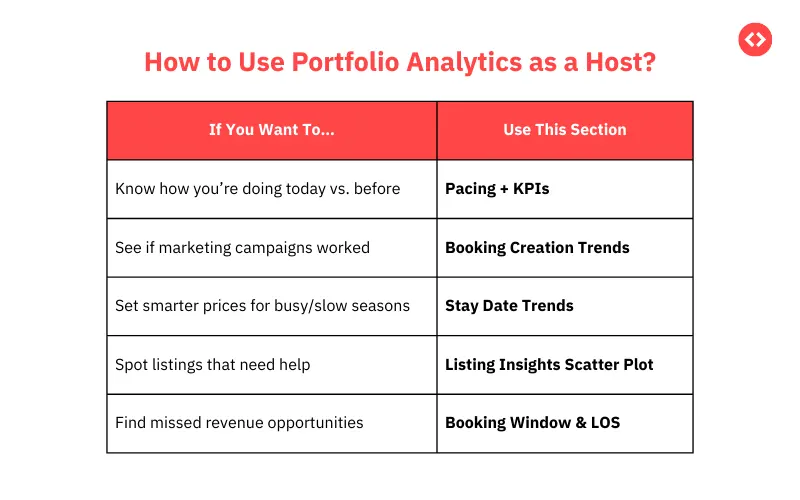
Definitions:
- Occupancy rate: The share of available nights that are booked over a period.
- ADR (Average Daily Rate): Average revenue per booked night.
- RevPAR (Revenue per Available Room): Revenue divided by available room nights; a holistic indicator of pricing effectiveness.
Set automated alerts for material variances (for example, pacing down 15% versus last year, or occupancy below 40% inside 21 days) so you can react before the window to recover closes. Seasonality and lead-time patterns vary by market, so calibrate your thresholds with historical insights and forward-looking demand indicators from your pricing tool.
Suggested tracking layout:
| Metric | 7-day (near-term) | 30-day (tactical) | 60-day (strategic) | 90-day (seasonal) | Alert threshold example |
|---|---|---|---|---|---|
| Occupancy | Gap-fill opportunities | Pickup trend vs. target | Booked vs. forecast | Season-to-date variance | <40% inside 21 days |
| ADR | Price resistance signals | Discount depth control | Rate integrity vs. comps | Seasonal rate alignment | ADR down >10% vs. last year |
| RevPAR | Day-of-week efficiency | Rule impact assessment | Portfolio mix health | Year-over-year momentum | RevPAR down >12% vs. same period |
| Pacing | Booking acceleration/slow | Pickup vs. prior periods | Need for promos/min stays | Seasonal compression check | -15% vs. last year for same arrival week |
Dynamically Price Your Property and Get FREE Custom Reports Tailored To Your Property!
Use PriceLabs Dynamic Pricing to competitively and dynamically price your property according to demand shifts and analyze past performance to set a strong pricing strategy for your property.
Create your Account NowDeploy and Test Pricing Rules with a Disciplined Approach
Start simple. Pilot a couple of rules on a handful of listings where variance is high, measure outcomes, and expand only when you see consistent lift.
Disciplined rollout:
- Select 3–5 listings with recent volatility or lagging RevPAR.
- Pilot 1–2 rules (e.g., event premium and near-term discount).
- Document baselines (occupancy, ADR, RevPAR, pacing).
- Run the test for at least one booking cycle or 2–4 weeks.
- Compare before/after against a control group and prior periods.
- Iterate parameters; expand to similar tagged listings if KPIs improve.
Sample triggers to copy:
- If pacing is 20% higher than last year for a date range, raise base rate by 8%.
- If occupancy <35% inside 21 days, apply a 12% discount and open 1-night stays on weekdays.
- If an event is flagged and comp ADR is +15%, add a 10% premium and extend minimum stay to 2 nights.
Audit monthly for data quality: reconcile blocked dates, fix duplicate listings, and correct amenity tags so tests remain trustworthy. For a practical framework on forecasting and rule tuning, see PriceLabs’ predictive analytics explainer for small hotels.
Optimize Listing Content and Booking Factors to Improve Conversion
Pricing wins attention; content wins the booking. Analytics often flag conversion drivers you can fix quickly—faster responses, complete descriptions, transparent fees, and up-to-date calendars. High-quality, recent photos and clearly listed amenities reliably lift conversion and reduce bounce.

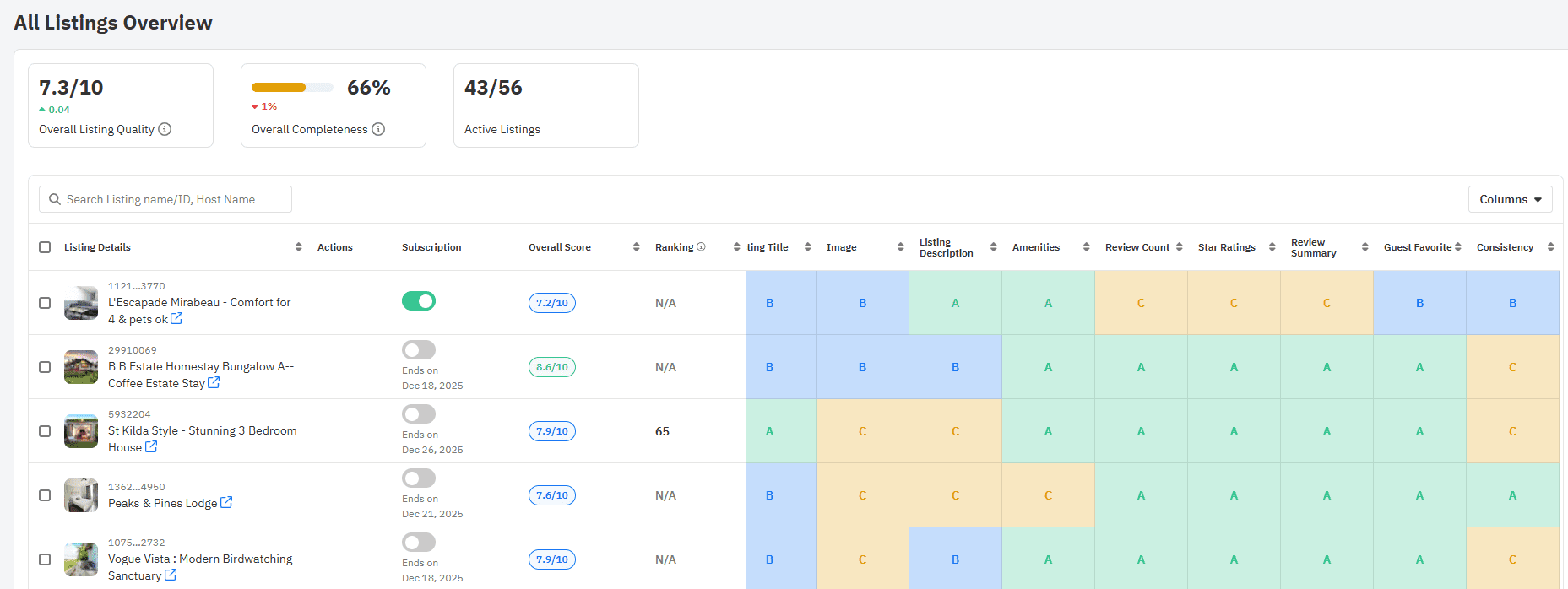
With Listing Optimizer, you can optimize photos, descriptions, and ensure that your listing quality is always high on Airbnb ,
- Act on the levers that Booking.com’s performance tools highlight—response times, cancellation policies, photo coverage, and amenity completeness—to improve rank and booking likelihood.
- Consider opt-in programs like Genius to boost visibility during need periods and align promotions to your pace signals; keep calendars synchronized to avoid penalties and maintain guest trust.
- Revisit content monthly: confirm calendar accuracy, refresh rates and fees for clarity, and highlight new amenities.
Conversion rate is the ratio of property page views that result in bookings; a higher conversion rate means more bookings per visitor.
With PriceLabs Listing Optimizer You Can Analyze The Quality Of Your Competitor's Listings.
With PriceLabs Listing Optimizer, you will be able to compare your listing with other listings guests would consider your competition and optimize your listing accordingly.
Create your Account NowMeasure, Iterate, and Expand Pricing Strategies Based on Results
Treat revenue management as a feedback loop. Measure the impact of each rule, compare performance to targets and the same period last year, and scale what works to similarly tagged listings. If a discount widens pickup but compresses ADR too far, adjust depth or window; if an event premium holds occupancy, test a higher uplift next cycle.
- Review KPI trends every week for near-term moves and monthly for broader shifts.
- Compare periods (this quarter vs. last year) to isolate true lift from seasonality and market changes.
- Keep refining: adjust min stays, widen lead-time bands, and time promotions against pacing and comp-set signals.
- Close the loop with regular data audits and dashboard hygiene so each decision rests on clean inputs.
For assembling tight, repeatable reporting that accelerates decisions, see PriceLabs’ guide to the importance of reporting and analysis in hospitality.
Frequently Asked Questions
How do I price competitively without guessing?
Advanced pricing tools like PriceLabs analyze competitor rates, pacing, and market demand so you can adjust prices in real time—removing guesswork and keeping you positioned to win key dates.
What pricing strategies maximize revenue for different stay lengths?
Use analytics to discount longer stays for steady occupancy and optimize short stays with lead-time rules and day-of-week premiums based on historic pickup patterns.
How can I stay competitive across multiple booking platforms?
Automated rate and inventory management syncs listings so pricing and availability stay consistent everywhere, maximizing visibility and profit while preventing double bookings.
How does Booking.com rank properties in search results?
Its algorithm factors in guest satisfaction, cancellation rates, pricing, and conversion signals—improving these drivers lifts your visibility and booking potential.
How do I know if my pricing strategy is working effectively?
Track occupancy, ADR, and RevPAR after each change and compare results over time and against last year to confirm what’s driving sustainable growth.