
Get started with PriceLabs now!
Want to learn what PriceLabs can do for you? See for yourself with a free trial. Get started now!
Note: BookingAnalyzer is a stand-alone Excel tool you can download here. It's completely free and doesn't require creating a PriceLabs account.
Looking at your own booking history is one of the simplest ways to find opportunities you're currently missing, without changing a single price. BookingAnalyzer takes the reservation data you already have and turns it into a handful of clear charts: when guests book, which days fill first, how far ahead they plan, and how long they typically stay. You don't need to be actively adjusting prices to get value from it. Even a quick look is usually enough to spot something in your own data you hadn't noticed.
Yes. It's a standalone spreadsheet, not a PriceLabs product feature, so there's no account or subscription needed to use it.
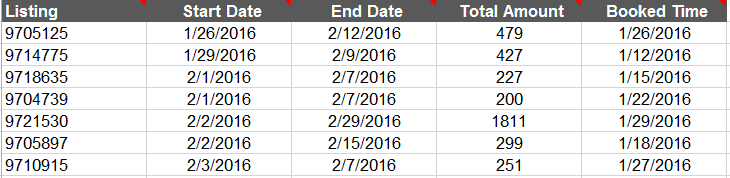
Just your own reservation history: listing ID, check-in and check-out dates, total amount paid, and the date each booking was made. Most PMS and channel manager exports include all of this.
BookingAnalyzer is a manual, one-time look at your own past bookings in a spreadsheet. Portfolio Analytics does this automatically and continuously, across your whole portfolio, and adds market comparisons so you can see whether a trend is specific to your listing or happening market-wide. BookingAnalyzer is a good starting point if you manage a handful of listings and want a quick read on your own data; Portfolio Analytics is the better fit once you're tracking this regularly or managing more properties than you want to re-export and re-analyze by hand.
Not directly. It shows you the pattern, not the price. Once you know which dates or days are underperforming, Dynamic Pricing is what actually adjusts your rates for you based on demand, rather than you setting each one manually off a chart.
We hope this helps you find something useful in your own reservation data. Since every market behaves a little differently, don't be surprised if your charts don't look exactly like anyone else's.
Want to learn what PriceLabs can do for you? See for yourself with a free trial. Get started now!
This tool is one part of the fundamentals covered in our complete guide to vacation rental analytics and market data.
Want to learn what PriceLabs can do for you? See for yourself with a free trial. Get started now!