Get started with PriceLabs now!
Want to learn what PriceLabs can do for you? See for yourself with a free trial. Get started now!
A vacation rental channel manager is software that keeps your calendars, rates and reservations in sync across booking platforms such as Airbnb, Vrbo and Booking.com. A booking on one platform blocks the same dates on the other connected platforms, so vacation rental managers and hosts avoid double bookings without updating every platform by hand. The right channel manager depends on how it connects to each platform, whether it syncs in both directions, and whether it is a standalone tool or part of a property management system (PMS). This guide covers how to check platform connections, sync direction and PMS bundling, and explains how we at PriceLabs work alongside the channel manager you choose.
A channel manager connects your listings to online travel agencies (OTAs) and other distribution sites, then pushes calendar, rate and availability changes to all of them from one place. When a guest books on Airbnb, the channel manager closes the booked dates on Vrbo and Booking.com. Many channel managers connect to each platform through its API, which lets reservations and updates travel in both directions.
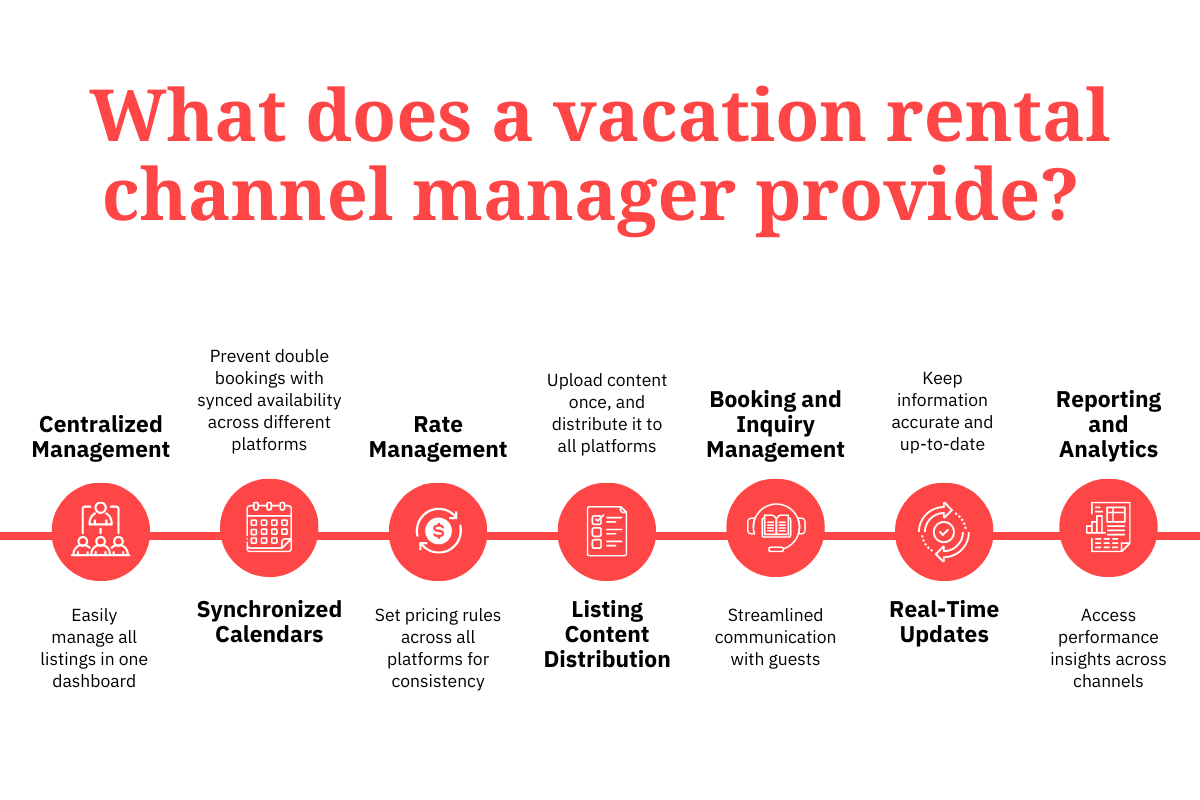
Many channel managers also bring guest messages from each platform into a single inbox.
A channel manager reduces double bookings by updating every connected calendar when a reservation comes in. Two guests are less likely to hold the same dates when each booking closes those dates on every platform.
A channel manager reduces manual work because a single change to a calendar, a rate or a minimum stay rule reaches every connected platform. Without one, each change means logging in to each platform separately.
A channel manager keeps availability and rates aligned across platforms, which helps most when the same property is listed on several sites.
A host with one property on one platform has no second calendar to keep in sync, so a channel manager adds little at that stage. A channel manager becomes useful once a second platform is added, and the benefit grows with each additional listing and channel.
Some property management systems include a channel manager, and some channel managers work without a PMS to host the central calendar, as our help center explains. Knowing which type you are buying helps you avoid paying for features you will not use and missing ones you need.
Many platforms combine property management with channel management, and some also add a website builder for direct bookings. A standalone channel manager suits vacation rental managers and hosts who only need distribution. A PMS with a built-in channel manager suits vacation rental managers and hosts who also want messaging, task management and reporting in the same system.
A one-way sync sends availability from your central calendar out to the platforms but does not bring reservations back in. A two-way sync exchanges reservations, availability and rates in both directions, so a booking made on any platform updates your central calendar and every other platform.
The connection method affects how quickly calendars update. Airbnb’s help center states that an Airbnb calendar refreshes from connected iCal calendars every 3 hours, so a reservation made on another platform can stay bookable on Airbnb in the meantime. Airbnb’s help center also notes that nights blocked on another calendar may not always be blocked on Airbnb.
iCal links share blocked dates only, so rates and minimum stay rules still need separate updates. Hosts with only a few listings can start with iCal calendar syncing between Airbnb and Vrbo and move to an API connection as booking volume grows.
The table below compares the main kinds of channel manager setups, so you can decide which kind fits before you compare individual providers.
| Setup | What it includes | Suits | Check before choosing |
|---|---|---|---|
| Standalone channel manager | Calendar, rate and availability sync across platforms, without a full PMS | Vacation rental managers and hosts who already use a PMS or only need distribution | Whether it connects to the PMS and tools you already use |
| PMS with a built-in channel manager | Channel sync plus reservations, messaging, tasks and reporting in one system | Vacation rental managers and hosts who want operations and distribution in one place | Listing limits on each plan, and which channels are connected |
| Direct booking platform with channel management | A website builder and booking engine alongside channel sync | Hosts and managers who want a direct booking website as well as OTA listings | How the booking site and the OTA calendars stay in sync |
Channel lists and plan limits change, so confirm current details with any vendor before you decide.
Platforms that bundle a direct booking website with channel management suit hosts weighing direct bookings against OTA bookings.
PriceLabs can sync prices to some booking platforms directly, and we connect to a PMS or channel manager when a listing is distributed across several platforms, which then updates the channels connected to it. We support more than 150 PMS and channel manager integrations, and our help center lists every supported integration.
Our Hyper Local Pulse algorithm recommends a price for each night using hyper local market data, including seasonality, day of the week, events and holidays, pacing and lead time. We recalculate prices every day and sync them to your PMS or channel manager, and you can also run a manual sync from your listing at any time.

Minimum, maximum and base prices set the limits within which our algorithm prices, and our Market Dashboards let you compare your listing with nearby competitors. Channel management is one part of a broader vacation rental automation setup.
A vacation rental channel manager is software that syncs your listings, calendars, rates and reservations across booking platforms such as Airbnb, Vrbo and Booking.com. A booking on one platform blocks those dates on the other connected platforms, which prevents double bookings.
A host who lists one property only on Airbnb has no other calendar to keep in sync. A channel manager becomes useful once you add a second platform, because every booking then has to block dates on that platform too.
iCal can work for a small number of listings with low booking volume. Airbnb’s help center states that an Airbnb calendar refreshes from connected iCal calendars every 3 hours, so a reservation made on another platform can stay bookable on Airbnb in the meantime. API-based connections reduce that delay.
No. We are a dynamic pricing tool that sends prices and minimum stay settings to your PMS or channel manager, which then updates your connected platforms.
Per channel pricing support depends on the provider, so ask the vendor how per channel rates work before you commit.
Want to learn what PriceLabs can do for you? See for yourself with a free trial. Get started now!