Get started with PriceLabs now!
Want to learn what PriceLabs can do for you? See for yourself with a free trial. Get started now!

Your cleaner texts at 7am asking which unit needs the deep clean. Your new coordinator asks where the pool code lives for the third time this week. Meanwhile the owner of your best-performing unit wants a revenue update by noon. Most property management teams do not have a knowledge problem. They have a retrieval problem. The answers exist, scattered across Drive folders, Slack threads, and one person's head. An AI knowledge base for vacation rentals fixes retrieval by turning your own documents into something your team can ask questions of, in plain English, at midnight, without waiting on you. This guide walks through building one with Google NotebookLM, what it handles well, and where it still needs a human in the loop. If you already run smart automation on the pricing side, this is the same idea applied to operational knowledge.
An AI knowledge base for vacation rentals is a private notebook built from your own standard operating procedures, property details, and guest policies, which your team queries in plain language instead of hunting through folders. Tools like NotebookLM answer only from the documents you upload and cite the exact passage behind every answer, so staff get consistent instructions rather than half-remembered ones. Most teams start with cleaning procedures, check-in instructions, and troubleshooting steps, then expand from there.
Think of it as an internal search engine that answers in sentences instead of returning a list of files. You upload your cleaning checklist, your lock code sheet, your appliance manuals, your house rules. Then anyone on the team can ask "how do I reset the smart lock at Ocean View 6" and get the answer with a citation pointing back to the source document.
The retrieval piece matters more than the AI piece. A team of six managing forty units generates a real archive of operational knowledge, and almost none of it is searchable in a useful way. Teams that already track property management KPIs tend to notice this gap first, because they can see time going somewhere without being able to name where.
An AI second brain for property managers is closer to a well-indexed filing cabinet with a receptionist than to a chatbot. It has no opinions about your business. It repeats what your documents say, which is exactly what you want when a cleaner needs the turnover sequence at 6am. That reliability is also why teams building out remote management workflows lean on it hardest.
Your PMS holds reservations. Your channel manager holds distribution. Your pricing tool holds rates. None of them hold the sentence "the hot tub at Pine Ridge takes 90 minutes to heat, tell guests before they arrive." That sentence lives in your vacation rental automation gap, and the knowledge base fills it. Managers already running a full rental software stack usually find this is the one layer nobody bought.
Staff turnover in vacation rental operations is high, and every departure takes documentation with it. When the person who knew the vendor list leaves, that knowledge leaves too, unless it was written down somewhere findable. Teams that have gone through a rushed property launch know how fast tribal knowledge becomes a single point of failure.
Then there is the interruption cost. Every "quick question" costs you the ten minutes it takes to get back to what you were doing. Across a week that adds up to a meaningful share of your capacity, which is capacity you would rather spend on owner conversations and portfolio growth.
Errors follow the same pattern. Missed cleaning steps and wrong check-in instructions usually trace back to someone guessing rather than someone not caring. Managers who audit their cleaning process setup often find the procedure was correct and the access to it was not.
NotebookLM is Google's source-grounded research tool. It runs on Gemini and answers only from the sources you add to a given notebook, with inline citations back to the passage it used. That constraint is the reason it suits property manager workflows better than a general chatbot.
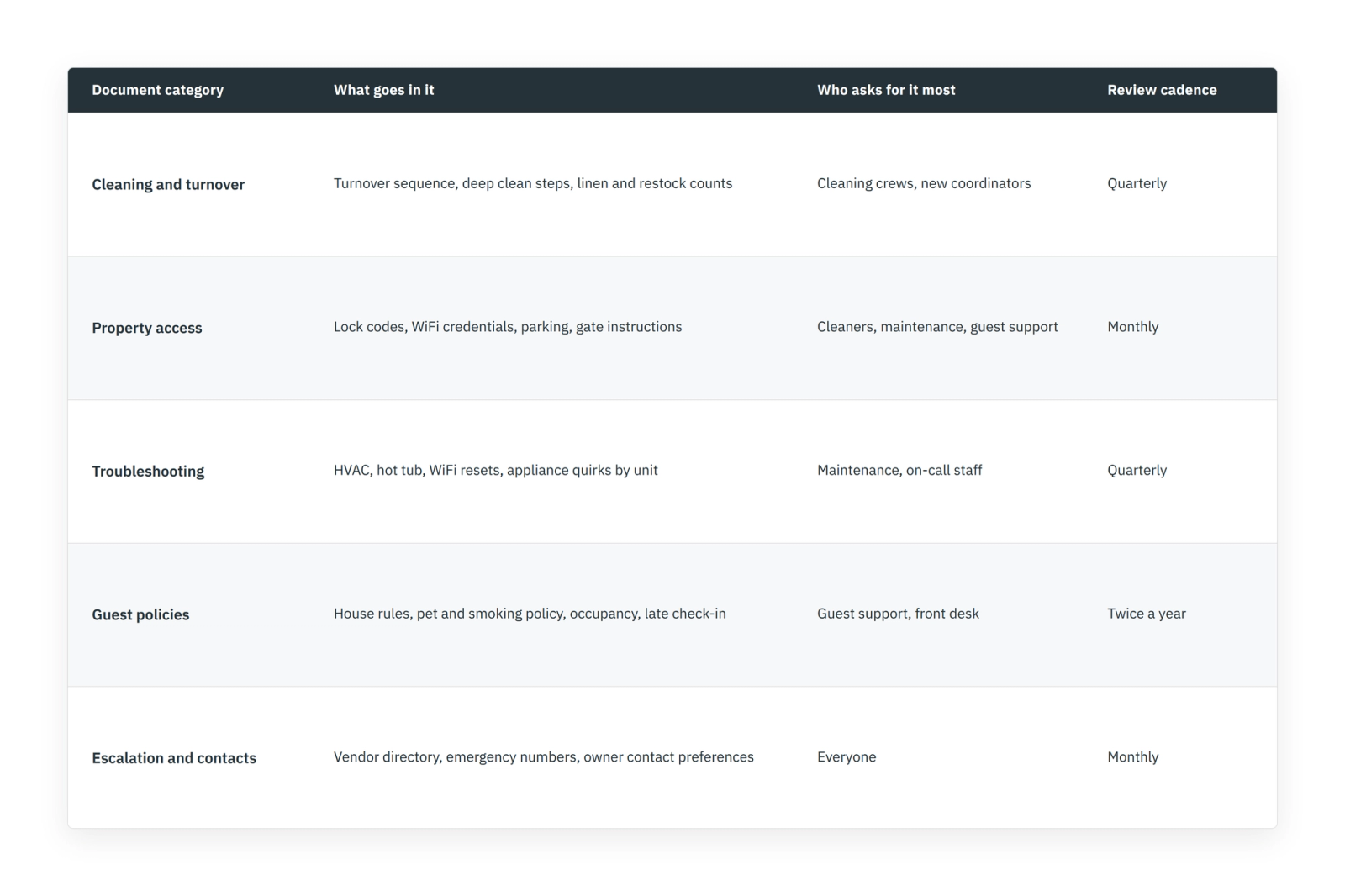
Pull together the documents your team already asks about. Standard operating procedures for cleaning, check-in, check-out, and guest communication. Troubleshooting notes. Property-specific data. House rules and pet policies. Vendor and emergency contacts. If your team currently keeps this in listing notes and shared docs, you already have most of the raw material.
NotebookLM currently accepts PDFs, Google Docs, Google Slides, Google Sheets, Word files, plain text, Markdown, CSVs, web URLs, and audio. Google added spreadsheet and Word support in early 2026, so your rate sheets and unit trackers can go in alongside your prose documents. Teams that keep multi unit setups in a spreadsheet will find that useful.
An AI knowledge base for vacation rentals is only as accurate as what you feed it. Outdated documents produce confidently wrong answers, delivered fast, which is worse than no answer. Review each file, standardise property naming so "Ocean View 6" is never also "OV6," and delete duplicates. The same discipline applies here as when you clean up data before performance tracking.
Group files by topic rather than by whoever created them. Cleaning in one bucket, access in another, troubleshooting in a third. This helps you decide later which notebook a file belongs in, and it makes gaps visible. Managers who have built out a marketing playbook will recognise the exercise.
Sign in with a Google account and create a notebook. On the free tier you get 50 sources per notebook, with paid tiers raising that ceiling, so portfolios above roughly thirty units usually split into several notebooks. One notebook per region or per property cluster works better than one giant notebook, and it mirrors how you would segment a portfolio analytics view.
One detail worth knowing before you commit: NotebookLM works from a static copy of each source, taken at upload. If you edit the underlying Google Doc, the notebook does not update itself. You re-add or refresh the source. That single fact shapes your whole maintenance routine, in the same way that stale settings quietly undermine customization options in any tool.
Run one thirty minute session. Show three real questions your team actually asks, let them watch the answer appear with its citation, then have each person ask their own. Adoption of NotebookLM for property management fails when the tool is introduced as policy rather than demonstrated as a shortcut, which is the same lesson most teams learn rolling out collaboration features.
Share the notebook with specific Google accounts as viewer or editor, the way you would a Google Doc. Editors can add and remove sources, viewers can only read and query, and shared collaboration is limited on the free tier. Set the expectation that the knowledge base is the first stop and you are the second. That is how you reduce onboarding time with AI rather than adding another tool nobody opens, and it pairs well with the way teams handle automation rollouts generally.
Name one person responsible for the notebook and put a monthly review on their calendar. Their job is to keep the vacation rental operational docs honest: re-upload changed documents, remove obsolete ones, and add the troubleshooting fix somebody discovered last Tuesday. Without an owner the notebook decays quietly, which is the same failure mode as an unmaintained goal tracking setup.
Source grounding reduces invented answers substantially. Independent testing has put NotebookLM's hallucination rate well below that of general-purpose chatbots working without document grounding, and every answer carries a citation you can click. It does not eliminate errors, and Google does not claim it does. Treat it the way you would treat any AI insight: useful, checkable, not gospel.
The two real failure modes are worth naming plainly. First, garbage in, garbage out. If you upload a superseded cleaning SOP, the tool will cite it faithfully and your crew will follow it. Second, interpretive overreach, where the model summarises a dense or contradictory document a shade more confidently than the source supports. Both are documentation problems wearing an AI costume, and both are fixed the same way you fix bad generative AI outputs anywhere else, by improving the inputs.
Sensitive material deserves a decision rather than a default. Google states that NotebookLM content is not used to train its models, and Workspace plans carry enterprise data protections, but uploaded sources are copied onto Google infrastructure. Owner financial terms and guest personal data are worth thinking twice about, in the same way you would when choosing where direct booking data lives.
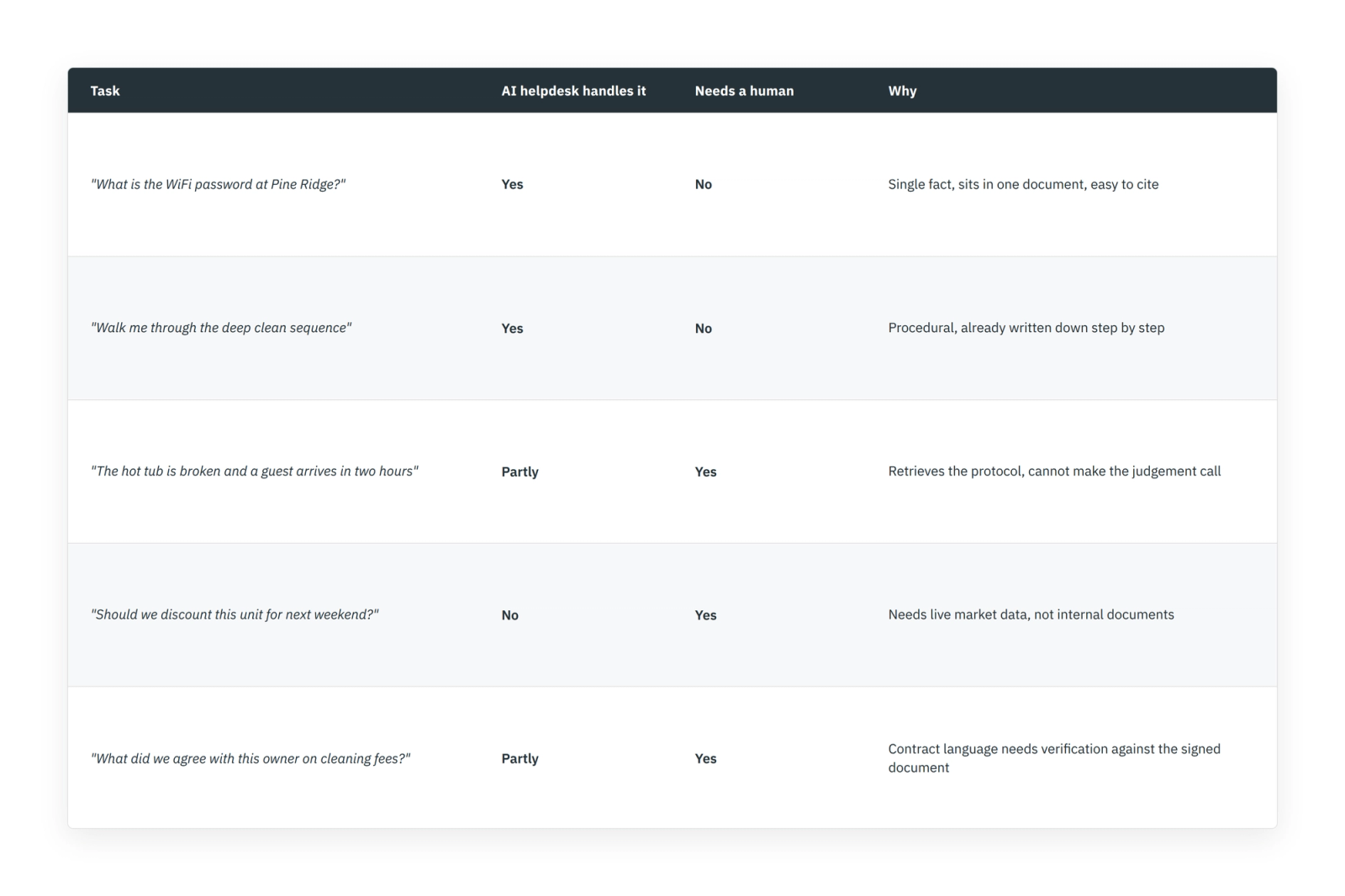
That last row points at the boundary. Retrieval questions belong to the AI helpdesk for vacation rentals, and there it earns its keep. Pricing and market questions belong to a tool built for them, which is why dynamic pricing and your knowledge base solve different problems and should not be asked to cover for each other. Managers who watch occupancy and ADR closely already understand that distinction.
A notebook nobody maintains becomes a liability within about a quarter. Codes rotate, vendors change, one unit gets a new dishwasher with different quirks. The monthly review is not optional, and it is the difference between a working AI second brain for property managers and a museum of last spring's procedures. Teams already reviewing pacing reports on a rhythm can bolt this onto the same cadence.
Version your documents visibly. Put the review date in the filename or the first line so anyone can see how fresh an answer's source is. When staff flag a wrong answer, fix the document rather than working around it, and tell the team the fix landed. That feedback loop is what turns an AI knowledge base for vacation rentals from a project into infrastructure, much like the loop behind consistent owner updates.
Watch which questions come up most and write better documentation for those. Repeated questions are a documentation gap telling you where it hurts. This is the same read you get from tracking usage on any tool, including the desktop app.
Notebooks are private until you share them, and access is granted to specific Google accounts as viewer or editor. Google states that NotebookLM content is not used to train its models, and Workspace editions carry the same enterprise data protections as Gmail and Drive. Your sources are still copied onto Google's infrastructure, so for owner contracts and guest personal data, check the terms against your own policy before uploading.
Yes. NotebookLM accepts Google Docs, Slides, and Sheets, PDFs, Word files, plain text, Markdown, CSVs, web URLs, and audio. Each source has a size ceiling, and the free tier allows 50 sources per notebook. Note that a source is a snapshot taken at upload, so editing the original document does not update the notebook automatically.
Less often than a general chatbot, but not never. Source grounding keeps answers tied to your uploaded documents and cites the passage used, and testing has shown a much lower error rate than ungrounded models. An AI helpdesk for vacation rentals can still oversimplify a dense document or repeat an outdated one faithfully, so spot-check anything high stakes.
Make the knowledge base the default first stop for every new hire question, and pair it with hands-on walkthroughs for anything physical. Write your five most-asked onboarding answers as proper documents before launch, then have the new hire query them on day one. Teams that reduce onboarding time with AI do it by removing the wait for a senior person, while keeping the training itself.
Start with one covering shared procedures, then add a notebook per region or property cluster as you approach the source limit. Splitting by property group keeps answers precise, because a question about one unit will not surface a similar answer from a different building.
Yes. Your PMS handles reservations, calendars, and guest records, all of which are live transactional data. The knowledge base handles written procedure and property detail, which is static reference material. They cover different jobs, and an AI second brain for property managers is not a system of record.
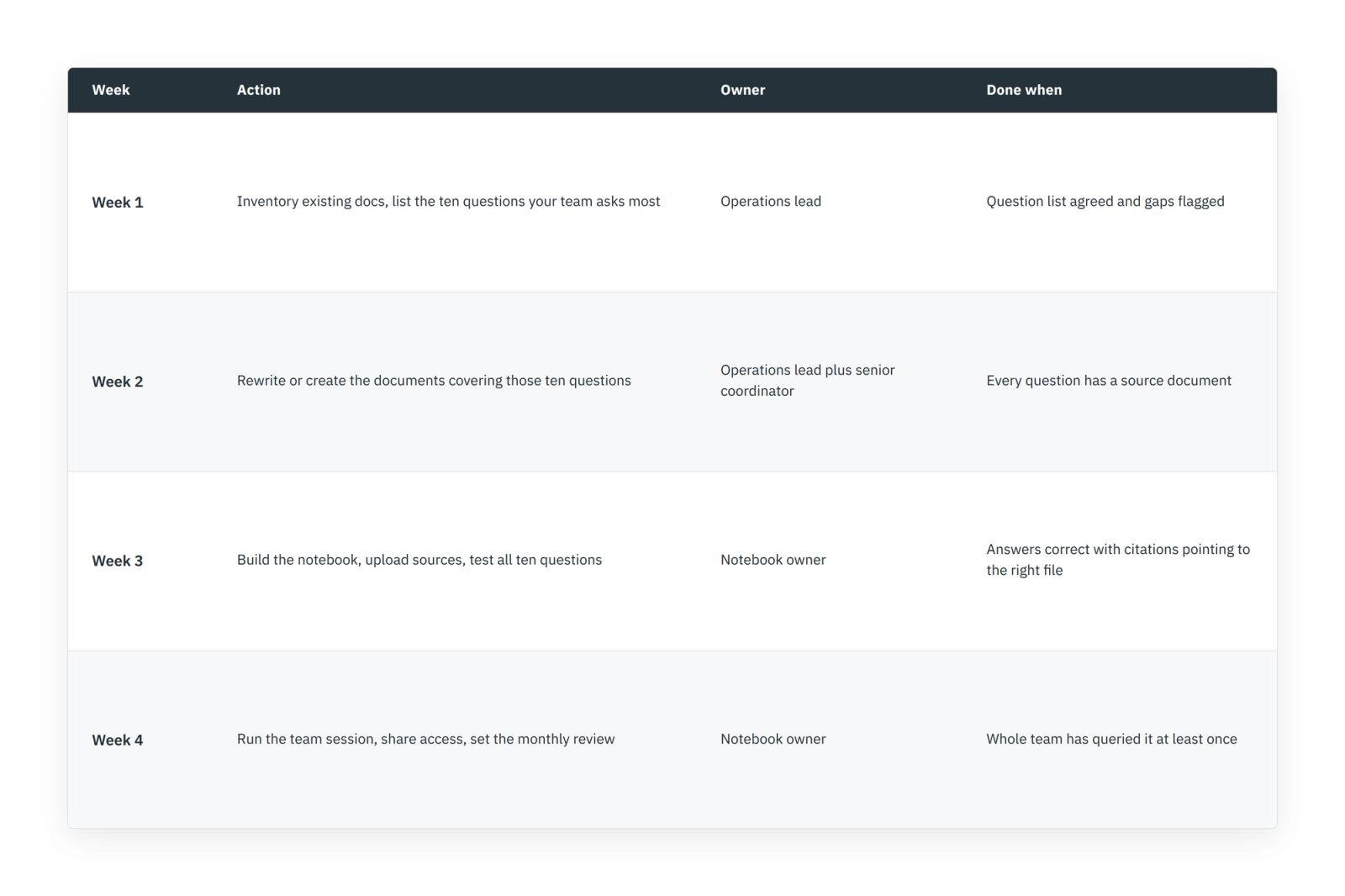
The teams that get value here do not begin by uploading everything. They write down the ten questions their staff ask most, make sure a clear document answers each one, and load only those. Everything else gets added when a real question demands it. That approach gives you a working AI knowledge base for vacation rentals in about a month, and a maintenance habit that survives the second month. For the wider picture on which parts of your operation are worth automating first, and in what order, start with the vacation rental automation guide.
Want to learn what PriceLabs can do for you? See for yourself with a free trial. Get started now!