
Get started with PriceLabs now!
Want to learn what PriceLabs can do for you? See for yourself with a free trial. Get started now!
If you've been setting the same nightly rate week after week and watching your calendar fill up too fast some months and sit empty others, you're leaving money on the table. Learning how to set up dynamic pricing in PriceLabs is one of the most practical things you can do as a host or property manager. It takes a couple of hours the first time, and once it's running, prices update automatically — up to 24 times per day — based on real local demand data. This guide walks you through every step, from connecting your listings to fine-tuning your customizations, so you can get your pricing working for you instead of against you. If you're new to the concept, start with this overview of what dynamic pricing means for vacation rentals before diving into the setup steps below.
Featured Snippet: To set up dynamic pricing in PriceLabs, connect your property management system or OTA, sync your listings, set a base price for each property, and let PriceLabs' Hyper Local Pulse algorithm generate daily price recommendations. You can then apply customizations like minimum and maximum prices, last-minute discounts, and day-of-week adjustments to fit your strategy.
The first thing you need to do when learning how to set up dynamic pricing in PriceLabs is connect your property management system (PMS) or OTA account. PriceLabs integrates with more than 150 platforms, including Airbnb, Vrbo, Booking.com, Guesty, Hostaway, Lodgify, and many others. You can read more about how these connections work in this guide on PMS pricing integration.
Go to your PriceLabs dashboard and click Add New Listing. Choose your PMS or channel from the dropdown, then follow the authorization flow — for most platforms, this means logging into your PMS account and granting PriceLabs access. For Airbnb, you'll connect directly via OAuth. For Vrbo and Booking.com, you typically go through a channel manager or PMS as the middle layer.
Once connected, your listings will sync automatically. If you manage multiple properties across different platforms, you can connect each one separately and manage them all from the same PriceLabs account.
After connecting your account, PriceLabs pulls in your active listings. You'll see them appear in the dashboard with basic details like property name, bedroom count, and platform. This is a good moment to check that every listing you expect to see is actually there. If a listing is missing, it usually means the platform integration needs a manual refresh or the listing is paused on the OTA side.
For anyone managing properties across Airbnb and Booking.com simultaneously, this is also where you want to make sure each listing is mapped correctly. Pricing discrepancies between channels can cost you real money, so check out this breakdown of pricing discrepancies between Booking.com and Airbnb before proceeding.
PriceLabs will show you a market comparison for each property — this helps you understand where your listing sits relative to comparable properties in your area. Don't skip this step. It's the foundation of setting a sensible base price in the next step.
Your base price is the starting point PriceLabs uses to calculate all your dynamic rates. It's not a floor price and not a ceiling — it's the midpoint the algorithm adjusts up or down depending on demand. Setting it correctly matters a lot. If your base price is too low, you'll end up discounting from an already-low starting point. If it's too high, the algorithm may push prices beyond what your market supports. Read this dedicated guide on setting a base price for your rental for a detailed walkthrough.
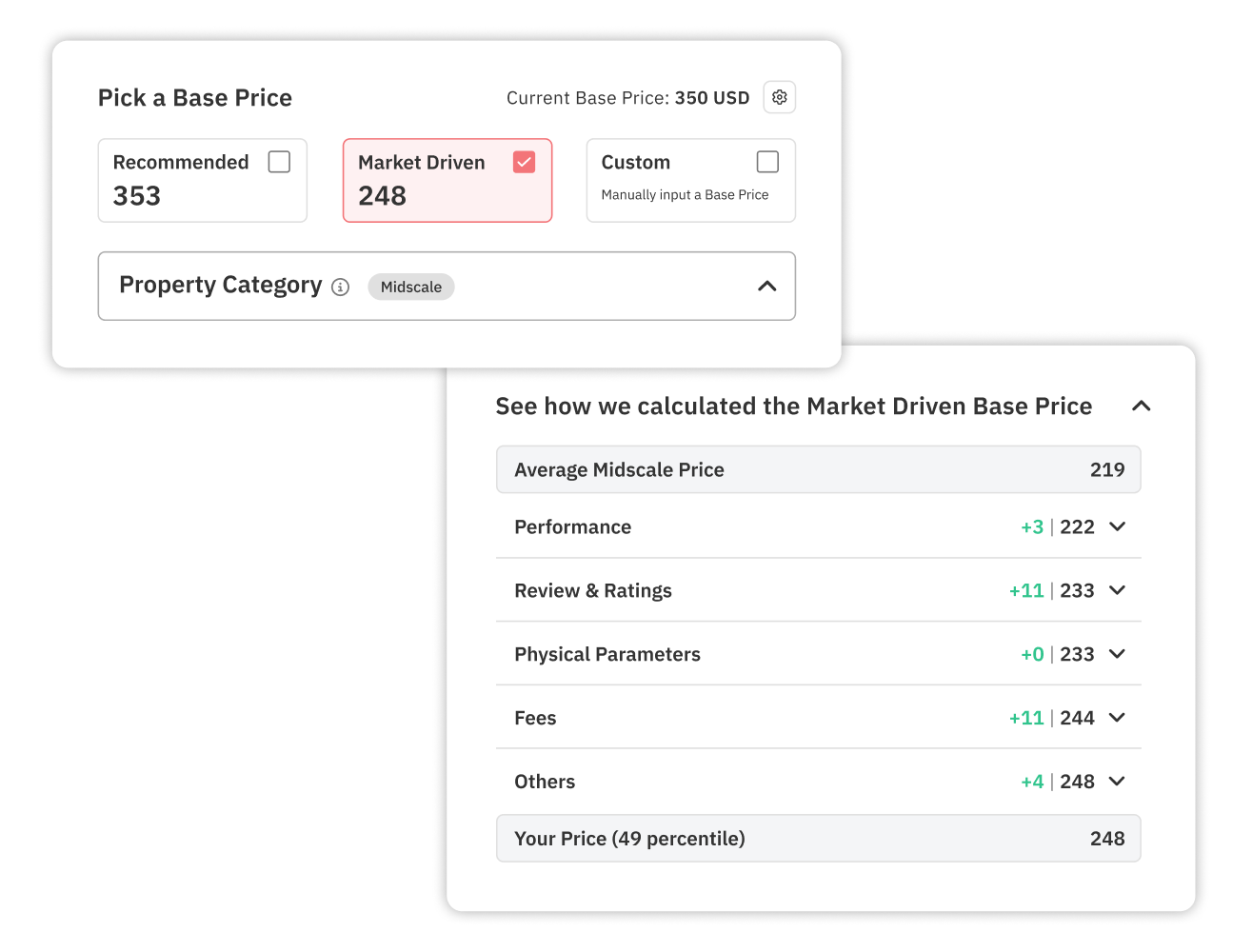
PriceLabs recommends a base price for each listing based on your market and comparable properties. You can accept this recommendation or set your own. A good starting point for most hosts is to take the average daily rate you've earned over the past 90 days (excluding peak seasons) and use that as your base. Property managers who want to understand the relationship between pricing and occupancy should also review this article on ADR vs occupancy to set a strategy before choosing their base price.
Once you enter your base price, save it and move on. You can always adjust it later — and you should revisit it seasonally.
PriceLabs' pricing engine is called Hyper Local Pulse. It pulls in local demand signals — search volume, booking pace, local events, seasonal trends, and competitor availability — and updates your prices daily. When demand is high, prices go up. When it's slow, prices drop to stay competitive. This is how to set up dynamic pricing in PriceLabs in a way that actually responds to real market conditions rather than just applying a flat percentage increase.
You don't need to configure the algorithm itself — it runs automatically once you've set a base price. What you control are the guardrails and customizations around it, which are covered in the next section. For a deeper look at how real-time pricing updates work, see this guide on real-time pricing updates for short term rentals.
The algorithm pushes updated prices to your connected channels up to 24 times per day. That means your Airbnb calendar, your Vrbo calendar, and your Booking.com calendar are all staying current without you touching anything.
This is the step most new users skip — and then regret. Without minimum and maximum price limits, the algorithm can theoretically price your property higher or lower than you're comfortable with. A min price protects you from giving away nights at a rate that doesn't cover your costs. A max price keeps you from getting priced out of last-minute bookings you'd otherwise capture. You can learn more about controlling pricing extremes in this overview of ADR optimization strategies.
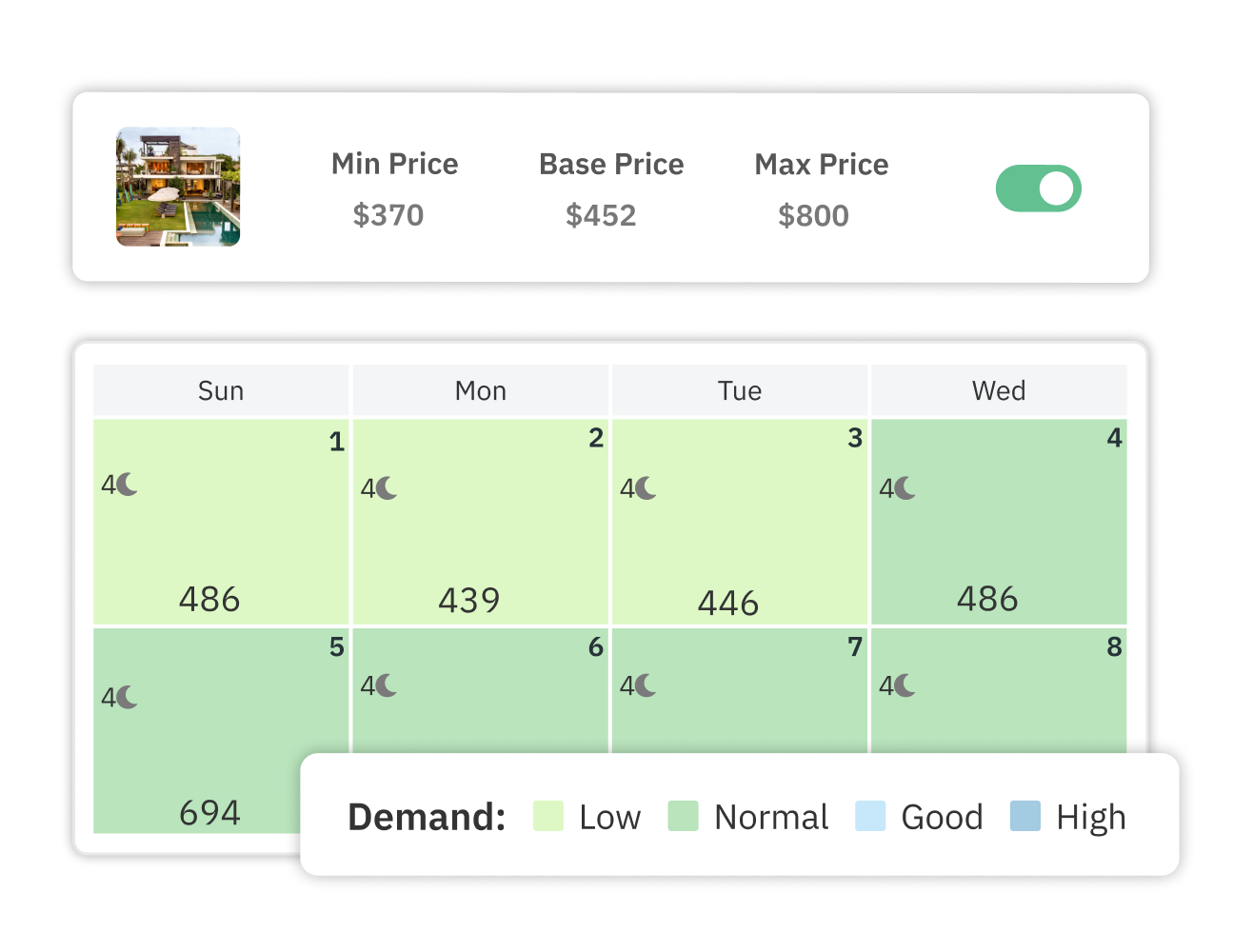
To set these in PriceLabs, go to the listing settings and scroll to the Min/Max Price section. Enter a floor (the lowest you'll accept on any night) and a ceiling (the highest you'd want to charge, even on your busiest weekend). Most hosts set a minimum that covers cleaning fees and operating costs with a small buffer, and a maximum based on what premium comparable properties charge during peak demand.
Property managers overseeing multiple listings should also consider setting different min/max values for each property type. A studio near a ski resort warrants different guardrails than a three-bedroom beach house.
Once your base price and guardrails are in place, you can layer on customizations that give you even more control. These aren't mandatory — the algorithm works without them — but they help you handle specific situations your market presents. PriceLabs offers a full customization suite described in detail in this guide on custom overrides for vacation rental pricing.
Here are the most commonly used customizations:
Property managers with 10 or more listings often find it useful to apply customizations at the portfolio level first and then override individual properties as needed. PriceLabs lets you do both.
Before you activate dynamic pricing, spend 10 minutes reviewing the price calendar for each listing. PriceLabs shows you a visual calendar with the recommended prices filled in. Check that the prices look sensible for upcoming weekends, holidays, and known local events. If something looks off — an unusually high or low price for a specific date — you can add a manual override for that date without disrupting the rest of the automated schedule.
Once you're satisfied, toggle the listing to active. PriceLabs will begin pushing prices to your connected channels immediately. The first sync usually completes within a few minutes, though some platforms can take up to an hour to reflect the new rates. For a full picture of how PriceLabs manages pricing across multiple OTAs at once, see this article on automated pricing across multiple OTAs.
Going live is not the end — it's the beginning. Check back on your calendar weekly for the first month to make sure prices are behaving as expected and adjust your base price or customizations if needed.
Setting up dynamic pricing in PriceLabs is straightforward once you know the order of steps. Connect your PMS or channel, set a sensible base price, put guardrails in place, and let the Hyper Local Pulse algorithm do the heavy lifting. The customizations exist for your specific situations — use the ones that fit your market and ignore the rest. If you want to go deeper on revenue strategy once you're up and running, this vacation rental revenue management guide covers the full picture.
Most hosts can complete the initial setup in under an hour. Connecting your PMS or OTA takes 10–15 minutes, setting a base price and min/max guardrails for each listing takes another 10–15 minutes, and reviewing the price calendar before going live takes about 10 minutes. Property managers with larger portfolios may need a few hours to configure customizations across all listings.
A good starting point is your average daily rate from the past 90 days, excluding major holidays and peak weekends. PriceLabs also suggests a recommended base price based on market data. You can use that recommendation as a starting point and adjust based on your knowledge of your property's performance. Revisit your base price every season.
Yes. Once you connect your listings and activate dynamic pricing, PriceLabs pushes updated rates to all connected channels up to 24 times per day. This includes Airbnb, Vrbo, and Booking.com. You don't need to manually update prices on each platform.
Yes. You can add a manual price override for any date directly in the PriceLabs price calendar. This override takes precedence over the algorithm's recommendation for that date without affecting the rest of your automated pricing schedule.
The algorithm can drop prices to your minimum during slow periods. If your minimum is below your actual cost per night (cleaning fees, utilities, platform commissions), you risk accepting bookings at a loss. Set your minimum price at or above your total cost per booked night with a small buffer to protect your margins.
Check your PriceLabs Portfolio Analytics dashboard after 30–60 days to compare your average daily rate and occupancy against the same period in prior years. You can also use the Market Dashboards feature to see how your pricing compares to similar listings in your area. Most hosts see measurable improvement within the first 90 days of consistent use.
Once you're set up, see our guide to choosing the best pricing tool for Airbnb if you're still evaluating whether PriceLabs is the right fit for your portfolio.
Want to learn what PriceLabs can do for you? See for yourself with a free trial. Get started now!