Get started with PriceLabs now!
Want to learn what PriceLabs can do for you? See for yourself with a free trial. Get started now!
"The house two doors down charges 400 a night. Why are we at 310?" Almost every property manager hears a version of this. The owner has seen a number on a listing, and that number now feels like the property's real worth.
The comp set exists to answer that question with evidence. This guide covers what to do when an owner disputes it: how to check the neighbour claim, how to show the result, and when the owner turns out to be right. If you are still building your first comparison group, start with comp set basics. The wider pricing picture sits in our revenue management guide.
Owners almost always quote what they saw on the listing. That is an asking price. It says nothing about whether anyone paid it.
Three gaps usually sit between the neighbour's listed rate and the neighbour's earnings:
Once you strip those out, the fair comparison is revenue per night the property was open for booking (RevPAR). It captures rate and occupancy together and ignores nights the owner held back.
Do not open with a defence. Open with a check. If the owner is right, you want to know before they prove it to you.
Gather three numbers for the neighbour over the same stay dates: the average rate guests actually booked, nights booked, and nights open for booking. Then put the owner's property through the same three. The checker below does the arithmetic and flags when the bedroom counts do not match.
In the default example, the neighbour charges 400 but books 10 of 28 open nights. The owner's home charges 310 and books 22 of 30. The neighbour's RevPAR is 142.86. The owner's is 227.33. The higher rate came with a much emptier calendar.
That is the most common outcome, and it is worth showing rather than telling. Owners believe a table they filled in themselves.
An owner who disagrees with the result will next question how the comparison group was chosen. Have the criteria written down before that conversation.
PriceLabs Market Dashboards let you build up to 30 comp sets per dashboard with more than 40 filters, including bedroom count, amenities and ratings. Each comp set can hold up to 2,000 listings. Share the filters you applied in plain language: three bedrooms, within the same area, private pool, similar rating.
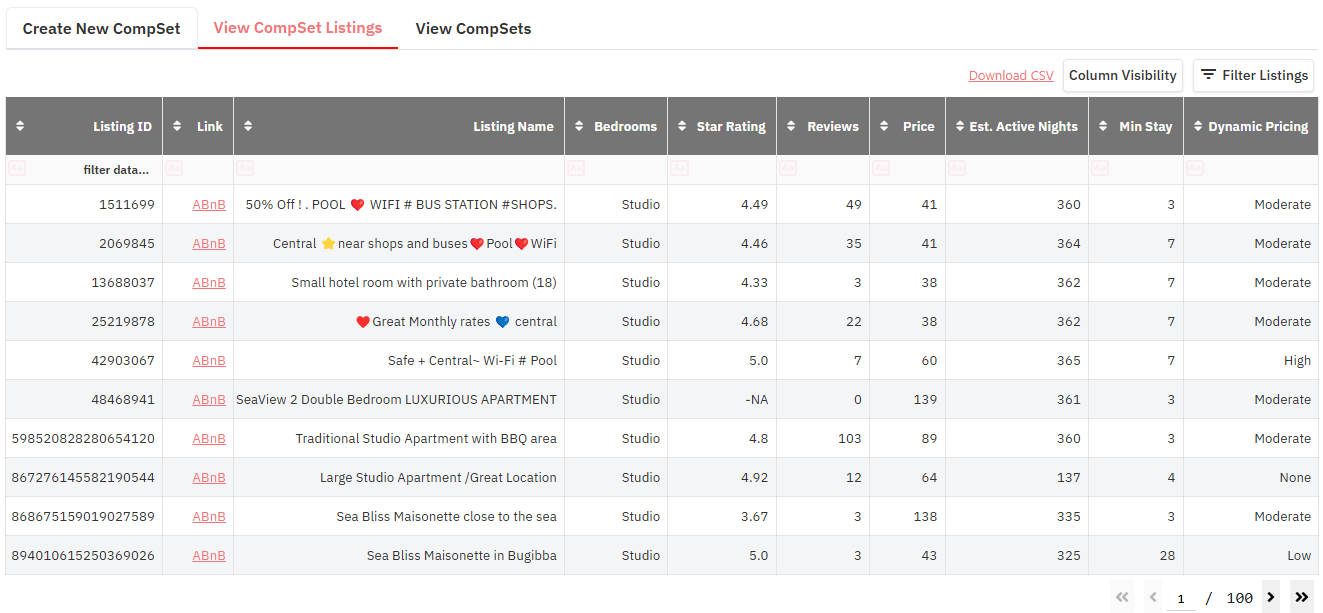
Then invite the owner to propose changes. If they think the neighbour belongs in the set, check it against the same filters. If it matches, add it. If it does not, the filter that excludes it is your explanation, and it is a reason the owner can verify.
Sometimes the check shows the neighbour genuinely earns more per available night on a like-for-like basis. That is useful information, not a defeat.
A real gap usually points to one of four causes, and each one has a different owner conversation:
If restrictions explain the gap, see pricing owner restrictions. If the property's condition explains it, see the owner upgrade case.
A comp set that changes every time an owner complains stops meaning anything. Agree it at onboarding, review it on a fixed schedule, and note every change with the reason.
Comp sets built in Market Dashboards flow into Portfolio Analytics and Report Builder, so the group used in the owner report is the same one your revenue team prices against. That consistency is what makes the benchmark credible when results are bad as well as good.
"You're right that the house two doors down lists at 400. I looked at the same month for both homes. They booked 10 of their 28 open nights. We booked 22 of 30. Per night they were open, they earned about 143 and we earned about 227. Here are the 32 homes in your comparison group, and the filters we used. If there is a home you think belongs in there, send it to me and I will check it against the same criteria."
The script works because it agrees with the fact the owner saw, then adds the facts they could not see. Nothing in it asks the owner to trust you. For more on using neighbourhood rates and availability day to day, see Neighborhood Data pricing. Our piece on proactive owner communication covers getting ahead of these questions.
The neighbour comparison never fully goes away. Owners walk past those houses. A manager who checks the claim every time, with the same method, turns a recurring argument into a recurring proof point.
Want to learn what PriceLabs can do for you? See for yourself with a free trial. Get started now!