
Get started with PriceLabs now!
Want to learn what PriceLabs can do for you? See for yourself with a free trial. Get started now!

Last summer, a property manager in a mid-sized beach market trusted their dynamic pricing algorithm through a major local seafood festival weekend. The algorithm saw moderate demand signals — it didn't know about the festival. Rates stayed at shoulder-season levels. Every competitor within two miles was at 2x baseline. The cost? Roughly $4,000 in missed revenue across eight listings, in a single weekend.
The fix? Custom overrides STR pricing — the layer of professional judgment that separates a sophisticated revenue management system from a basic one. Custom overrides are rule-based or manual instructions that temporarily supersede your dynamic pricing algorithm for specific dates, stay lengths, or demand conditions. This checklist covers the seven override types every professional STR revenue stack should have configured. Understanding where overrides fit in the complete revenue management framework is the first step.
Custom pricing overrides are manual or rule-based instructions that temporarily supersede an automated dynamic pricing algorithm for specific dates, stay lengths, or market conditions — allowing property managers to capture event-driven demand, fill orphan gaps, and enforce minimum revenue floors without disabling automation entirely. A professional STR stack should include seven override types: date-specific price locks, minimum price floors, smart minimum-stay rules, orphan day gap-fill rules, last-minute discount rules, seasonal profile switching, and bulk portfolio overrides.
Dynamic pricing algorithms are powerful — but they're not omniscient. They work from data: historical booking patterns, competitor rates, local demand signals. What they can't access is your local knowledge. The new festival announced six weeks ago. The major convention center that just confirmed a 5,000-person event for a Tuesday in March. The competitor who closed for renovations and pulled 15 listings off the market in your submarket overnight.
Dynamic pricing for vacation rentals handles routine demand fluctuations automatically — but it needs human input to capture the edge cases that drive outsized revenue. That's what custom overrides STR pricing is designed to do.
There are two types of overrides. Scheduled or rule-based overrides apply automatically when predetermined conditions are met — for example, a rule that reduces minimum stay to one night whenever a calendar gap of exactly one or two nights appears. Manual one-time overrides are applied intentionally to specific dates — setting a locked price of $650 for a particular holiday weekend, regardless of what the algorithm suggests.

PriceLabs Date-Specific Overrides and Custom Pricing Rules handle both types, giving PMs a structured toolkit that works at any portfolio scale. The broader category of pricing customizations vacation rental managers use encompasses everything from seasonal profiles to gap-fill logic — all of which are covered in this checklist. Proper dynamic pricing rules STR configuration means your automation is working for you, not just around you.
Event dates are the single highest-leverage opportunity in STR pricing — and the one most often left to algorithm chance. For any confirmed local event (festival, sporting tournament, graduation weekend, major conference), you should lock a minimum price floor before the algorithm has a chance to discount into that demand. PriceLabs Date-Specific Overrides let you set a locked price or custom rule for any specific date or date range without disrupting the algorithm's behavior on surrounding dates. Operators who apply manual overrides on event dates consistently capture 30–50% more revenue on those nights compared to algorithm-only pricing. That gap represents real money — and it accumulates across an entire event calendar.
Your base price and minimum price settings work together to define your revenue floor — the lowest rate the algorithm is permitted to set, regardless of demand signals. If your minimum price is too low, the algorithm may discount into territory that doesn't cover your fixed costs, let alone generate margin. The right minimum price calculation: your cost-of-carry per night (fixed costs allocated to one available night) plus your target margin.

Setting the right base price is foundational to every pricing tactic that builds on top of it. A minimum price floor that's calibrated to your actual cost structure is the most basic protection your custom overrides STR pricing system needs.
Minimum-stay rules are a powerful form of override that most PMs underuse. Setting a 3–5 night minimum for holiday weekends prevents your premium dates from being consumed by 1-night bookings at lower rates with full cleaning costs. Reducing minimum stays during low-demand windows keeps the calendar moving.
PriceLabs Smart Minimum-Stay Adjustments automate this logic — dynamically lengthening minimum stays around peaks and shortening them for gap-fill scenarios.

Minimum stay rules short-term rental management is one of the most direct ways to influence both occupancy and margin simultaneously. Configure weekend minimums, holiday minimums, and off-peak minimums as three separate rule sets — don't try to handle them with a single blanket setting.
An orphan day is a 1–2 night gap between two existing bookings — a date window too short for most guests searching with standard minimum stay requirements, but still a bookable night that could generate incremental revenue. Without a specific rule, these gaps sit empty. With an orphan day override, the minimum stay drops to one night automatically when the gap is detected, and the rate may adjust to make the window attractive to last-minute flexible travelers.

Last-minute pricing strategy for property managers overlaps significantly with orphan day logic — both target the final booking window before a night goes unoccupied. Configuring these rules in PriceLabs Custom Pricing Rules adds occupancy without manual calendar monitoring across your portfolio.
Last-minute pricing adjustments for vacation rental bookings (0–7 days to check-in) require a different logic than seasonal discounts. The goal is to convert uncommitted demand — travelers who haven't booked yet but would consider your property at the right price — without training your regular guests to wait for discounts. The key safeguard is a hard floor: set a minimum last-minute rate that still covers your variable costs and preserves margin.
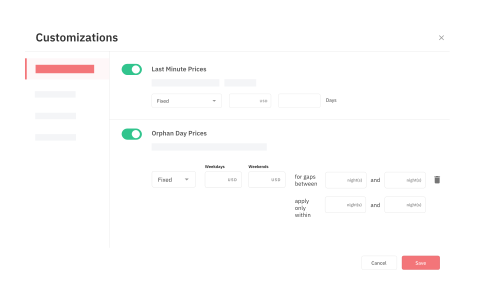
Last-minute pricing adjustments vacation rental managers use effectively typically involve a modest 10–20% discount in the 3–7 day window, with a steeper discount only in the 0–2 day window for properties in competitive markets. Never let last-minute rules discount below your minimum price floor — that's what the floor is for.
A seasonal profile is a named configuration — High Season, Shoulder, Off-Peak — with its own base price, minimum price, length-of-stay requirements, and discount depth. Switching between profiles as the calendar progresses is fundamentally different from setting one-off date overrides: profiles apply consistent logic across an entire period rather than requiring date-by-date management. Automation in vacation rental management means building reusable rule sets, not making the same manual adjustment 12 times a year. Configure your seasonal profiles once, map them to your calendar, and review them quarterly. This is the foundation of a scalable vacation rental revenue stack.

When a macro event — a new airline route into a regional airport, a major festival announcement, a competitor exiting the market — affects your entire portfolio, editing each listing individually is not a viable option. Bulk update tools and portfolio management at scale require the ability to push a single rule change across all listings simultaneously. PriceLabs APIs and bulk update functionality allow PMs to apply event-driven overrides or seasonal profile switches portfolio-wide in one action rather than 49 individual edits. With 150+ PMS and channel manager integrations — including Hospitable, Eviivo, and Beds24 — those changes sync to all booking channels instantly. The time savings alone justify this infrastructure investment.

The most common anxiety among growing PMs is this: "Am I second-guessing a system that knows more than I do?" The answer depends entirely on what kind of knowledge you're bringing to the table. Manual price overrides Airbnb managers make strategically — based on confirmed local information — are appropriate. Overrides made because you "feel like" rates should be higher, without checking pacing data first, usually hurt performance. Revenue management discipline means knowing when your data should override your instincts, and vice versa.
Override when you have local knowledge the algorithm cannot access:
Do not override when:
The "10% rule" is a useful check: if your instinct differs from the algorithm by more than 10%, investigate the data before overriding. Pacing Analysis and Future Pricing Insights in PriceLabs show you forward-looking demand versus historical pace — that data check takes two minutes and prevents most bad overrides.
Market Dashboard give you the objective data context needed before any manual intervention. Minimum stay rules for short-term rentals follow the same logic: check occupancy pace before tightening or loosening minimums.
For a Growing PM managing 10–49 properties, the override configuration workflow in PriceLabs follows a five-step sequence that takes an initial investment of time to set up — and then runs systematically from that point forward. Vacation rental automation starts with override infrastructure, not calendar management.
Date-specific overrides property manager workflows become efficient only when the foundation — base price, minimum price, and seasonal profiles — is already configured correctly. PriceLabs Portfolio Analytics tracks override impact post-deployment so you can measure RevPAR lift on override dates versus comparable non-override dates.
Property managers who build this infrastructure spend less time on reactive adjustments and more time on strategic decisions. The 150+ PMS and channel manager integrations ensure every override syncs to Airbnb, VRBO, Booking.com, and your PMS simultaneously — no manual channel-by-channel updates. The vacation rental revenue stack that includes this full suite of override types is the difference between managing pricing and managing revenue.
Every override you configure should be reviewed after the booking window closes. The feedback loop is what separates a system from a habit — and what keeps your override logic improving over time. Connecting override performance back to the revenue management framework is how you know whether your custom overrides STR pricing decisions are working.
The vacation rental revenue stack only improves if you close the feedback loop.
The key metrics to track after any override deployment:
Recommend a monthly override audit: review which rule types drove bookings and which resulted in prolonged vacancy. PriceLabs Portfolio Analytics provides the dashboard to run this review at the portfolio level, not property by property. Market Dashboard tools benchmark your override results against competitive performance so you're not measuring against your own baseline in isolation.
The most effective custom overrides STR pricing practice is also the most simple: build your event and seasonal calendar 12 months out, and configure overrides for every known high-demand period before the booking window opens. Demand you know is coming in six months is bookable now — and if you don't have a price lock in place, the algorithm may not capture the full premium.
The complete vacation rental revenue management guide provides the strategic context for building this calendar discipline into your operations.
Recommended lead times:
As a final reference, here is the condensed checklist of all seven override types your professional STR revenue stack should have configured: date-specific price locks for events and holidays; minimum price floors based on cost-of-carry calculations; smart minimum-stay rules for weekends and peaks; orphan day gap-fill rules for 1–2 night gaps; last-minute discount rules with hard price floors; seasonal profile switching for High, Shoulder, and Off-Peak periods; and bulk portfolio overrides for market-wide events. Property managers who build this full stack operate with a systematic advantage over those handling overrides ad hoc.
A custom pricing override is a manual or rule-based instruction that temporarily supersedes a dynamic pricing algorithm for specific dates, stay-length conditions, or demand scenarios. Overrides allow property managers to respond to local events, fill calendar gaps, and protect minimum revenue floors without disabling automation entirely. They are distinct from base pricing settings — overrides apply to specific conditions, while base settings define the permanent revenue floor.
Override your algorithm when you have local knowledge it cannot access — a new festival announced after the algorithm was trained, a major competitor who just closed, or a regulatory change that shifts supply. For routine demand fluctuations, trust the algorithm. Before overriding, check your pacing data to confirm the opportunity is real and not already priced in by the system.
Every professional STR pricing stack should include: date-specific price locks for events and holidays; minimum price floors to protect RevPAR; smart minimum-stay rules for weekends and peaks; orphan day gap-fill discounts; last-minute discount rules; seasonal profile switching; and bulk portfolio overrides for market-wide events. These seven types address every major override scenario a growing property manager will encounter.
PriceLabs Date-Specific Overrides let property managers lock a price or apply a custom rule to a specific date or date range — for example, setting a $450 minimum for a festival weekend — without disrupting the algorithm's behavior on surrounding dates. Changes sync instantly to all connected channels via PriceLabs' 150+ PMS integrations, so the override appears simultaneously on Airbnb, VRBO, and any other connected platform.
Yes. PriceLabs APIs and bulk update tools allow property managers to push pricing rule changes across all listings simultaneously, enabling portfolio-wide event-driven overrides or seasonal profile switches in a single action, rather than editing each listing manually. This is particularly valuable for market-wide events that affect all properties equally.
An orphan day rule automatically reduces the minimum stay length — and optionally the nightly rate — when a 1–2 night gap appears between existing bookings. Without this rule, those nights often go unbooked because standard minimum stay requirements make them inaccessible to most guests. With the rule in place, the listing captures incremental revenue from last-minute flexible travelers without any manual calendar intervention.
Custom overrides are not a sign that your automation is failing. They are the layer of professional judgment that separates a sophisticated revenue management system from a basic one. The seven overrides in this checklist — date-specific price locks, minimum price floors, smart minimum-stay rules, orphan day gap-fill rules, last-minute discount rules, seasonal profile switching, and bulk portfolio overrides — cover every major scenario a growing property manager faces.
If you're managing six or more properties and still handling overrides listing by listing, it's time to build a system. PriceLabs gives you every override type in this checklist, plus the portfolio analytics to measure whether they're working. The full revenue management framework gives you the strategic context for every override decision. Start your free PriceLabs trial and configure your first override checklist today.
Overrides matter most around unpredictable demand spikes — see our broader guide to event pricing for Airbnb.
Want to learn what PriceLabs can do for you? See for yourself with a free trial. Get started now!

