
Get started with PriceLabs now!
Want to learn what PriceLabs can do for you? See for yourself with a free trial. Get started now!
Market-based pricing sets your nightly rates from what is happening in your market right now: what comparable listings charge, how quickly those dates are filling, and which events or seasons are pulling demand up or down. A market-based rate moves with competitor pricing, booking pace and seasonal demand instead of sitting still for months at a time. Below you will find what the method is, how it differs from fixed and cost-plus pricing, the seven steps to set it up, what to do in three common demand scenarios, the problems that catch people out, and a four-week order to start in.
Market-based pricing starts from the market rather than from your costs. You build a group of comparable listings, watch what they charge and how much of their calendar sells, then set your own rate against that picture, adjusted for the things that make your property different. A market-based rate answers one question: what would a guest comparing my listing against the realistic alternatives pay for this particular night?
Two inputs do most of the work. Supply and demand in your area for specific dates explains why a Saturday in July and a Tuesday in November in the same property are not the same product. Your comp set, meaning the group of listings a guest would realistically consider instead of yours, turns a competitor's rate into a number that means something for your own property. Pricing is one lever inside wider revenue management, so a market-based rate works best when your distribution and cost side are already in order.
| Approach | How the rate is set | What it misses |
|---|---|---|
| Fixed pricing | One rate, or a short seasonal rate card, held for months | Events, demand swings and what competitors are doing |
| Cost-plus pricing | Your costs plus a target margin | Whether guests will pay that number on those dates |
| Market-based pricing | Competitor rates, booking pace, supply, seasonality and events | Nothing in the market, but it still needs your own floor and ceiling |
Demand in a short-term rental market rarely holds steady for more than a few weeks. A festival announcement, a new wave of supply, a school holiday shift or a slow booking month all change what your dates are worth, and a static rate card absorbs none of that. Pricing from market signals means a high-demand weekend earns what it should, and a soft midweek stretch gets cheap enough to sell rather than sitting empty at a rate nobody is paying.
Market-based pricing also makes owner reporting easier to defend. When an owner compares their revenue to the house down the road, a documented comp set and a rate that tracks it give you something to show. The number that settles most owner comparisons is revenue per available night, because a neighbor's listed rate says nothing about how many of those nights actually sold.
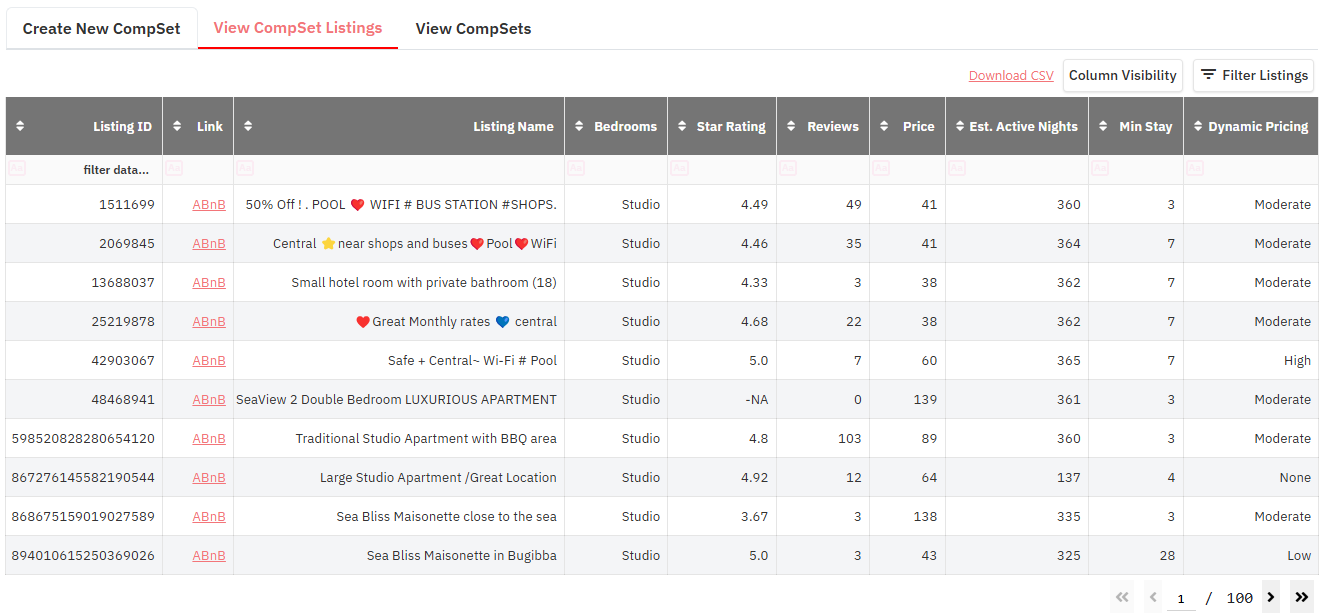
The order of these steps matters. Set your comp set and your price limits before you touch seasonality or events, because every later adjustment is calculated against your base, minimum and maximum.
The method is the same in every case: read the signal, then move rate and length-of-stay together. The figures below are starting points to test against your own booking history rather than fixed rules.
| Scenario | What to do | Why |
|---|---|---|
| Confirmed event weekend | Lift the rate well above your seasonal band and raise the minimum stay, then step the minimum back down inside the final two weeks | Captures the premium while still reaching guests who want a shorter trip |
| Soft off-season midweek | Drop toward your minimum and allow one and two-night stays | A discounted night that sells beats an empty night at full rate |
| Orphan gap between bookings | Keep the rate at or above your seasonal band and lower the minimum stay to the length of the gap | A guest who needs one specific night at short notice is rarely the most price-sensitive |
Cutting rate and loosening restrictions at the same time is the error worth avoiding, because it hands a cheap short stay to a guest who would have paid more. Orphan gaps deserve separate treatment, since those nights are usually blocked by your own minimum stay setting rather than by any shortage of demand.
Tracking a comp set by hand means opening a dozen listings, noting what each charges for a spread of future dates, and repeating that often enough to catch changes. Manual tracking is manageable for one property and impossible across a portfolio, which is why most managers automate the data collection and keep the judgment calls for themselves.
A pricing tool collects the signals and does the arithmetic every day: competitor rates, how much of the market's calendar has sold for each future date, your own booking pace, seasonality and confirmed events. You still decide the floor, the ceiling and the strategy. The tool decides what a given Tuesday in April is worth across everything it can see, and updates that number again the next day as the market moves.
One limit of any pricing tool is worth being clear about. Pricing tools send rates to your channel manager or property management system, and that system passes them on to Airbnb, Vrbo, Booking.com and your direct site. How quickly a new rate appears on a channel depends on the system sitting in between, so test the chain end to end with one listing before rolling pricing out across a portfolio.
Too much data to act on. A market throws off more numbers than anyone can use, and the way out is to decide in advance which three you check. Occupancy for the next 30 nights, pacing against the same month last year, and revenue per available night will answer most questions, and pricing reports put them in one view.
Racing competitors to the bottom. Competing on price alone ends with everyone earning less for the same work, which is what your minimum price exists to prevent. If your comp set is undercutting you across a whole season, check whether the problem is rate at all before you drop your prices: review score, photo quality and minimum stay settings block more bookings than price does in most soft markets.
Chasing occupancy instead of revenue. A full calendar at a low rate can earn less than a 70% calendar at a healthy one, and it costs more in turnovers. Judge every pricing change on revenue per available night across the whole month rather than on how full the calendar looks.
Missing a local event. Event calendars never catch everything, particularly one-off local events and anything announced at short notice. Keep a standing habit of checking local tourism board and venue announcements at the start of each month, and set the rate and minimum stay for confirmed dates in the same sitting.
Week one. Build your comp set, pull the median booked rate for the last 12 months, and set your base, minimum and maximum. Run the setup on one listing or one group rather than the whole portfolio.
Week two. Build your three seasonal bands and load confirmed events for the next 12 months, setting the rate and minimum stay for each event together.
Week three. Add minimum stay rules by lead time, plus a rule for orphan gaps. Change one thing at a time so you can tell what moved the numbers.
Week four. Watch pacing for the next 30 nights without intervening, unless a date is clearly mispriced.
The 30-day check. Compare occupancy, ADR and revenue per available night against the same period last year. Then check whether your rates are hitting the minimum or the maximum often, because a rate pinned at either limit means the limit is doing the pricing rather than the market. Once the test group is behaving, apply the same setup to the rest of the portfolio.
We built Dynamic Pricing to do the daily part of market-based pricing: it recalculates each future night from local demand, booking pace, seasonality and your comp set, inside the minimum, base and maximum you set. You keep control of the limits and the strategy, and we handle the recalculation across every listing every day.
For the market side, Market Dashboards let you build up to 30 comp sets per dashboard using more than 40 filters, including bedroom count, amenities and ratings, with up to 2,000 listings in a set. Comp sets built in Market Dashboards flow through to Portfolio Analytics, so the group you price against is the same one your owner reports benchmark against.
Neighborhood Data shows nearby rates and availability day to day, which is how you tell whether a soft week belongs to your listing or to the whole market. Checking neighborhood rates before you override a recommended price is the habit worth building, because most apparent mispricing turns out to be the market moving rather than the tool.
Market-based pricing is a method that sets your nightly rates from current market conditions rather than from a fixed rate card or from your costs. The main inputs are competitor rates, how fast comparable listings are filling, seasonality and confirmed local events. Each future date gets its own price, and that price is recalculated as the market changes.
Market-based pricing describes where the inputs come from, which is the market around you. Dynamic pricing describes the behavior, which is a rate that changes over time as those inputs change. In practice market-based pricing and dynamic pricing work together, because a price built from market signals only stays accurate if it is recalculated regularly.
You can price from the market manually, and for a single listing in a market you know well it is workable. The cost is time: checking a comp set often enough to catch changes means reviewing a dozen listings across a spread of future dates, then repeating that weekly. Most managers automate the data collection once they pass a handful of properties, because manual checks stop being realistic and the gaps start costing more than the tool.
Rates should be recalculated daily, because competitor pricing and market occupancy both move daily. Your own hands-on review can be much lighter: a 15-minute look at the next 30 nights each week and a monthly check of pacing against last year covers most situations. The limits you set, meaning your minimum, base and maximum, need reviewing only a couple of times a year.
Market-based pricing does not mean undercutting anyone. Pricing from the market tells you where your rate sits relative to comparable listings, which often means pricing above them. A property with a better review score, stronger photos or an amenity the comp set lacks should carry a premium, and your minimum price is there to stop a soft market from pulling you below the point where a booked night is worth having.
Want to learn what PriceLabs can do for you? See for yourself with a free trial. Get started now!

