Get started with PriceLabs now!
Want to learn what PriceLabs can do for you? See for yourself with a free trial. Get started now!

Few things stop a rental business faster than an Airbnb listing suspended notice. One day the calendar is filling. The next, your listing is invisible in search and new bookings stop. The situation feels arbitrary, but it rarely is. Airbnb publishes the rules it enforces, the actions it takes, and the appeal routes available to you. If bookings have gone quiet for reasons unrelated to enforcement, our guide to low short-term rental bookings is a better starting point.
Speed matters. Every day an Airbnb listing sits suspended is a day of lost booking pace that later pricing cannot recover. Work through the steps below in order. Keep your dynamic pricing running on your remaining live channels so demand keeps flowing somewhere.
Airbnb measures every home listing against four ground rules for home hosts: listing accuracy, honoring reservations and refunds, timely communication, and listing cleanliness. Repeated low ratings signal that one of these is slipping.
Enforcement escalates in stages. Airbnb typically educates first, then warns, then suspends or removes for repeated or severe violations. Knowing which pillar failed tells you what your appeal must prove. Hosts who track these signals alongside their property management KPIs usually catch problems before an Airbnb listing suspension happens.
Your listing page must describe the home guests actually get. That covers the map pin, accommodation type, bedroom and bed counts, privacy level, and every amenity you claim.
Airbnb prohibits using AI or digital editing to hide damage, smooth over flaws, or add amenities that do not exist. Restrictions on amenity access, such as a pool open only in summer, must be disclosed. A structured Airbnb listing optimization checklist is the fastest way to audit this yourself.
Cancelling confirmed bookings is the fastest route to an Airbnb listing suspension. Airbnb also holds you responsible for check-in access, working key codes, and any refund you promised.
You may not ask a guest to cancel on your behalf to sidestep the penalty. Double-booking across channels is a common trigger, which is why calendar sync across vacation rental software matters more than most hosts assume.
Airbnb sets different response expectations depending on how close the guest is to check-in. Slow replies during a live stay carry far more weight than slow replies to early planning questions.
The exact windows appear in the Airbnb suspension checklist further down. Hosts managing rentals remotely need clear escalation routines rather than good intentions.
Listings must be free of health hazards such as mold and pests, meet a high cleanliness standard, and be cleaned between every stay.
Cleanliness sub-ratings tend to move before overall ratings do, so they work as an early warning that an Airbnb listing suspension may be coming. Standardising turnovers with an Airbnb cleaning checklist removes most of the variance behind complaints.
Airbnb applies four distinct enforcement actions, and hosts frequently confuse them. The action you received determines whether you wait it out or file a formal appeal. You can find which one applies under Listing issues within the Insights tab of your hosting dashboard.
Get this right before contacting support, because the wrong framing wastes your one clear shot. Managers running several accounts should audit all of them in Portfolio Analytics once a listing is flagged.
For a straightforward Airbnb listing suspension, upcoming reservations usually proceed as booked. Airbnb may ask for evidence the issue is fixed before you reactivate. Once reactivated, the listing returns to search and accepts bookings again. Further reports can trigger another suspension, so treat reactivation as probation rather than a clean slate. Rebuild booking pace deliberately using a pricing strategy checklist.
An account restriction is quieter but still costly, since it blocks Superhost status and new listings while your existing calendar keeps running. Account removal is more disruptive.
Reservations that are ongoing or check in during the appeal window get cancelled, your listings stop appearing in search, and payouts are paused. Guests are offered rebooking help but are not told why. Reservations with check-in after that window stay active until Airbnb decides. Knowing which bookings sit inside the window helps you triage guest messages, and listing performance data shows which dates cost the most.
Airbnb does not publish a fixed duration. It documents that in most cases you can reactivate once the suspension period ends, sometimes after providing evidence the issue is resolved. Length depends on the violation and your history. Host reports range from a few days to several weeks, so treat any specific number you read elsewhere with caution. Plan your direct booking backup for weeks, not days.
Account removals work differently from an Airbnb listing suspension. Airbnb gives you a set appeal window stated in the pending removal email, and its own documentation uses 48 hours as an example. Miss it and the account is removed on the stated date, though you can still appeal afterwards. Check email and spam daily once any notice lands. Keep pricing live elsewhere through your Vrbo pricing tool.
Anxiety pushes hosts toward long emotional messages that go nowhere. A structured response works better. Follow these five steps before writing anything to Airbnb, documenting each one as you go. The discipline that improves Airbnb search ranking applies here too: evidence beats argument.
Do not create a second account or relist the property under a different profile. Airbnb detects duplicate accounts and treats them as an additional violation, which makes recovery from an Airbnb listing suspension considerably harder.
Keep everything on one profile. If you manage properties for owners, tell them early, because the reporting habits in our property manager resources apply here too.
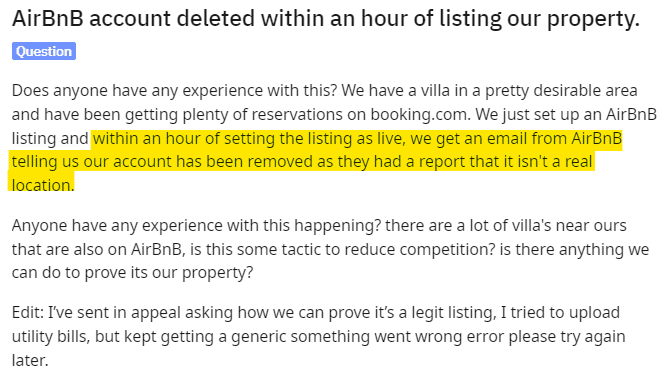
Appeals are submitted through the link in your notification or by contacting Airbnb directly, and must arrive by the stated deadline. Airbnb reviews new or corrected information, Reviews Policy violations, and other relevant circumstances.
There is no separate public appeals form to hunt for. The link comes to you. Build the appeal around specific issue reports, with the precision you would apply to a listing quality audit.
A listing removal appeal needs the listing name, the reservation codes for the stays where issues were reported, your reasoning for appealing each specific report, and supporting documentation.
Account removal appeals require the same four items, with the account name replacing the listing name. Prepare all four before you start, because a partial submission wastes the window. Hosts who already document turnovers through an inspection checklist usually have the evidence ready.
Two arguments are explicitly ruled out under Airbnb's enforcement policy. The first is that a guest review was unfair, since disagreement alone is not sufficient grounds.
The second is that the problem was a one-time issue, because removals are based on repeated or severe violations. Arguing either point produces a templated rejection. Focus on corrected facts and proof of remediation, then rebuild demand with Market Dashboards once you are live again.
Review removal is separate from a suspension appeal, though success can lift your ratings. Airbnb's Reviews Policy permits removal only when a review is irrelevant to the stay, fake, tied to bias or extortion or incentives, posted by a competitor, retaliatory, or in breach of the Content Policy. Retaliation has a strict definition.
The reviewer must have committed a violation, been notified, then left a biased review because it was reported. Evidence quality decides these cases, so keep message threads intact and study the ranking signals in our listing quality research.
Airbnb is equally clear about what does not qualify. Disagreement with a star rating is not grounds. Neither is a review mentioning factors outside your control, such as neighbourhood noise, nor subjective opinions like a kitchen feeling cramped.
Submit requests through the review dispute flow, and note you can remove a review you wrote yourself within 30 days. Dilution works better than disputes, which is where Listing Optimizer helps fix the content driving complaints.
The Host Cancellation Policy is where vague advice does the most damage, so here are the actual numbers. Airbnb applies a minimum Airbnb cancellation fee of $50 USD, scaled by how close to check-in you cancel.
The fee is withheld from your next payouts, and you receive no payout for the cancelled reservation. Airbnb also blocks the calendar for those dates. Repeat cancellations put your listing at risk, which is why balancing occupancy against ADR should never involve cancelling confirmed stays.
The reservation amount includes base rate, cleaning fee, and any pet fees, but excludes taxes and guest fees. For stays of 28 nights or longer, the percentage applies to the non-refundable portion as of the cancellation date, up to the following 30 days. Fees may be waived for a Major Disruptive Event or certain valid reasons beyond your control, with documentation. Pricing your cleaning fee accurately matters twice over, since it feeds this calculation.
Airbnb can also hold you responsible for a cancellation you did not initiate. Double-booking, substituting a different property, or gross inaccuracies that disrupt a stay all count. Airbnb gives an advertised pool guests cannot use as an example. In those cases the Airbnb cancellation fee and consequences apply regardless of who clicked cancel. Calendar sync is a compliance issue, not just an operational one, and belongs in the same review cycle as your rental pricing setup.
Use this Airbnb suspension checklist as a quarterly self-audit. Each item maps to a documented ground rule, so working through it tells you where you stand before Airbnb does. Hosts managing more than a handful of units should run it per listing rather than per account. Pair it with the Airbnb host checklist for a fuller operational review.
Airbnb sets three expectations. When check-in is more than five days away, respond within three days. When a guest reaches out within five days of arrival or during the stay, respond within 12 hours during local daytime hours. When check-in is imminent or a time-sensitive issue arises mid-stay, respond within one hour during local daytime hours. Airbnb may step in directly if you are unresponsive on a live trip issue. Build alerts around the one-hour window first, and treat it as seriously as your revenue management routines.
Walk the property against the live listing page every quarter. Confirm the map pin, bedroom and bed counts, privacy level, and every ticked amenity. Check that photos show the current state of the space, including furniture you have replaced.
Disclose seasonal or time-limited amenity access explicitly. Note anything in the surroundings affecting expected noise. This audit doubles as conversion work, since accuracy drives the signals in our listing optimization guide.
Photograph the property after every professional clean, before the next guest arrives. Timestamped images give you evidence if a complaint is later disputed.
Share a standardised checklist with external cleaning teams covering linens, bathrooms, kitchen surfaces, and common areas. Watch cleanliness sub-ratings separately from your overall score, because they move first. Tightening this is covered in our guide to optimising cleaning operations.
Keep your cancellation rate as close to zero as you can. Sync calendars in real time across every channel you sell on. Block dates for maintenance well in advance rather than cancelling after a booking lands.
Never ask a guest to cancel on your behalf. If you genuinely cannot host, contact Airbnb before cancelling and bring documentation, because the Airbnb cancellation fee is only part of the cost. Building buffer into multi-unit availability rules prevents most of these situations.
Account closure is the most severe outcome and is genuinely hard to reverse. Once your home host account is closed, you are permanently banned from hosting your home or any other space on Airbnb. You can still travel as a guest and host an experience or service, and other users will not see the closure.
Airbnb closes accounts when a host has had listings repeatedly suspended, holds overall ratings below 99% of all other ratings, or has violated the Terms of Service. Revenue diversification stops being optional here, and our direct bookings guide is where to start.
Existing reservations follow a specific rule. You can still host guests scheduled to arrive within seven days of closure. Beyond that window, Airbnb finds guests another place to stay and cancels the booking with you, without compensation.
Model that revenue gap immediately rather than discovering it at month end. A revenue estimate for the affected dates helps you decide how aggressively to price elsewhere.
You can still appeal by contacting Airbnb support, and appeals remain possible even after an account has been removed. Airbnb will consider new or corrected information and Reviews Policy violations.
Be realistic about the odds and work the appeal alongside a rebuild rather than instead of one. Most hosts recover faster by rebuilding demand on other channels, and our vacation rental marketing guide covers that groundwork.
Attempting it is a poor idea. Airbnb's decision applies to you as a host, not merely to one login, and the platform actively detects duplicate accounts. Creating one is treated as a further violation that undermines any appeal you have running. Providing false statements in connection with Airbnb policies is itself a Terms of Service breach. Rebuild on channels where you are in good standing instead, using Booking.com and Vrbo as immediate replacements.
Some hosts ask whether a business entity or family member can list the same property. This carries real risk, since Airbnb links accounts through payment details, addresses, and property data.
If the listing is identifiably the same home, expect it to be flagged and the ban to follow. Weigh that honestly against the cost of building elsewhere. The Global Host Report gives useful context on how other operators structure their channel mix.
The real lesson of an Airbnb listing suspension is concentration risk. If one platform supplies most of your bookings, one enforcement decision can remove most of your income overnight. Diversification is not a consolation prize for banned hosts. It is basic revenue protection every operator should have before anything goes wrong.
Vrbo, Booking.com, and your own direct booking site each behave differently. Booking.com tends to bring higher volume with different guest expectations. Vrbo skews toward family and larger-group stays. Direct bookings carry no platform commission but require you to generate demand yourself.
Test them properly rather than listing once and hoping. Our guide to direct booking strategy covers building that pipeline without a marketing team.
Pricing consistently across those channels is the part most hosts underestimate. Rates that drift out of sync create the double bookings that trigger cancellations, which is how diversification can ironically cause an Airbnb listing suspension. PriceLabs syncs Dynamic Pricing and minimum stay rules across connected channels so one strategy drives every calendar. That removes the manual updating where mistakes creep in.
Finally, treat platform standing as a metric you monitor rather than a status you assume. Review ratings, response rate, and cancellation history monthly, the same way you review ADR and occupancy. Enforcement rarely arrives without warning signs, and the Airbnb suspension checklist above is designed to surface them early. If any vocabulary here is unfamiliar, the vacation rental glossary is a useful reference to keep open.
Airbnb does not publish a fixed duration. Listing suspensions end after a period determined by the violation and your history, after which you can usually reactivate by logging in and following the prompts. You may be asked to provide evidence the issue is fixed. Account removal appeals run on a stated deadline instead, with Airbnb's own documentation using 48 hours as an example.
Usually not. For a standard listing suspension, current and upcoming reservations generally continue as booked while the listing stays hidden from search. Listing removal is different, because reservations with check-in after the removal date are cancelled. During an account removal appeal window, ongoing stays and stays checking in inside that window are cancelled.
Only if it breaches Airbnb's Reviews Policy. Qualifying grounds are irrelevance, fake reviews, bias or extortion or incentivisation, competitor reviews, retaliation, and Content Policy breaches. Disagreement with a star rating, mentions of factors outside your control, and subjective opinions do not qualify. You can remove a review you wrote yourself within 30 days of publication.
A minimum of $50 USD, scaled by timing. Cancelling 48 hours or less before check-in costs 50% of the reservation amount for nights not stayed. Between 48 hours and 30 days out it is 25%, and more than 30 days out it is 10%. The reservation amount includes base rate, cleaning fee, and pet fees, but excludes taxes and guest fees.
No. A closed host account means you are permanently banned from hosting on Airbnb, and the platform detects duplicate accounts. Creating one is treated as an additional violation that undermines any appeal in progress. Appeal through official channels instead, and rebuild bookings on other platforms while the appeal is considered.
Open the Insights tab in your hosting dashboard and go to Listing issues. That section shows the specific issue reports, the reservations they relate to, and which enforcement action applies. Airbnb also sends notifications by email and in the app. Check your spam folder if nothing appears in your inbox.
An Airbnb listing suspension is a revenue problem before it is a compliance problem. PriceLabs keeps Dynamic Pricing running across Airbnb, Vrbo, Booking.com, and 150+ connected systems, so one channel going dark does not take your whole calendar with it. See what it does for your portfolio with a free trial.
Avoiding this starts with understanding your obligations as a host — see our guide to Airbnb business licensing.
Avoiding a suspension starts with the fundamentals in our complete guide to becoming an Airbnb host.
Want to learn what PriceLabs can do for you? See for yourself with a free trial. Get started now!