
Get started with PriceLabs now!
Want to learn what PriceLabs can do for you? See for yourself with a free trial. Get started now!

Your calendar has a few empty weeks coming up. The fastest fix feels obvious: drop the price until bookings show up again. Most hosts reach for this lever first, and most of the time it is the wrong one to pull, because it treats a symptom instead of whatever is actually driving the slow patch.
Solid vacation rental pricing strategies rarely start with a price cut. They start by checking whether your base price is even set correctly, whether your listing and reviews are pulling their weight, and whether occupancy-based adjustments are already doing the correcting your calendar needs. A price cut treats the symptom. This guide walks through the actual causes, and what to check before you touch your rate at all.
Lowering your vacation rental price is rarely the right first move when occupancy drops. Check your base price, your listing quality, your reviews, and your occupancy-based adjustments first, since one of those is usually the real problem. Fix the cause and you protect your revenue instead of trading it away.
A price cut can look like it works, because a lower rate usually does fill some nights. The trouble is what it costs you to get there. Guests read price as a signal of quality, and a steep discount can make your listing look like the option nobody else wanted first.
There is also the revenue you give up on nights that were always going to book. If you drop your rate across the board to fix a handful of slow dates, you are discounting the strong dates along with the weak ones. Independent hosts who improve their pricing power through photos and reviews rather than discounting tend to sustain a higher rate without losing bookings, since guests become less price sensitive once they trust the quality of the stay.
Before assuming price is the problem, it helps to run through the same competitive pricing questions experienced hosts ask themselves, covering comp set shifts, seasonality, and listing changes, before price ever enters the conversation.
The rest of this guide walks through the checks worth running before a price cut, in the order that actually matters for most independent hosts. Strong vacation rental pricing strategies treat the price as the last lever, not the first.
Before anything else, check whether your vacation rental base price actually reflects your listing today. Your base price is the average nightly rate your property should earn across a full year, and every other price you see is built on top of it. If that starting number is wrong, no amount of demand can fix it.
PriceLabs gives you three ways to set it: imported from your current OTA rate, recommended from market data and comparable listings, or custom if you have information the algorithm cannot see, like a recent renovation or a new amenity.
Most independent hosts do well starting with the recommended figure and only overriding it where they have real information to add. PriceLabs turns this number into a nightly rate using the same underlying metrics and graphs that show your minimum, maximum, and recommended price side by side. If your listing is new, setting a base price from market data alone is straightforward even without booking history to lean on.
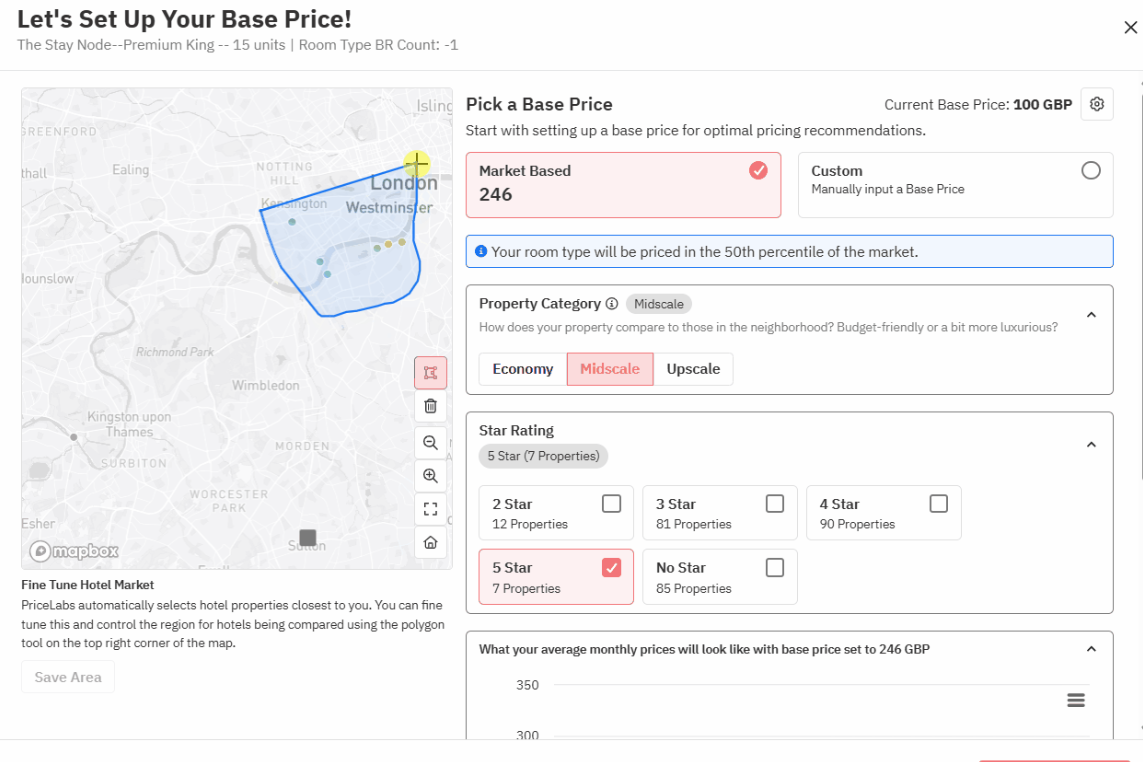
A base price set once and never revisited is a common cause of the exact slow patch that tempts hosts into a price cut. Reviewing pricing on a fixed quarterly schedule, rather than reacting to every soft week, keeps this from happening in the first place.
Occupancy-based pricing is built to do exactly what a manual price cut is trying to do, only automatically and without giving up revenue on the nights you did not need to discount. It checks your listing's actual booking pace and nudges rates down slightly when you are behind pace, or up when you are ahead of it.
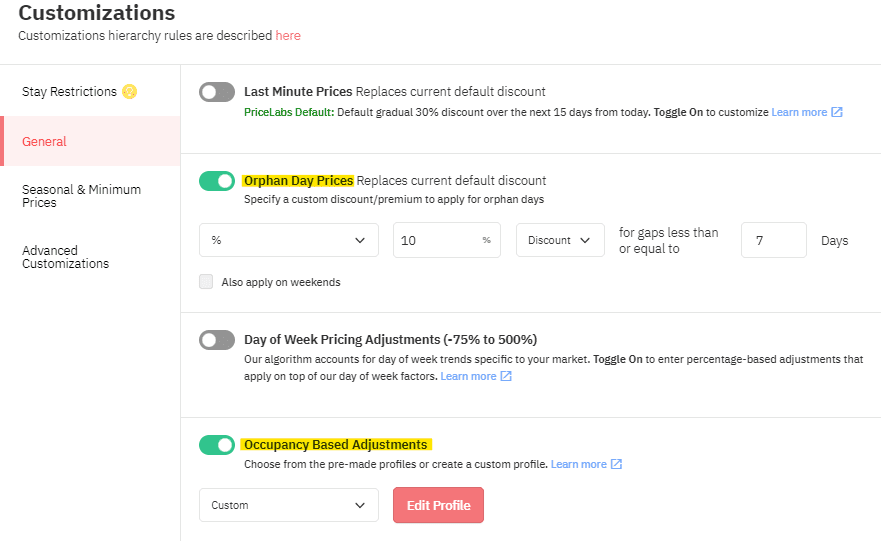
This is the lever that should be reacting to a slow week, not your base price. You can choose how strongly it reacts: a balanced default setting for most listings, a more aggressive setting once you have a season of booking history to lean on, or a market-driven setting that weights comparable listings more heavily while your own history is still thin. These settings live inside your PriceLabs customizations, alongside other pricing rules like minimum stay adjustments.
If bookings are genuinely slow across your whole market and not just your listing, that points to a market shift worth checking in your dynamic pricing configuration rather than a reason to slash your rate on your own.
Once base price and occupancy-based adjustments are ruled out, look at the listing itself. A weak-converting listing can sit empty at any price, since guests decide whether a property looks worth booking before they even compare rates closely.
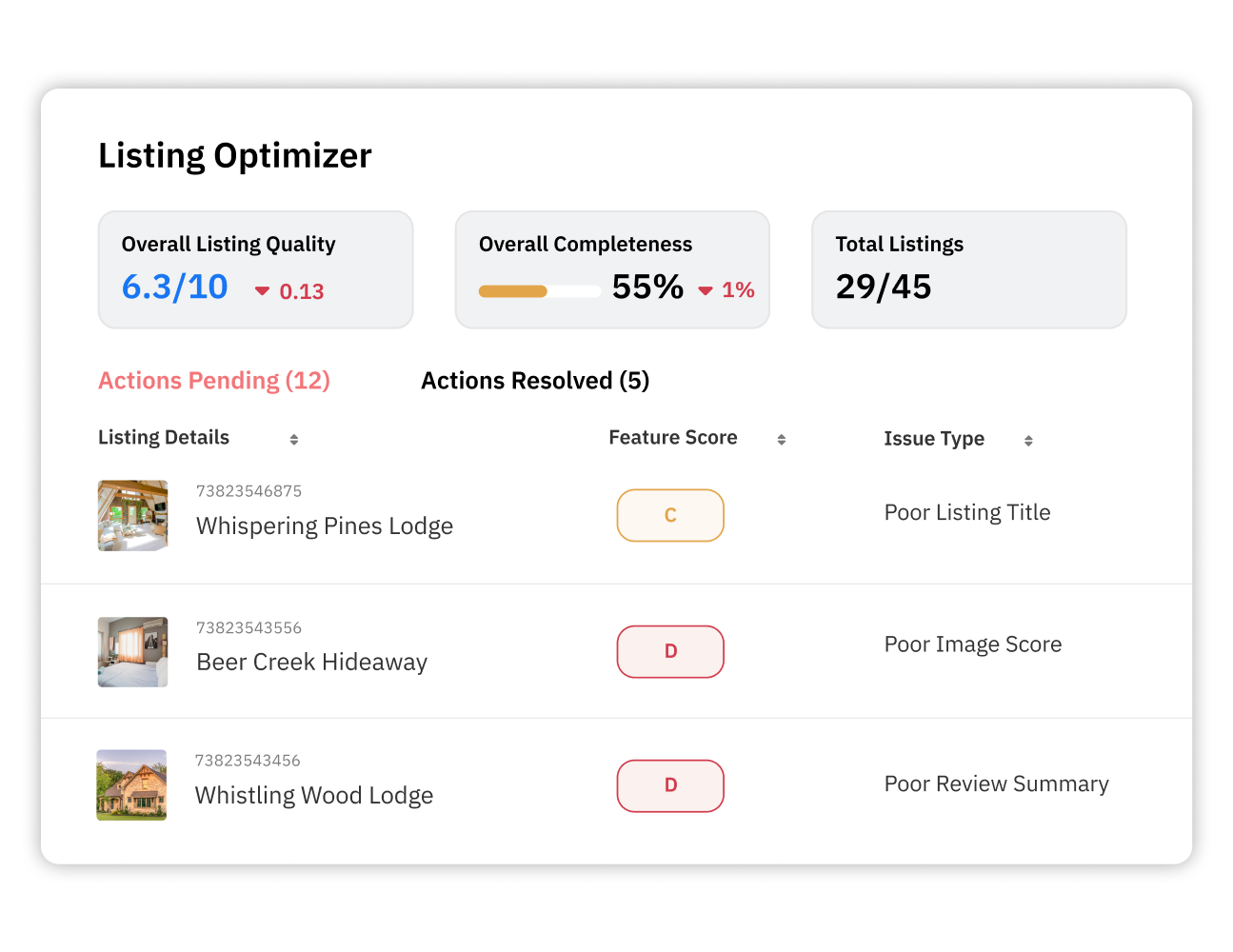
Reviews carry similar weight. Guests trust a strong review history enough to book at a fair rate instead of waiting for a discount, and review sentiment shows up in occupancy trends before most hosts notice a problem manually. A run of lukewarm reviews about cleanliness or communication will slow bookings long before your price does.
Responding to reviews matters here too, not just collecting them. A specific, well-written review response reassures future guests that an issue was actually fixed, while a generic reply does not.
None of this means your price is never the answer. Sometimes it genuinely is too high or too low for what your market will pay, and a change is warranted. The difference is doing it with evidence rather than reacting to a single slow week.
| Signal | What It Usually Means | Better Fix Than a Price Cut |
|---|---|---|
| One or two slow weeks | A normal demand dip or a base price that is due for review | Let occupancy-based adjustments correct it, then review base price quarterly |
| Consistently low conversion despite fair pricing | Weak photos, outdated description, or missing amenities | Refresh the listing before touching the rate |
| Recent drop in review scores | An operational issue guests are noticing, like cleanliness or communication | Fix the underlying issue, then respond to the reviews |
| Base price untouched for a year or more | The anchor no longer reflects your listing quality or market | Update the base price using current market data |
Your vacation rental pricing strategies work best when a price cut is the last option you reach for, not the first. Check your base price, let occupancy-based adjustments do the daily correcting, and keep your listing and reviews in good shape before you touch your rate. If you have not reviewed your setup recently, make sure your dynamic pricing configuration has both levers set up correctly.
Not as a first move. Check your base price, your occupancy-based adjustment settings, and your listing quality and reviews first, since one of these is usually the actual cause of a slow patch.
Your base price is the average nightly rate your listing should earn across a year, and every other rate is calculated from it. If it is wrong, occupancy problems can look like a pricing issue when they are really a base price issue.
Occupancy-based adjustments automatically nudge your rate up or down based on your actual booking pace, correcting slow patches without a manual, across the board discount that also cuts into your strong dates.
Strong photos, an accurate description, and a solid review history let guests book at a fair rate with confidence. Weak versions of any of these can keep a well-priced listing from converting.
When your base price has not been reviewed in a while, or a broader market shift shows up consistently across your comp set, not because of a single slow week.
Want to learn what PriceLabs can do for you? See for yourself with a free trial. Get started now!