
Updated : Jan 27, 2026
In the fast-paced world of short-term rentals, managing rates during peak demand can feel like “juggling flaming torches”—challenging, intense, and fraught with the risk of leaving money on the table. For Vrbo hosts and property managers, high-season surges are the ultimate opportunity to optimize RevPAR (Revenue per Available Room), but the risk of underpricing a holiday weekend or losing a booking to a more agile competitor is very real. To truly master these fluctuations, implementing professional vrbo pricing software is no longer optional; it is the foundational tool needed to automate rates, capture demand, and protect your profitability during the busiest times of the year
To truly master the market, you need a sophisticated dynamic pricing tool that moves beyond static, seasonal rules. You must leverage data-driven vrbo pricing software to navigate shifting traveler behaviors—like the shorter booking windows that have become the “new normal” in 2026.
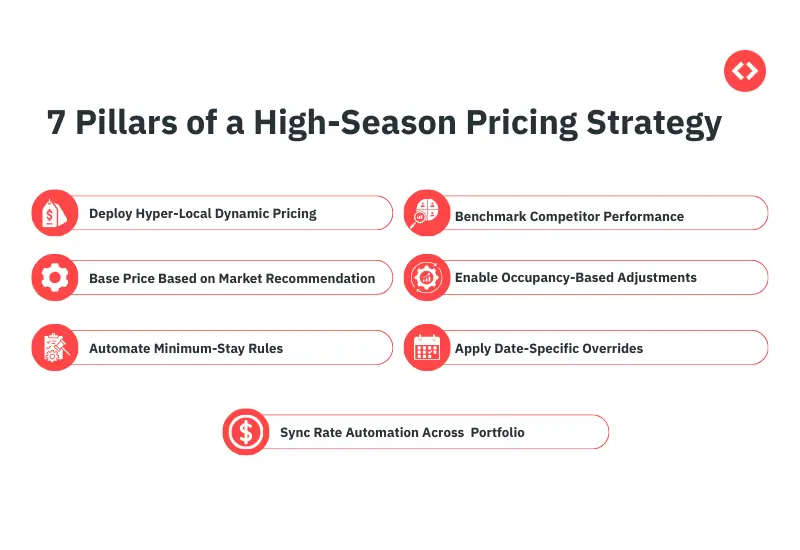
Here are the seven most crucial features to look for in Vrbo pricing software to efficiently handle high-season surges.
Don’t let high-season surges or shifting traveler behaviors catch you off guard.
Leverage the industry’s most powerful short-term rental market insights for portfolio management to outpace your competition and optimize your RevPAR year-round. Join thousands of successful property managers who use data to drive every booking.
Start Your Free Trial1. Hyper-Local Dynamic Pricing
Static pricing is a relic of the past. To stay competitive, your nightly rates must adjust in real time based on local supply and demand. PriceLabs uses a proprietary Hyper Local Pulse (HLP) algorithm that goes beyond broad city trends. It analyzes millions of data points from Airbnb, Vrbo, and Booking.com, alongside hotel pacing and neighborhood-specific occupancy. This “Pulse” detects subtle market shifts—like a localized wedding block or a hyper-local street festival—that standard tools miss. By incorporating a Pacing Factor, the algorithm compares current market occupancy against historical trends, ensuring your rates are aggressive when demand is high and protective when it’s soft.
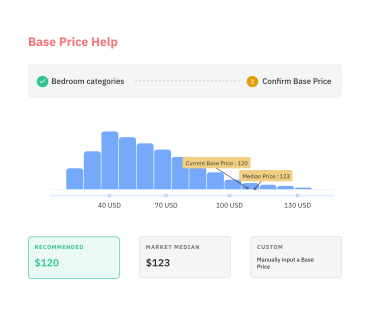
2. Base Price Help for Peak Readiness
Your Base Price is the foundational nightly rate for your listing—think of it as the average rate for a year with no extreme demand. If it’s set too low, even the best algorithm will underprice your high season because it’s starting from the wrong floor.
Before the high-season rush, use the PriceLabs Base Price Help tool. This tool doesn’t just guess; it scans listings with the same number of bedrooms in your immediate area to provide a suggested starting point. It categorizes data into percentiles, allowing you to see where your property falls relative to the “market average” and “luxury” tiers. Setting this correctly ensures your dynamic adjustments scale from a position of data-backed strength.
3. Intelligent Minimum-Stay Engine
High-demand weeks are prone to “one-night gaps” that are nearly impossible to fill, leading to lost revenue and high turnover costs.
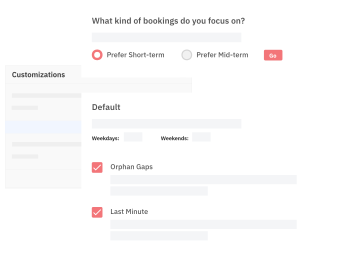
An automated minimum-stay setting protects your calendar by dynamically adjusting requirements based on Opportunity Cost. PriceLabs’ min-stay recommendation engine analyzes Length of Stay (LOS) patterns in your market to recommend:
- Far-Out Restrictions: Requiring 5-7-night stays months in advance when demand is still at peak levels.
- Last-Minute Flexibility: Automatically dropping to a 1- or 2-night minimum as dates approach to capture “assured revenue” from remaining gaps.
- Orphan-Gap Rules: A specialized feature that detects unbookable gaps (e.g., a 2-day hole between two 5-day stays) and automatically lowers the minimum stay only for those specific dates.
4. Market Dashboard & Competitive Benchmarking
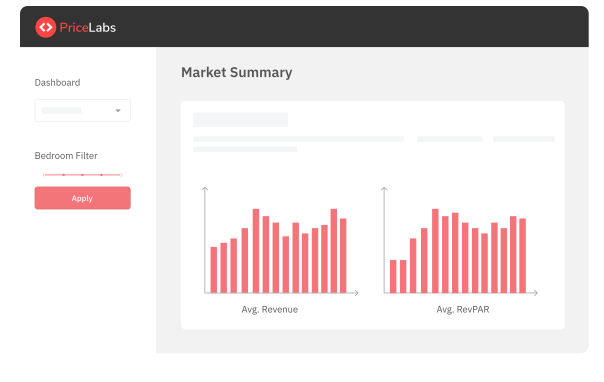
You can’t price in a vacuum. Understanding your competition’s ADR (Average Daily Rate) and future occupancy is essential for justifying your own price hikes during a surge.
The PriceLabs Market Dashboard acts as your macro-view command center. By creating Custom Comp Sets, you can filter the market down to your exact rivals (e.g., “3-bedroom homes with hot tubs and flexible cancellation“). You gain access to 40+ filters to see their booking window (how far out they are getting booked) and amenity trends, so you can spot whether the market is filling up faster than usual for an upcoming holiday.
5. Occupancy and Lead-Time Controls
In 2026, booking lead times are shrinking as guests prioritize flexibility. Your Vrbo rate automation must be agile to catch these late-stage planners without sacrificing far-out revenue.
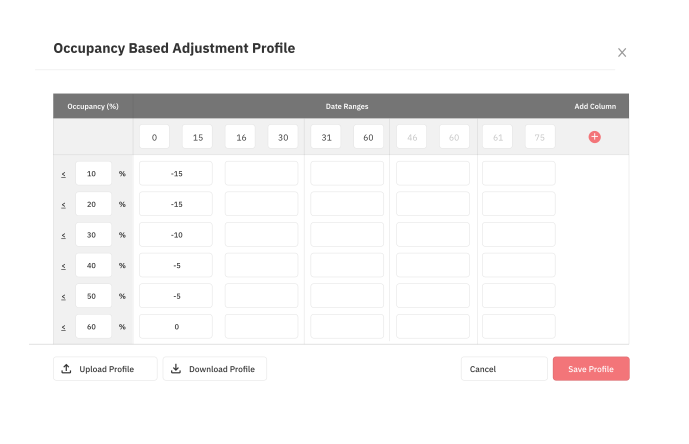
PriceLabs provides granular Occupancy-Based Adjustments (OBA):
- Dynamic Discounts & Premiums: If your occupancy over the next 30 days is below market levels, the system automatically applies a discount to stimulate bookings. If you’re 80% booked while the market is at 40%, it triggers a premium to maximize the value of your remaining nights.
- Portfolio-Level OBA: For those with multiple units, portfolio occupancy-based adjustment allows you to adjust prices based on the occupancy of a group of similar listings, ensuring you don’t overprice one unit while others sit empty.
6. Date-Specific Overrides & Visual Calendar
Even the best algorithm benefits from human expertise during major events. A visual Multi-Calendar with Override capabilities is non-negotiable for professional managers.
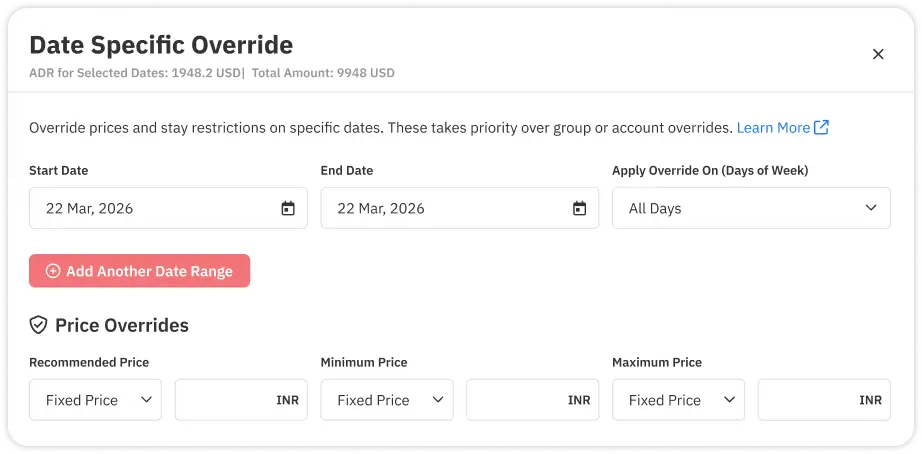
With PriceLabs, you can apply Date-Specific Overrides across your entire portfolio in seconds. You can choose from:
- Rule Overrides: Changing minimum stays specifically for a holiday weekend without affecting the rest of the season.
- Fixed Pricing: Setting a hard price for a major event like a music festival.
- Percentage Adjustments: Applying a 20% “event premium” on top of the recommended dynamic rate.
7. Integrations & Multi-Unit Mapping for Scale
For property managers with growing portfolios, manual updates are a recipe for human error and missed revenue. Scalability requires deep, two-way integration.
PriceLabs connects to 150+ PMS and channel managers, but the secret weapon for scale is Multi-unit Mapping. This feature allows you to map “child” listings to a “parent” listing. When you update a strategy or override a price on the parent, it automatically flows to all child units. This ensures rate parity across identical units in the same building and allows you to manage hundreds of listings with the same effort it takes to manage one.
Master Your Pricing Strategy with Vrbo Pricing Software
Managing high-season surges doesn’t have to be a guessing game. By integrating PriceLabs Dynamic Pricing with your Vrbo listings, you gain access to the same high-level data used by global hotel chains.
Our tools are designed to remove manual labor from revenue management. From using Base Price Help to prep for summer to the Market Dashboard for spying on competitor amenities, PriceLabs offers the flexibility and intelligence needed to navigate any high-demand period.
Bottom Line
Adaptability is the key to thriving during 2026’s selective travel market. By leveraging vrbo pricing software that offers hyper-local insights and intelligent automation, property managers can stop “reacting” to the market and start leading it.
Frequently Asked Questions
1. What are the most important Vrbo pricing features to use during high season?
Key features include dynamic rate adjustments based on demand, minimum-stay rules to protect your calendar, and occupancy-based pricing to optimize revenue as your availability shrinks.
2. How can I raise Vrbo rates for holidays without losing bookings?
Use real-time demand data and competitive benchmarks from market dashboards to justify your rates. Setting flexible minimum stays or targeted discounts for “orphan gaps” can also help maintain guest interest while keeping rates high.
3. When should I apply peak season pricing rules for upcoming surges?
Ideally, you should have your peak season pricing rules active at least three to six months in advance. This ensures your vrbo pricing software captures early-bird demand at a premium while protecting your availability for the highest-value dates.