
Get started with PriceLabs now!
Want to learn what PriceLabs can do for you? See for yourself with a free trial. Get started now!

As an Airbnb host, you want your calendar to stay competitive around the clock — but not at the cost of your minimum stays, price floors, or blackout dates. Here’s how to get automation working for you, without it overriding the rules that protect your income.
If you’re updating your Airbnb rates manually — whether that’s once a week, once a month, or using a static seasonal calendar — you’re already behind. Markets shift daily. A local concert can spike demand overnight. A school holiday can push last-minute bookings weeks out. By the time you’ve noticed the opportunity, it may have already passed. For the full setup this builds on, see how to customize PriceLabs and track your goals.
This is where dynamic pricing comes in. It recalculates your nightly rates every day based on real demand signals — local events, competitor rates, seasonality, and your own booking pace — and pushes those updates automatically to Airbnb, Vrbo, and 150+ connected channels. PriceLabs’ customisation layer lets you configure minimum prices, maximum prices, minimum stay restrictions, blackout dates, last-minute discounts, and far-out adjustments — all of which the algorithm respects absolutely. Automation does the work; your rules keep it honest.
PriceLabs’ platform includes Portfolio Analytics for performance tracking, Listing Optimizer for content improvements, Market Dashboards for local context, and a centralised dashboard that puts everything in one place. For individual hosts managing one to five listings, this means going from guesswork and spreadsheets to a data-backed strategy that runs largely on autopilot.
Not every listing should price the same way. A city-centre studio with strong weekend demand needs a different strategy than a countryside cottage that primarily attracts week-long stays. PriceLabs lets you build custom rule sets for each listing — or apply shared rules across groups of similar properties — so that each one follows logic that fits its actual market conditions.
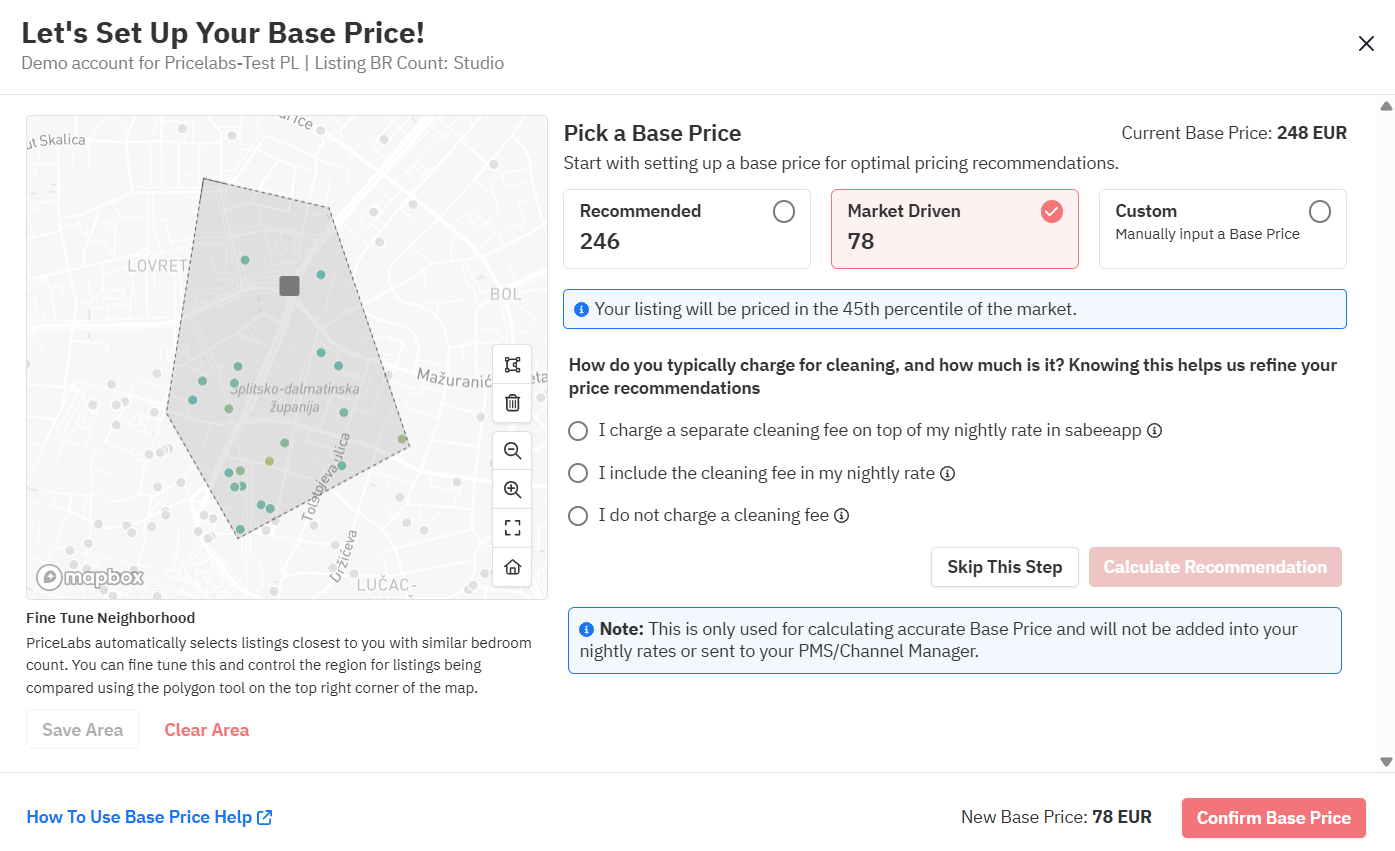
The most important rules to configure from the start are your base price, your minimum nightly rate, and your minimum stay restrictions. Your base price is the anchor from which the algorithm adjusts up or down. Set it too high, and you’ll miss bookings in low demand; set it too low, and the algorithm has less room to push rates when demand peaks. PriceLabs’ Base Price Help tool analyses your listing’s historical performance and local market data to suggest an appropriate starting point.
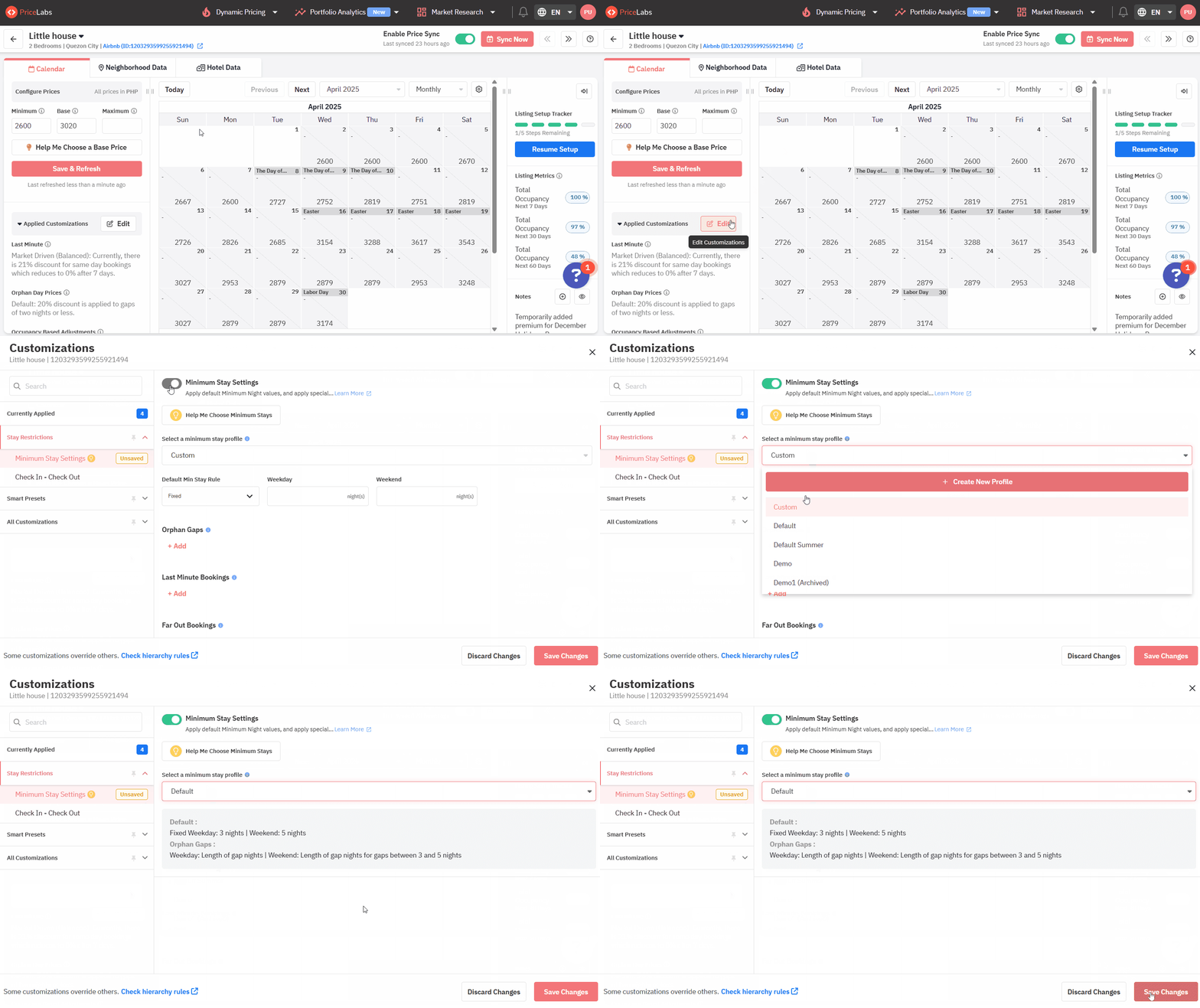
Minimum stay rules are equally strategic. A rigid 3-night minimum set year-round will block bookings during slower periods when a 1- or 2-night stay would have been perfectly profitable. PriceLabs lets you set default minimums that apply across your calendar, then override them for specific date ranges — lowering minimums to fill shoulder-season gaps and tightening them around peak weekends to avoid underpriced short stays that leave no room for premium multi-night bookings.
| Listing type | Recommended rule configuration | Goal |
| Urban short-stay | Weekend premium, event alerts, 2-night min default | Capture demand spikes |
| Rural / leisure property | 7-night min peak, price floor set to costs + margin | Protect margins |
| New listing | Slightly lower base, 1-night min to attract first reviews | Build review history |
| Seasonal property | Custom seasonal profiles per quarter, blackout dates | Maximise peak revenue |
If you have multiple listings, PriceLabs’ seasonality insights tool lets you compare rule performance across properties side by side — so you can see whether a minimum stay change on one listing improved RevPAR before rolling it out elsewhere. This is the foundation for running a smarter, more granular strategy without spending more time on manual updates.
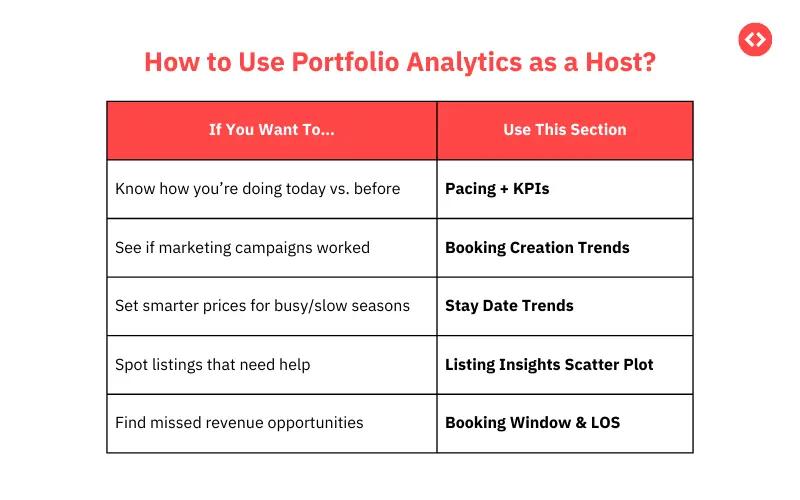
Full automation works well for ordinary nights. For peak weekends, major local events, or premium holiday periods — the dates that drive a disproportionate share of your annual income — it’s worth staying closer to the process before prices go live.
A semi-automated approach means the system still does all the calculation work: it pulls market data, assesses demand, and generates a recommended rate. But instead of pushing that price automatically, it flags the date for your review. You spend two minutes checking the suggestion against your own knowledge of the local market — is a big festival actually happening? Are your competitors already sold out? — and then confirm or override. This is sometimes called an approval workflow, and it gives you decisive authority on the nights that matter most without adding daily manual work.
PriceLabs’ customisation panel lets you configure different behaviours for different date ranges. You can allow fully automatic syncing for standard dates while applying a manual-review layer to peak periods. Revenue management at its best is this blend: automation doing the volume work, and the host making the calls that require context no algorithm fully has.
A practical way to handle this is to check in on your calendar weekly rather than daily. Use PriceLabs’ pricing calendar view to spot any upcoming high-demand dates where the algorithm has pushed rates significantly higher or lower than usual. Those are the moments worth a closer look — and the moments where your local knowledge adds the most value on top of what automation provides.
PriceLabs’ pricing recommendations are built partly on what comparable listings in your area are charging. If those comparables are poorly chosen — inactive listings, properties in different neighbourhoods, units with far more or fewer bedrooms, or listings with wildly different quality levels — the algorithm has flawed inputs, and your prices will reflect that.
Dirty competitor data is one of the most common reasons hosts find their automated pricing doesn’t feel right. Rates drop unnecessarily on dates where genuine demand exists, or premiums get missed because the comp set includes listings that aren’t actually competing for the same guests. The fix isn’t complicated, but it requires a small investment of time upfront.
PriceLabs gives you access to Neighbourhood Data, which shows you how comparable listings in your area are pricing and booking. From there, you can select a custom Comp Set — the specific listings you want the algorithm to benchmark against. The key criteria to apply are: similar bedroom count, similar property type, similar location radius, and active booking history. Properties that haven’t been booked in months, or that exist in a different suburb or price tier, should be excluded.
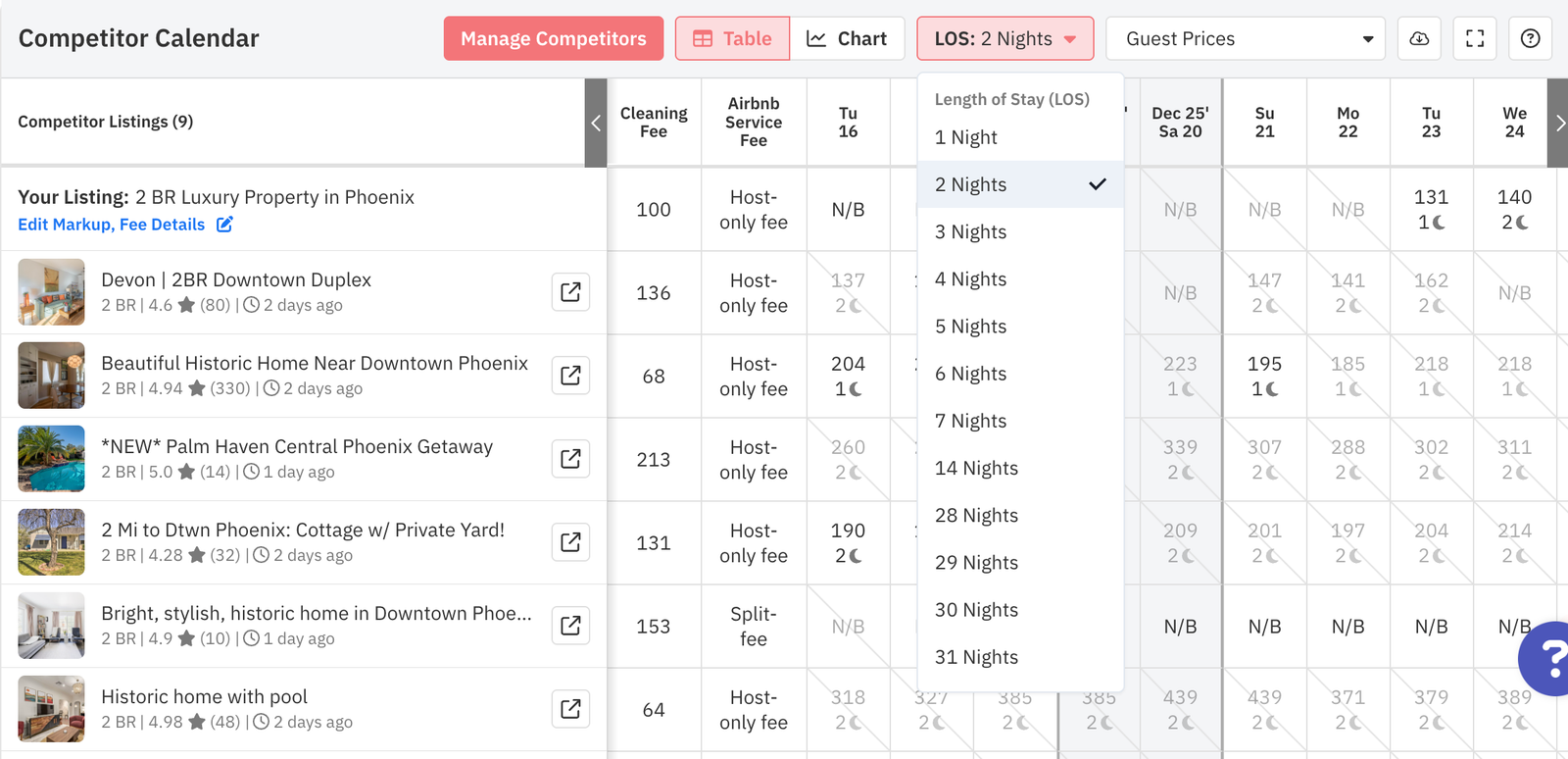
Well-curated competitor data doesn’t just improve individual pricing decisions — it means the algorithm’s baseline understanding of your market is accurate, which compounds over time into consistently better automated recommendations.
One of the most common reasons hosts override automated pricing too often — or abandon it entirely — is that the system behaves like a black box. A rate goes up or down and there’s no explanation. You can’t trust what you can’t understand, and so you end up second-guessing the algorithm on every date rather than letting it work.
PriceLabs is built to avoid this. Its Hyper Local Pulse (HLP) algorithm generates daily pricing recommendations using a combination of your listing’s internal performance data (occupancy trends, lead time, booking pace), local market signals, and event calendars. Critically, it surfaces the reasoning behind price changes — so when a rate for a particular weekend is higher than usual, you can see that it’s because local occupancy is elevated and comparable listings are selling out faster than they were at the same point last year.
This transparency is what separates PriceLabs from simpler pricing tools. You’re not just told what to charge — you’re shown why, which means you can make an informed decision about whether to follow the recommendation, adjust it, or override it entirely for dates where your local knowledge suggests something different.
| Pricing approach | Transparency level | Best for hosts who… |
| Rule-based only | High — fully auditable logic | Want complete control over every input |
| AI recommendations with explainability | High — reasoning visible per date | Want automation with context and override ability |
| Full auto-sync, no review | Moderate — relies on algorithm trust | Want maximum time savings, have well-set guardrails |
For new PriceLabs users, the recommended approach is to start with automatic syncing enabled but review your calendar weekly for the first month. Use the platform’s pricing logs and reporting to understand which types of adjustments the algorithm makes most frequently on your listing — that builds the intuition to know when to intervene and when to let it run.
A static pricing calendar doesn’t know that you have a three-day gap opening up between two bookings next week, or that the local marathon just announced its route and your neighbourhood is suddenly in high demand. But a well-configured dynamic pricing setup does — and it responds automatically.
PriceLabs connects your pricing rules to real-time inventory signals. When your calendar tightens — fewer available nights, a gap that’s hard to sell at full price — the algorithm adjusts accordingly. This is particularly valuable for two scenarios that trip up a lot of hosts: orphan nights and last-minute availability.
Orphan nights are the one- or two-night gaps between bookings that your standard minimum stay rules make unbookable at full price. Left unaddressed, they simply go unbooked — which is lost revenue for a night that your property is already available. PriceLabs’ orphan gap rules automatically detect these gaps and apply a targeted discount to make them bookable, without you having to manually lower your minimum stay or adjust your price. The discount is configurable — you decide how aggressive it should be — and it only applies when a genuine gap is detected.
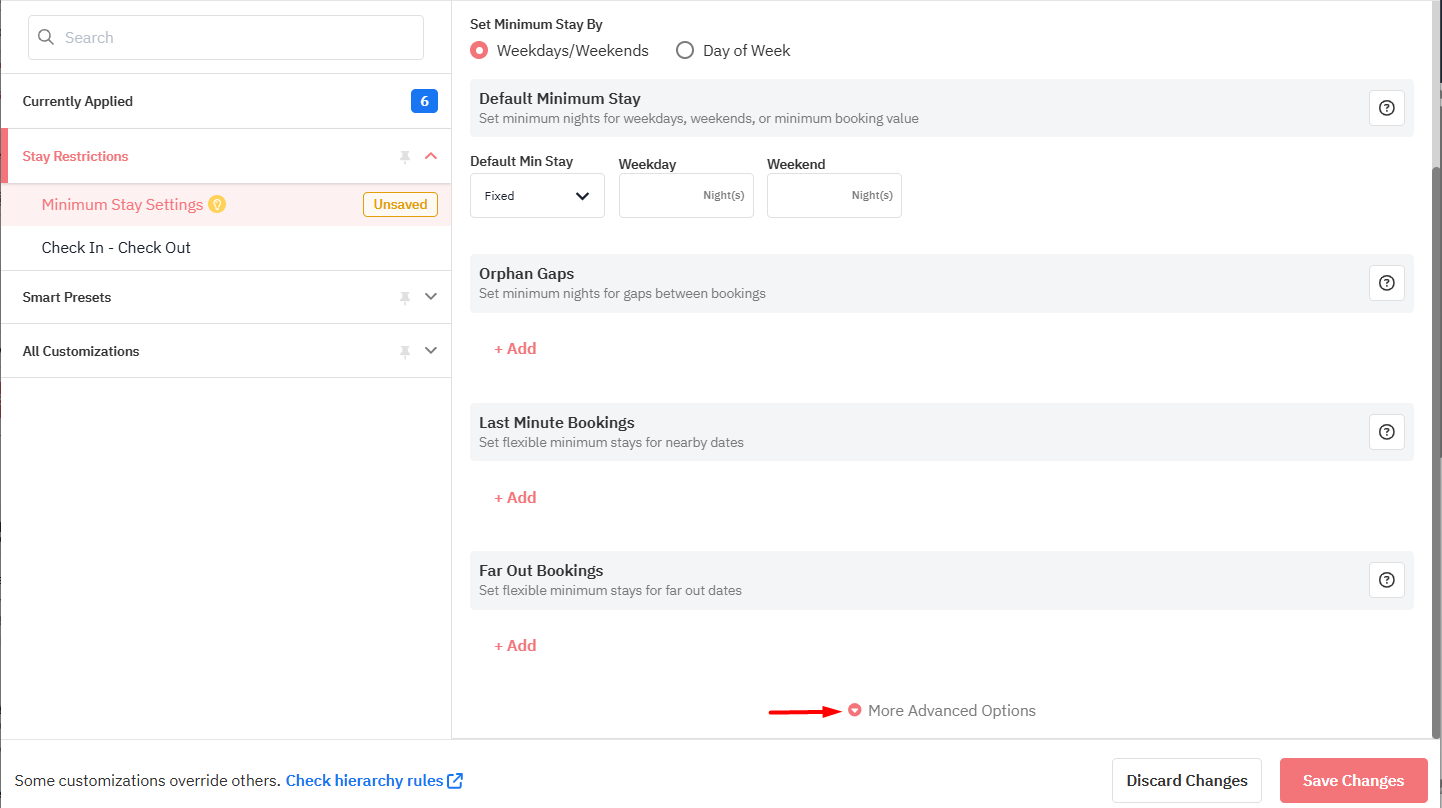
For last-minute availability, PriceLabs’ last-minute discount customisation lets you set up automatic rate reductions as unbooked dates approach. You choose the trigger window (for example, within 7 days or 14 days of check-in) and the discount percentage, and the algorithm handles the rest. The key rule to know: percentage-based last-minute discounts will always respect your minimum price floor, so you can never accidentally drop below your cost basis through automation.
All of this happens within whatever guardrails you’ve set. The algorithm never prices below your minimum or above your maximum. And every change is logged in your pricing history, so you can see exactly what was changed, when, and why.
The most important thing to configure before switching on automated pricing is your guardrails. Without hard limits in place, it’s theoretically possible for automation to underprice your listing during low-demand stretches or to push rates so high during a demand spike that you deter bookings. Both outcomes can be avoided with a few minutes of upfront setup.
Your minimum nightly rate is the single most important guardrail. This is the floor below which PriceLabs will never push your price, regardless of how low market demand drops. To set it correctly, start by calculating your actual cost per night: mortgage or rent, utilities, cleaning fees, platform fees, and a margin buffer. That total is your true floor — anything below it means you’re hosting at a loss. PriceLabs’ base price guidance helps you set a minimum that’s grounded in both your costs and what the market will realistically support. For a deeper look at the customization options available, see how to optimize your pricing strategy using customizations.
Maximum price ceilings are equally worth setting, even though they feel counterintuitive. Without a ceiling, automated pricing can occasionally produce rates that are technically market-supported but practically off-putting to guests browsing Airbnb. A very high rate on an anomalous date can also hurt your search ranking if it results in guests clicking and not booking. Setting a sensible maximum — perhaps 3–4× your base price — keeps the algorithm working within realistic bounds.
| Guardrail type | What it prevents | How to set it |
| Minimum nightly rate | Pricing below cost in low-demand periods | Costs + margin buffer, reviewed quarterly |
| Maximum price ceiling | Unrealistic spikes that deter bookings | 3–4× base price, or market-informed upper bound |
| Minimum stay floors | Fragmented short bookings during peak periods | Higher minimum on weekends and events, lower off-peak |
| Blackout / hold dates | Unwanted bookings on personal-use or maintenance dates | Block in PriceLabs calendar, synced to all channels |
Once your guardrails are in place, automated pricing becomes genuinely low-risk. The algorithm has a large range to optimise within, but it can never take actions that cross your defined limits. For hosts just getting started, this is often the reassurance needed to trust the system enough to let it run — and to start seeing the revenue benefits of daily automated updates that would be impossible to replicate manually.
Switching to automated pricing isn’t a one-time task. Markets evolve. Guest behaviour changes with economic conditions, travel trends, and competition. A rule set that was perfectly calibrated for last summer may be leaving revenue on the table this year. The hosts who get the most from PriceLabs are the ones who treat strategy refinement as a routine part of hosting — not a one-time setup.
The good news is that this doesn’t require much time. A monthly check-in of 20–30 minutes, guided by your Portfolio Analytics dashboard, is usually enough to catch issues and make meaningful improvements. Look at your key metrics: occupancy rate, average daily rate (ADR), revenue per available night (RevPAR), and booking lead time. If occupancy is high but ADR is lagging, your minimum price may be too conservative. If occupancy is low and your minimum is frequently being hit, the floor may need reviewing against current market conditions.
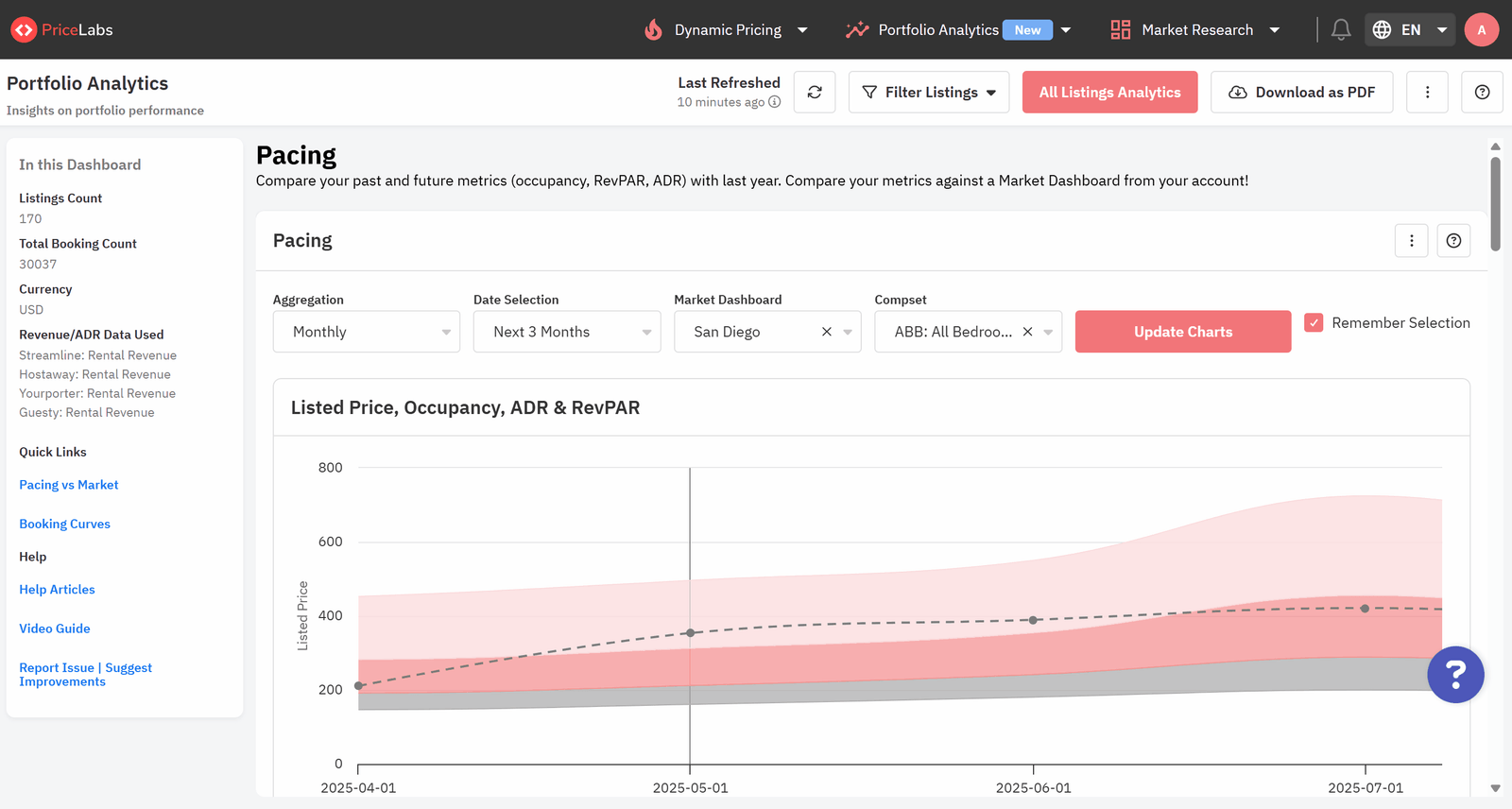
PriceLabs’ Pacing Charts (available in Portfolio Analytics) are particularly useful for this. They show how your current booking pace compares to the same period last year, letting you see early whether a coming month is tracking ahead of or behind your historical baseline — and adjust your strategy before the dates arrive, not after they’ve passed.
The best-performing hosts on PriceLabs don’t just set up automation and walk away — they use the data it generates to get progressively smarter about their listing’s unique demand patterns. Over time, that feedback loop is what separates a good pricing strategy from a great one.
No. PriceLabs treats your minimum stay settings as hard constraints. The algorithm adjusts nightly rates within your rules, but it never changes your minimum stay requirements unless you specifically configure dynamic minimum stay rules to do so. Any changes to stay restrictions happen only through settings you explicitly configure.
If you’ve set a minimum nightly rate, PriceLabs will never push your price below it — even when local demand is very low. The algorithm may reduce rates toward your floor to improve occupancy, but the floor itself is always respected. For percentage-based last-minute discounts, the minimum price acts as an absolute lower bound.
PriceLabs includes a Base Price Help tool that analyses your listing’s historical performance and local market data to suggest an appropriate base price. If PriceLabs notices your minimum price is being hit across more than 21 available days in the next 30-day window, it will proactively recommend a 5% reduction to give the algorithm more room to work.
Yes. PriceLabs’ centralised dashboard lets you manage pricing, rules, and availability across all your listings from one place. Portfolio Analytics gives you a unified performance view, and you can apply shared rule sets across groups of listings or configure each one individually.
PriceLabs recalculates and syncs pricing daily. For most integrations this means your Airbnb calendar is updated every 24 hours with the latest market-informed rates. This daily cadence is what allows the platform to respond to demand shifts, event announcements, and competitor changes far faster than any manual process.
Yes, with the right setup. New listings benefit from a slightly lower base price and a flexible minimum stay (often 1 night) to attract first bookings and build review history. Once you have 5–10 reviews, you can revisit these settings and tighten your rules as your listing gains credibility and ranking. For the strategic foundation this all rests on, see how dynamic pricing works for vacation rentals.
Want to learn what PriceLabs can do for you? See for yourself with a free trial. Get started now!