
Get started with PriceLabs now!
Want to learn what PriceLabs can do for you? See for yourself with a free trial. Get started now!

Dynamic pricing only pays off if you can see what changed, why it changed, and what it earned you. This checklist outlines the reporting you should expect from a modern revenue management solution—clear portfolio analytics, market insights, transparent pricing logs, and integration status—so you can make confident, fast decisions without living in spreadsheets.
With PriceLabs’ AI-driven recommendations, comprehensive market dashboards, and audit-ready logs, hosts can track revenue, occupancy, and rule performance in one place while maintaining accountability across channels and team members. Below, you’ll find the essential reports and metrics to review weekly, plus the guardrails and alerts that keep your Airbnb rates accurate, competitive, and profitable.
Dynamic pricing is the automated adjustment of nightly rates based on real-time demand, competitor activity, and local events. Robust reporting turns those adjustments into actionable decisions by explaining what changed and how it impacted performance. When insights are delivered with clear context and traceability, busy hosts can move from analysis to action without second-guessing settings.

What to expect from PriceLabs reports:
Together, these reports deliver portfolio analytics, market insights, and end-to-end visibility—core to any serious revenue management solution. They help teams align on what changed and why, reduce back-and-forth with owners, and make it easier to standardize revenue workflows.
Bonus Read: The Ultimate Guide to Dynamic Pricing for Short-Term Rentals
Every report should make your core KPIs easy to understand. Track them weekly and monthly, and compare against last year or a fixed baseline to see whether your pricing and positioning are working. Use consistent definitions and timeframes so trends are comparable and actionable across your portfolio.
| Metric | What it tells you | Formula |
| ADR (Average Daily Rate) | Average price earned per booked night | Total Room Revenue ÷ Nights Sold |
| Occupancy Rate | Share of available nights that were booked | Nights Sold ÷ Nights Available |
| RevPAR (Revenue per Available Room) | Revenue per calendar night, booked or not | Total Room Revenue ÷ Nights Available (or ADR × Occupancy) |

Practical guidance:
High-demand dates and seasonal swings drive disproportionate revenue. Your reports should show both the “why” and the “how much” so you can align rates with real demand while protecting your brand positioning. Clear context also helps explain performance to your team members when outcomes vary by season.

Guardrails are your minimum and maximum rates that prevent underpricing or extreme spikes. Effective reporting explains which rules or overrides led to the final price and whether these outcomes align with your vacation rental pricing strategy. With a solid audit trail, you can quickly spot settings that need tightening before missed revenue compounds.

Lead time—the time between booking and arrival—is a powerful predictor of demand and the need for discounting. Reports that segment performance by lead-time bands helps you shape last-minute markdowns and far-out premiums with confidence. When combined with cancellation visibility, you can adapt proactively to protect RevPAR and reduce avoidable vacancy.

Channel parity means consistent rates, availability, and restrictions across Airbnb, Vrbo, Booking.com, and others. Maintaining parity keeps guest expectations aligned and reduces friction that can depress conversions. Strong reporting should make it obvious when and where parity breaks so you can fix issues before they affect revenue.

Dynamic pricing should be evaluated against costs to ensure sustainable profit. Elevating price is only useful if net returns improve after cleaning, supplies, platform fees, and operations. Build a simple, repeatable profitability view that pairs pricing outcomes with real expenses.
| Item | Example | Notes |
| ADR (monthly avg) | $165 | From portfolio analytics |
| Occupancy (monthly) | 70% | 21 nights booked |
| Room revenue | $3,465 | 21 × $165 |
| Cleanings (per stay) | $150 | Cost per turnover |
| Stays (assumed avg 3 nights) | 7 | 21 nights ÷ 3 |
| Cleaning cost total | $1,050 | 7 × $150 |
| Net before other costs | $2,415 | Revenue − cleaning |
Review this monthly to validate profit and inform minimum-night and turnover strategies. Pair these checks with your guardrails to protect margin even during softer periods.
Your automated recommendations log should show the full path from suggestion to outcome so you can learn and iterate. When you can trace each change to the rules and market signals behind it, trust in automation grows and manual exceptions decline.
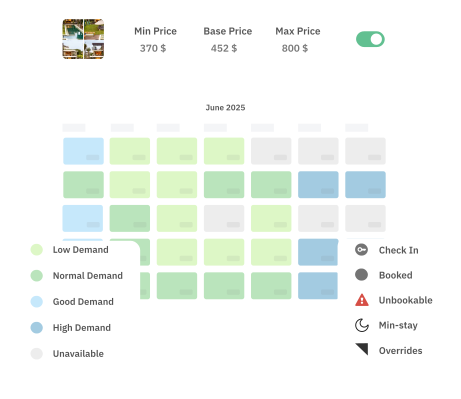
Rule performance measures how specific automations influence revenue and occupancy. Clear visibility into which rules move the needle helps you refine configurations and replicate successful patterns. Use weekly and monthly views to separate short-term noise from durable gains.

Market pulse reporting explains why your rates changed. By pairing competitor ADR trends, demand indices, and booking windows with your own pacing, you can calibrate premiums and discounts with confidence. This context is especially important when onboarding new listings or entering new seasons.
Healthy integrations prevent lost bookings and mispriced nights. A simple status tile or table with the last sync time, affected channels, and color-coded health makes it easy to spot problems at a glance. Close the loop with alerting, so issues are resolved before they impact performance.
| System | Last Sync | Status | Notes |
| PMS | 10:42 AM | OK | Rates and availability updated |
| Airbnb | 10:44 AM | Warning | 1 listing failed; retry queued |
| Vrbo | 10:46 AM | OK | In sync |
| Booking.com | 10:47 AM | Error | API auth expired—reconnect |
Set alerts for failures to avoid double bookings or stale prices that leave money on the table. Use post-incident reviews to adjust processes and prevent repeats.
Great reporting becomes a weekly habit that keeps your strategy sharp and your team aligned. Use a consistent cadence, document changes and their rationales, and compare outcomes against the plan to compound small wins. Over time, this discipline builds confidence in automation and frees up time for guest experience and operations.
Weekly reviews are ideal for catching anomalies and responding to demand shifts before they impact revenue. Many hosts align this with an ops meeting to review overrides, pacing, and upcoming events, so decisions are documented and consistent. If your market is highly seasonal or event-driven, add quick midweek spot checks during peak periods.
Prioritize revenue, occupancy rate, ADR, RevPAR, and booking pace to understand performance and identify pricing opportunities. Supplement these with lead-time segments and cancellation metrics, so your last-minute and far-out strategies are grounded in real demand. When in doubt, start with ADR and occupancy, then layer in pacing to see where adjustments will matter most.
Use audit logs that label each change as automated or manual, with user, timestamp, and rationale. This separation helps you evaluate which overrides improved outcomes and which should be rolled back. Over time, you can reduce unnecessary overrides by tuning guardrails and rule settings instead.
Consistent rates and availability across channels reduce guest confusion, prevent double bookings, and protect conversions. Parity also simplifies owner communications, since portfolio analytics will align with what guests see across sites. If discrepancies occur, use sync health reports to identify and resolve the root cause quickly.
Event premiums show where high-demand dates boosted rates and revenue, helping you refine future rules and market positioning. Review date-level context and incremental gains so you can replicate successful patterns for similar events. Pair this with your market pulse to confirm whether competitive dynamics support the same or different premium next time.
Want to learn what PriceLabs can do for you? See for yourself with a free trial. Get started now!


