
Get started with PriceLabs now!
Want to learn what PriceLabs can do for you? See for yourself with a free trial. Get started now!
Picture a vacation rental listed at a price so low that it looks like a typo. You would expect the bookings to stampede in. According to our data science team, they don’t. While building our Hyper Local Pulse algorithm, the team found several patterns in how lead time affects pricing. This article walks through each one, then shows which settings in PriceLabs put them to work.
Vacation homes are booked on perceived quality as well as physical quality, and guests read price as a signal of that quality. A rate that sits far below comparable homes makes guests wonder what is wrong with the place, so you can end up with unsold nights even at a bargain price.
The fix starts before any discount does. A base price that matches your property’s quality and market position gives every later discount a sensible starting point.
A vacation rental night that nobody books cannot be sold later, which makes it perishable inventory. Our analysis of several markets shows the pricing logic that follows: prices should generally come down as the stay date approaches, because each day without a booking lowers the odds of getting one.
That finding is the basis for last minute discounts and far out premiums.
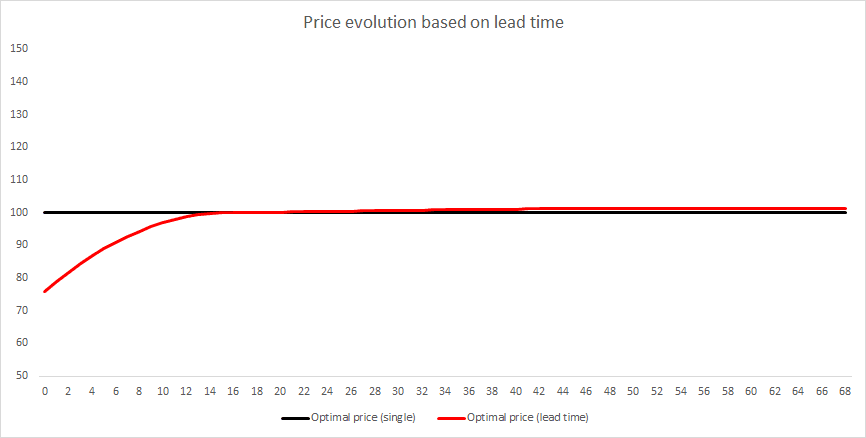
Airlines raise prices as a date gets closer, and our data science team explains why the same logic does not carry over. Airlines operate in an oligopolistic market, and business travel with its loyalty programs pushes it even closer to a monopolistic one. Short-term rentals sit much closer to perfect competition, which is why dynamic pricing for vacation rentals follows a very different lead time pattern.
There is one exception worth knowing. When a market’s forecast is revised upward after a sudden surge in demand, the chance of booking rises even though less time remains, and a last minute price increase can make sense.
Urban markets tend to have shorter booking windows, so discounts should kick in closer to check-in and not too early. For 1BR vacation rentals in Chicago, our optimization recommends starting last minute discounts closer to the check-in date than a one-size-fits-all approach would. Checking what competitors in your area do, for example through a competitive analysis on Airbnb, shows you where the local discount window opens.
Traditional vacation destinations, where guests book far in advance, work the other way around. Aggressive far out premiums may hurt you there, and last minute discounts may need to start earlier than they would in a city.
The seasonal pattern holds a surprise. Our data science team’s analysis suggests that both low and high seasons tend to have smaller last minute discounts than the shoulder season, for two different reasons.
In low season, the algorithm already recommends lower prices, and the probability of booking does not change much as check-in gets closer. In high season, most competitors are likely to be booked already, so your own probability of booking does not fall sharply with time, which makes the case for a small discount. That leaves the shoulder season with the larger last minute discounts.
By default, listings on Hyper Local Pulse use Market Driven (Balanced), which applies the same last minute adjustments your competitors show. If Balanced discounts too much or too little for you, Conservative and Aggressive tone it down or turn it up. Listings still on the old algorithm get a gradual 30% last minute discount over the 15 days before check-in.
When you want fixed rules instead, the help center lists three options, each with an example:
Custom last minute settings cover up to 90 days. Minimum Last Minute Prices supports up to 5 rules, so you can step the price floor down as check-in approaches instead of using a single hard cutoff. For tiered discounts, such as different discounts at 30, 14 and 7 days out, the Step Last-Minute Discount option in Occupancy Based Adjustments is the place to build them. The same options are available at the listing, group and account level, and you can apply last minute discounts from the Customizations settings.
A date-specific override with a fixed price takes priority over last minute prices. When no date-specific override applies, last minute and orphan day prices are used, and if both are discounts, the larger discount applies.
Far out prices exist because demand for distant dates is uncertain, and big events may not be announced yet. Keeping rates high far out means you are not the first home to book before a large event is announced, and any booking you do get comes at a higher rate.
Far out settings have two limits. They start no earlier than 60 days from today, and the premium is capped at 20%. A 10% premium after 90 days, applied gradually over 60 days, reaches 10% on day 150. Minimum Far Out Prices supports up to 5 rules, so the price floor can step up the further out a date is. Listings on the old algorithm get a gradual 20% premium over seven months after 30 days, and a flat 20% premium after 240 days.
The help center notes that most mid-term rentals do not use last minute discounts and suggests setting Last Minute Prices to No Last Minute Discount. If you want shorter stays to be bookable close to check-in instead, you can set up to three last minute minimum night rules.
Last minute pricing is a customization that lets you fine-tune the prices of dates that are close to check-in, so you can stay competitive in your market and still protect revenue. In PriceLabs you can choose a Fixed price, a % Flat discount or premium, a % Gradual discount or premium, No last minute adjustment, or Market Driven. Market Driven is available on listings that use Hyper Local Pulse and applies adjustments based on real-time market trends.
Custom last minute price settings in PriceLabs cover up to 90 days before check-in. If you do not customize anything, listings on Hyper Local Pulse use Market Driven (Balanced) by default, and the numbers change every day as we observe market trends. Listings on the old algorithm get a gradual 30% last minute discount over the 15 days before check-in.
Far out prices in PriceLabs start no earlier than 60 days from today, and the premium is capped at 20%. For example, a 10% premium after 90 days, applied gradually over 60 days, reaches 10% on day 150. We keep far out rates high because demand for distant dates is uncertain, and large events may not have been announced yet.
For short-term rentals, our analysis of several markets shows that prices should generally come down as the stay date approaches, because each day without a booking lowers the chance of getting one. The exception is a sudden surge in demand that revises the market forecast upward, which can justify raising the price even with less time left. Most mid-term rentals skip last minute discounts altogether, and the help center suggests setting Last Minute Prices to No Last Minute Discount for them.
Set a minimum price. The help center recommends one so that prices do not drop too low during low seasons or last minute discounts. You can also set Minimum Last Minute Prices, which adds a separate price floor for last minute days and supports up to 5 rules, so the floor steps down as check-in approaches instead of dropping at a single cutoff.
The Last Minute Prices customization does not support tiered discounts, so a step-based structure has to be built elsewhere. The Step Last-Minute Discount option in Occupancy Based Adjustments is where you can set different discounts at 30, 14 and 7 days before check-in.
Want to learn what PriceLabs can do for you? See for yourself with a free trial. Get started now!