
Table of Contents
Updated : Mar 23, 2026
Airbnb launched one of its most requested hosting features in the United States: Seasonal Cancellation Policies. The feature was announced in Airbnb’s Q4 2025 Fall Release and has been rolling out country by country since. For the first time, hosts can now set different cancellation policies on different calendar dates, all within a single listing. Until now, every reservation on your listing was governed by a single policy year-round. That meant accepting the same level of cancellation risk in July as in November, whether your calendar was packed with premium bookings or sitting half-empty. The new seasonal feature changes that fundamentally.
What Are Seasonal Cancellation Policies?
Seasonal Cancellation Policies allow you to override your listing’s default cancellation policy for any specific date or date range directly from your Airbnb calendar. Bookings that fall within a date-range override will use that policy; all other dates continue under your main listing policy.
Dynamically Price Your Property and Get FREE Custom Reports Tailored To Your Property!
Use PriceLabs Dynamic Pricing to competitively and dynamically price your property according to demand shifts and analyze past performance to set a strong pricing strategy for your property.
Create your Account NowThe two most powerful use cases, according to Airbnb and early adopters, are:
- Stricter policies for future high-demand dates — such as a FIFA World Cup match night or a major concert weekend — to protect premium bookings from last-minute cancellations.
- More flexible policies for last-minute unbooked dates — to improve search visibility and reduce friction for guests who are on the fence about booking.
There is also an important interaction with Airbnb’s Reserve Now, Pay Later feature (introduced in 2025). Flexible and Moderate are the only policies that allow guests to defer payment until a few days before check-in. With seasonal policies, you can now restrict that option to genuinely last-minute, unbooked dates only — while keeping the rest of your calendar on your preferred stricter setting.
How to Set a Seasonal Policy: Step-by-Step
The entire process happens within your Airbnb calendar on desktop. As of the launch date (March 20, 2026), this feature is not yet available on the Airbnb mobile app.
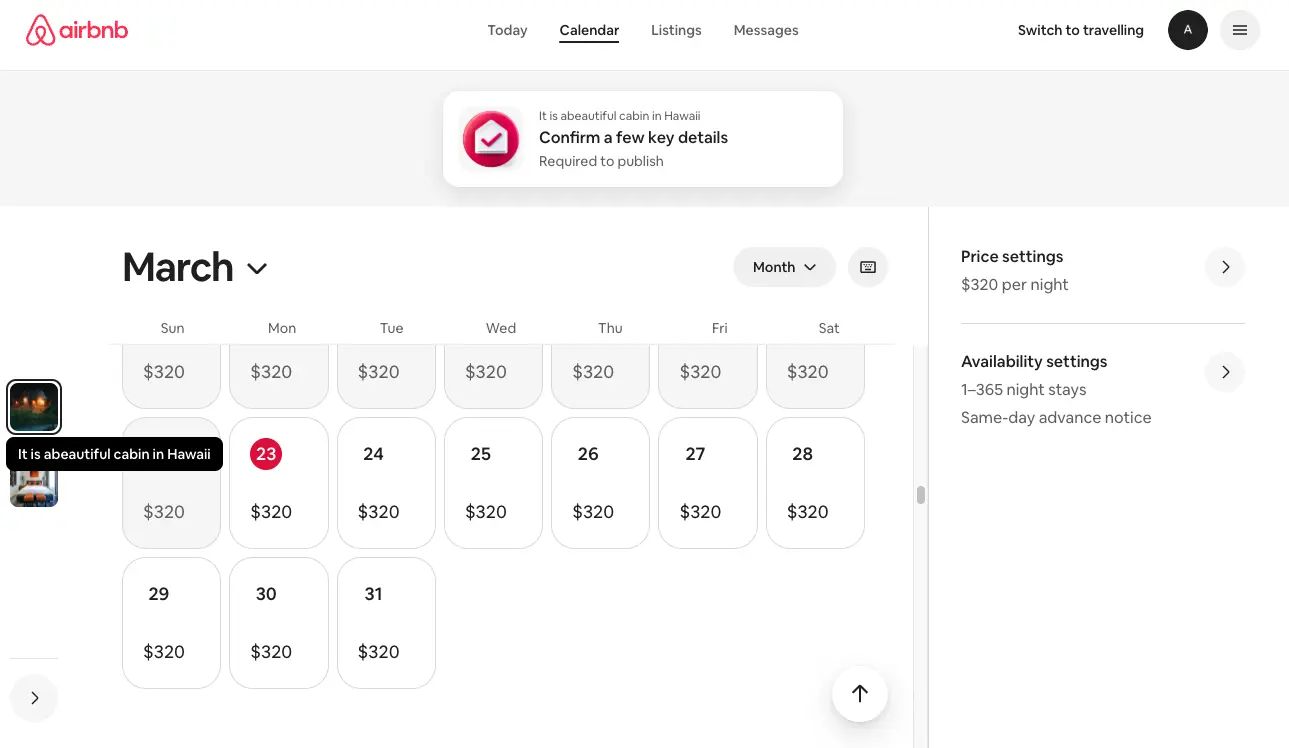
Step 1: Open Your Calendar
Go to your listing and open the Calendar view.
Step 2: Select the Date Range
Click on a single date, or select a range by clicking the first date and then Shift-clicking the last date in the range.
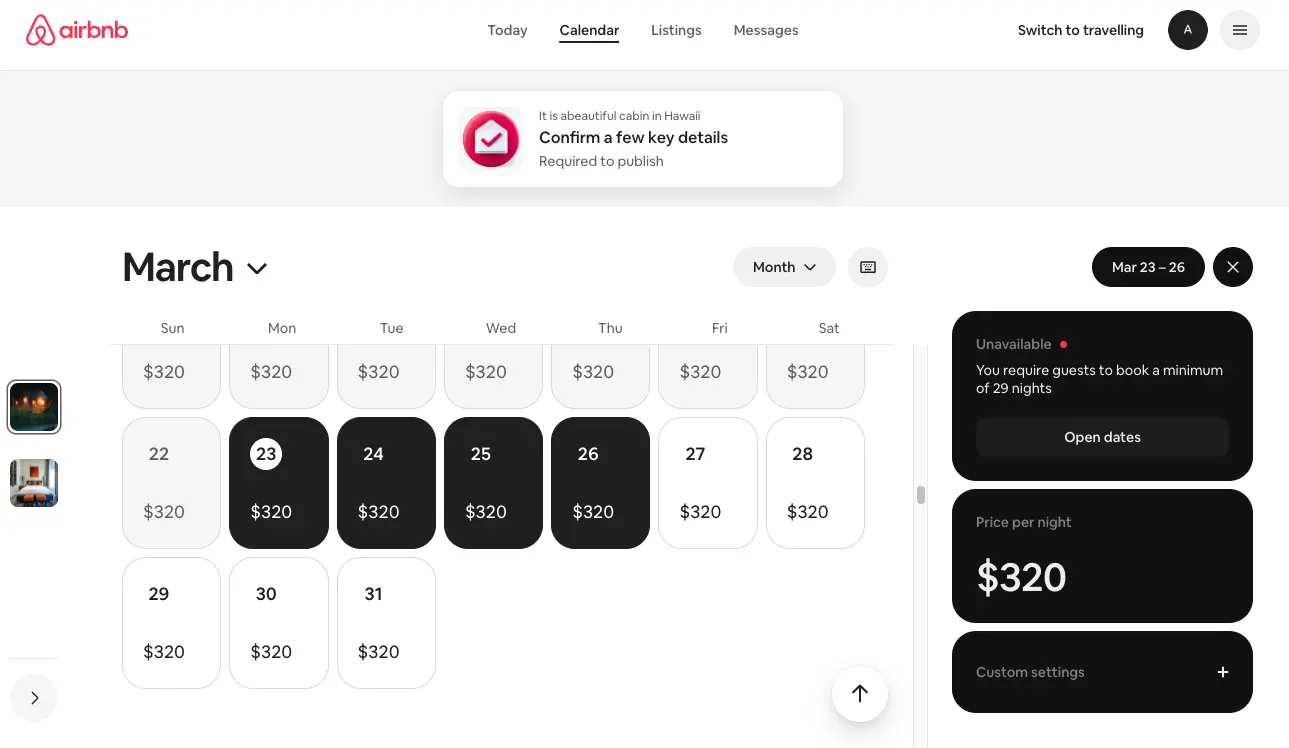
Step 3: Open Custom Settings
Three black action boxes will appear on the right side of your screen. Click the bottom one: “Custom Settings.” This is the same panel used to set custom promotions — a powerful Airbnb tool in its own right for filling last-minute calendar gaps.
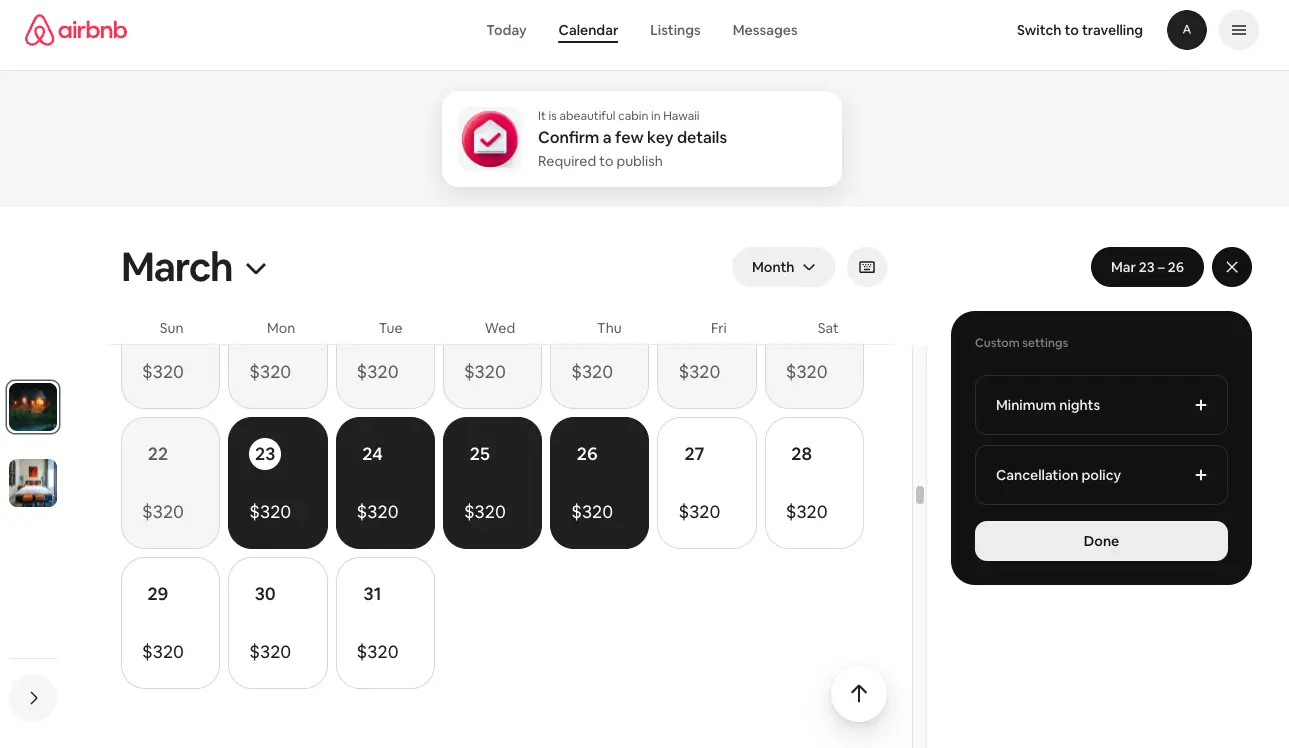
Step 4: Choose Your New Policy
Your current policy will be displayed. Select the policy you want to apply to the chosen date range. Your options are Flexible, Moderate, Limited, and Firm. (Strict is no longer available for new assignments.)
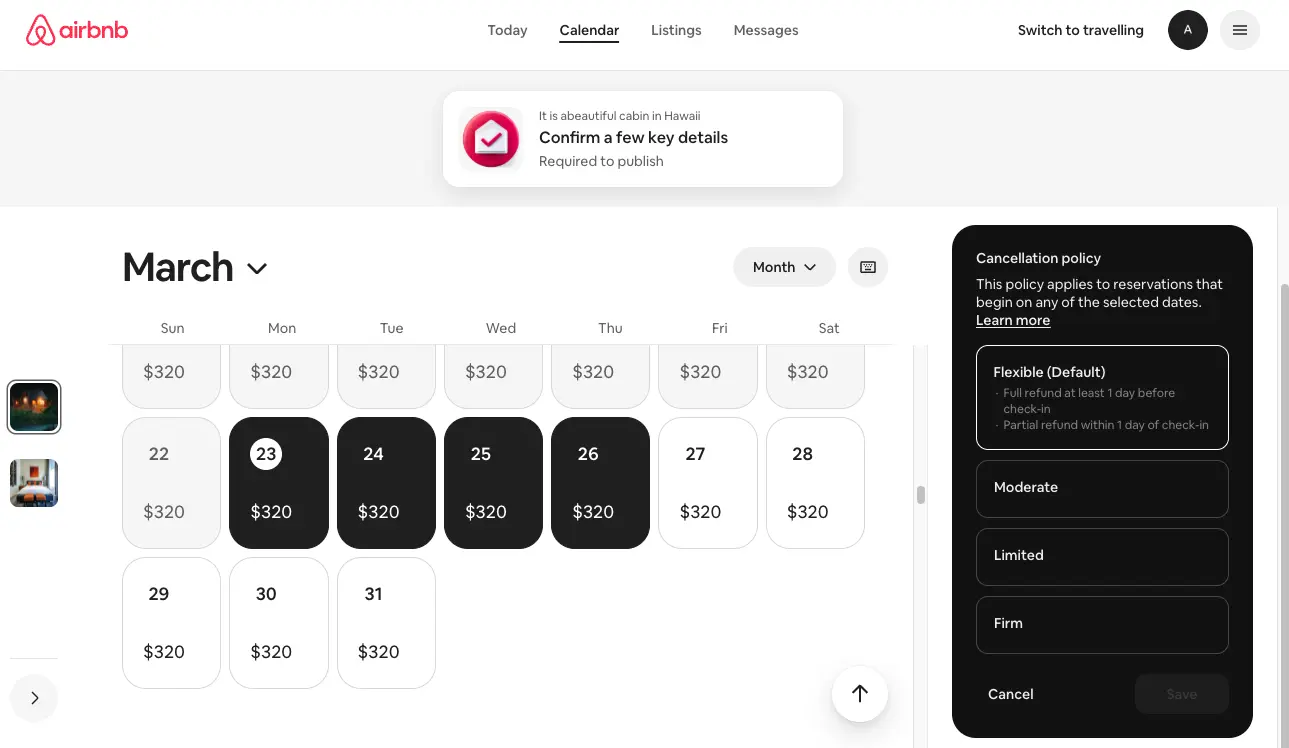
Example: If your default listing policy is Firm, but you have unbooked dates 10 days out, you could switch those dates to Limited — which still gives you partial refund protection (guests get a partial refund only 7–14 days before check-in) while improving your search ranking for those late-availability dates.
The new policy will appear in the calendar field for the selected dates. If you are also running a custom promotion on the same dates, both will be visible. Click Done, and the seasonal policy is live.
Dynamically Price Your Property and Get FREE Custom Reports Tailored To Your Property!
Use PriceLabs Dynamic Pricing to competitively and dynamically price your property according to demand shifts and analyze past performance to set a strong pricing strategy for your property.
Create your Account NowAvailable Cancellation Policies
Here is a summary of the four policies available for seasonal assignment, along with their refund terms:
| Policy | Full Refund Deadline | Partial Refund Window | Best For |
|---|---|---|---|
| Flexible | Up to 24 hrs before check-in | N/A (no partial; non-refundable inside 24 hrs) | Last-minute open dates; max visibility |
| Moderate | Up to 5 days before check-in | 50% refund inside 5 days | Shoulder season; Reserve Now Pay Later dates |
| Limited ★ New | Up to 14 days before check-in | 50% refund 7–14 days before check-in | Good balance of protection & flexibility |
| Firm | Up to 30 days before check-in | 50% refund 7–30 days; 100% kept inside 7 days | Peak season & high-demand event dates |
Note: Airbnb’s algorithm is not publicly documented, but hosts widely observe that more flexible policies tend to improve listing placement in search results.
Know Your Booking Lead Time First
Cancellation policies are a powerful lever, but only if you understand your own booking window. Airbnb calls this your Booking Lead Time — the average number of days in advance guests book your listing.
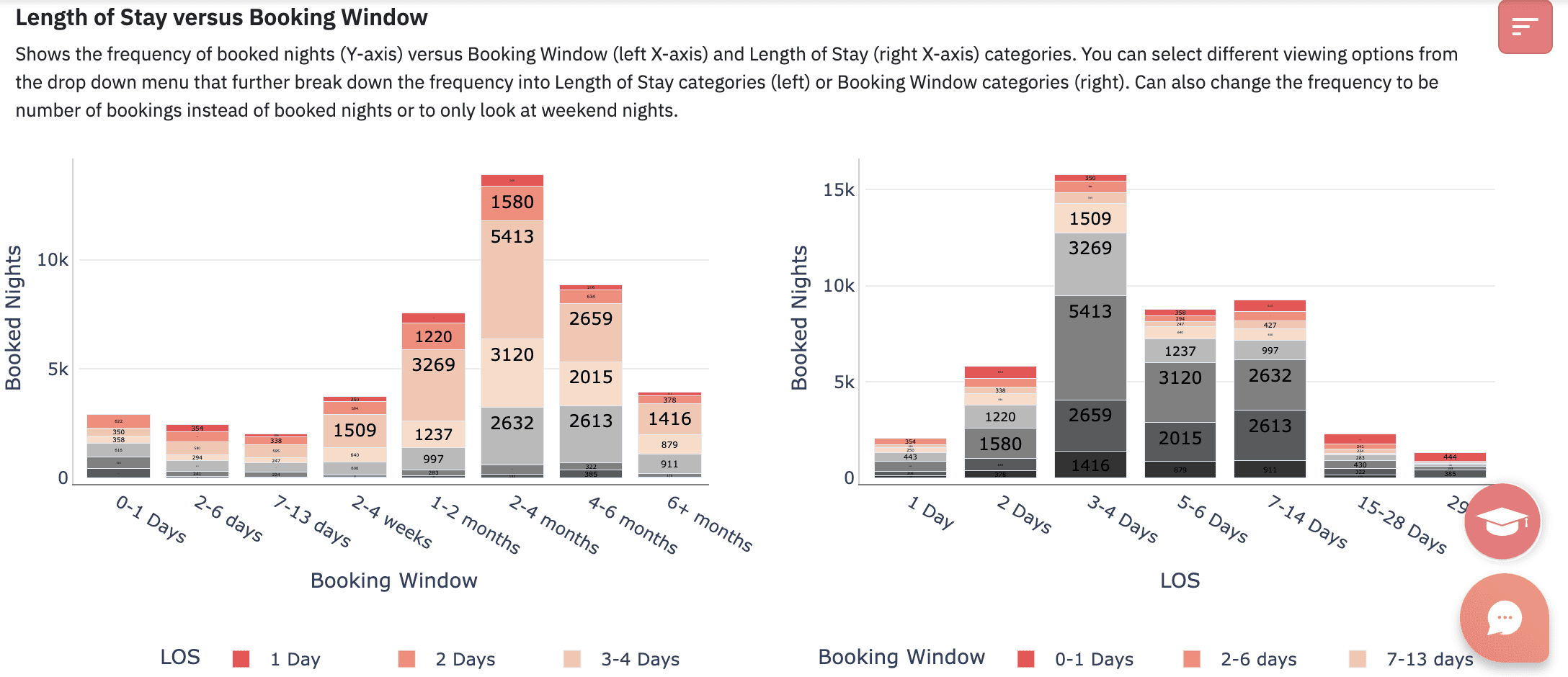
If you have Airbnb’s professional hosting tools enabled, you can view your booking lead time directly in your Airbnb account right now. This data should inform your seasonal policy decisions:
- If guests book 30–90+ days out on average, a Firm policy on future dates makes strong sense — those bookings are valuable and far from check-in.
- If your listing fills primarily within 0–14 days, a Flexible or Moderate policy year-round may serve you better than layering complexity.
- For a mixed booking window, seasonal policies are ideal: Firm for dates booked far out, Flexible or Moderate for dates within your typical last-minute window.
Strategic Recommendations for Hosts
1. Use Stricter Policies for Events and Peak Dates
Apply Firm (or Limited) policies to specific event dates — major sports events, concerts, local festivals, public holidays — where demand is predictably high and a last-minute cancellation would be costly to replace. Set these in advance, before the booking dates open.
2. Use Flexible or Moderate for Last-Minute Gaps
For dates that are currently unbooked and within your typical last-minute window (typically 7–14 days out), switch to Flexible or Moderate. This improves your search ranking for those dates and removes the cancellation-policy barrier for guests who are comparing options.
3. Control Reserve Now, Pay Later Exposure
The Reserve Now, Pay Later feature — where guests can hold a booking without paying up front — is only available under Flexible and Moderate policies. With seasonal policies, you now have direct control: enable deferred payment only for dates where you genuinely want to encourage last-minute bookings, and block it on your high-value future dates by keeping those on Firm.

4. Combine with Custom Promotions
Custom promotions (percentage discounts set on specific date ranges via the same Custom Settings panel) stack with seasonal cancellation policies. A last-minute discount combined with a Flexible or Moderate policy on open dates is one of the most effective ways to fill calendar gaps.
Dynamically Price Your Property and Get FREE Custom Reports Tailored To Your Property!
Use PriceLabs Dynamic Pricing to competitively and dynamically price your property according to demand shifts and analyze past performance to set a strong pricing strategy for your property.
Create your Account NowRecommended Policy Setup by Property Type
| Property Type | Peak / Event Dates | Shoulder Season | Last-Minute Gaps |
|---|---|---|---|
| Beach / Hill Resort | Firm | Limited or Moderate | Flexible or Moderate |
| City Apartment | Limited or Moderate | Moderate | Flexible |
| Event-Adjacent Property | Firm (event nights) | Moderate | Flexible |
| Unique / High-Demand Stay | Firm | Limited | Moderate |
Using PriceLabs to Complement Your Seasonal Policy
Setting the right cancellation policy for each date range is the risk side of your revenue strategy. To maximise what you actually earn from those dates, pair seasonal policies with a dynamic pricing tool. PriceLabs is one of the most widely used platforms among professional short-term rental hosts for exactly this purpose.
How PriceLabs and Seasonal Policies Work Together
Your cancellation policy controls the risk of each booking. PriceLabs controls the rate. Aligning them by date range creates a complete, automated revenue strategy:
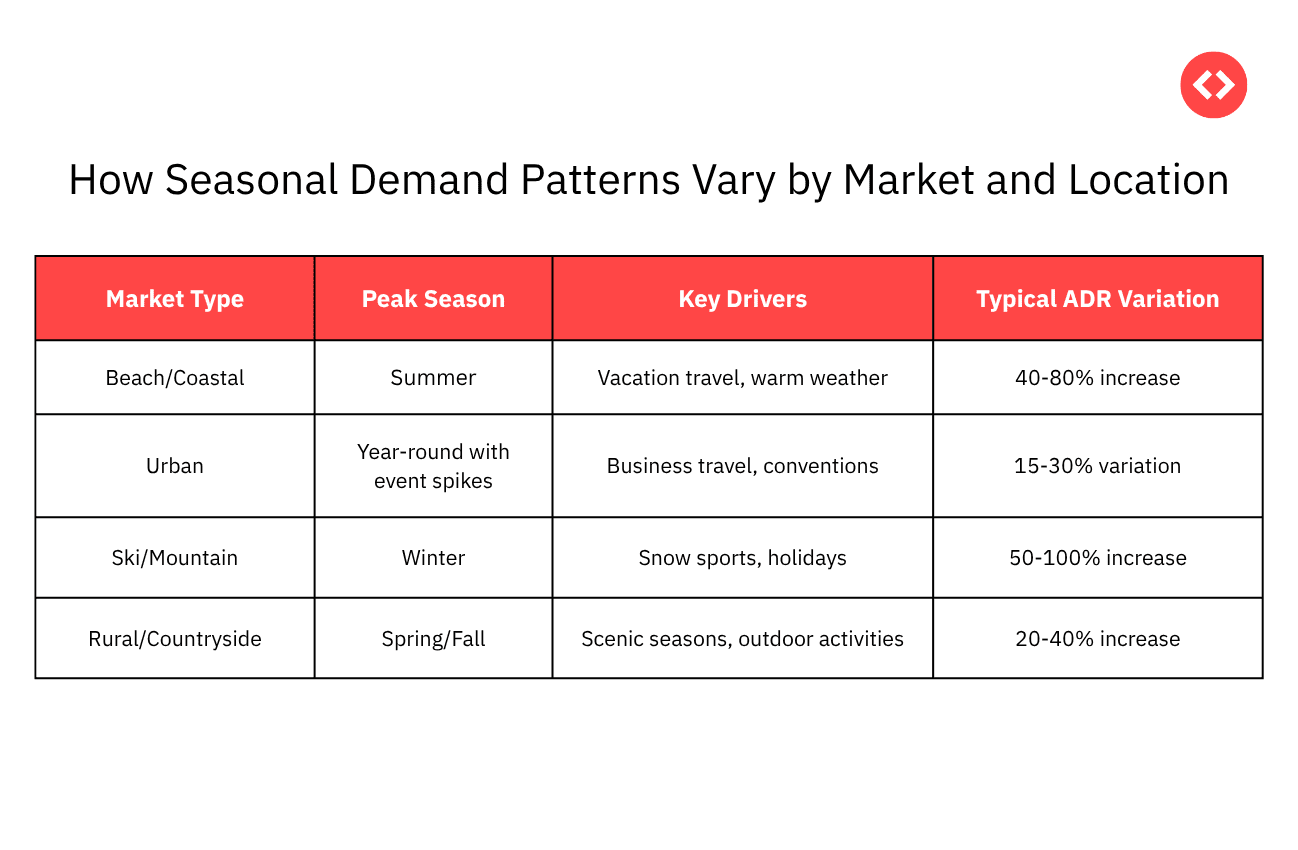
- For event and peak dates: PriceLabs raises rates to capture maximum demand. Your Firm seasonal policy ensures those premium bookings are not cancelled without consequence.
- For last-minute unbooked dates: PriceLabs’ Last-Minute Discounts automatically reduce rates as check-in approaches. Your Flexible or Moderate seasonal policy removes the guest’s final hesitation to book.
- Importantly, seasonal cancellation policies are “sticky”: when PriceLabs (or any dynamic pricing tool) updates your rate for a date, the cancellation policy you have set for that date does not change. The two systems operate independently.
Key PriceLabs Features for Seasonal Hosts
| PriceLabs Feature | How It Complements Seasonal Cancellation Policies |
|---|---|
| Dynamic Base Price | Adjusts your nightly rate automatically using live market data — so your Firm-protected peak dates are also priced to reflect actual demand. |
| Seasonal Adjustments | Set price multipliers for specific date ranges. Mirror these to your Airbnb seasonal policy windows so pricing and policy are always aligned. |
| Last-Minute Discounts | Automatically reduces rates as check-in approaches for open dates — designed to work in tandem with a Flexible or Moderate seasonal policy on those nights. |
| Far-Future Boosts | Increases prices for dates booked well in advance. Pairs directly with a Firm policy on those same future dates to protect the premium booking. |
| Market Dashboard | Shows your occupancy and average daily rate vs. competitors — useful for validating whether your seasonal policy mix is helping or hurting bookings. |
Note on PMS compatibility:
Seasonal cancellation policies set directly in Airbnb behave like custom promotions and are not overwritten by Property Management System (PMS) updates. PriceLabs and other dynamic pricing tools also do not override them. Automation of seasonal policy assignment via third-party tools is expected in the future but is currently a manual process in Airbnb.
Frequently Asked Questions
1. Are seasonal cancellation policies available worldwide?
Seasonal Cancellation Policies were announced as part of Airbnb’s Q4 2025 Fall Release and are rolling out country by country. Check your Airbnb calendar to see if the Custom Settings panel shows the cancellation policy option — that’s the quickest way to confirm availability in your market.
2. Will my dynamic pricing software override the seasonal cancellation policy?
No. Seasonal cancellation policies are “sticky”: once set, they are not affected when a dynamic pricing tool (such as PriceLabs, Wheelhouse, or Beyond) updates the nightly rate for that date. Price and policy operate independently.
3. Can I use seasonal policies if I use a Property Management System (PMS)?
Yes. Because seasonal policies are set directly in Airbnb (via the same Custom Settings panel as custom promotions), they behave like promotions and are not overwritten by PMS calendar syncs. However, automation of seasonal policy assignment through PMS or pricing tools is not yet available — it remains a manual process in Airbnb as of launch.
4. Can I set seasonal policies on the Airbnb mobile app?
Not yet. As of the March 2026 launch, this feature is only available on the desktop version of Airbnb. Mobile app support has not been announced.
Conclusion
Seasonal Cancellation Policies give hosts a level of control that simply was not possible before March 2026. You can now protect your most valuable bookings with stricter terms, improve search visibility for quiet periods with more flexible ones, and finally manage the Reserve Now, Pay Later exposure in a targeted way.
The hosts who will benefit most are those who take an active approach: check your booking lead time data, map your demand calendar, and configure date-range policies before those dates are open for booking. Pair the feature with PriceLabs for dynamic pricing on the same date windows, and combine it with custom promotions to fill last-minute gaps.
The feature is rolling out globally. If it’s not yet in your market, it is coming. Now is the time to build your seasonal policy strategy so you can deploy it the moment it goes live.