
Table of Contents
Updated : Jan 29, 2026
When we first built Listing Optimizer, we had a very specific user journey in mind.
We imagined hosts treating it like a high-performance SEO dashboard—the kind of tool you open every morning with a cup of coffee. We pictured them obsessively tweaking title lengths to hit the perfect character count, A/B testing amenity descriptions, and logging in daily to chase a 1% lift in conversion. We thought we were building a scalpel for surgical optimization.
But after watching how hosts actually use the tool, we realized we were wrong.
They aren’t using it as a daily optimization tool. They are using it as a decision-making and prioritization compass.
Most software tools in our industry focus on showing users what is possible—all the knobs you can turn and levers you can pull. But looking at our users’ actual behavior reveals something more interesting: hosts don’t want another job. They don’t want to be “optimizers.” They want to be confident business owners.
Here is how the Listing Optimizer is actually being used in the wild.
With PriceLabs Listing Optimizer You Can Analyze The Quality Of Your Competitor's Listings.
With PriceLabs Listing Optimizer, you will be able to compare your listing with other listings guests would consider your competition and optimize your listing accordingly.
Create your Account NowThe Host Reality: Validation Over Optimization
We initially thought the primary value of the tool was “improvement.” In reality, for the vast majority of solo hosts, the primary value is validation.
Hosts are often operating on an island. Unlike a hotel manager with a revenue team, a host makes changes in a vacuum. If they change their main photo or rewrite their description, they often have a nagging fear: Did I just make it worse?
We see this in the usage patterns. The behavior isn’t the steady, linear “optimize listing a little bit every day” pattern we expected. Instead, it’s episodic. It’s triggered by specific moments of uncertainty.
Hosts use the Listing Optimizer primarily to answer three specific questions that have nothing to do with micro-optimization and everything to do with peace of mind.
1. “What needs attention right now?”
The first thing hosts look for isn’t a list of keywords to add; it’s the Health Score.
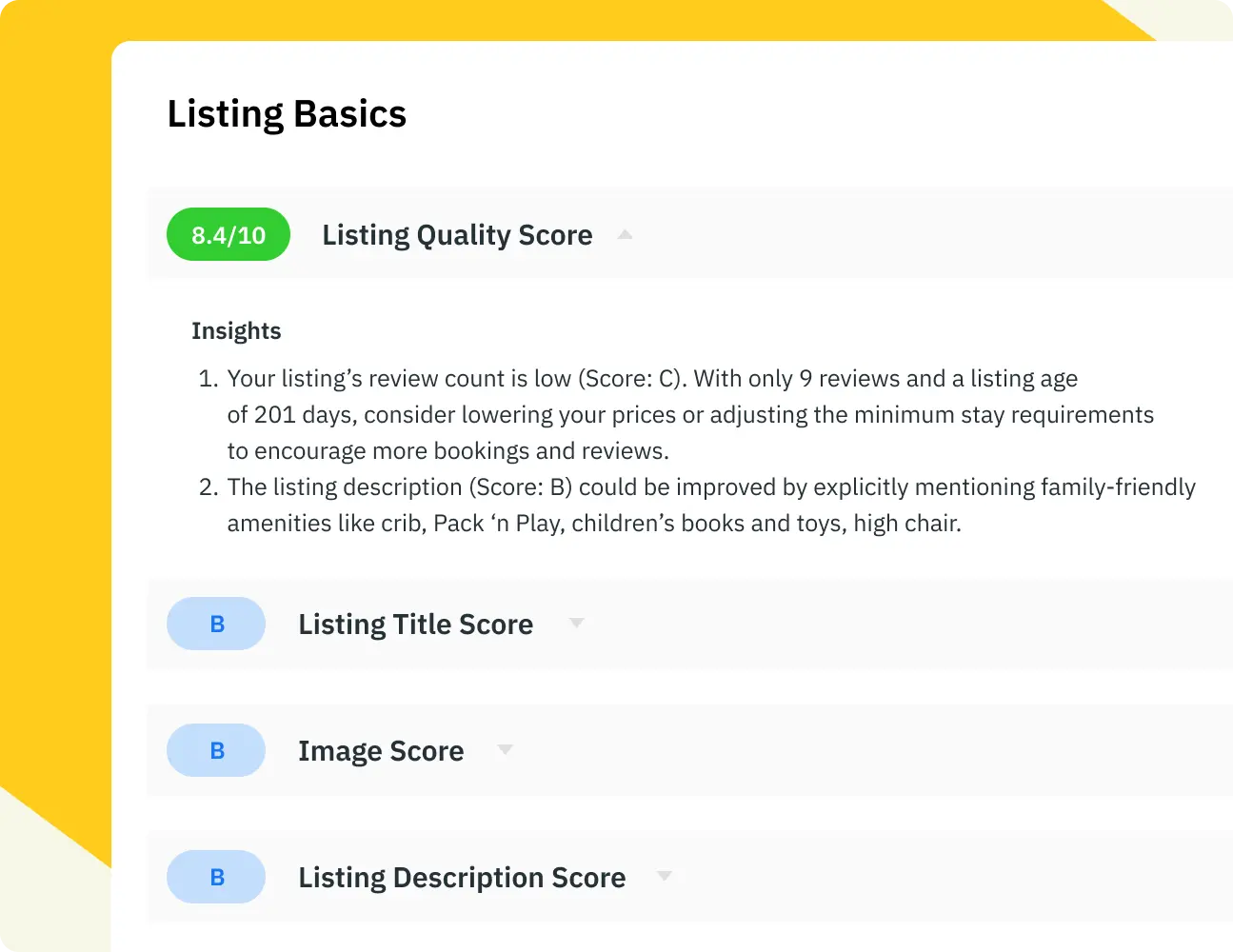
They use the score not as a gamified target to hit 100%, but as a binary signal: Is my listing healthy, or is it sick?
If the score is green, they often close the tab. That’s a success. They don’t spend 20 minutes trying to nudge a 90% to a 95%. They see the green score, get the validation that their listing is fundamentally sound, and go back to running their business.
However, if the score is red or yellow, that’s when the tool shifts from a “monitoring” system to a “prioritization” system. They don’t want to fix everything; they want to know the one or two big things dragging them down. Is it a lack of amenities? Is the title too short? They use the tool to cut through the noise and find the bleeding wound.
With PriceLabs Listing Optimizer You Can Analyze The Quality Of Your Competitor's Listings.
With PriceLabs Listing Optimizer, you will be able to compare your listing with other listings guests would consider your competition and optimize your listing accordingly.
Create your Account Now2. “Am I missing something obvious?”
The second most common behavior is benchmarking against neighbors, using the Top Performer Insights.
We thought hosts would use this to copy competitors. Instead, they use it to check their blind spots.
A host might think their listing is perfect because they have a great pool. But when they look at the Top Performer data, they might realize that the top 5 listings in their area all explicitly mention “High-Speed Remote Work WiFi” in their titles, and they don’t.
They aren’t looking to copy-paste; they are looking for the “obvious” market standards they might have missed. It’s a sanity check: Am I losing bookings because I forgot to check a box that everyone else checked?
3. “Is my listing at risk?”
This is the anxiety-reduction use case. We see hosts checking the tool after making changes to their Airbnb listings.
Let’s say a host updates their photos. In the “Expectation” model, they would wait a month to see if revenue goes up. In the “Reality” model, they run the Listing Optimizer immediately. They want to know if the computer vision algorithm “sees” the new photos as an improvement or a downgrade.
If the Listing Quality Grade holds steady or improves, they feel safe. If it drops, they revert the change. It’s a safety net that allows them to experiment without waiting for a bad month of revenue to tell them they messed up.
With PriceLabs Listing Optimizer You Can Analyze The Quality Of Your Competitor's Listings.
With PriceLabs Listing Optimizer, you will be able to compare your listing with other listings guests would consider your competition and optimize your listing accordingly.
Create your Account NowWhat They Don’t Do (And Why That’s Good)
Perhaps the most telling insight is what we don’t see.
They don’t make daily copy tweaks.
We don’t see hosts logging in every morning to change “Cozy Apartment” to “Charming Apartment” to see if it moves the needle. They intuitively understand (or perhaps simply don’t have the time to test) that constant meddling can sometimes hurt ranking stability more than help it.
They don’t obsess over micro-optimizations.
If a listing has a “Good” health score, hosts rarely fight to make it “Perfect.” They understand the law of diminishing returns better than we gave them credit for. Once the listing crosses the threshold of “competitive,” their focus shifts elsewhere—guest communication, cleaning operations, or pricing strategy.
Clarity Over Complexity
This divergence from our expectations is actually a positive signal. It means that the Listing Optimizer is solving a deeper problem than just “SEO.“
It is solving the problem of decision fatigue.
Hosting involves a thousand small decisions. Should I buy a new couch? Should I lower my cleaning fee? Should I rewrite my bio?
By treating the tool as a compass rather than a to-do list, hosts are protecting their time. They are using data to validate that they are on the right track, so they can stop worrying about the listing and start focusing on the guest.
The tool doesn’t need to be a daily habit to be valuable. In fact, its greatest value might be that it gives hosts the confidence to avoid checking their listings every single day.
With PriceLabs Listing Optimizer You Can Analyze The Quality Of Your Competitor's Listings.
With PriceLabs Listing Optimizer, you will be able to compare your listing with other listings guests would consider your competition and optimize your listing accordingly.
Create your Account Now