
Table of Contents
Updated : Apr 14, 2026
If you’re a small Airbnb host, you’ve probably felt that sinking feeling of wondering whether you priced last weekend correctly — or whether the listing down the street is cleaning up while yours sits empty. The short-term rental market moves fast. Demand spikes for events you didn’t know about, competitors quietly adjust their rates overnight, and the gap between a well-priced listing and an under-optimized one can be the difference between a thriving side income and a stressful hobby.
This is exactly the problem PriceLabs was built to solve. What began as a tool for automating nightly rates has grown into a full revenue management platform — one that gives individual hosts the same data-driven edge previously available only to large property management companies. Whether you’re managing one apartment or a handful of properties across different cities, PriceLabs arms you with instant earnings comparisons, real-time competitive intelligence, and automation that handles the repetitive work so you can focus on what you do best: hosting.
The Real Challenges Small Hosts Face
Running a short-term rental without the right tools isn’t just time-consuming — it creates genuine blind spots that cost money. Most small hosts navigate a combination of gut instinct, manual research, and whatever pricing guidance their OTA provides. This approach creates several compounding problems.
Without market visibility, hosts often set a base rate and leave it largely unchanged for weeks or months. That static rate might be appropriate for an average Tuesday in shoulder season, but it fails to capture the premium a local festival commands, undersells a holiday weekend, or becomes uncompetitive during a stretch of low demand when guests need a reason to choose your listing over others.
The manual alternative — refreshing competitor listings, building spreadsheets, tracking booking trends — is the kind of work that can easily consume several hours a week. And even then, the picture is incomplete, since a few visible listings aren’t a representative sample of the broader market.
PriceLabs removes these friction points at every level: research, benchmarking, pricing decisions, and distribution.
Revenue Estimator Pro: Know What Any Address Can Earn
Before you can optimize a listing, you need to know its earning potential. The PriceLabs Revenue Estimator Pro solves this with a tool that pulls live Airbnb listing data from within a 15 km radius of any address to instantly forecast monthly and annual revenue, average daily rate (ADR), and occupancy.

This is particularly powerful for hosts who are evaluating whether to convert a space, expand to a new city, or compare how the same property type performs across different markets. Rather than spending weeks scraping competitor listings and building your own projections, Revenue Estimator Pro gives you a location-specific picture within minutes.
You can model different scenarios side by side — comparing how a two-bedroom in one market stacks up against a similar property type elsewhere — and use the export feature to pull that data into your own planning documents. The result is a credible, data-backed revenue estimate grounded in what real listings are actually earning, not hypothetical averages.
For hosts who want a quick back-of-the-envelope calculation without signing up, PriceLabs also offers a free Revenue Estimator on our website.
Dynamic Pricing: The Engine Behind Competitive Rates
At the heart of PriceLabs is its Dynamic Pricing engine — an algorithm that recalculates and pushes nightly rates every day based on a combination of real-time demand signals, seasonality patterns, local events, booking pace, and what competitors are actually charging in your area. Unlike static seasonal pricing, it responds to the market as it shifts, not as it was expected to behave.
For small hosts, this means you stop leaving money on the table during high-demand periods and stop sitting on overpriced nights when the market softens.
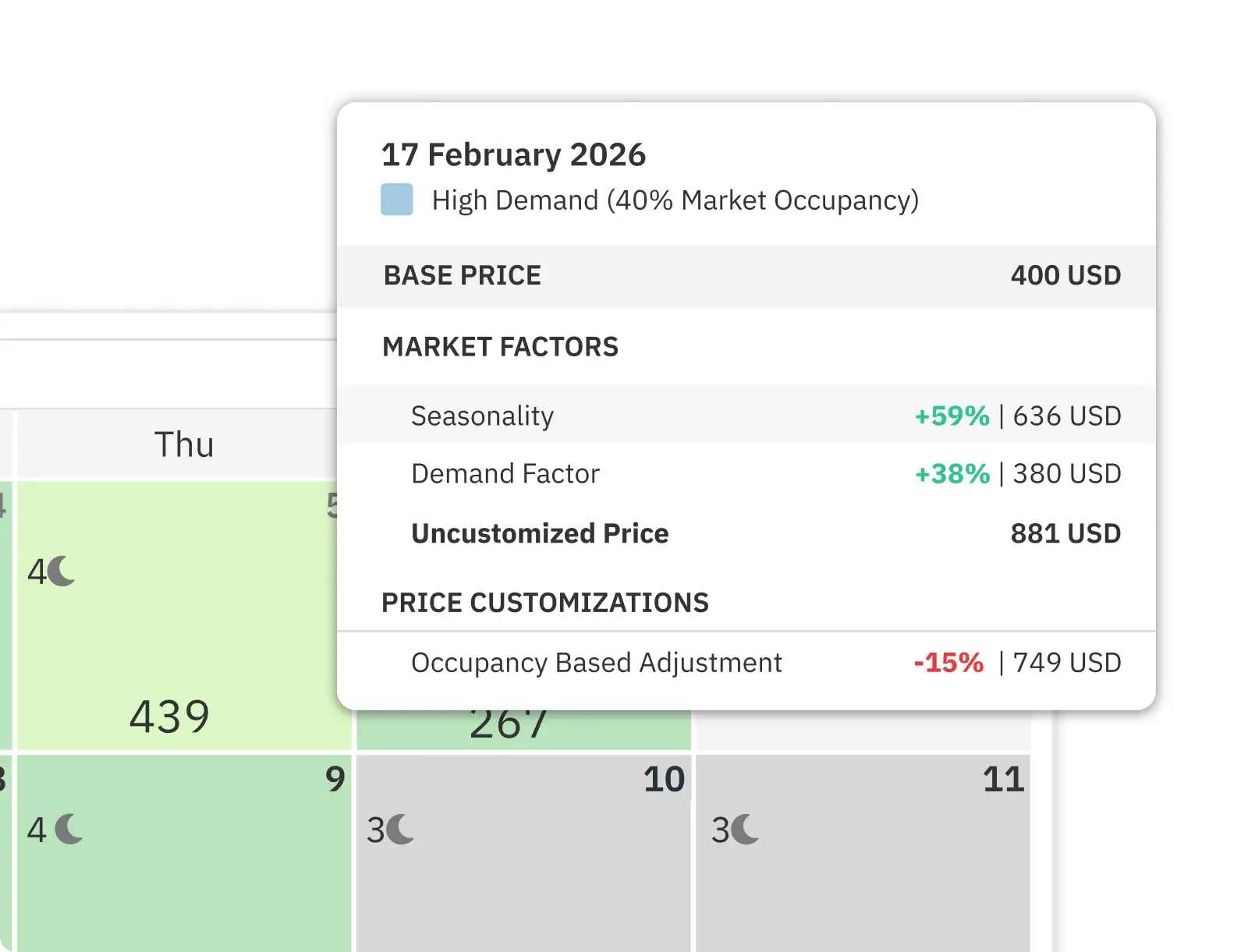
The system also supports more granular controls for hosts who want them. You can set base, minimum, and maximum prices to act as guardrails, configure last-minute discounts that automatically reduce rates as an unbooked date approaches, and manage orphan night pricing — those tricky one- or two-night gaps between bookings that are hard to sell at full price. The algorithm automatically applies a discount to these gaps, and you can customize how aggressive that discount is.
Prices and minimum stays sync daily across Airbnb, Vrbo, Booking.com, and 150+ connected property management systems and channel managers. This daily synchronization maintains rate parity — consistent pricing across every platform you’re listed on — which builds trust with guests and eliminates confusion caused by price discrepancies between OTAs. If you want a deeper look at how to use automation without over-customizing, the PriceLabs guide on Airbnb tips for hosts walks through exactly when to intervene manually versus when to let the algorithm do its job.
Market Dashboard: Benchmarking Against Your Competition
Knowing your own prices is one thing. Understanding how they compare to what’s actually happening in your local market is another. The PriceLabs Market Dashboard provides a real-time competitive snapshot that goes far beyond what you can piece together by manually browsing other listings.
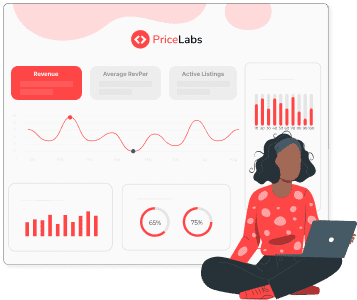
The dashboard tracks key performance indicators across your local market — occupancy rates, ADR, RevPAR (revenue per available room), and booking pace — and visualizes them in a format that makes trends immediately readable. You can see not just where the market is today, but how it’s moving and which segments are performing best.
What makes this particularly useful is the ability to build customized competitor sets. Rather than comparing yourself against every listing in a ten-kilometer radius, you can filter by bedroom count, amenities, property type, and location to create a relevant peer group. Your one-bedroom urban apartment doesn’t need to be benchmarked against a five-bedroom villa — and with custom comp sets, it won’t be.
Regular review of these benchmarks helps hosts identify two things: when they’re underperforming relative to similar properties, and when they’re outperforming in ways that suggest there’s room to raise rates. Both are actionable insights that are invisible without market data.
Portfolio Analytics and Report Builder: Deeper Insights for Growing Hosts
For hosts managing more than one listing — or those with ambitions to grow — Portfolio Analytics provides a unified view of performance across all properties. Instead of context-switching between individual listing dashboards, you get a centralized snapshot that makes it easy to compare properties, spot underperformers, and identify where your attention is most needed.
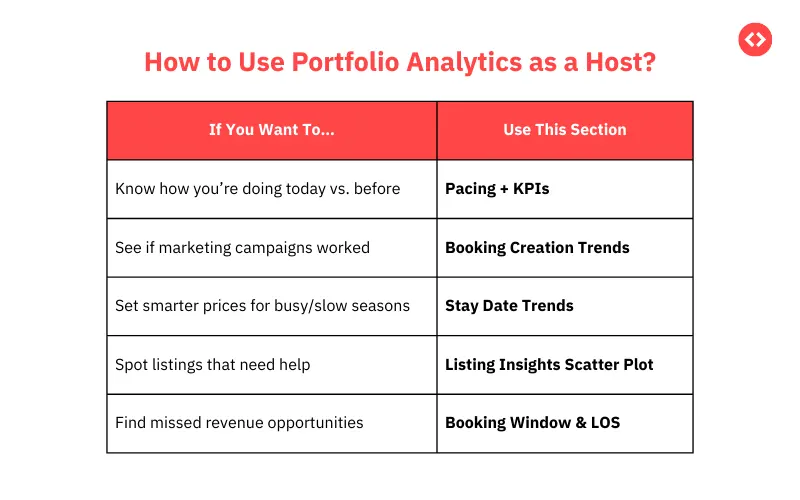
The Report Builder extends this further by enabling custom comparisons between your portfolio metrics and live market averages. This is where you can answer questions like: is my ADR keeping pace with what similar properties are earning, or am I systematically underpricing? Is my occupancy strong, but my revenue lagging, which might suggest my minimum stays are too restrictive? Are certain properties capturing demand that others aren’t, and why?
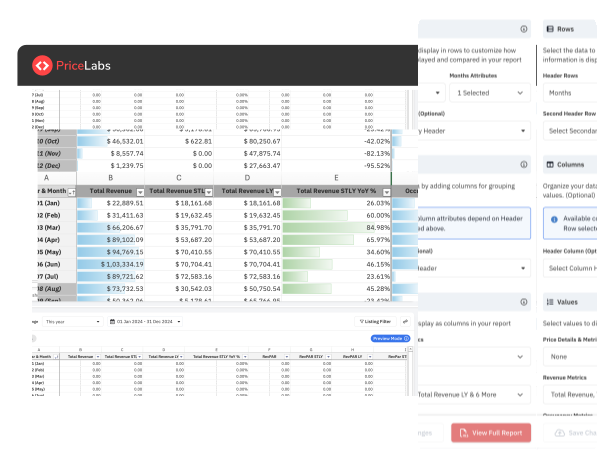
These insights are the foundation for smarter strategy adjustments — refining minimum stay rules, applying targeted last-minute discounts, and experimenting with pricing for different booking windows. The dynamic pricing reporting checklist that PriceLabs recommends is a useful framework for structuring these weekly reviews: checking key metrics, reviewing rule performance, and confirming channel parity before any major changes.
Automation: Getting Your Time Back
One of the most underappreciated benefits of PriceLabs isn’t a specific feature — it’s the cumulative time saved. For hosts who currently review and adjust rates manually, even a basic dynamic pricing setup can reclaim several hours per week. For hosts who haven’t been adjusting rates at all, the revenue impact of switching from static to dynamic pricing is often immediate and significant.
The automation stack in PriceLabs covers several areas beyond just nightly rates:
Rate rules and guardrails. You set your base price, minimum, and maximum, and the algorithm operates within those bounds. This means you never have to worry about the system pricing a premium weekend below your floor rate or pushing a slow Tuesday above what the market will bear.
Minimum stay optimization. The Minimum Stay Recommendation Engine analyzes your booking patterns and market demand to suggest appropriate minimum-stay restrictions for different time periods. During peak season, longer minimum stays protect your calendar from low-value short bookings. During slower periods, dropping to a one-night minimum can help fill gaps that would otherwise go empty.
Orphan night management. When a booking creates an unbookable one- or two-night gap in your calendar, orphan gap rules automatically apply a discount to make those nights attractive to short-stay guests. It’s a small thing that compounds across a full calendar year into meaningful incremental revenue.
Multi-channel sync. With 150+ PMS and channel manager integrations, every pricing update flows automatically to every platform. There’s no manual export, no copy-pasting rates between dashboards, no risk of one channel showing a stale price.
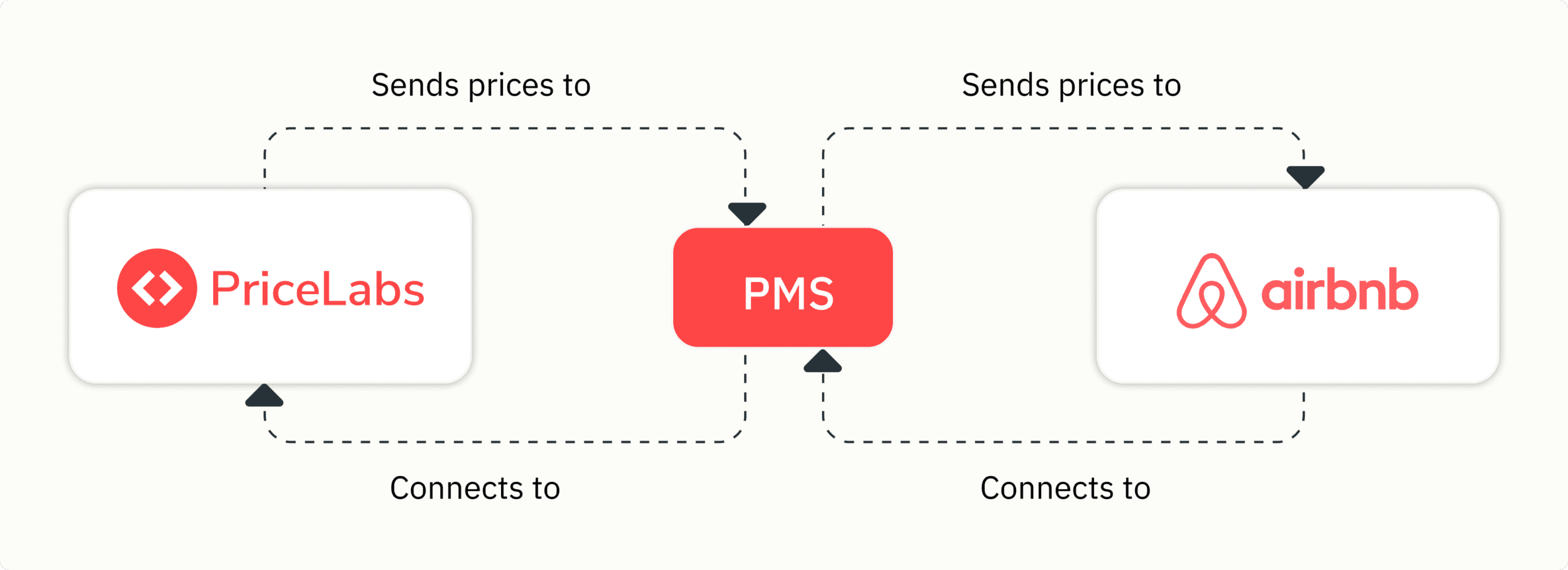
The result is a hosting operation that stays competitive with minimal active management — which is especially valuable for hosts who aren’t doing this full-time.
What the Workflow Actually Looks Like
Getting started with PriceLabs is designed to be incremental, not overwhelming. The onboarding path for a small host typically follows the same progression: connect your listing to PriceLabs via a direct Airbnb sync or your PMS, set a base price with minimum and maximum guardrails, build a relevant competitor set in the Market Dashboard, and then let the automation run.
From there, the recommended approach is to start with PriceLabs’ suggested default settings rather than customizing aggressively from day one. The algorithm needs a period to calibrate to your specific market and booking patterns, and too many manual overrides too early can obscure what’s actually working. The best practice guidance from PriceLabs is clear on this: there’s a meaningful difference between relying on automation to do its job and knowing when genuine local context requires human intervention.
Once the baseline is running, the ongoing time commitment drops substantially. A weekly review of Portfolio Analytics — checking ADR, occupancy, and RevPAR trends against market averages — is typically enough to stay informed and catch any issues before they compound. Ahead of major events or seasonal shifts, it’s worth refreshing your comp set and reviewing your minimum stay rules. Beyond that, the system runs itself.
Key Metrics to Track
Understanding which numbers actually matter helps hosts use PriceLabs more effectively and make better decisions from the data it surfaces.
ADR (Average Daily Rate) is the average nightly rate you earn across all booked nights. It’s the primary indicator of pricing strength and the first number to watch if you suspect you’re underpricing.
Occupancy rate is the percentage of available nights that are actually booked. High occupancy with low ADR often signals that rates are set too low — the listing is filling easily because it’s underpriced. Low occupancy with high ADR might suggest that rates are too ambitious for current demand or that minimum-stay requirements are too restrictive.
RevPAR (Revenue per Available Room) combines both of the above into a single number that reflects your overall revenue efficiency. It’s calculated by multiplying ADR by occupancy rate, which means it captures both the price you’re earning and how often you’re earning it. RevPAR is the clearest single indicator of whether your pricing strategy is working.
Booking pace and pickup tracks how far in advance bookings are coming in relative to historical patterns. A slowdown in booking pace is often an early signal to adjust pricing or minimum stays before the calendar problem becomes obvious.
The PriceLabs dynamic pricing reporting checklist recommends reviewing these metrics weekly at minimum, with a more detailed monthly review of how your portfolio is trending against market benchmarks.
Best Practices for Getting the Most from PriceLabs
A few principles consistently separate hosts who see strong results from those who underutilize the platform:
Start conservative, adjust gradually. Applying too many custom rules before you understand your market’s baseline creates noise that makes it hard to diagnose what’s working. Let the recommended settings run for a few weeks, then layer in adjustments one at a time so you can see their effect clearly.
Map listings accurately across OTAs. Mismatched listings create duplicate data problems and can undermine rate parity. Take the time at setup to confirm each listing is correctly matched to avoid downstream issues.
Use the free trial fully. The 30-day free trial gives you a clean window to validate the platform’s accuracy against your market before committing. Use it to compare PriceLabs’ suggestions against your intuition, and flag dates where you have local knowledge the algorithm might not yet have.
Refresh comp sets before major events and seasonal transitions. The competitor landscape shifts — new listings come online, existing ones change their positioning, and major events change who you’re competing with. Refreshing your comp set before high-demand periods ensures your benchmarks remain relevant.
Use Market Dashboard pacing reports to test small rule changes. Before applying a new rule — say, a longer minimum stay for peak weekends — use the pacing data to understand whether the rule is likely to help or create orphan gaps. Small, evidence-based adjustments compound well over time.
Frequently Asked Questions
How accurate are Airbnb revenue estimates from PriceLabs? Revenue Estimator Pro uses live and historical Airbnb market data drawn from listings within a 15 km radius to produce location-specific income estimates. The projections reflect what comparable listings are actually earning, not hypothetical market averages.
Can I compare income potential between different cities or property types? Yes. Revenue Estimator Pro and the Market Dashboard both support cross-market comparisons, letting you model expected earnings and occupancy across cities or between different property types.
How does dynamic pricing reduce manual workload? Dynamic Pricing recalculates and pushes updated rates every day based on demand, competitor activity, and market conditions. This removes the need for manual rate checks and adjustments, which for active hosts can otherwise consume several hours per week.
How can I customize competitor sets? In the Market Dashboard, you can filter listings by bedroom count, location radius, amenities, and property type to build a comp set that reflects your actual competitive peer group rather than a generic local average.
Is PriceLabs only useful for hosts with multiple listings? No — the platform is designed to work for single-listing hosts as well. The pricing algorithm, Market Dashboard, and Revenue Estimator Pro all provide value regardless of portfolio size, and the pricing plans are structured to scale with the number of listings you manage.