Table of Contents
Updated : Apr 6, 2026
Managing underperforming Airbnb rentals often means drowning in manual tasks—adjusting prices by hand, coordinating cleaners through endless texts, and fielding repetitive guest questions at all hours. The good news? Modern Airbnb listing optimizer tools can identify which properties are lagging and automate the workflows that consume your time.
By integrating dynamic pricing platforms, analytics dashboards, and task automation software, hosts can pinpoint underperformance early, implement data-driven fixes, and scale their portfolios without proportionally increasing workload. This guide walks you through the exact systems, tools, and best practices that transform reactive, manual Airbnb management into a streamlined, profitable operation.
Bonus Read: Vacation Rental Revenue Management: The Complete Guide for Hosts and Property Managers
Understanding Underperformance in Airbnb Rentals
Underperformance in the short-term rental market means your listing consistently trails behind local competitors in occupancy rates, nightly pricing, or guest satisfaction scores. A property might look busy on paper but still underperform if it’s booked at rates below market potential or attracting guests who leave mediocre reviews.
Recognizing underperformance early is crucial because it directly affects cash flow and the long-term reputation of the property. Listings that lag often do so because of inefficient workflows—manual pricing that can’t keep up with demand shifts, delayed responses to guest inquiries, or inconsistent cleaning schedules that result in poor reviews.
Addressing these operational gaps quickly prevents revenue loss and allows hosts to focus on growth rather than firefighting daily issues.
Key Challenges Leading to Manual Work Overload
Airbnb operators face several operational bottlenecks that create excessive manual work and limit scalability. Fragmented systems force hosts to toggle between multiple booking platforms, spreadsheets, and communication channels, wasting hours on data entry and reconciliation.
Repetitive guest communication—sending check-in instructions, answering the same WiFi password question, requesting reviews—becomes unmanageable as portfolios grow. Manual key exchanges require coordination with guests’ unpredictable arrival times, while inconsistent cleaning schedules lead to last-minute scrambles and missed turnovers.
Updating prices manually across calendars means hosts either leave money on the table during high-demand periods or price themselves out during slow seasons.
Common pain points include:
- Juggling bookings across Airbnb, Vrbo, and direct channels without double-bookings
- Tracking maintenance requests through text messages and sticky notes
- Managing accounting and invoicing manually in spreadsheets
- Coordinating with cleaners via phone calls for every turnover
- Monitoring competitor pricing and adjusting rates, listing-by-listing
Identifying Underperforming Airbnb Listings
Pinpointing which listings are falling behind requires both qualitative observation and hard data. Telltale signs include below-market occupancy rates, frequent last-minute cancellations, a pattern of negative reviews citing cleanliness or communication issues, and consistently low guest ratings that drag down search rankings.

If a property sits vacant during peak season while similar nearby listings are booked solid, that’s a red flag. Persistent guest complaints about the same issue—outdated amenities, confusing check-in, slow responses—signal operational problems that manual workflows can’t solve at scale.
Analytics platforms like PriceLabs and PMS-integrated dashboards aggregate booking, pricing, and review data to measure your performance against local benchmarks. These tools surface listings with revenue or occupancy trailing the market average and highlight specific optimization opportunities.
A practical audit checklist includes:
- Review booking data and occupancy rates over the past 90 days
- Compare your nightly rates to similar properties within a one-mile radius
- Track average review score trends month-over-month
- Audit guest feedback for recurring issues like cleanliness, communication, or amenities
- Check your calendar for gaps during high-demand periods when competitors are fully booked
Dynamically Price Your Property and Get FREE Custom Reports Tailored To Your Property!
Use PriceLabs Dynamic Pricing to competitively and dynamically price your property according to demand shifts and analyze past performance to set a strong pricing strategy for your property.
Create your Account NowAutomating Pricing to Boost Revenue
Dynamic pricing is the automated adjustment of nightly rates based on real-time market conditions, demand fluctuations, and property-specific trends. Instead of manually updating calendars, dynamic pricing tools analyze competitor rates, local events, seasonality, and booking pace to set optimal prices that maximize both occupancy and revenue.
PriceLabs uses AI-driven recommendations combined with customizable rules, allowing hosts to set minimum rates, adjust for local events, and optimize for occupancy or revenue goals.

Setting up automated pricing involves:
- Integrating your PMS with PriceLabs or another dynamic pricing tool
- Setting base rates and minimum acceptable nightly prices for each listing
- Activating AI or rule-based adjustments to optimize for occupancy, local events, or seasonal trends
- Reviewing recommendations weekly during the first month to fine-tune settings
- Monitoring performance through automated reports to validate revenue increases
Streamlining Booking and Guest Communication
Manual guest communication becomes unmanageable as portfolios grow, leading to missed or delayed replies that harm reviews and bookings. Guests expect immediate responses to questions about WiFi passwords, parking, check-in procedures, and local recommendations. Answering these repetitive inquiries manually consumes hours each day and creates inconsistent service quality across properties. Automation significantly reduces these administrative burdens, allowing hosts to maintain high responsiveness without constant manual effort.
Automated guest communication systems send scheduled or triggered messages to guests, covering check-ins, check-outs, and frequently asked questions. Platforms like Smartbnb, iGMS, and PMS-integrated messaging tools enable hosts to create message templates that deploy automatically based on booking events. Benefits include reduced guest questions, accurate check-in coordination, and more consistent service across all properties.
Practical examples of automated messaging include:
- Pre-arrival message (24 hours before check-in): Sends check-in instructions, door codes, parking details, and WiFi credentials
- Check-in confirmation (day of arrival): Confirms guest arrival, provides host contact information, and shares the digital guidebook link
- Mid-stay check-in (day 2 of stay): Asks if guests need anything and reminds them of house rules
- Pre-checkout reminder (day before departure): Outlines checkout procedures and requests guests leave keys in lockbox
- Post-checkout review request (3 hours after checkout): Thanks guests and asks for a review with a direct link
Automating Cleaning and Maintenance Scheduling
Technology-driven cleaning and maintenance automation dramatically reduces coordination errors and time spent managing turnover teams. Manual scheduling requires hosts to track checkout times, notify cleaners, confirm completion, and handle last-minute changes when guests extend stays or cancel. This workflow breaks down quickly when managing multiple properties, leading to missed turnovers, guest complaints, and emergency cleanings at premium rates.
Automated cleaning scheduling tools trigger work orders for turnover teams based on live booking data, eliminating manual coordination. Platforms like Turno and Uplisting assign tasks and notify cleaners automatically when bookings change, syncing with your PMS to ensure cleaners arrive at the right property at the right time. iGMS automates cleaning schedules and reminders, minimizing risk of missed turnovers by sending alerts to cleaning teams the moment a checkout is confirmed.
A practical workflow for onboarding cleaners via automation tools includes:
- Add cleaner profiles and contact information to your cleaning automation platform
- Set default cleaning windows and task checklists for each property
- Configure automatic notifications to cleaners when new bookings are confirmed
- Enable automatic reminders 24 hours before scheduled cleanings
- Implement photo verification or digital checklists for quality control
- Track completion status and payment through the platform’s dashboard
Leveraging Analytics for Data-Driven Decision Making
Short-term rental analytics aggregate listing data—occupancy, revenue, guest feedback—for actionable business optimization. Rather than relying on gut feel or anecdotal evidence, hosts use analytics to identify trends, validate strategy changes, and prioritize which listings need attention. Tools like AirDNA, Hostfully, and PriceLabs’ Market Dashboards provide competitive benchmarking and automatic performance alerts, surfacing insights that would take hours to compile manually.
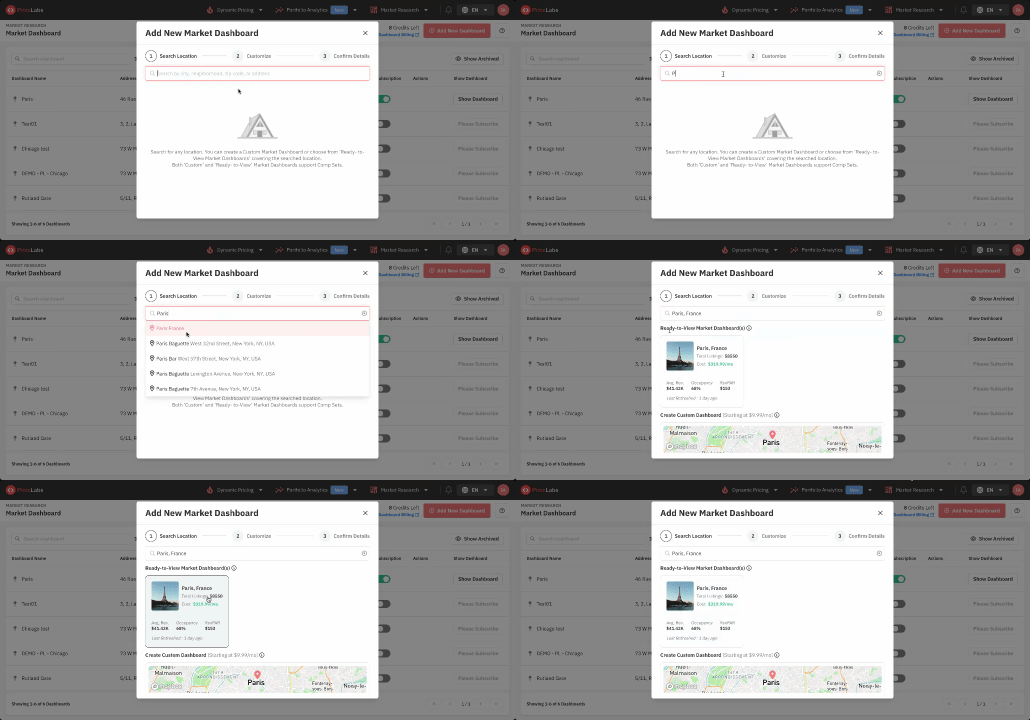
Analytics platforms empower hosts to make data-driven decisions through several key use cases:
- Identify poor-performing listings at a glance: Dashboard views highlight properties with below-average occupancy or revenue per available night
- Monitor the impact of pricing changes: Track revenue and occupancy shifts after implementing dynamic pricing or adjusting base rates
- Track seasonal occupancy or guest satisfaction trends: Identify patterns in booking pace, cancellations, or review scores across months or seasons
- Benchmark against local competitors: Compare your rates, occupancy, and revenue to similar properties in your market
- Receive automated alerts: Get notified when a listing’s performance drops below set thresholds
Creating Standard Operating Procedures and Digital Guest Guides
Standard Operating Procedures are step-by-step written instructions for recurring workflows that reduce guesswork for teams and co-hosts. Without SOPs, every team member handles tasks differently, leading to inconsistent guest experiences and operational inefficiencies. Documenting procedures for check-in coordination, cleaning protocols, maintenance requests, and guest communication ensures quality remains high even as you delegate more responsibilities.
Digital guidebooks package property information, check-in instructions, and local area rules to minimize routine guest questions. Platforms like Touch Stay and Duve allow hosts to create interactive guides that guests access via smartphone, reducing repetitive inquiries about WiFi, parking, appliance instructions, and nearby restaurants. These guides improve guest satisfaction while freeing hosts from answering the same questions repeatedly.
Examples of essential SOPs include:
- Key handoff checklist: Steps for managing lockbox codes, smart lock access, or in-person key exchanges
- Cleaning checklist: Room-by-room tasks with quality standards and photo verification requirements
- Guest arrival instructions: Detailed procedures for greeting guests, providing property tours, and handling early check-ins
- Maintenance escalation protocol: When and how to contact plumbers, electricians, or HVAC specialists for common issues
A sample digital guidebook table of contents might include:
| Section | Content |
| Welcome | Personal greeting, host contact information, emergency contacts |
| Property Access | Door codes, lockbox location, parking instructions, building entry |
| House Manual | Appliance instructions, WiFi credentials, thermostat settings, trash/recycling |
| House Rules | Quiet hours, smoking policy, pet policy, maximum occupancy |
| Local Recommendations | Restaurants, attractions, grocery stores, transportation options |
| Checkout Instructions | Checkout time, key return, basic tidying expectations |
Integrating Smart Home Technologies to Reduce Manual Interactions
Smart home technology encompasses IoT-based devices like locks, thermostats, and sensors that can be remotely managed to streamline property access, environment control, and security. These devices enable self-service guest experiences while slashing coordination work for hosts. Instead of arranging in-person key handoffs or adjusting thermostats between bookings, hosts program devices to handle these tasks automatically based on reservation schedules.
Smart locks like 33Lock or Keycafe automate check-in and check-out, offering guests flexibility to arrive on their schedule while eliminating manual key coordination. Hosts generate unique access codes for each reservation, which expire automatically after checkout, improving security without requiring physical key management. Nest Thermostats enhance guest comfort and save energy by adjusting temperatures based on occupancy schedules, ensuring properties are comfortable when guests arrive but energy-efficient during vacancies.
Additional smart home integrations that reduce manual work include:
- Noise monitoring devices: Alert hosts to potential parties without invading guest privacy
- Smart water leak detectors: Send immediate notifications to prevent costly damage
- Automated lighting systems: Create welcoming ambiance for arrivals and deter break-ins during vacancies
- Smart doorbells with cameras: Allow remote guest verification and package delivery management
Best Practices for Delegation and Outsourcing
Task delegation and smart outsourcing lift the manual burden off the primary host while scaling quality across growing portfolios. Building rosters of trusted local cleaners and maintenance specialists ensures you have reliable teams ready to handle turnovers and repairs without constant host supervision. Platforms like Turno connect hosts with vetted, on-demand cleaning professionals, simplifying the process of finding and managing turnover teams in new markets.
Standardizing onboarding and setting clear expectations via SOPs and digital guidebooks ensures third-party vendors deliver consistent results. When cleaners, maintenance workers, and co-hosts follow documented procedures, quality remains high even when the primary host isn’t directly involved. This standardization is essential for scaling beyond a handful of properties.
Best practices for ongoing oversight with minimal intervention include:
- Automated checklists: Require photo verification of completed tasks through your cleaning or maintenance platform
- Milestone notifications: Set up alerts when tasks are marked complete or when issues require escalation
- Performance scorecards: Track vendor reliability, response times, and guest satisfaction metrics
- Regular but infrequent check-ins: Schedule monthly reviews rather than daily micromanagement
- Clear escalation paths: Document when and how vendors should contact you for decisions or emergencies
Monitoring Performance with Automated Reporting
Automated reporting is the periodic generation and delivery of performance, financial, and guest review data via email or dashboard, eliminating the need to manually compile metrics. Instead of logging into multiple platforms to check occupancy rates, revenue trends, and review scores, hosts receive scheduled summaries that highlight key performance indicators and flag issues requiring attention.
Platforms like PriceLabs enable automated reports on occupancy, rate trends, and revenue across booking channels. These reports can be customized to include portfolio-level summaries or property-specific deep dives, delivered daily, weekly, or monthly based on host preferences. Automated alerts notify hosts immediately when performance drops below set thresholds, enabling quick corrective action before small issues become major problems.
Dynamically Price Your Property and Get FREE Custom Reports Tailored To Your Property!
Use PriceLabs Dynamic Pricing to competitively and dynamically price your property according to demand shifts and analyze past performance to set a strong pricing strategy for your property.
Create your Account NowA sample reporting cadence and key metrics might include:
| Report Frequency | Key Metrics | Purpose |
| Weekly | Occupancy rate, average nightly rate, booking pace vs. last year | Monitor short-term trends and adjust pricing or marketing |
| Monthly | Total revenue, RevPAR, review scores, cleaning costs | Assess overall performance and profitability |
| Quarterly | Market share vs. competitors, seasonal trends, maintenance expenses | Strategic planning and budget forecasting |
| Automated Alerts | Sudden occupancy drops, negative reviews, booking cancellations | Immediate response to performance issues |
Building a Scalable, Tech-Enabled Airbnb Management System
Integrating automation, analytics, and delegation elements creates a seamless, scalable Airbnb operation that grows without proportionally increasing manual work. A phased approach ensures hosts implement core systems first—PMS and dynamic pricing—then layer in automation for guest messaging and cleaning scheduling, and finally add data-driven performance monitoring. This staged rollout prevents overwhelming operational changes while delivering immediate efficiency gains at each step.
Platforms offering robust integrations are essential for scalability. PriceLabs integrates with 150+ PMS and channel managers, providing role-based permissions and portfolio-level controls that support both individual hosts and property management companies. Centralized systems eliminate data silos, reduce errors from manual data entry, and enable hosts to manage dozens or hundreds of properties from a single dashboard.
A step-by-step roadmap for rolling out a scalable system includes:
- Centralize data and bookings via PMS: Choose a property management system that syncs with all your booking channels and consolidates calendars, guest information, and financials
- Layer in PriceLabs for pricing and revenue management: Connect your PMS to enable dynamic pricing and automated rate optimization across your portfolio
- Add cleaning and maintenance automation: Integrate tools like Turno or Uplisting to schedule turnovers and work orders automatically
- Integrate analytics and reporting dashboards: Set up automated performance reports and alerts through PriceLabs or your PMS.
- Develop SOPs and digital guides for efficient delegation: Document procedures and create guest guidebooks to standardize operations across properties and team members.
- Train your team and vendors: Ensure co-hosts, cleaners, and maintenance workers understand the new systems and their roles.
- Monitor and refine: Review automated reports monthly to identify bottlenecks and opportunities for further optimizatio.n
Frequently Asked Questions
1. What are the best ways to automate repetitive hosting tasks?
The most effective ways include using PMS platforms to schedule guest communications, employing dynamic pricing tools for rate adjustments, and leveraging cleaning scheduling apps to coordinate turnover with minimal effort.
2. Which property management systems reduce manual work most effectively?
The most efficient systems automate bookings, guest messaging, and reporting, significantly reducing manual input for hosts managing single or multiple Airbnb properties.
4. How can I delegate cleaning and maintenance without constant oversight?
Outsourcing through cleaning platforms or building a roster of trusted pros, combined with automated workflows, helps ensure tasks are completed without daily host supervision.
5. What tools help automate guest communication while maintaining service quality?
Tools like PMS-integrated messaging, Smartbnb, and iGMS enable automated, personalized guest communications, ensuring high service standards with less manual coordination.
6. How can I set up automated reporting to monitor rental performance?
Automated reporting can be set up by using analytics tools or PMS software that deliver regular email or dashboard summaries of occupancy, revenue, and guest reviews.