
Table of Contents
Updated : Apr 3, 2026
Demand changes quickly, competitors reprice often, and guest expectations keep rising. Hosts who rely on static pricing or manual tracking are forced to react late, missing both bookings and revenue.
Top-performing hosts use live insights to adjust pricing, availability, and guest experience as market conditions change. They focus on what’s happening now, not what worked in the past.
This blueprint shows how data-driven hosts use real-time analytics, automation, and smart pricing to increase occupancy, protect margins, and grow direct bookings.
In today’s Airbnb market, real-time data is no longer optional—it’s a competitive advantage.
Understand the Value of Real-Time Data for Airbnb Hosting
Real-time data is information that updates continuously based on what’s happening in your Airbnb market right now. This includes demand trends, pricing changes, occupancy levels, competitor rates, and guest booking behavior.
This data supports key hosting decisions such as:
- Dynamic pricing: Updating nightly rates as demand changes
- Competitive benchmarking: Seeing how similar listings are priced and performing
- Automation: Responding faster with less manual effort
- Guest experience improvements: Understanding what drives bookings and reviews
Implement Dynamic Pricing to Maximize Revenue
Dynamic pricing is an automated pricing approach that adjusts your nightly rates in real time based on current market demand, seasonality, local events, and competitor activity. In 2026, this flexibility is essential—static pricing can’t keep up with how quickly the Airbnb market moves.
Dynamically Price Your Property and Get FREE Custom Reports Tailored To Your Property!
Use PriceLabs Dynamic Pricing to competitively and dynamically price your property according to demand shifts and analyze past performance to set a strong pricing strategy for your property.
Create your Account NowWhen prices are fixed, listings are often overpriced during low-demand periods or underpriced during peak periods. Both lead to lost revenue. Dynamic pricing solves this by responding immediately to changes in booking pace and market conditions, helping you stay competitive without constant manual updates.
Data-driven hosts use dynamic pricing to:
- Increase occupancy during slower periods by pricing competitively
- Capture higher rates during peak demand and local events
- Maximize RevPAR by balancing price and availability
- Save time by reducing manual pricing work

In short, dynamic pricing helps you stay aligned with your market at all times. It’s one of the most effective ways to improve both occupancy and revenue—without increasing operational effort.
Optimize Listing Presentation with Data-Driven Visuals and Descriptions
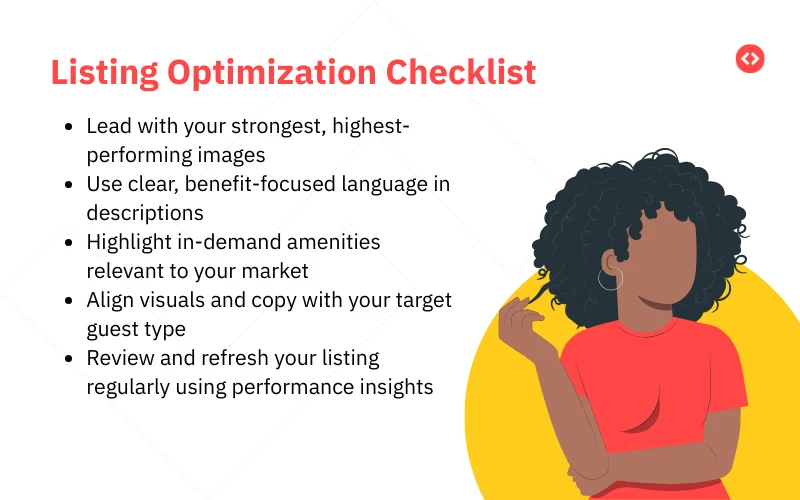
High-performing hosts track how guests interact with their listings—what images get the most views, where guests drop off, and which amenities or phrases consistently drive bookings. This makes it easier to focus on changes that improve conversion, not just appearance.
Tools like Listing Optimizer help streamline this process by analyzing your listing against top-performing competitors and highlighting high-impact improvements—from missing amenities to underperforming photos and description gaps. Instead of overhauling everything, hosts can prioritize fixes that actually move the needle.

Data-backed improvements often include:
With PriceLabs Listing Optimizer You Can Analyze The Quality Of Your Competitor's Listings.
With PriceLabs Listing Optimizer, you will be able to compare your listing with other listings guests would consider your competition and optimize your listing accordingly.
Create your Account Now- Using high-quality, professional photos to build trust
- Reordering images based on view-to-book performance
- Highlighting amenities guests actively search for
- Updating descriptions to reflect current guest preferences
Automate Guest Communication to Enhance Booking Conversion
Guest communication automation is the use of tools that schedule, personalize, and automatically send messages at key moments in the guest journey—before arrival, during the stay, and after checkout. This ensures guests always receive the right information at the right time, without requiring constant manual follow-up.
Automation helps hosts:
- Respond instantly to inquiries and booking confirmations
- Share check-in instructions, house rules, and local tips reliably
- Send post-stay messages and review requests on time
- Maintain a fast response rate, even during busy periods
Dynamically Price Your Property and Get FREE Custom Reports Tailored To Your Property!
Use PriceLabs Dynamic Pricing to competitively and dynamically price your property according to demand shifts and analyze past performance to set a strong pricing strategy for your property.
Create your Account NowMonitor Market Trends and Competitor Activity Continuously
Airbnb performance doesn’t exist in isolation. Your pricing, occupancy, and booking pace are directly influenced by what’s happening in your local market—and how competing listings respond to it. That’s why successful hosts track market trends continuously, not occasionally.

Key competitor metrics to monitor include:
- Nightly prices and discounting patterns
- Minimum stay requirements
- Booking availability and gaps
- New amenities or listing upgrades
Market intelligence tools and dashboards make this easier by presenting occupancy trends, average daily rates (ADR), and booking pace in a clear, visual format. Instead of reacting after performance declines, hosts can make informed adjustments in advance.
Leverage Analytics to Fine-Tune Pricing and Availability Strategies
Analytics help you move from broad market awareness to listing-level optimization. Instead of relying on averages or intuition, hosts use performance data to spot revenue leaks and fix them early.

Start by tracking a few core metrics:
- ADR (Average Daily Rate): What you earn per booked night
- Occupancy rate: How often your listing is booked
- RevPAR: How efficiently your listing generates revenue
- Booking window & lead time: When guests are booking
- Gap nights: Unbooked nights between reservations
Reviewing these regularly shows where adjustments are needed. For example, slower booking pace may signal pricing that’s too high, while frequent one-night gaps could mean minimum stay rules need tweaking.
Dynamically Price Your Property and Get FREE Custom Reports Tailored To Your Property!
Use PriceLabs Dynamic Pricing to competitively and dynamically price your property according to demand shifts and analyze past performance to set a strong pricing strategy for your property.
Create your Account NowBuild and Promote a Direct Booking Channel
As Airbnb competition increases, relying on a single platform limits both control and profitability. That’s why many high-performing hosts are investing in direct bookings—reservations made through their own website or booking page, without an intermediary.
Direct bookings help hosts:
- Reduce platform fees and improve margins
- Build repeat guest relationships
- Control branding, policies, and communication
- Create a more resilient revenue stream
Getting started doesn’t require complex infrastructure. Hosts typically launch a direct booking channel by integrating a booking website with their property management system, ensuring availability and pricing stay in sync across platforms.
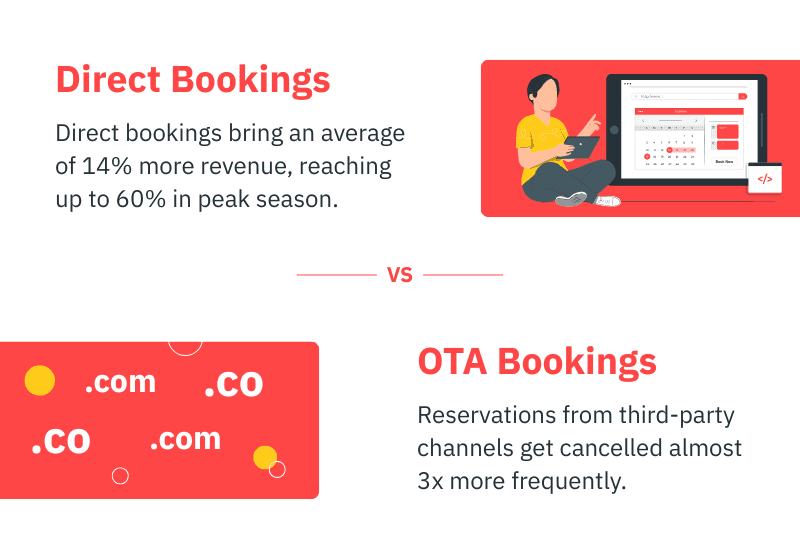
To make direct bookings work, focus on:
- Pricing parity: Keep rates consistent across Airbnb and your direct site
- Exclusive perks: Offer small incentives like flexible check-in, local discounts, or added amenities
- Clear messaging: Let past guests know they can book directly next time
Promotion plays a key role. Email follow-ups, social media, and simple on-site reminders can steadily increase the share of direct bookings over time. The goal isn’t to replace Airbnb—but to balance it with a channel you fully control.
Dynamically Price Your Property and Get FREE Custom Reports Tailored To Your Property!
Use PriceLabs Dynamic Pricing to competitively and dynamically price your property according to demand shifts and analyze past performance to set a strong pricing strategy for your property.
Create your Account NowFoster Guest Satisfaction to Improve Reviews and Rankings
Guest satisfaction directly affects your Airbnb visibility, bookings, and revenue. Strong reviews build trust with future guests and improve your listing’s ranking in search results.
Top hosts treat guest feedback as actionable data. Reviews and ratings reveal what guests value most and highlight recurring issues that need attention. Fixing these early helps prevent negative reviews and improves overall performance.
High-impact areas to focus on include:
- Clear and timely communication
- Accurate listings that set expectations
- Consistent cleanliness and maintenance
- Small comfort-focused improvements
Continuously Adapt Strategies Based on Data Insights
Airbnb success in 2026 isn’t about setting a strategy once—it’s about reviewing, adjusting, and improving continuously. Markets change, guest behavior evolves, and what works today may not work next season.
Data-driven hosts build regular review habits. They revisit pricing, availability, booking pace, and guest feedback on a monthly or quarterly basis, then make small, targeted adjustments instead of large, reactive changes.
A simple review cadence helps hosts:
- Adjust pricing for seasonal demand shifts
- Refine minimum stays and availability rules
- Update listings and amenities based on guest feedback
- Test new strategies without disrupting performance
Frequently Asked Questions
How often should I adjust my Airbnb pricing for best results?
Ideally, pricing should be reviewed at least weekly. Using dynamic pricing tools allows rates to update daily based on real-time demand, seasonality, and market changes—helping optimize both occupancy and revenue without manual effort.
What are the most important metrics to track for maximizing Airbnb revenue?
Focus on ADR (Average Daily Rate), occupancy rate, RevPAR, booking window, length of stay, and channel mix. Together, these metrics show how well your listing is priced, booked, and generating revenue.
How can I increase the share of direct bookings relative to Airbnb bookings?
Create a simple direct booking website, keep pricing consistent across channels, and offer small exclusive perks for direct guests. Promoting direct bookings to past guests through email or messaging also helps grow this channel over time.
What real-time data sources are critical to improving my listing’s performance?
Key sources include dynamic pricing tools, market analytics dashboards, and channel manager reports. These provide live insights into demand trends, competitor pricing, occupancy, and booking pace.
How does dynamic pricing impact occupancy and revenue in fluctuating markets?
Dynamic pricing automatically adjusts nightly rates as demand changes. This helps maintain higher occupancy during slow periods and capture higher rates during peak demand—resulting in better overall revenue performance.