Table of Contents
Updated : Apr 6, 2026
In the rapidly evolving world of short-term rental revenue management, the difference between a high-performing portfolio and a struggling one often comes down to how property managers interpret and act on their market data.
In the recent RevLabs podcast, Niki Turner, a seasoned property management expert at PriceLabs, brings a unique perspective to the table, having spent over a decade in multi-family residential management before transitioning into the dynamic world of vacation rentals.
This article explores the core differences between long-term and short-term revenue management, common pitfalls for large portfolio managers, and the “human” data points that a revenue management software might miss.
The Transition: Multi-Family vs. STR Revenue Management
Many property managers enter the STR space from traditional real estate backgrounds. While the fundamental goal of maximizing ROI remains the same, the mechanics of revenue management differ significantly.
1. Granularity of Strategy
In multi-family management, managers typically aim to maximize monthly rates. In the short-term rental industry, demand fluctuates daily. Strategies must be granular enough to account for specific day-of-the-week demand and local events.
2. Management Intensity
Short-term rental property management is significantly more labor-intensive. Managers do not just manage a lease; they handle guest communications, vacation rental marketing, and rapid turnovers, including cleaning and restocking after each stay.
3. Shared Day-to-Day Struggles
Despite the strategic differences, Turner notes that the day-to-day “wins” and “struggles” of property management are very similar. Whether managing hundreds of apartments or a vacation rental portfolio, the core challenge remains balancing operational efficiency with guest satisfaction.
Bonus Read: Vacation Rental Revenue Management: The Complete Guide for Hosts and Property Managers
The Critical Mistake: Over-Customizing Your Pricing
Turner shared a critical insight regarding a trap that many experienced managers fall into: over-customization.
When using powerful tools like PriceLabs, the sheer volume of available customizations can be tempting. However, pulling too many levers at once can be counterproductive.
The Strategy: Trust the algorithm. Managers should start with the Base Price and Minimum Price recommendations and only apply PriceLabs customizations when they have a specific, data-backed reason to deviate from market trends.
Experience the Power of Data-Driven Pricing
Gain the competitive edge by leveraging real-time market intelligence and automated pricing. Protect your property’s wealth and maximize your ROI with the industry's most trusted revenue management platform.
Start Your Free 30-Day TrialBest Practices for Large Portfolio Managers
Managing 10+ listings requires a different level of organization than managing a single unit. To maintain healthy RevPAR and Occupancy without burnout, managers must streamline their workflows.
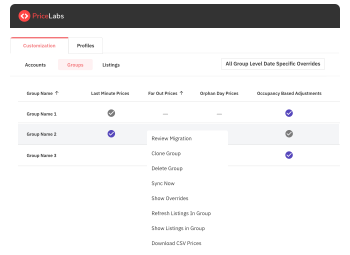
Group Your Listings
For portfolios with multiple properties in the same city or market, grouping is essential. This allows managers to:
- Apply bulk customizations for specific owners or investment groups.
- Ensure consistency across similar property types, such as 2-bedroom units in a specific neighborhood.
- Save time by making a single update that propagates across the entire group.
Use Performance Benchmarking
Turner highlights the importance of knowing where a property falls in the market. Just as multi-family managers assess their position relative to competitors, STR managers should use Neighborhood Data to determine their percentile. This ensures the pricing strategy makes sense for the product being offered.
The “Human” Data Point: Feedback Beyond the Screen
While data is the backbone of revenue management, it does not tell the whole story. Turner emphasizes that being “on-site” provides feedback that data cannot always capture.
If occupancy rates are declining despite competitive pricing, feedback from guests or teams might reveal that:
- Competitors are offering specific amenities the property lacks and may require vacation rental listing optimization.
- The property’s perceived value does not match the price point.
- Local competitors are offering specific “specials” or packages that are drawing demand away.
Bottom Line: Managers must use data to set the strategy, but use human feedback to refine it.
How PriceLabs Helps Navigate Market Shifts
To maintain a competitive edge, property managers must move beyond static pricing and integrate technology that eliminates guesswork. Short-term rental revenue management relies on deep market insights to stay profitable. PriceLabs provides a suite of advanced tools specifically designed to help professional managers turn raw data into actionable revenue strategies.
1. Market Dashboards: Your Macro-View Command Center
The Market Dashboard acts as a comprehensive analytical tool, providing property managers with an edge through in-depth competitor and market analysis. It provides a consolidated view of your local area, including Estimated Revenue, Average Occupancy, Average RevPAR, and Average ADR.
- Spotting Trends: The tool offers insights into local booking patterns and identifies missing opportunities in the market.
- Amenity Gap Analysis: Managers can use graphical representations to review demand trends for specific amenities before investing in property upgrades.
- Historical & Future Forecasting: It allows you to analyze historical data and future occupancy rates specifically for slow seasons or particular high-demand dates.
- Policy Benchmarking: You can compare your specific policies—such as cleaning fees, cancellation policies, and extra-person fees—against the local market average to ensure you aren’t pricing yourself out.

2. Neighborhood Data: Precision Competitive Analysis
Neighborhood data is essential for short-term rental revenue management because it allows for granular comparison. Managers can move past broad market averages to look at the specific properties they compete with daily.
- Custom Comp Sets: You can create tailored comp sets based on property type, bedroom count, or specific features (like pet-friendly status) to gain precise insights into your true competition.
- Qualitative & Quantitative Insights: PriceLabs’ competitor calendar allow you to look at numerical data while also letting you click through to individual listings on Airbnb or Vrbo for a qualitative review.
- Base Price Optimization: By analyzing competitor rates and market trends through Neighborhood Data, managers can determine a highly competitive starting point for their dynamic pricing.

3. Portfolio Analytics: Managing at Scale
For property managers overseeing 10+ listings, Portfolio Analytics serves as the ultimate diagnostic tool. It automates the tracking of key performance indicators (KPIs) across an entire portfolio.
- Automated Oversight: It enables remote management of properties across 150+ countries and automatically uploads optimized rates to preferred channels such as Airbnb and Vrbo.
- Performance Pacing: Managers can pace their current portfolio’s performance against both the broader market and their own previous year’s performance.
- Identifying Underperformers: The tool quickly highlights which listings are falling behind in occupancy or revenue, allowing for immediate strategic adjustments.
- Owner Reporting: Using the Report Builder, managers can generate clear, visual reports to provide owners with transparent insights into listing performance. This builds trust by showing data-driven reasons for pricing shifts.

Final Thoughts
Success in the STR market requires a blend of historical data, predictive algorithms, and operational efficiency. As Niki Turner points out, moving from static rates to a data-driven strategy is the only way to ensure long-term sustainability and growth.
Frequently Asked Questions
1. Why is occupancy low even though prices are lower than competitors?
Price is not the only factor; inaccurate listing descriptions, low-quality photos, few reviews, and intense competition also affect conversion rates. Additionally, if competitors offer desired amenities that a property lacks, guests may pay more for those features. PriceLabs Listing Optimizer can help with this. It is an AI-powered tool that scans your Airbnb listing to identify content gaps, suggests data-backed improvements to titles and descriptions, and benchmarks your listing against local top performers to boost your search ranking and bookings.
2. How often should a Base Price be adjusted?
Managers should review the Base Price regularly, especially when moving between seasons or if the Booking Window changes significantly. PriceLabs recommends using the Base Price Help Tool to ensure the starting point aligns with current market demand.
3. What is a “good” RevPAR for a short-term rental?
RevPAR is relative to a specific market and property type. The best way to determine success is to benchmark RevPAR against a custom comp set using the Market Dashboard to see if the property is outperforming the local average.