
Table of Contents
Updated : Mar 12, 2026
Managing a vacation rental portfolio in 2026 feels a bit like being an air traffic controller. With 7.7 million active listings on Airbnb and millions more on Vrbo, the market is more crowded than ever. Due to the increased competition, it has become extremely relevant for property managers to identify underperforming short-term rental listings and finding ways to fix them.
This blog will teach you how to use market insights to diagnose underperformance and the exact steps you need to take to turn those listings around.
1. Understand Key Vacation Rental Performance Metrics
You can’t fix what you don’t measure. To identify underperforming short-term rental listings, you must move beyond looking at just your bank balance and start analyzing vacation rental KPIs.
- Occupancy Rate: The ratio of occupied rooms to available rooms. This tells you if your property is being utilized to its full potential.
- ADR (Average Daily Rate): Your total room revenue divided by booked nights. It helps you understand if you are pricing too low or missing out on premium rates.
- RevPAR (Revenue Per Available Room): The ultimate efficiency metric, calculated by multiplying occupancy by ADR. A high RevPAR indicates a healthy balance of price and demand.
- Booking Window & Pace: The period between reservation and check-in. Monitoring your booking pace—how fast you are getting booked compared to previous years—is a vital “early warning system”.
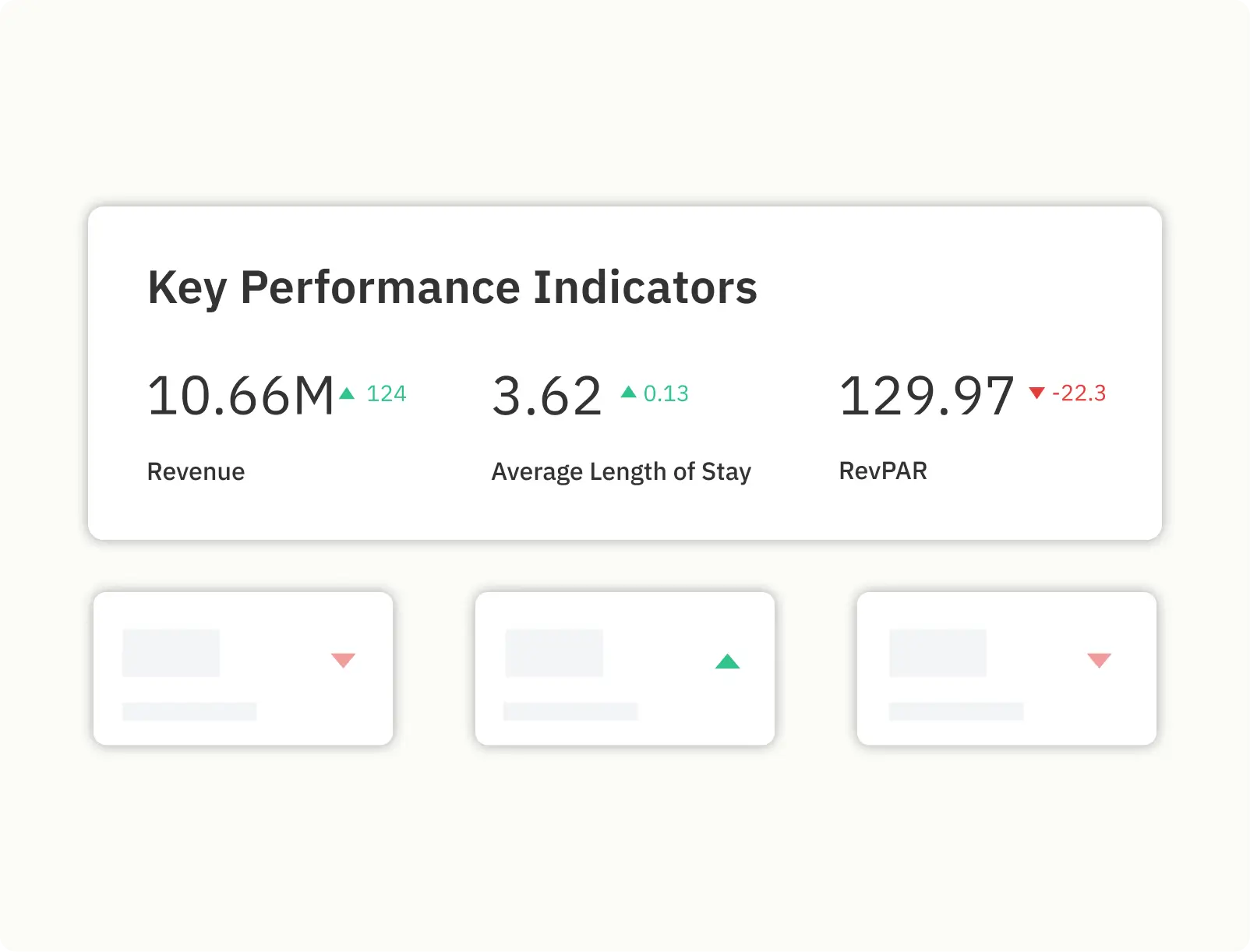
To stay ahead of the curve, you should utilize a comprehensive analytics suite that provides real-time data on key performance indicators (KPIs) like occupancy, lead time, and revenue. A critical tool for this is PriceLabs Portfolio Analytics, which allows you to pace your specific listings against both current market trends and your own historical performance from the previous year.
By integrating this type of advanced reporting, you can:
- Collaborate with Stakeholders: Export customized performance reports as PDFs to share visual insights with your team or property owners, fostering trust and aligning on strategic growth initiatives.
- Identify Underperformance Early: Monitor real-time KPIs—including Estimated Revenue, Average RevPAR, Average Occupancy, and Average ADR—to spot when a listing is falling behind market averages.
- Analyze Booking Patterns: Track metrics such as the booking window (the time between reservation and check-in) and length of stay (LOS) to understand how guest behavior is shifting in your local region.
- Make Data-Driven Decisions: Use consolidated visual insights to eliminate pricing guesswork, allowing you to adjust your revenue management strategy quickly and nimbly based on actual demand.
Ready to Turn Your Underperforming Listings Around?
Don't let revenue killers fly under your radar. In a 2026 market that moves faster than ever, manual tracking isn't just exhausting—it’s expensive. Whether you're managing five properties or five hundred, the difference between a high-yield portfolio and a struggling one is data. Take control of your revenue with real time data from PriceLabs Revenue Management Platform.
Start Your Free Trial Now2. Identify Underperforming Short-term Rental Listings with Market Insights
A listing might feel like it’s doing poorly, but you won’t know for sure until you compare it to the neighbors. This is where competitor benchmarking comes in.
Benchmarking is the process of measuring a property’s performance against similar listings (comp sets) based on location, size, and amenities. You should set “red-flag thresholds.” For example, if the market occupancy is 70% but your listing is at 45%, you have a problem.
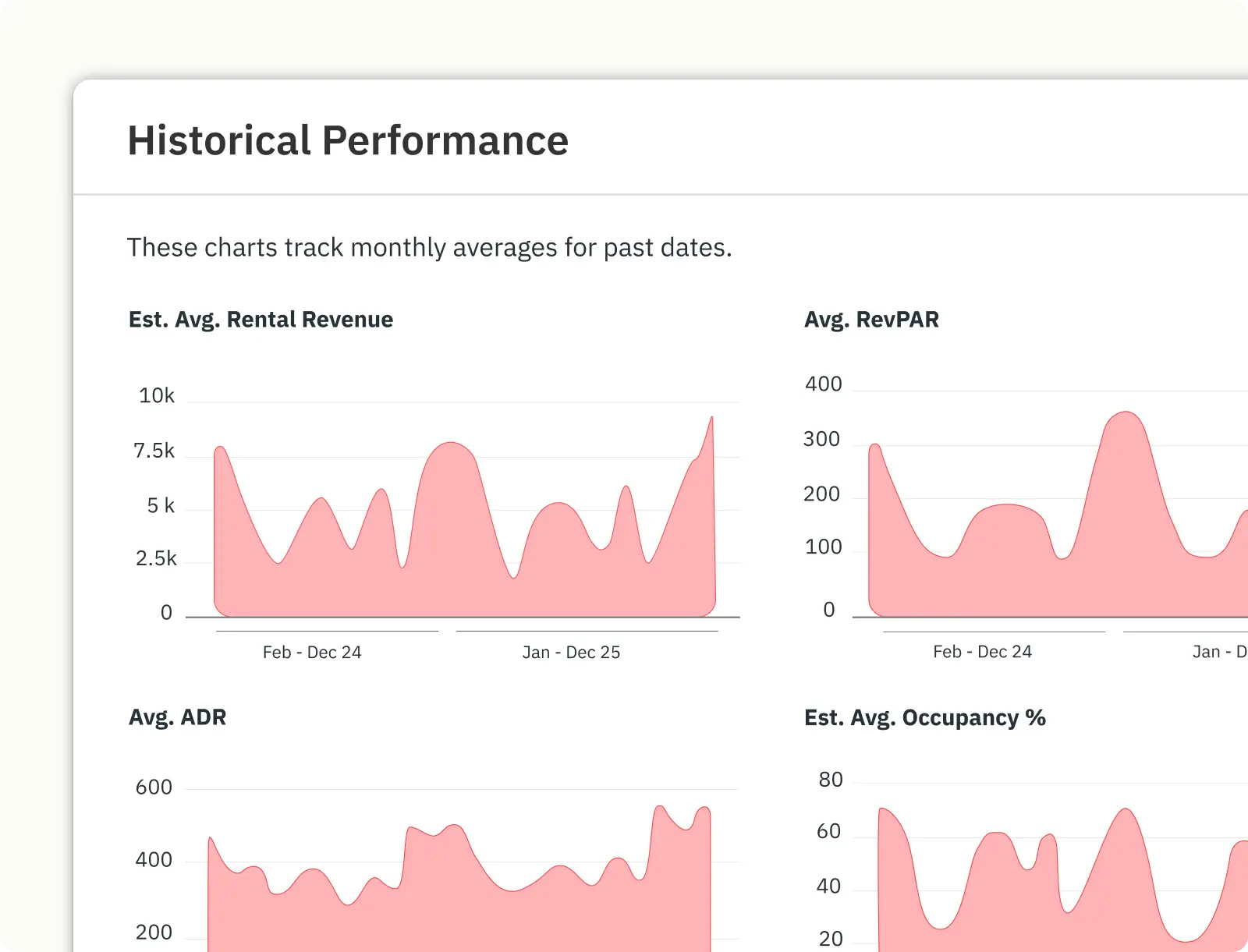
How PriceLabs Helps: Use PriceLabs Market Dashboard for granular competitive benchmarking. To stop the guesswork and identify exactly why a listing is underperforming, you need more than just general market averages. The PriceLabs Market Dashboard provides a sophisticated suite of tools to conduct a deep-dive competitive analysis. It allows you to move beyond broad data and compare your property’s performance against a highly specific custom comp set tailored to your property’s unique characteristics. By utilizing this tool, you can ensure you are truly comparing “apples to apples” through detailed filtering and qualitative insights:
- Custom Comp Set Filters: You can filter the market data by bedroom count, property type, or specific high-value features such as an indoor pool, hot tub, or professional workspace.
- Real-Time KPI Benchmarking: The dashboard provides a consolidated view of essential real-time metrics, including Estimated Revenue, Average RevPAR, Average Occupancy, and Average ADR. You can immediately see if your RevPAR is lagging behind similar top-tier properties in your immediate vicinity.
- Amenity Demand Trends: Use the Amenities Chart to identify “missing opportunities”. If 80% of bookings in your area are going to listings with a specific amenity that you lack, you’ve found a clear path to fixing underperformance.
3. Diagnose the Booking Funnel to Pinpoint Issues
If your metrics are down, you need to find where the “leak” is in your booking funnel. This is a step-by-step analysis of the guest journey:
- Visibility (Impressions): Are people even seeing your listing? If impressions are low, your SEO or photos might be the issue.
- Inquiry-to-Booking Ratio: Are they clicking but not booking? This usually points to a problem with your description, house rules, or a slow response rate.
- Pricing Abandonment: Are they reaching the checkout and leaving? Your nightly price or cleaning fees might be out of sync with market expectations.
Remember, underperformance can be channel-specific. One OTA might be driving low-quality traffic while another performs well. Analyze them separately to optimize your reach.
Ready to Turn Your Underperforming Listings Around?
Don't let revenue killers fly under your radar. In a 2026 market that moves faster than ever, manual tracking isn't just exhausting—it’s expensive. Whether you're managing five properties or five hundred, the difference between a high-yield portfolio and a struggling one is data. Take control of your revenue with real time data from PriceLabs Revenue Management Platform.
Start Your Free Trial Now4. Audit and Optimize Listing Quality
Data shows that the “basics” are often the biggest revenue killers. According to PriceLabs research:
- 70% of underperforming listings had weak or unclear photos.
- 40% had incomplete descriptions or inconsistent amenity lists.
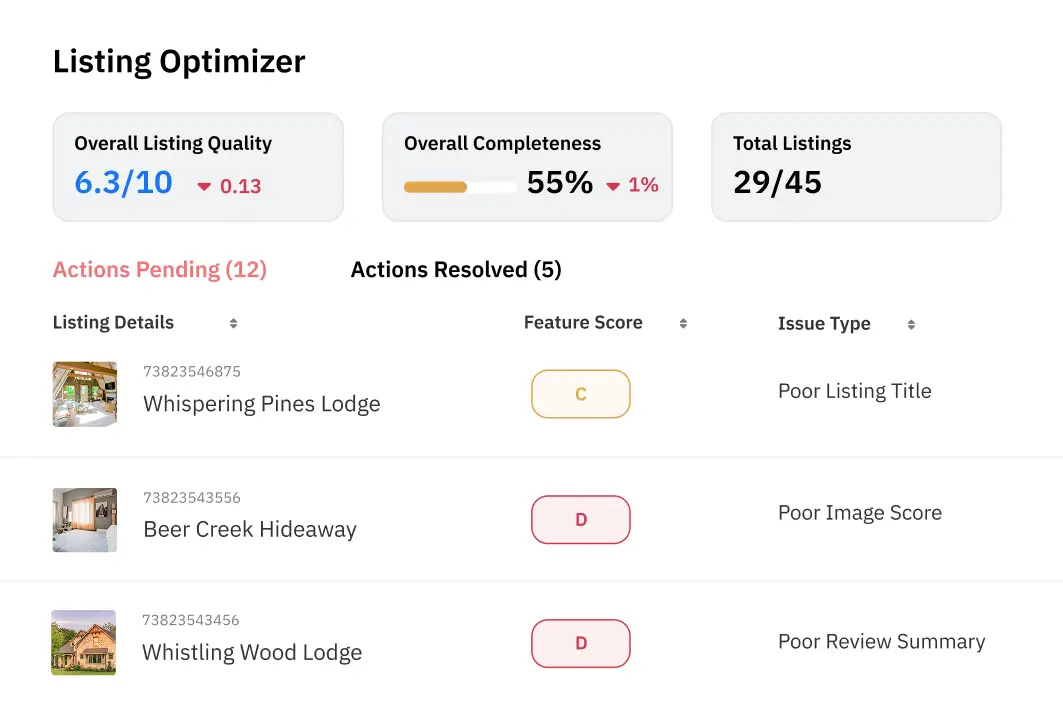
A listing audit is a systematic review of your online presence. You must ensure your Airbnb photos showcase seasonal beauty and your USPs.
Prioritized Audit Checklist:
- Professional Photos: At least 30 well-lit, high-quality shots.
- SEO-Rich Titles: Use keywords like “Cozy Cabin” or “Work-from-home friendly”.
- Amenity Accuracy: Ensure your “Must-haves” (WiFi, AC, Kitchen) are clearly checked.
5. Implement Strategic Dynamic Pricing Adjustments
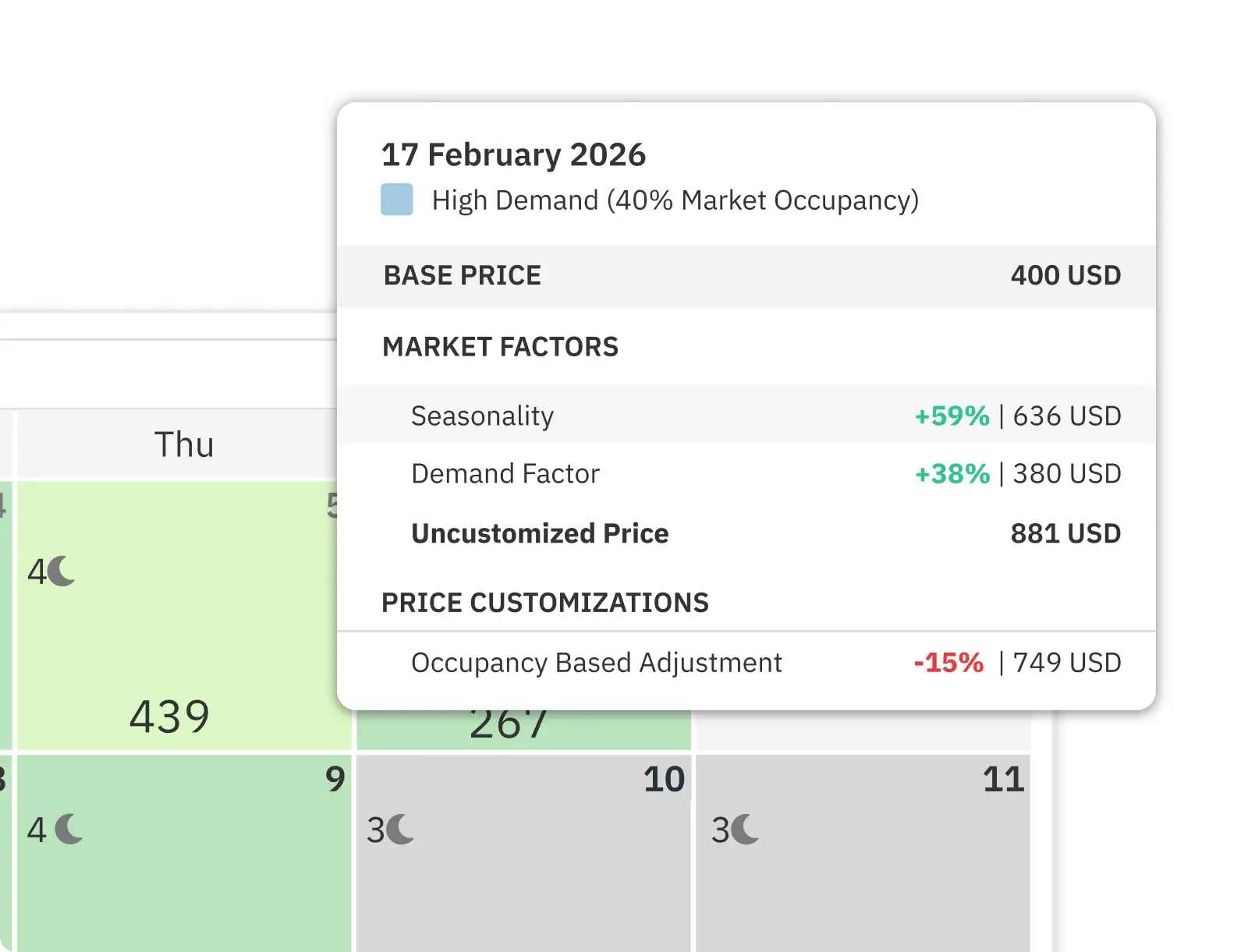
Static pricing is a relic of the past. To fix an underperforming listing, you must adopt dynamic pricing—automatically adjusting rates based on real-time demand, local events, and competition.
Dynamic pricing tools can increase revenue by approximately 20%, with some operators seeing revenue uplifts of up to 35%.
- Event-Driven Pricing: Protect your rates for major events like the Super Bowl or FIFA World Cup. Don’t let a guest book a premium date at a “low season” price.
- Minimum Stay Rules: Reduce minimum stay restrictions (e.g., from 5 nights to 2) during slow periods to attract last-minute weekend travelers.
Ready to Turn Your Underperforming Listings Around?
Don't let revenue killers fly under your radar. In a 2026 market that moves faster than ever, manual tracking isn't just exhausting—it’s expensive. Whether you're managing five properties or five hundred, the difference between a high-yield portfolio and a struggling one is data. Take control of your revenue with real time data from PriceLabs Revenue Management Platform.
Start Your Free Trial Now6. Resolve Operational and Guest Experience Barriers
Sometimes the problem isn’t the price—it’s the person. Operational blockers like slow response times or deferred maintenance lead to negative reviews, which crush your search ranking.
- Speed Matters: Respond to inquiries within an hour. Use automated messaging to handle check-in instructions.
- Liberalize Policies: Consider becoming pet-friendly or offering flexible check-ins. These small changes can significantly increase your “bookability”.
- PMS Integration: Use a Property Management System (PMS) to sync your calendars and automate the “boring stuff” so you can focus on the guest.
7. Scale Performance with Automation
As your portfolio grows, manual updates aren’t just tedious—they become impossible to maintain without significant human error. Automation is the strategic use of software to handle repetitive, high-frequency tasks, from pricing adjustments to property maintenance coordination.
In 2026, AI adoption in the STR industry has soared as managers seek to future-proof their businesses. By leveraging data-driven solutions, you can eliminate pricing guesswork and streamline administrative workflows. Smart managers are now using tools like the PriceLabs Listing Optimizer to scan hundreds of listings simultaneously, identifying “revenue killers” such as poor titles or incomplete amenity lists before they impact your bottom line.
Your Automation Priorities:
- Dynamic Pricing: Transition from static to market-responsive rates. PriceLabs’ dynamic pricing tool automatically adjusts your nightly rates based on real-time market metrics, including seasonality, local demand, competitor pricing, and upcoming local events.
- Guest Messaging: Use Property Management Systems (PMS) to automate guest communication. This ensures guests receive prompt responses—ideally within an hour—and automated pre-arrival instructions, which significantly impacts your search ranking and guest satisfaction.
- Task Management & Turnovers: Coordinate cleaning and maintenance through automated scheduling tools like Breezeway. This ensures every property is thoroughly sanitized and restocked between guest stays without the need for manual intervention.
- Market Intelligence: Integrate the PriceLabs Market Dashboard to automatically track shifting trends in guest preferences, such as the most desired amenities or changing Length of Stay (LOS) patterns in your specific neighborhood.
Bottom Line
Underperforming listings are a challenge, but they are also an opportunity. By using market insights and data-driven tools like PriceLabs, you can transform a struggling property into a high-revenue asset. Adaptability, benchmarking, and automation are the keys to thriving in the 2026 market.
Frequently Asked Questions
1. How does oversupply affect vacation rental occupancy?
Oversupply increases competition, which can lead to lower occupancy if you don’t differentiate your property. You must use professional photos and highlight unique amenities to stand out.
2. Which amenities have the greatest impact on bookings?
High-speed WiFi, pet-friendly policies, and “vacation mode” luxuries like hot tubs or pools tend to drive the highest demand.
3. How can guest booking pace help identify underperformance?
If your booking pace is slower than the market average for a specific date (like a holiday), it’s a sign that your price is too high or your listing visibility is low.
4. How can pricing strategies adapt to major local events?
Use dynamic pricing to set higher “event floors” and adjust minimum stay restrictions to ensure you are booked for the entire duration of the event, maximizing your revenue.